8 Best Buyer Intent Leads Finder Tools For Sales
Compare 8 buyer intent leads finder tools on the signal each reads, what it costs and where it breaks, so your reps call the accounts buying this quarter.
Adarsh Kumar
GTM Expert
Founder — CommunityTracker, Miraa.io, and Infraboxes
Most intent data tells you a company is curious. It rarely tells you which person there wants to talk. Five years in GTM, scaling startups from zero to $5M+ ARR, taught me to judge every “signals” tool on that gap.
Say you have 2,000 names. One vendor watches your website, another buys third party research data, and a third watches the people already in your CRM. All three call it intent, yet only one tells a rep who to call before lunch. Buy the wrong kind and your team gets a busy feed with an empty calendar.
The signal I trust most is a change on a person you already know: a new role, a funding round, a post asking for help. Anonymous traffic and topic surges help me rank accounts. So in this list lead monitoring comes first, with visitor ID and research intent as add-ons.
You get eight tools, the signal each reads, what it costs, what reviewers on Capterra, TrustRadius and Reddit report, and three cost scenarios to rerun with your own numbers.
TL;DR
Tool | What it finds | Entry price |
|---|---|---|
Intent on people you upload: job changes, funding, posts, scored 0 to 100 | $39 a month, billed monthly | |
Topic intent plus a contact database | $49 per seat per month billed annually | |
Signals from community, product, web and research data | $2,500 a month, billed annually | |
Website visitor ID plus research intent and chat | $10,000 a year | |
Person level ID of US website visitors | $79 a month, billed monthly | |
Company level website visits with an intent score | €79 a month, billed annually | |
Job changes of past customers and champions | $40,000 a year | |
Job change, social and web intent signals inside enrichment tables | $185 a month billed monthly ($167 billed annually) |
At a glance: features
Feature | CommunityTracker | Apollo | Common Room | Warmly | RB2B | Leadfeeder | UserGems | Clay |
|---|---|---|---|---|---|---|---|---|
Upload your own lead list | Yes | Yes | Yes | Yes | No | No | Yes | Yes |
Job change signals | Yes | Yes | Yes | Yes | No | No | Yes | Yes |
Social post signals | Yes | No | Yes | Yes | No | No | No | Yes |
Intent score per lead | Yes | Yes | Yes | Yes | No | Yes | Yes | No |
Website visitor ID | No | Yes | Yes | Yes | Yes | Yes | Yes | Yes (Growth only) |
Third party research intent | No | Yes | Yes | Yes | No | Partial (intent topics in Dealfront search) | No | No |
Built in email or LinkedIn campaigns | Yes | Yes | No | Yes | No | No | Yes | No |
Free plan | Yes | Yes | No | No | Yes | Yes | No | Yes |
At a glance: pricing
Tool | Entry paid plan | Next plan up | Billing model |
|---|---|---|---|
CommunityTracker | $39 a month (Starter), billed monthly | $99 a month (Pro), billed monthly | Flat plan, enrichment credits |
Apollo | $49 per seat per month billed annually (Basic) | $99 per seat per month billed monthly, $79 billed annually (Professional) | Per seat, pooled credits |
Common Room | $2,500 a month, billed annually (Essential, 5 seats) | Custom (Advanced, 15 seats) | Annual contract |
Warmly | $10,000 a year or $4,875 a quarter (Web Deanonymization) | $20,000 a year (Inbound Chat) | Annual or quarterly, credits |
RB2B | $79 a month, billed monthly (Starter, 300 resolutions) | From $149 a month, billed monthly (Pro, 600 resolutions) | Per resolution overage |
Leadfeeder | €79 a month billed annually, €113 billed monthly (Discover) | €369 a month billed annually, €527 billed monthly (Activate) | Unlimited users |
UserGems | $40,000 a year (Core) | $75,000 a year (Advanced) | Annual, plus one time setup fee |
Clay | $185 a month billed monthly, $167 billed annually (Launch) | $495 a month billed monthly, $446 billed annually (Growth) | Data credits plus actions |
1. CommunityTracker
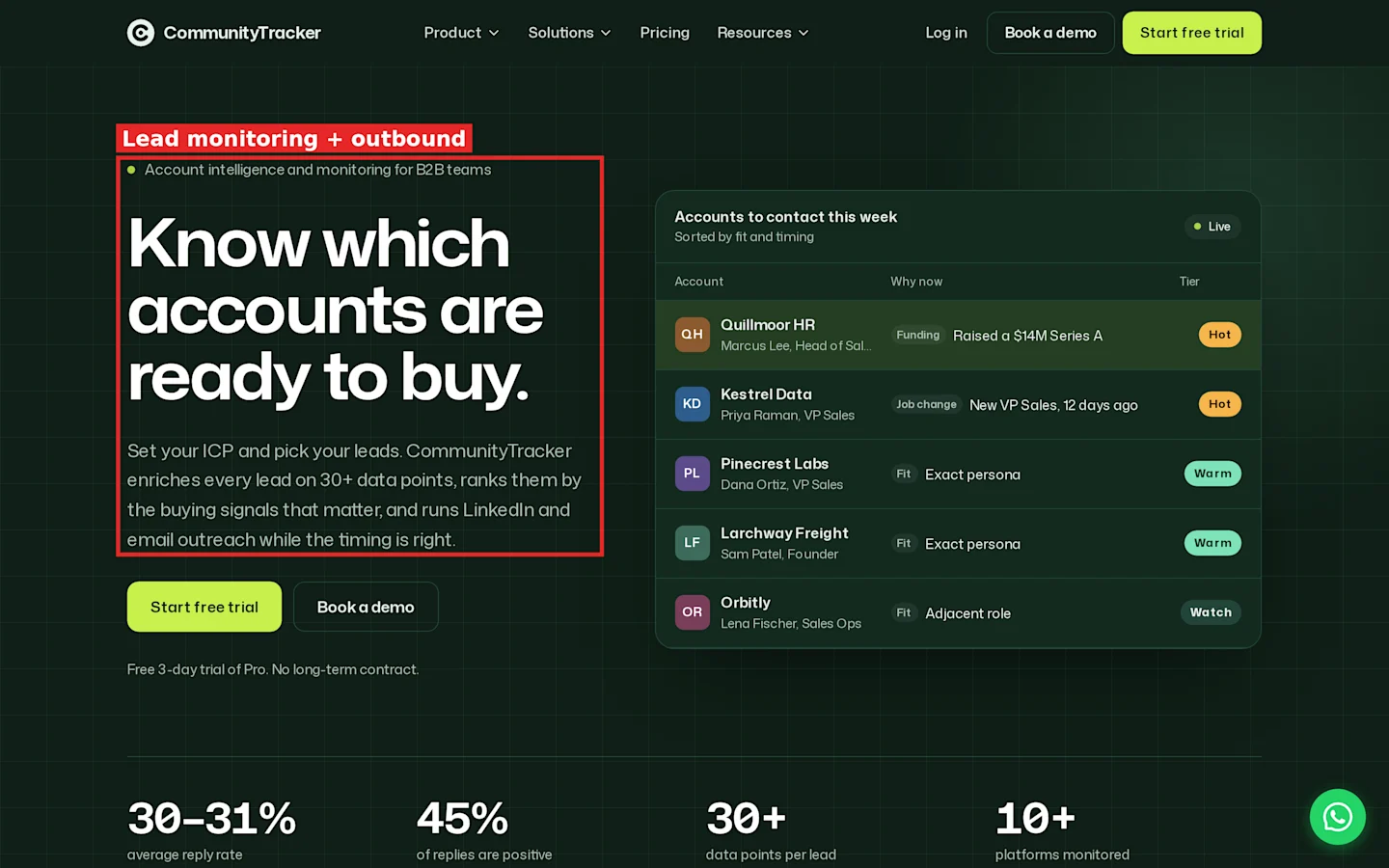
CommunityTracker homepage: account intelligence and monitoring, with LinkedIn and email outreach.
Most intent tools start with strangers. CommunityTracker starts with the people you already picked. You upload a list, it watches each person, and it ranks them by how close they look to buying.
Lead monitoring features
Lead lists. The Leads page holds lists of people you uploaded, from a CSV with mapped columns. The header shows how many leads have a LinkedIn URL, how many still need one, and how many have an email.
Monitor. Click Monitor and CommunityTracker watches every lead on the list for job changes, funding and new posts. Monitoring runs on paid plans, and each list shows when it was last scanned.
Buying intent score. Every monitored lead gets a score from 0 to 100 and a tier: Hot, Warm, Watch or No tier. The tier chips sit above the table, so you can click Hot and see only the leads worth a message today.
Top signal. Each row shows the one signal that moved the score most, such as “New role: VP of GTM”. Your rep reads the reason before opening the profile.
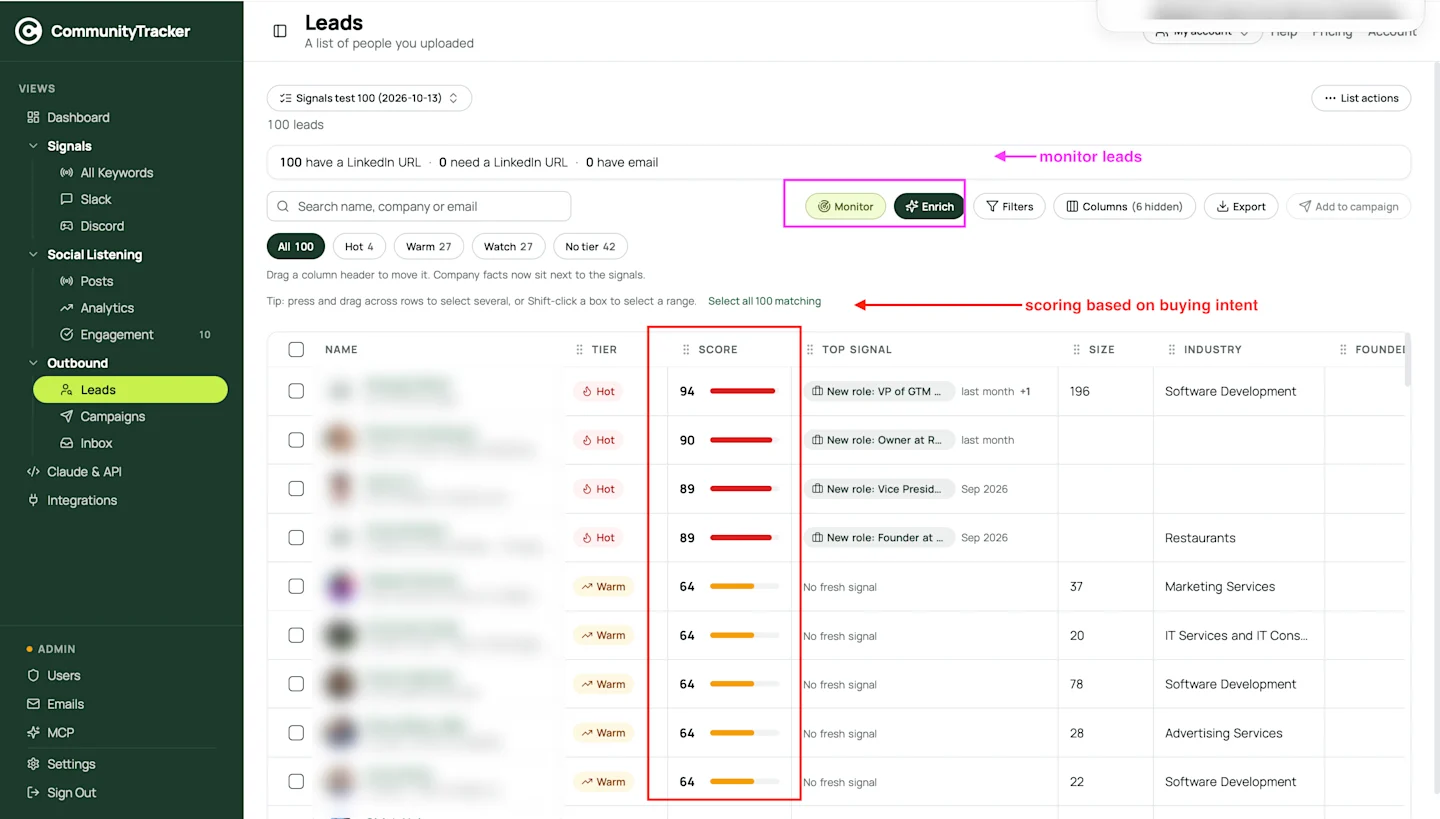
CommunityTracker Leads page: Monitor and Enrich on each list, with a buying intent score per lead. Lead details blurred.
In one 100 lead test list, the tier split came out at 4 Hot, 27 Warm, 27 Watch and 42 with no tier. The four Hot leads scored 94, 90, 89 and 89. A second list of 100 produced 0 Hot and 21 Warm. Across the two lists the Hot rate is 2%. Your rate depends on who you upload, so measure it on your own first list before you forecast.
Enrich. Enrich fills the gaps: LinkedIn URL, person details, work email and company data cost 1 credit each, and a phone number costs 10. Misses are refunded. Every new account starts with 100 enrichment credits.
Filters, Columns and Export. Filter by tier, size, industry or founding year, hide columns you do not need, and export the list to CSV for your CRM.
Add to campaign. Select leads and push them into a LinkedIn or email campaign. Campaigns and Inbox sit under Outbound in the sidebar, so replies from both channels land in one inbox. Auto add moves up to 100 leads a day into a campaign.
You also get an AI assistant connector and API access on every paid plan, so a GTM engineer can pull scores into another workflow.
The same account also runs keyword social listening across 10+ platforms, including Reddit, LinkedIn and X, if you want community mentions next to your lead signals.
Pricing
CommunityTracker plans:
Free, $0 a month: 1 keyword on Reddit, with alerts once a day. No lead monitoring.
Starter, $39 a month: lead lists, monitoring, enrichment credits, and LinkedIn and email campaigns, plus four keywords across GitHub, Hacker News, LinkedIn and Reddit.
Pro, $99 a month: everything in Starter, plus AI intent scoring, Slack alerts and ten keywords on every platform. One account; user limit not listed.
Advanced, $199 a month: everything in Pro, plus twenty keywords and visibility gaps.
On credits, every new account gets 100 enrichment credits. Email, LinkedIn URL, person and company lookups cost 1 credit each, a phone costs 10, and misses are refunded.
Plans are billed monthly, with annual billing on request. You can try Pro free for 3 days, and every new subscription comes with a 14-day money-back guarantee.
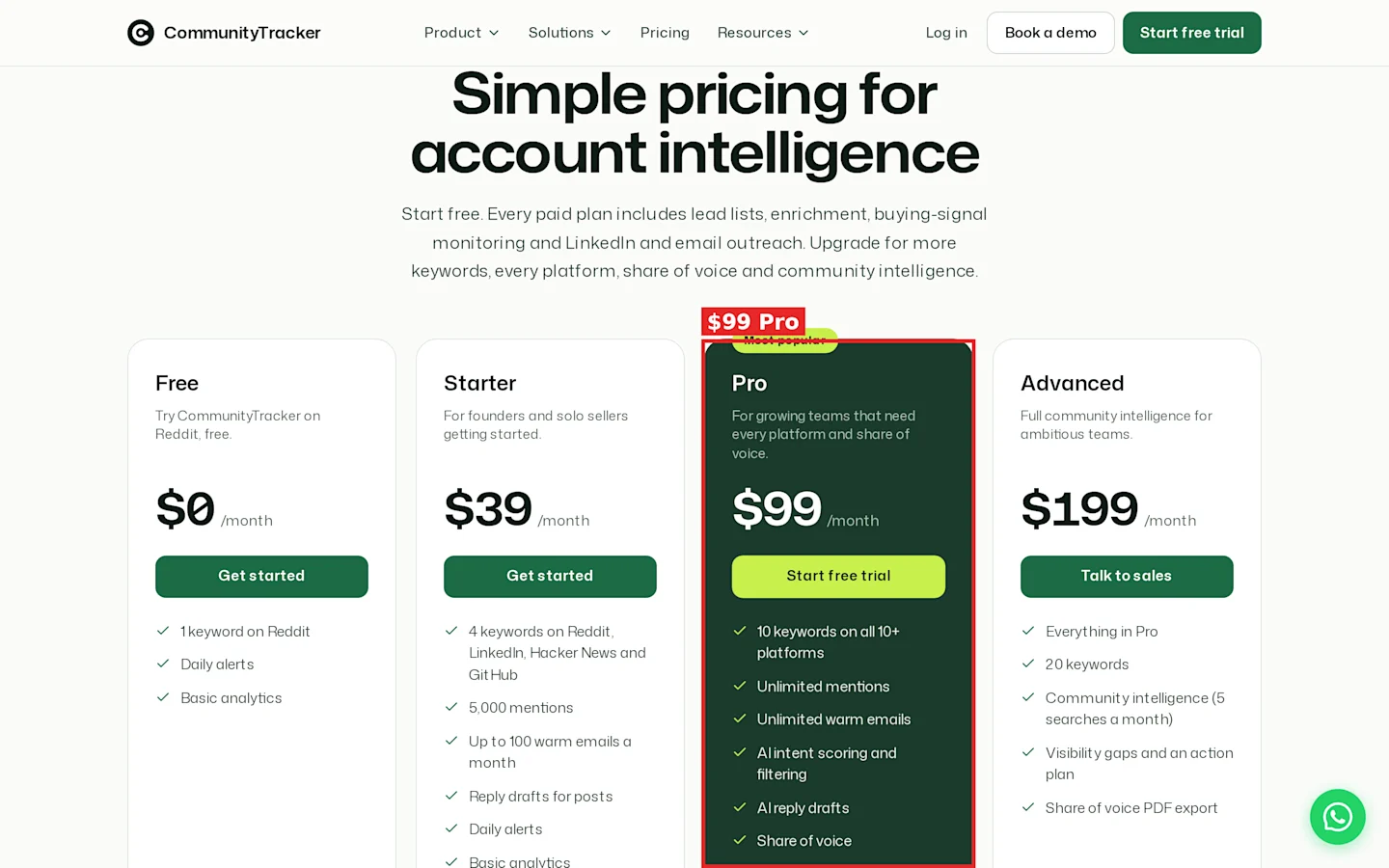
CommunityTracker pricing: Pro at $99 a month.
See the pricing page.
Pros
Scores people you chose, so the Hot tier is already in your ICP.
Signal, score, enrichment and campaign live on one screen.
Flat plan price, so adding a rep does not add a seat fee.
Refunded credits on failed enrichment.
Cons
No website visitor ID.
Daily alerts on every plan, with Slack delivery from Pro.
Summary
Upload the 2,000 people you would message anyway, turn on Monitor, and work the Hot tier each morning. If your intent data needs to include anonymous website visitors, pair it with a visitor identification tool.
2. Apollo
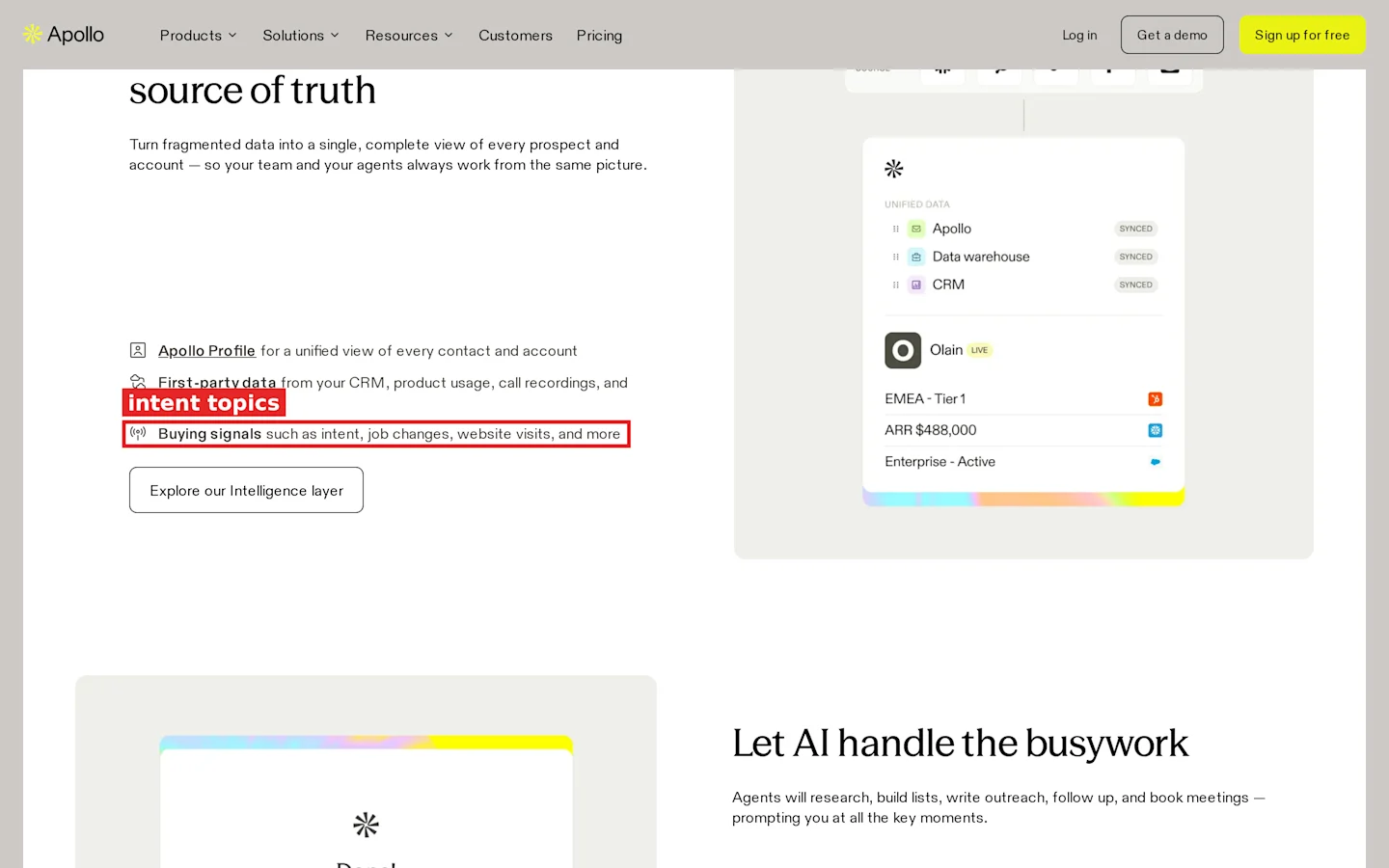
Apollo homepage: buying signals such as intent, job changes and website visits.
Apollo is a contact database with sequences, a dialer and intent topics on top. Most teams buy it for the contacts and use intent to sort them.
Features
Buying intent topics for account prioritization.
Buying signals for job changes and website visits.
Website visitor identification.
CSV uploads and CRM enrichment.
Sequences, dialer and Chrome extension.
Pricing
Apollo charges per seat with pooled credits. Basic costs $49 per seat per month billed annually, or $65 billed monthly. Professional costs $99 per seat per month billed monthly, or $79 billed annually. A Free plan exists.
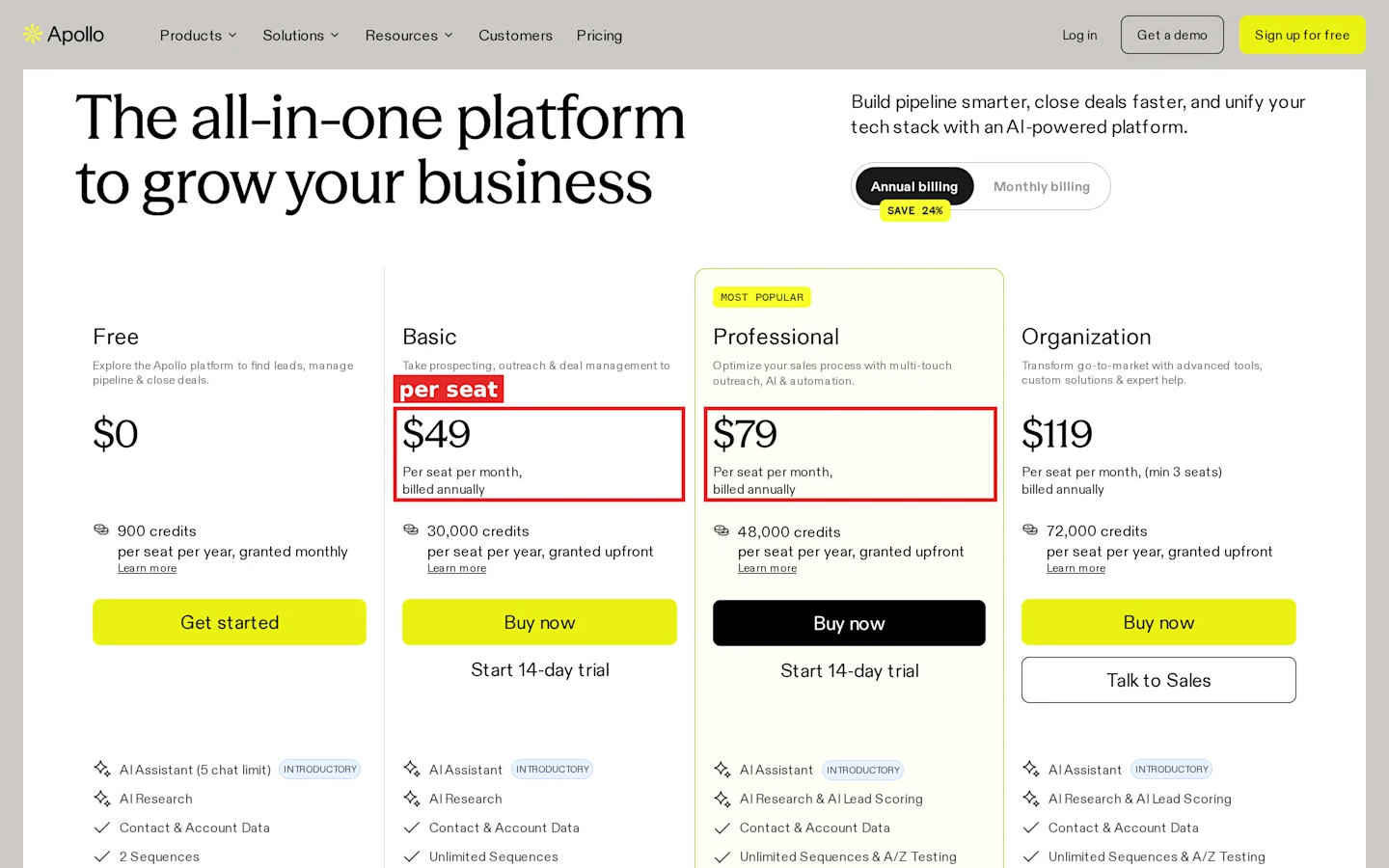
Apollo pricing with annual billing selected: Basic at $49 and Professional at $79 per seat per month.
Pros
One login for data, sequences and calls.
Low entry price per seat.
A free plan to test search and filters.
Cons
Intent is topic level, so it ranks accounts more than people.
Seat pricing grows with every rep.
Credits are pooled per period, so heavy users drain the team balance.
What reviewers report
On Capterra, Apollo holds 4.5 from about 398 reviews.
Liked: - A sales specialist found it “significantly streamlined” prospecting. - A growth lead called the filters “very robust”, making ICP contacts “easy and cheaper” to find. - A data lead credits it with saving time “by automating outreach and follow-up tasks.” - One reviewer liked having search, verification and outreach “without constantly switching between different tools.” - Another described it as “outbound sales, intent signal and CRM tool all rolled into one.”
Disliked: - A researcher flagged “unclear pricing, forced waterfall verification” and “excessive credit consumption.” - One user hit contacts that “wasn’t always accurate or up to date.” - An account development manager estimated “between 5-10% of listed titles will be wrong” against LinkedIn. - On Reddit, a six rep SDR team reported “15-20% bounce rates” and credits that “burn through fast when half the data comes back empty.” - Another user found useful features “limited to higher-priced plans.”
Summary
Pick Apollo when you still need to find the contacts. For deciding which known contact to call this week, its topic intent is a sorting aid, not an answer.
3. Common Room
Common Room pulls community activity, product usage, website visits, social engagement and Bombora research topics into one person level view. It is built for a team with an ops owner who tunes signals every week.
Features
Social and community engagement signals.
Job change tracking.
Website deanonymization, 1,000 a month on Essential.
Bombora Company Surge topics: 6 on Essential, 12 on Advanced, 25 on Enterprise.
AI scoring and buying committee views.
Pricing
Essential costs $2,500 a month billed annually and includes 5 seats, 100,000 contacts, 5,000 RoomieAI research credits and 2,500 Prospector credits. Advanced (15 seats) and Enterprise (30 seats) are custom. There is no free plan.
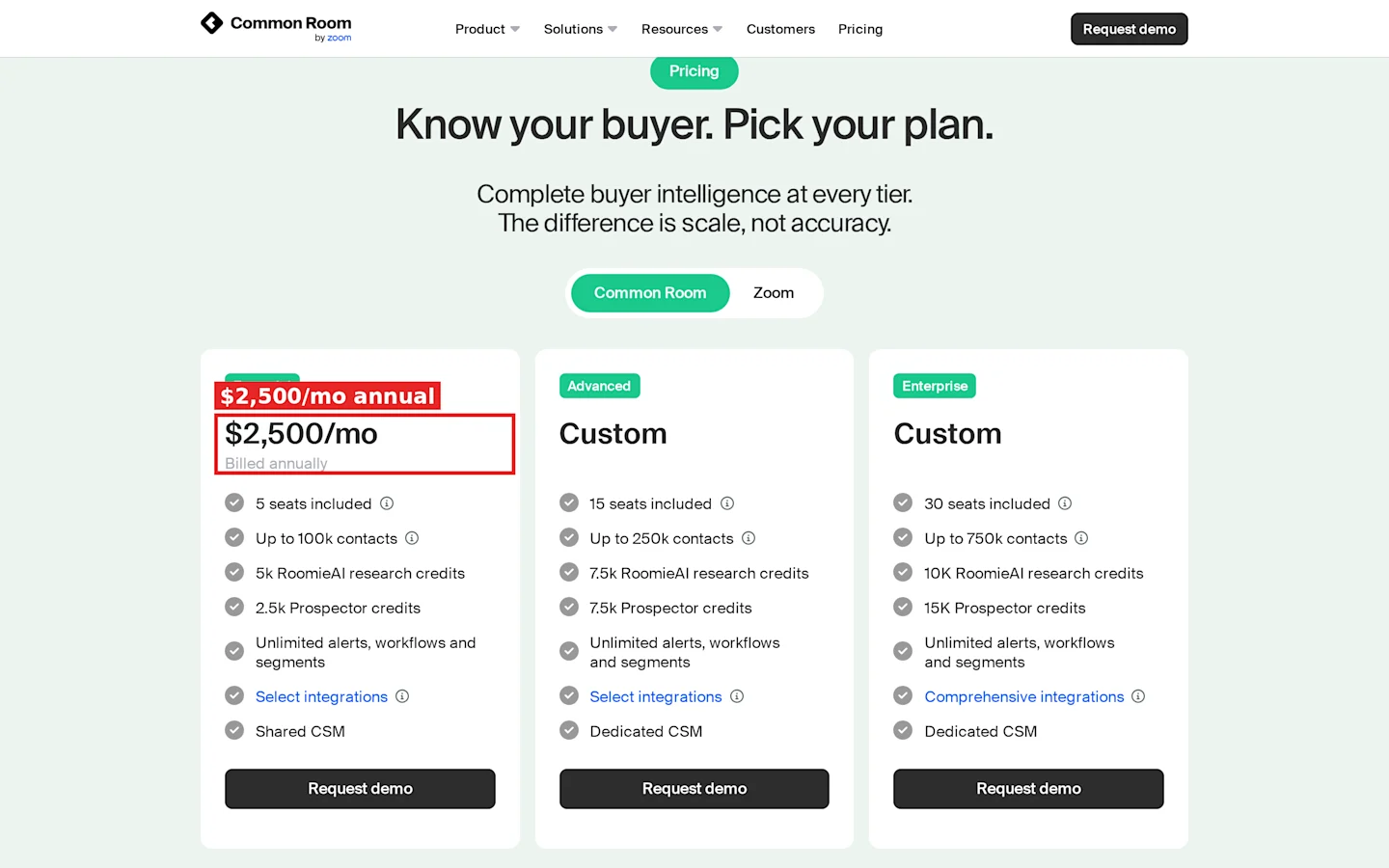
Common Room pricing: Essential at $2,500 a month billed annually, with 5 seats.
Pros
Community, social, web, product and research signals in one record.
Job change tracking for known champions.
Five seats included in the entry plan.
Cons
$30,000 a year before you add seats.
Product signals cost extra below Enterprise.
In product data exports are an add-on on Essential and Advanced.
What reviewers report
TrustRadius scores it 7.6 out of 10. This block draws on 3 TrustRadius reviewers plus 1 Reddit thread, so treat it as a thin sample.
Liked: - A marketing director liked “web based intent signals.” - The same reviewer found “job movers is great for tracking high value ICP folks.” - A marketing manager valued “data aggregation” and “signal capture.” - A BDR used it for “finding people who were on your companies website” and filtering to ICP. - The BDR also credited it with “many more outbound booked meetings.”
Disliked: - “Hubspot integration was really difficult to use.” - “Navigation was honestly hard.” - The BDR wanted “more help within the customer success team” to set up plays. - The same review found it “didn’t really work for tracking the inbound process.” - On Reddit, one poster noted a team lead admitting that acting on signals “fast and consistently” was the hard part, and asked whether it ends as “a gorgeous dashboard full of intent nobody had the bandwidth to act on.”
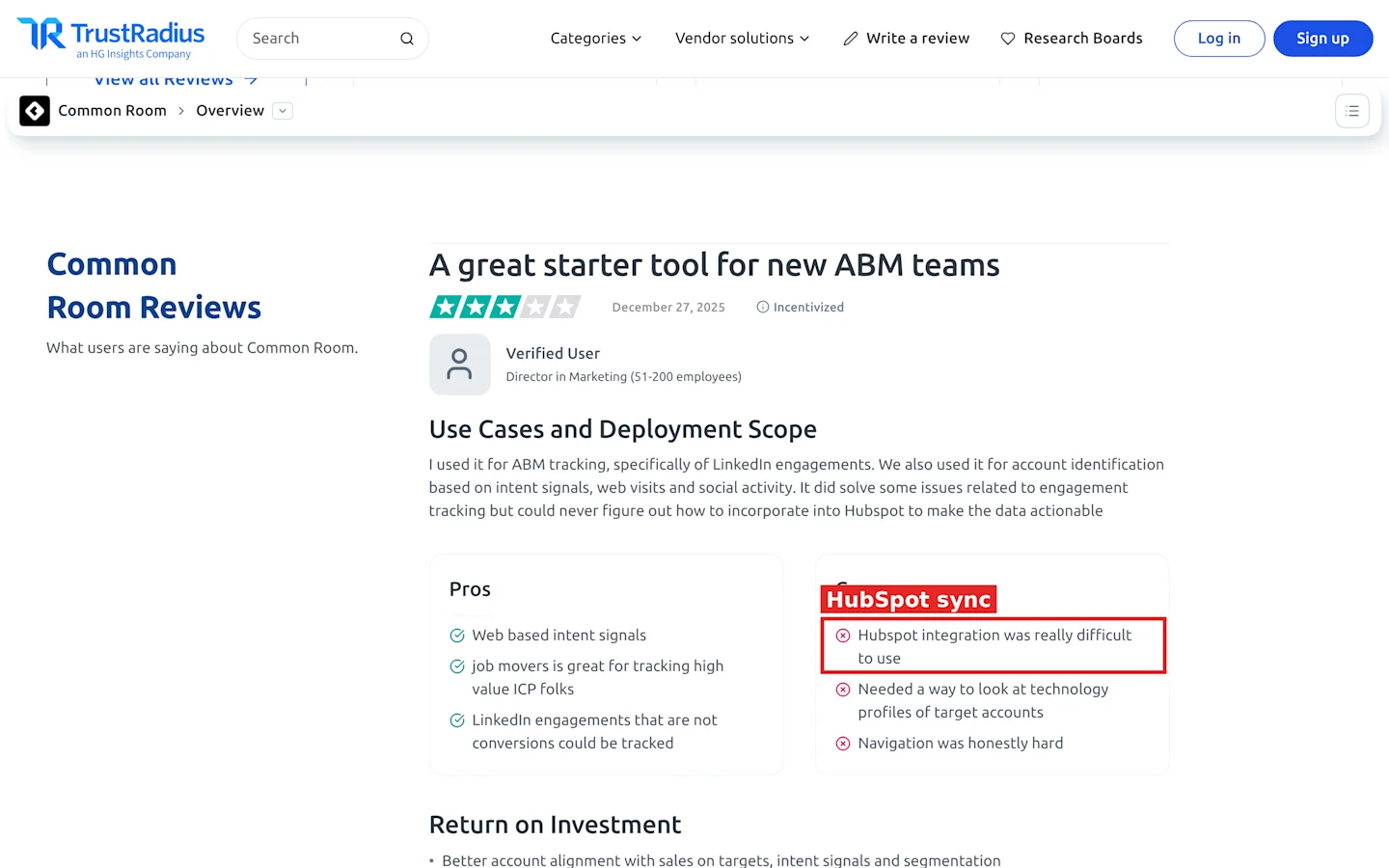
TrustRadius: a Common Room reviewer reports that the HubSpot integration was difficult to use.
Summary
Common Room earns $30,000 a year only when you already collect community and product data. If you would connect one source, the rest of the bill buys you nothing.
4. Warmly
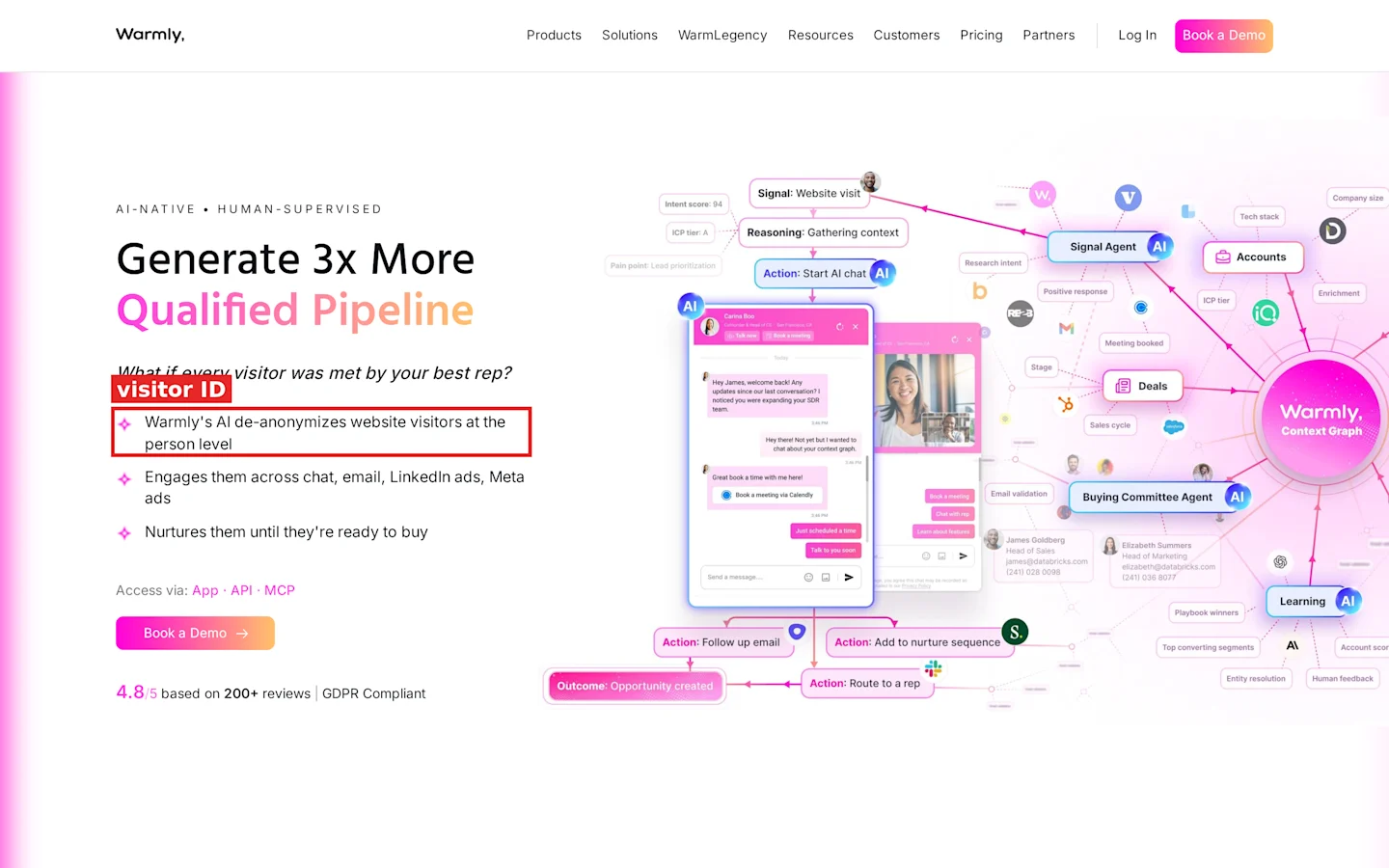
Warmly homepage: website visitor de-anonymization at the person level.
Warmly identifies website visitors, layers social activity and Bombora research intent on top, and can run AI chat on your site. It sells on annual or quarterly terms.
Features
Person and company level website visitor ID.
Social media monitoring as a second party signal.
Bombora research intent and competitor keyword signals.
ML intent scoring and buying committee identification.
AI inbound chat, popups and lead routing.
Pricing
Web Deanonymization starts at $10,000 a year or $4,875 a quarter. Inbound Chat costs $20,000 a year, and Inbound Autopilot costs $30,000 a year. Each plan starts from 10,000 credits a month. The GTM Signals add-on costs $10,000 a year, so visitor ID plus signals comes to $20,000 a year.
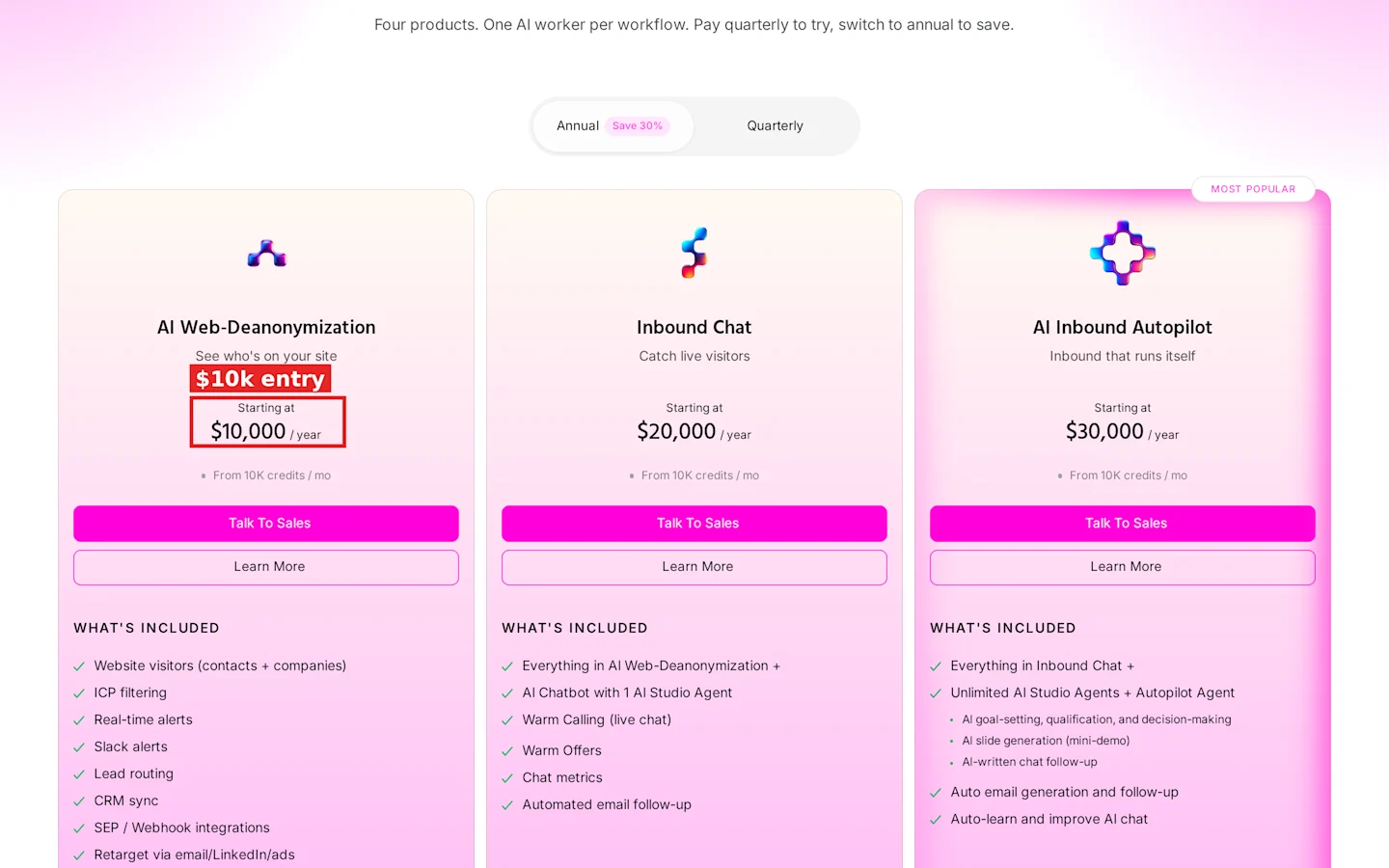
Warmly pricing: AI Web-Deanonymization starts at $10,000 a year.
Pros
Visitor ID, intent and chat under one contract.
Quarterly billing option.
First, second and third party signals in one score.
Cons
Research intent costs extra on top of the base plan.
No monthly plan.
Value scales with traffic, so a low traffic site gets a short list.
What reviewers report
Capterra shows no Warmly reviews yet, so this block relies on 3 Reddit threads and falls short of five liked and five disliked points. Treat it as a thin sample.
Liked: - In a r/b2bmarketing thread, a tester found it “quickly knew where I work.” - A buyer in r/AskMarketing shortlisted it for “contact-level identification” and orchestration after UserGems came in “way out of the price range.” - Practitioners in a visitor ID thread group it with tools that have “decent rates.”
Disliked: - The same tester found it did not know “who I was”, only the company. - They warned that “likely” contacts in the deliverable are “very misleading.” - The visitor ID thread notes these tools “bundle a bunch of features to buff up to 5k-10k USD.”
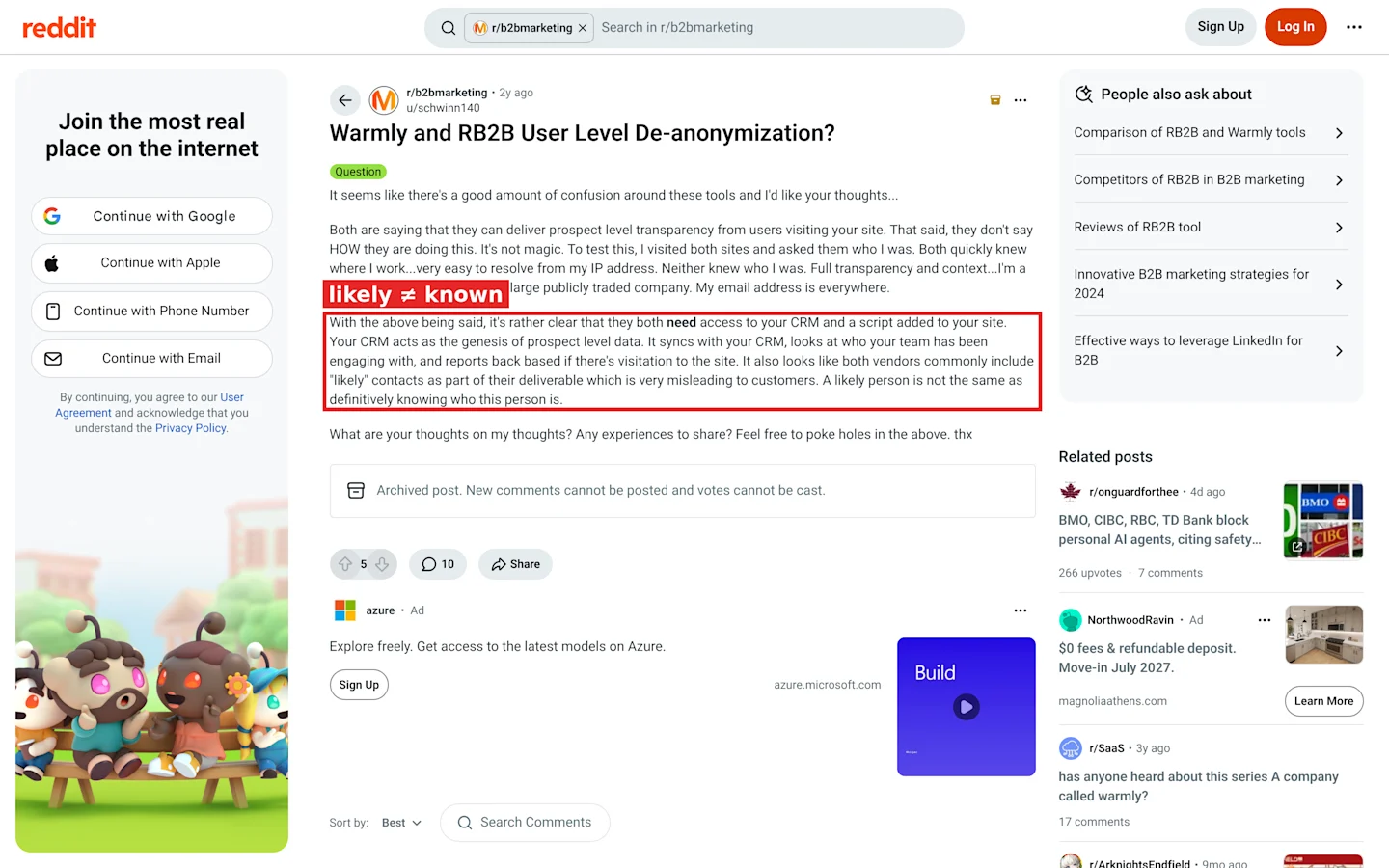
Reddit, r/b2bmarketing: a “likely” contact is not the same as a known one.
Summary
Warmly is a traffic play. With thousands of US visitors a month and a CRM to sync, the $10,000 entry pays for routing and chat; below that, check the RB2B math in Scenario 2 first.
5. RB2B
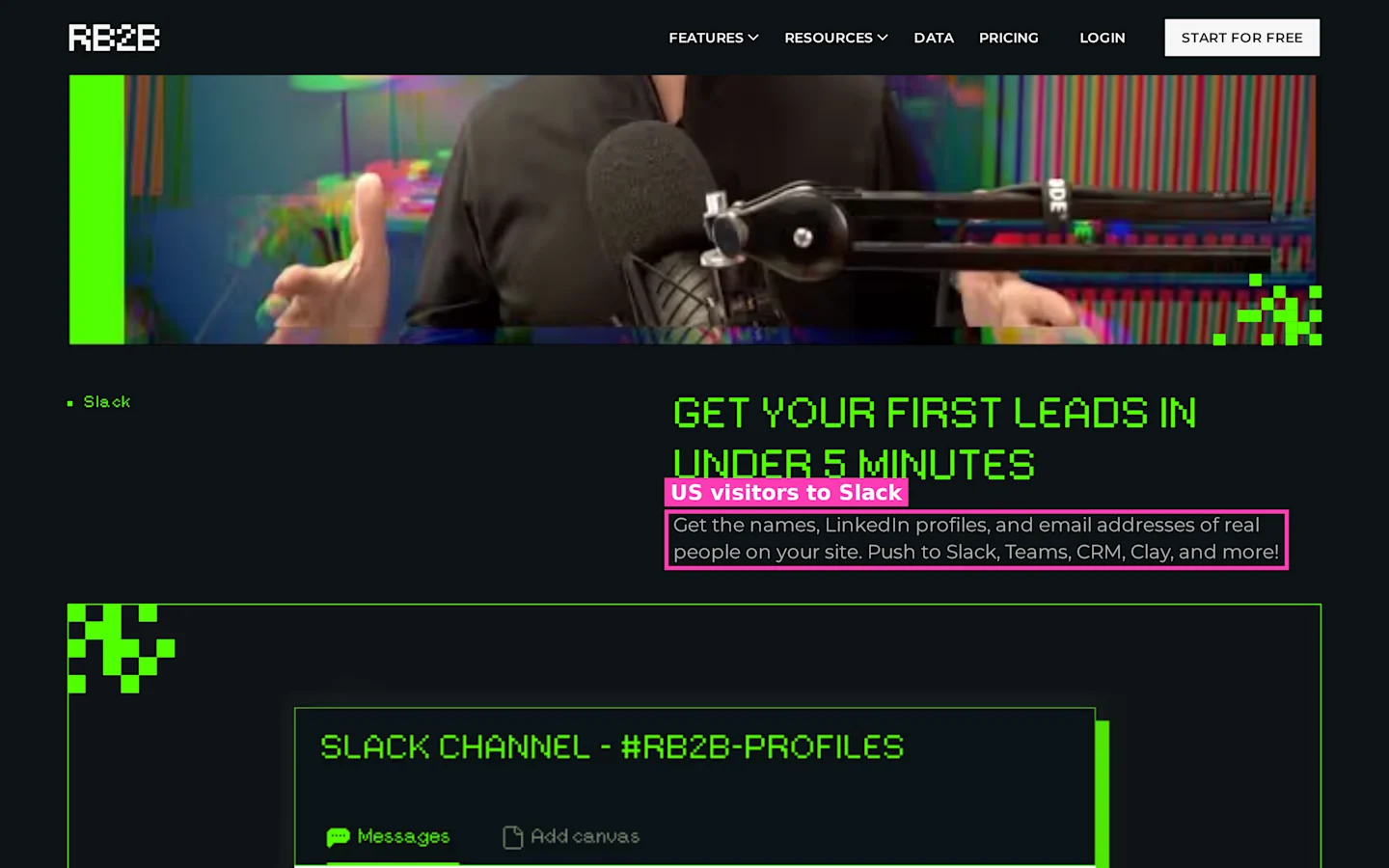
RB2B homepage: names, LinkedIn profiles and emails of site visitors, pushed to Slack and your CRM.
RB2B does one job. It names US website visitors at the person level and drops their LinkedIn profiles into Slack or Teams.
Features
Person level ID for US visitors from Starter.
Company level ID on Free.
Business emails and all integrations from Pro.
Premium resolution on Pro+.
Hot pages and lead filters.
Pricing
Free covers company level ID and 150 resolutions. Starter costs $79 a month billed monthly for 300 resolutions, with 45¢ overage. Pro starts at $149 a month billed monthly for 600 resolutions, with 25¢ overage. Pro+ starts at $199 a month billed monthly and raises coverage to 35 to 45%, against 15 to 20% on lower plans. Extra domains cost $99 a month each, up to five. The 7 day trial needs no card.
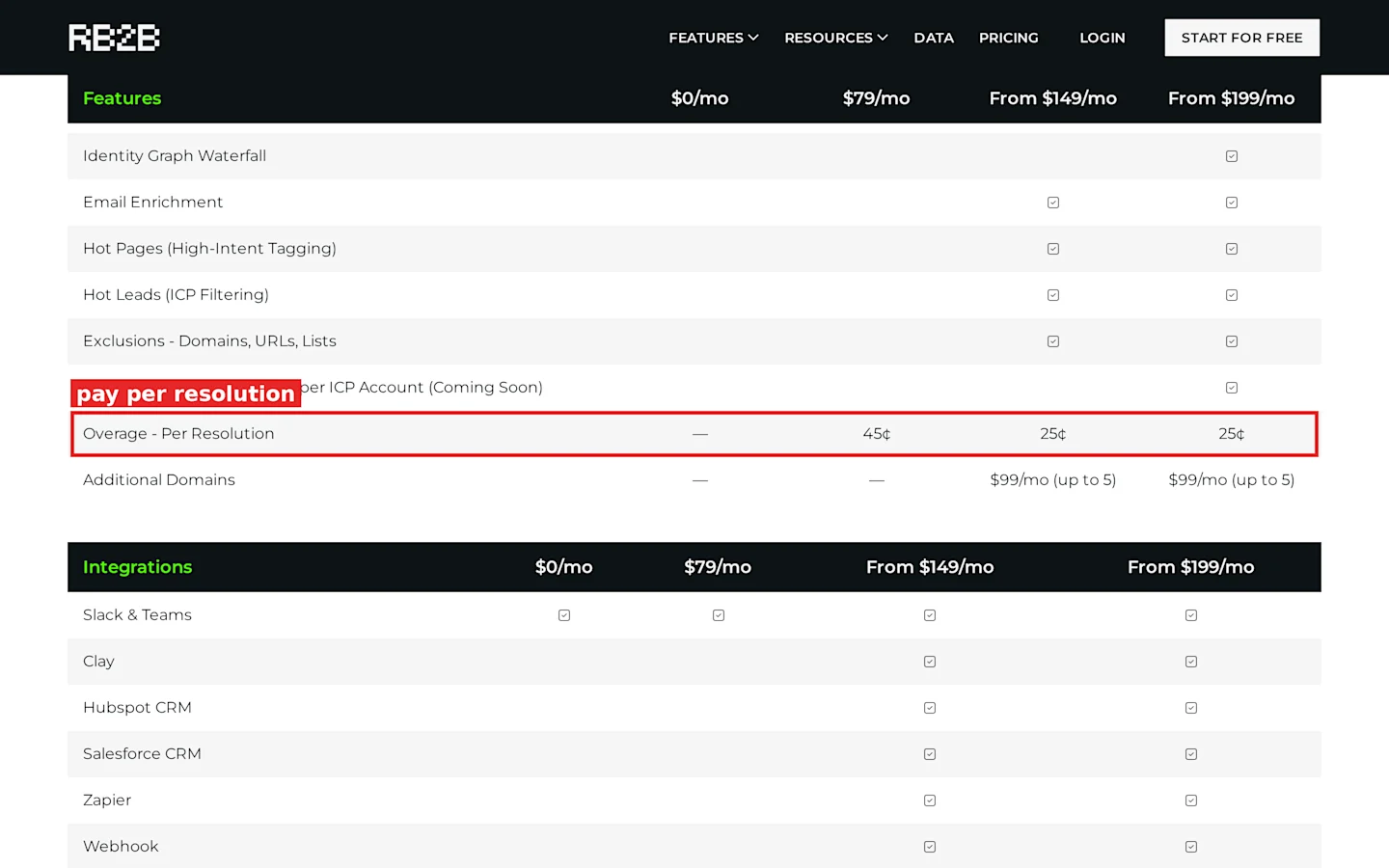
RB2B pricing: overage per resolution, 45¢ on Starter and 25¢ on Pro.
Pros
Paid plans start at $79 a month, billed monthly, with no annual contract.
Setup is one script on your site.
Coverage figures printed on the pricing page.
Cons
US only at the person level.
Every resolution costs money, wrong ones included.
No list monitoring or campaigns.
What reviewers report
Liked: - A Reddit user in r/b2bmarketing was “fairly satisfied” and saw 70 to 80% identification against 40 to 60% elsewhere. - The same user liked the lower entry price compared with bundled tools. - Another commenter saw value in matched data as “a signal.” - A thread on visitor tracking agreed these tools “work” for 10 to 30% of traffic. - The one Capterra reviewer found it “easy to like the promise.”
Disliked: - “Maybe 20% of Rb2bs 70% matched is inaccurate”, one user wrote, with “the spouse or child of my prospect” showing up. - A r/microsaas tester got “2 ids so far and both were inaccurate.” - Another tested it “for like 6 weeks and maybe 20% of visitors got identified at all.” - A US marketer removed the RB2B tag because the matches rarely agreed with three account level tools. - The Capterra reviewer rated it 1.0, citing login codes that “most times” don’t arrive and data “seldom complete or accurate.”
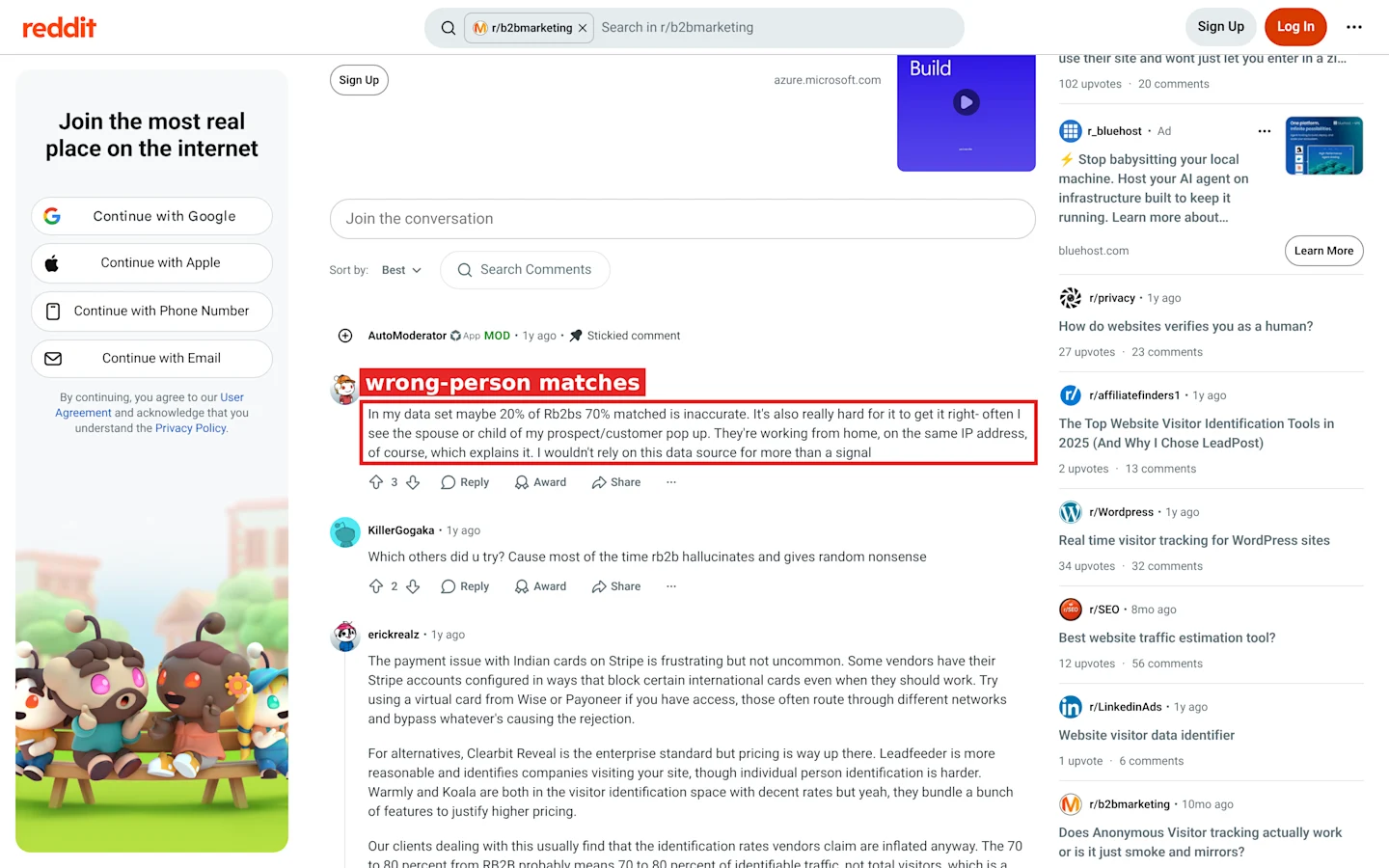
Reddit, r/b2bmarketing: a user reports spouse or child matches on shared IP addresses.
Summary
Run the free tier for two weeks. If named ICP visitors show up, Starter at $79 a month tells you whether your traffic holds buyers, provided someone checks each name before it enters a sequence.
6. Leadfeeder (Dealfront)
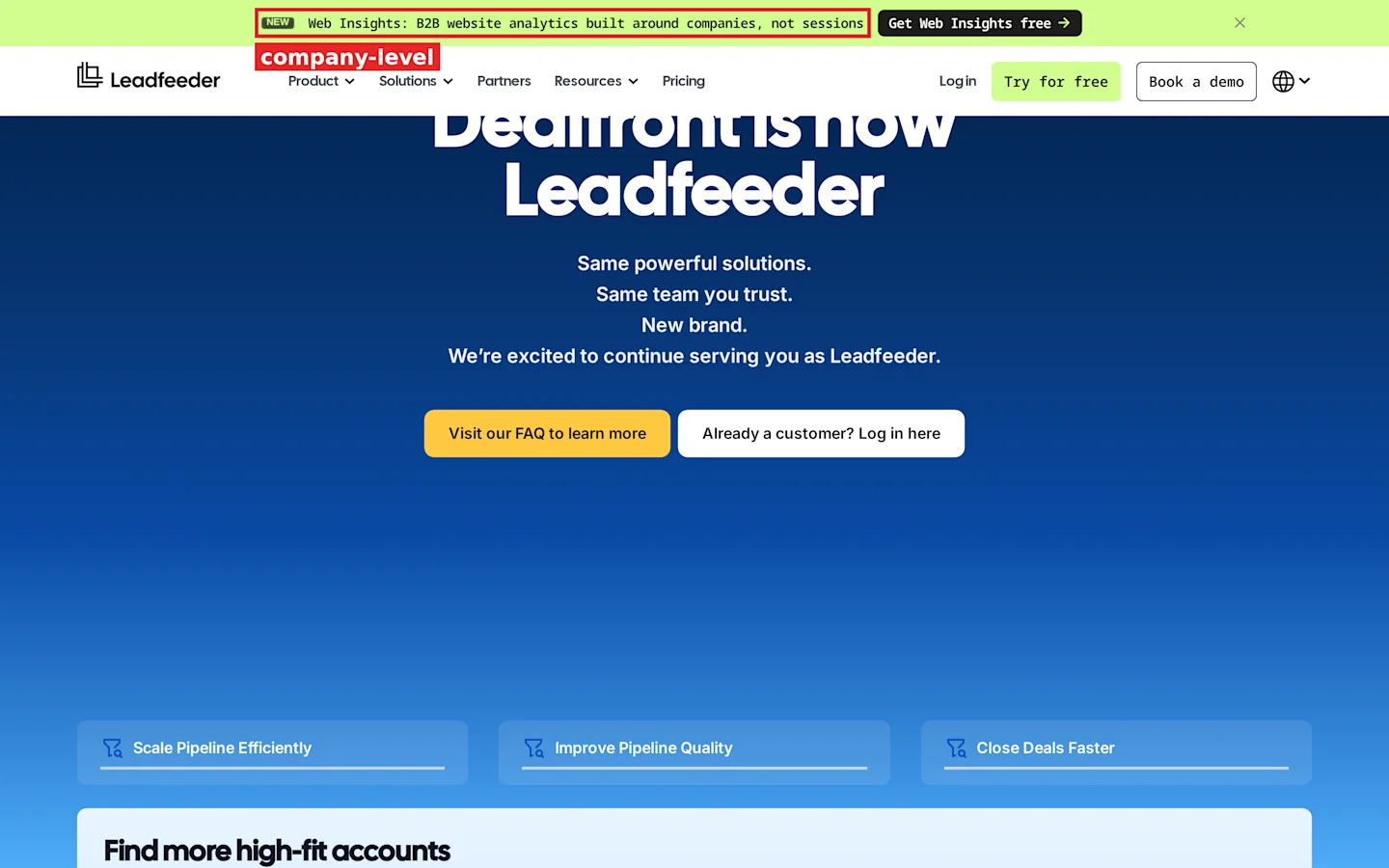
Leadfeeder homepage: website analytics built around companies, not sessions.
Leadfeeder, now part of Dealfront, names the companies on your site, not the people. It adds an Intent Score on each report row and lets every colleague log in.
Features
Company level website visitor ID.
ICP fit and Intent Score on every report row.
Filter by intent signals on Activate.
Company search filtered by tech stack, intent topics and hiring signals.
Unlimited users on every plan.
Pricing
Lite is free and shows the last 100 companies with 7 day history. Discover starts at €79 a month billed annually or €113 billed monthly. Activate starts at €369 a month billed annually or €527 billed monthly. Scale costs €599 a month on annual terms only. Trials last 14 days.
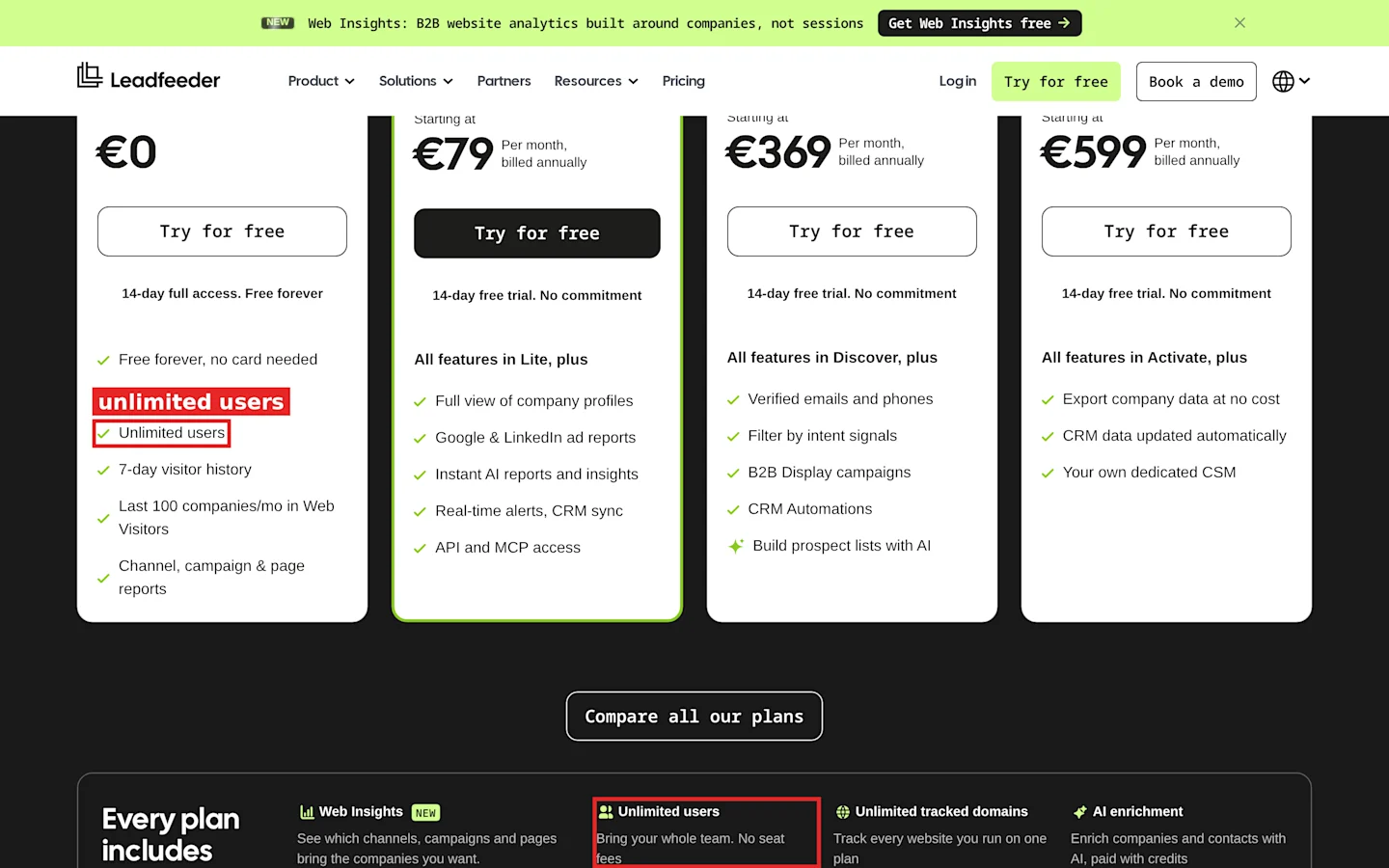
Leadfeeder pricing: unlimited users on every plan, with annual prices shown.
Pros
Unlimited users, so cost per rep falls as the team grows.
Prices in euros with a monthly option on Discover and Activate.
Free tier to test traffic quality.
Cons
No person level ID.
Scale is annual only.
Verified contacts start on Activate, not Discover.
What reviewers report
Leadfeeder holds 4.2 on Capterra, with ease of use at 4.5.
Liked: - A VP of sales got “a meaningful number of warm leads for sales team.” - An IT manager can “proactively reach out to potential leads that would have otherwise gone unnoticed.” - A senior account manager checks it daily to “understand intent leads better.” - A founder called it “the sweet spot” between cold and warm email. - A product strategy manager liked filtering visitors by ideal customer profile and pages viewed.
Disliked: - A marketing specialist called the renewal clause “shameless”, since you must cancel 30 days before renewal. - A managing director cited “deceptive billing practices” and “slow or non existent support.” - The same marketing specialist found 70% of identified traffic came from unrelated industries. - A CMO wrote “they can’t track the person just the company.” - A German reviewer rated data for phone prospecting in DACH as poor and often “veraltet” (outdated).
Summary
Leadfeeder gives a whole team account level visit data for one fixed fee. Set a calendar reminder 31 days before renewal.
7. UserGems
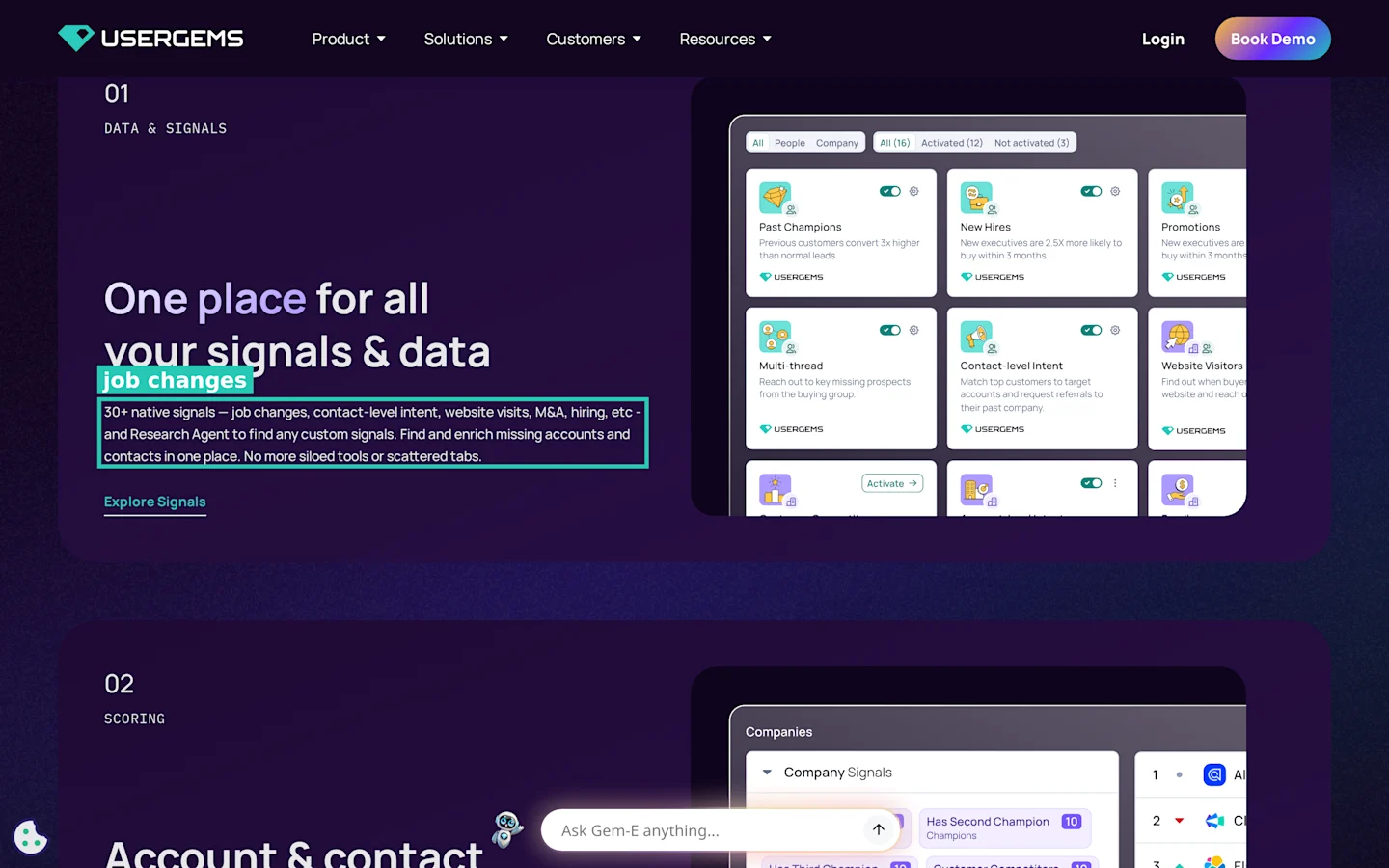
UserGems homepage: job changes among 30+ native signals.
UserGems watches your past customers, champions and closed lost contacts for job changes, then routes the mover to the right rep. Its plans now add scoring, research and writing agents on top of job changes.
Features
Job change tracking on CRM contacts, with retroactive job change leads as an option.
Account and contact scoring with buying stages.
Contact level intent and web deanonymization.
Automated campaigns and a writing agent.
Salesforce, HubSpot, Outreach, Salesloft and Gong Engage sync.
Pricing
Core costs $40,000 a year, Advanced $75,000 a year and Elite $150,000 a year. Core covers a TAM of 2,000 to 4,000 accounts, Advanced 4,000 to 10,000, and Elite 10,000+. Implementation adds a one time $3,000 to $10,000, and retroactive job change leads add a one time $3,000. Every plan includes unlimited admin and end users, and UserGems offers money back if you see no ROI in closed won revenue.
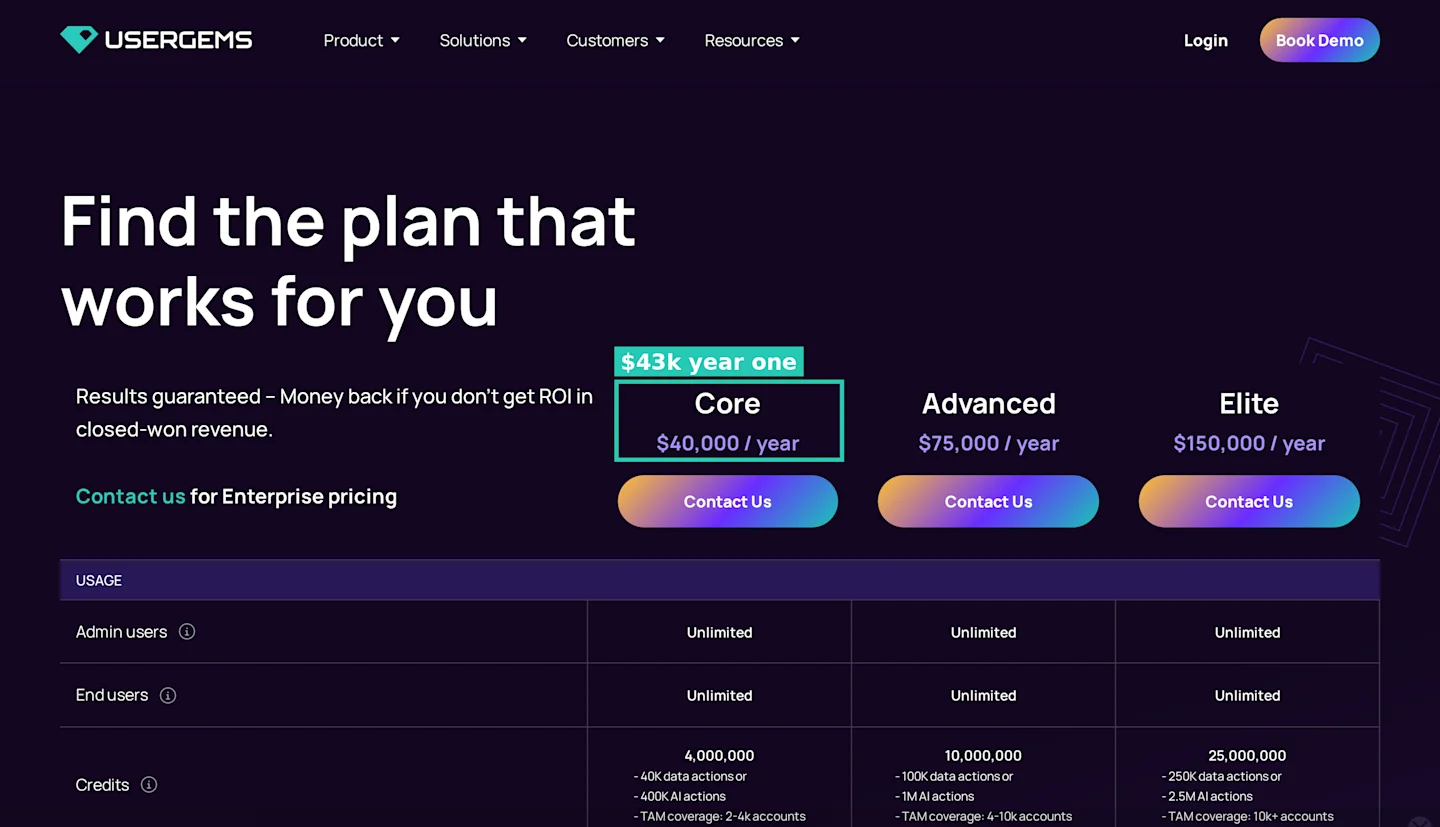
UserGems pricing: Core at $40,000 a year. The $3k implementation fee sits lower in the same table.
Pros
Job change tracking is the core product, with a retroactive backfill option.
Unlimited users.
Money back clause tied to closed won revenue.
Cons
$43,000 minimum first year.
TAM coverage caps tie the price to account count.
Annual contracts only.
What reviewers report
UserGems holds 4.7 on Capterra. This block draws on 6 Capterra reviewers plus 1 Reddit thread, so treat it as a thin sample.
Liked: - An SDR “crushed my KPIs” with alerts on former client staff who move. - Another SDR saved “30 minutes each morning” of call prep. - The same reviewer called it the “sole automated method” for updating Salesforce on job changes. - An SDR found support replies “within minutes.” - A marketing director found the emails “100% perfect.”
Disliked: - “Similar names can occasionally cause the information on accounts to become muddled.” - Recommended lists include contacts that “may not align perfectly with my ideal customer profile.” - One SDR found it helps most “if your CRM data is clean and accurate.” - “The pricing is too heavy for start-ups and mid tier market players.” - A founder on r/SaaS got a “$30k+” quote for “essentially a job change monitoring.”
Summary
At $43,000 in year one, UserGems needs large deals and a CRM full of past champions. Scenario 3 shows where that line sits.
8. Clay
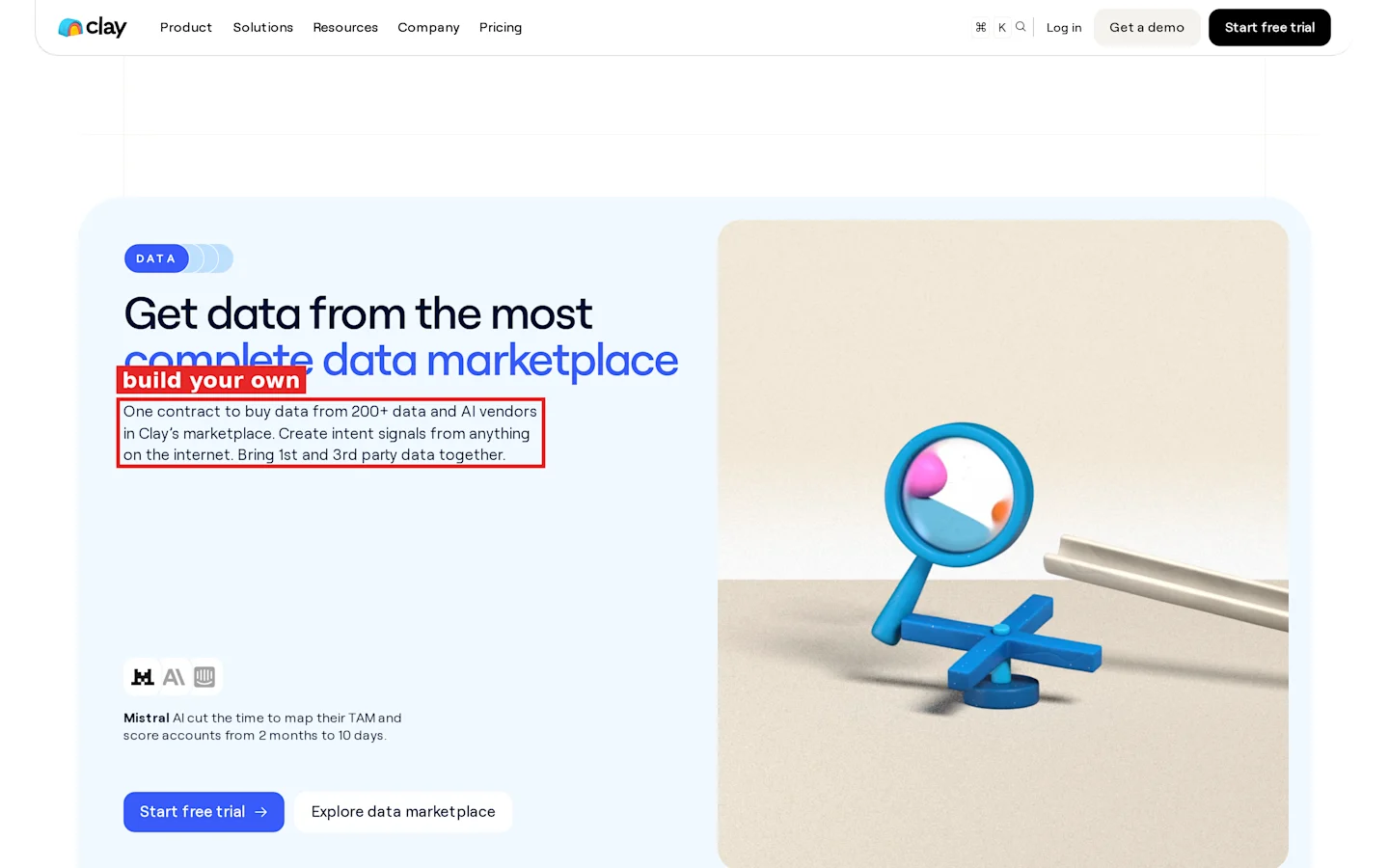
Clay homepage: create intent signals from anything on the internet.
Clay is a spreadsheet of enrichment providers with signal tracking built into the tables. It is the tool on this list where you build the intent logic yourself.
Features
Job change, promotion and new hire signals from Launch.
Social listening signals from Launch.
Web intent signal tracking on Growth only.
Waterfall enrichment across many data providers.
Webhooks, HTTP API and CRM auto sync on Growth.
Pricing
Clay has a Free plan. Launch costs $185 a month billed monthly ($167 billed annually) and includes 2,500 data credits, 15,000 actions a month and 50,000 rows per table. Growth costs $495 a month billed monthly ($446 billed annually) and adds CRM sync, HTTP API, webhooks and web intent signals, with 6,000 data credits and 40,000 actions a month. Enterprise is custom. A 14 day trial is available.
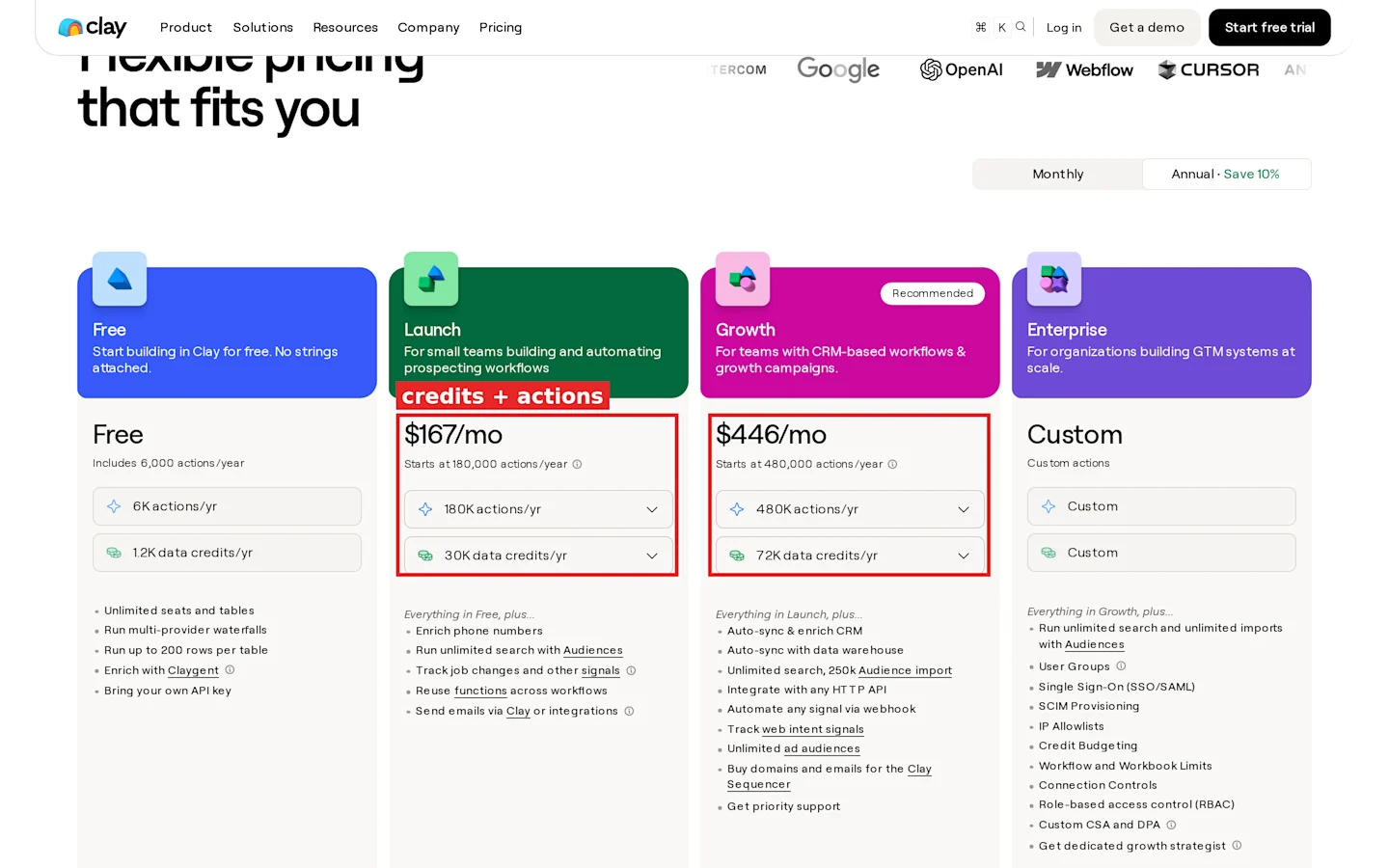
Clay pricing with annual billing selected: Launch at $167 and Growth at $446 a month.
Pros
Any signal you can define, you can track.
Many data providers behind one bill.
Monthly and annual billing on every paid plan.
Cons
Needs someone who builds workflows.
Data credits and actions billed separately.
Web intent signals start at $495 a month.
What reviewers report
The Capterra UK Clay listing describes a different product, a personal CRM, so I left it out. This block draws on 4 Reddit threads.
Liked: - An agency operator in r/gtmengineering saw a 3.8% reply rate on Clay enriched campaigns against 2.9% from a manual stack. - The same reviewer cut bounces to 1.4% from 2.7%. - They spent about 25 minutes per 100 leads in Clay against 90 manually. - A r/GrowthHacking commenter found ROI came from “fewer but better timed” leads tied to a real signal. - A commenter in the r/gtmengineering switch thread found Clay “shines when you’re chasing specific triggers.”
Disliked: - The agency operator spent “15-20 hours in the first 3 weeks” learning tables and enrichment steps. - They burned starter credits “in like 18 days” and estimated an extra $400 in credits. - Support took “4 days to get a response” when an integration broke. - The switch thread author left because “lookup costs kept surprising” the team and quality was “inconsistent” for a niche ICP. - A team on r/sales runs Clay with Apollo, Instantly and Zapier as a “DIY setup”, which shows the glue work it asks for.
Summary
Clay rewards a team with a GTM engineer and a signal no vendor tracks out of the box. Budget two to three weeks of setup before you judge the reply rates.
Three GTM scenarios to rerun
Scenario 1: cost per Hot lead for one sales account
Your team uploads one full list of 2,000 ICP contacts. The blended Hot rate across the two test lists is 2%, so you get 40 Hot leads. The stronger of the two lists ran at 4%, which gives 80. The second list scored 0 Hot and 21 Warm, so a weak list can return no Hot leads at all. Treat the cost per Hot lead as a range between those two.
Tool | Monthly cost per account | Per Hot lead at 2% (40) | Per Hot lead at 4% (80) |
|---|---|---|---|
CommunityTracker Pro | $99 | $2.48 | $1.24 |
Apollo Professional, 5 seats, monthly | $495 | $12.38 | $6.19 |
Warmly entry, $10,000 a year ÷ 12 | $833 | $20.83 | $10.42 |
Warmly entry plus GTM Signals, $20,000 a year ÷ 12 | $1,667 | $41.67 | $20.83 |
Common Room Essential, billed annually | $2,500 | $62.50 | $31.25 |
Where it breaks: Apollo, Warmly and Common Room do not score on the same 0 to 100 scale, so their “Hot” is a stand in for “top ranked.” Use the rate from your own first list, not mine.
Scenario 2: seat pricing against resolution pricing
You want 2,000 named visitors a month.
RB2B Pro costs $149 a month for 600 resolutions plus 1,400 × 25¢ = $350 in overage, so $499 a month. At 15 to 20% coverage you need 10,000 to 13,333 US visitors to reach 2,000 resolutions. If 20% of matches are wrong, the figure from the RB2B reviewer block, you pay $499 for 1,600 usable names, or 31¢ each.
Leadfeeder Activate costs €369 a month billed annually, flat, for unlimited users. Spread over 5 reps that is €73.80 each, and over 10 reps €36.90. Apollo at 10 Professional seats costs $990 a month. Doubling the team doubles the Apollo bill and leaves Leadfeeder flat, while doubling traffic raises RB2B overage and leaves the other two flat.
Scenario 3: job change tracking at list scale
You sell a $5,000 annual contract and want alerts when past champions move.
UserGems Core costs $40,000 a year plus $3,000 implementation, so $43,000 in year one. You need 9 closed deals from job change leads to cover it ($43,000 ÷ $5,000 = 8.6). CommunityTracker Pro costs $99 × 12 = $1,188 a year, which one closed deal covers four times over.
Where it breaks: CommunityTracker watches the lists you upload, so a CRM of 50,000 past contacts needs you to split, upload and rotate lists by hand. UserGems reads your CRM directly with unlimited users, and Core covers 2,000 to 4,000 accounts. At a $25,000 deal size, two recovered deals ($50,000) cover the $43,000 first year.
How I picked these tools
Each tool tracks at least one buying signal you can act on: a job change, a visit, a research surge or a post.
Each tool publishes prices I could check on its own pricing page.
Each tool has reviews on Capterra, TrustRadius or Reddit.
I dropped 6sense because it publishes no prices.
I dropped Trigify and Koala because both shut down. Trigify switched off its platform on 22 October 2026 at 11:59pm BST after its team joined HubSpot, and Koala closed on Sep 30, 2025 after Cursor acquired it.
How to choose
Start with where your buyers leave a trace.
You already know the people: you need list monitoring. Compare sections 1 and 7, and run Scenario 3 with your deal size.
Your buyers find you first on your website: you need visitor ID. Compare sections 4, 5 and 6, and run Scenario 2 with your traffic.
You need contacts before signals: start with the database in section 2.
You collect community and product data: section 3 joins them.
No vendor tracks the signal you care about: section 8 lets you build it.
For most outbound teams running one account, my pick is CommunityTracker Pro for the list you already own, plus a free visitor ID tier to see if your traffic adds anything.
FAQ
What is a buyer intent leads finder tool?
It is software that flags people or companies showing signs they may buy soon, such as a new role, a funding round, a website visit or a post asking for a recommendation, and ranks them for your reps.
What is the difference between first party and third party intent?
First party intent comes from your own assets, like your website or CRM. Third party intent comes from outside data, like research topic surges sold by Bombora or public job changes.
How accurate is website visitor identification?
Coverage on vendor pricing pages runs from 15 to 45% of US traffic at the person level. The RB2B reviewer block above shows lower figures and wrong matches from real users.
Can I track buying signals on a list I upload?
Yes. CommunityTracker, UserGems, Common Room and Clay accept your own list. CommunityTracker scores each lead 0 to 100 and tiers them Hot, Warm or Watch.
How often should I rescore a lead list?
Check the last scan time on each monitored list before a campaign goes out, and pull fresh Hot leads from the latest scan rather than last month’s export.
Should I buy visitor ID and lead monitoring together?
Only if your site gets enough US or European business traffic to fill a list. Run the free tier of RB2B or Leadfeeder for two weeks first. If fewer than 50 named ICP visitors show up, put the budget into monitoring the leads you already have.
How much should a small sales team spend on intent data?
One account can run lead monitoring for $99 a month on CommunityTracker Pro. Seat based tools cost $245 to $495 a month for five seats, and annual contracts start at $10,000.