Google Alerts is a free monitoring tool that emails you when new Google Search results match a query you choose.
If you are asking how do Google Alerts work, the short answer is: Google runs your saved query against new Search results and sends matches based on your alert settings.
Set an alert for your company name, a competitor, a product category, or a phrase your buyers use, and Google watches for new matching Search results.
Google's own Search Help page describes the job this way: alerts send emails when new results for a topic appear in Google Search.
That is useful.
Google Alerts watches the web through Google's search index. It does not give you a complete community intelligence across Reddit, X, LinkedIn, Bluesky, Hacker News, Indie Hackers, Dev.to, Stack Overflow, Product Hunt, GitHub, or Slack.
It just sends matching results.
Your team still has to sort the noise, decide whether the mention matters, and choose the next move.
This guide explains how Google Alerts works, how to set it up, which search operators make it sharper, where it breaks down, how to troubleshoot missing alerts, and how GTM teams should turn alerts into action instead of another inbox.
What Is Google Alerts?#
Google Alerts is a Google Search notification service. It runs a saved search for you and sends matching new results to your inbox.
For B2B teams, the common use cases are simple:
Brand mentions:
"CommunityTracker"or"CommunityTracker.ai"Competitor mentions:
"CompetitorName" alternativesProduct category mentions:
"community monitoring tool"or"social listening for Reddit"Executive mentions:
"Founder Name" "Company Name"PR and backlink monitoring:
"Company Name" -site:company.comHiring and market shifts:
"Company Name" layoffsor"Company Name" funding
The tool is free and fast to configure. It is a good first layer for web mention tracking.
But Google Alerts is full of noise.
If your team keeps finding buying conversations too late, see how CommunityTracker turns community signals into pipeline actions.
How Do Google Alerts Work?#
Google Alerts works by connecting your saved query to Google's search systems. To understand what the alert is doing, start with how Google Search works.
Google Search Central explains Search in three stages: crawling, indexing, and serving. Crawling is how Google discovers and downloads pages with automated programs.
Indexing is how Google analyzes and stores information from those pages.
Serving is how Google returns relevant results when someone searches. Google also says it cannot guarantee that a page will be crawled, indexed, or served.
Google Alerts sits on top of that system. When Google sees a new result that matches your alert query and fits your alert settings, it can send that result to you.
Step 1: You define the query#
The query is the most important part of the alert.
If you enter a broad term like analytics, you will get a noisy stream. If you enter a precise phrase like "product analytics for B2B SaaS" or "Mixpanel alternative", you get fewer results with more context.
Google Alerts accepts many of the same operators people use in Google Search, including quotation marks for exact phrases, site: for a specific site, and - for exclusions.
For alerts, the most useful operators are:
Exact phrase:
"your brand name"Exclusion:
"your brand name" -jobs -careersSite filter:
"your category" site:reddit.comSite exclusion:
"your brand name" -site:yourdomain.comCompetitor comparison:
"competitor" "alternative"Category intent phrase:
"looking for" "your category"
Start narrow. Add broader alerts only when you have a review workflow in place.
Step 2: Google finds matching results#
Google Alerts depends on content that Google can discover, crawl, index, and serve. That means an alert is not a guarantee that every mention on the internet will reach you.
If a post is private, blocked from crawling, hidden behind a login, not indexed, removed quickly, or not selected as a relevant result for your query, Google Alerts will not reliably catch it.
For example, a public blog post that names your company is a natural fit. A private Slack thread is not. A LinkedIn post, Reddit comment, X thread, GitHub issue, or forum discussion depends on indexing, access, source behavior, and query match quality.
Step 3: Your settings filter the result#
Google Alerts gives you a small set of controls that decide what you receive: frequency, sources, language, region, result volume, and delivery.
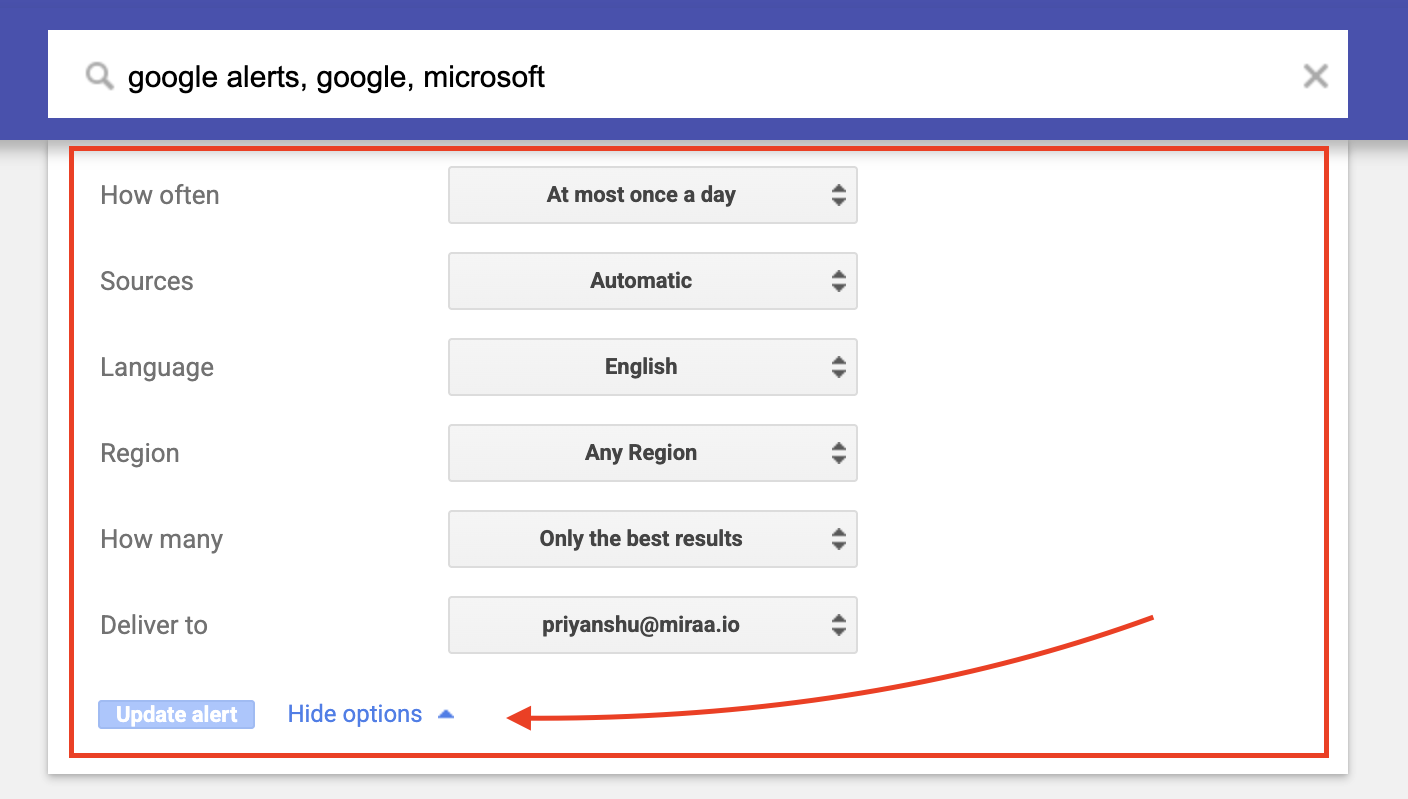
The core settings are:
How often: as-it-happens, at most once a day, or at most once a week
Sources: automatic, news, blogs, web, video, books, discussions, or finance
Language: any language or a selected language
Region: any region or a selected country or region
How many: only the best results or all results
Deliver to: email or, for some users, RSS
These settings are useful, but they are not workflow logic. "All results" can increase noise. "Only the best results" can miss edge cases. "As-it-happens" helps with speed, but it is not the same as real-time monitoring across every source your buyers use.
Step 4: Google sends the alert#
The standard delivery path is email. Some users also route Google Alerts into RSS-based workflows from the delivery option in the Alerts interface.
Email is fine for personal monitoring. For GTM work, email is a weak operating layer. Alerts pile up, ownership is unclear, and no one knows whether a mention was reviewed, ignored, routed, or acted on.
How To Set Up Google Alerts#
Google Alerts setup is simple. The harder part is choosing queries that produce useful signals.
1. Go to Google Alerts#
Open Google alerts while signed into your Google account.
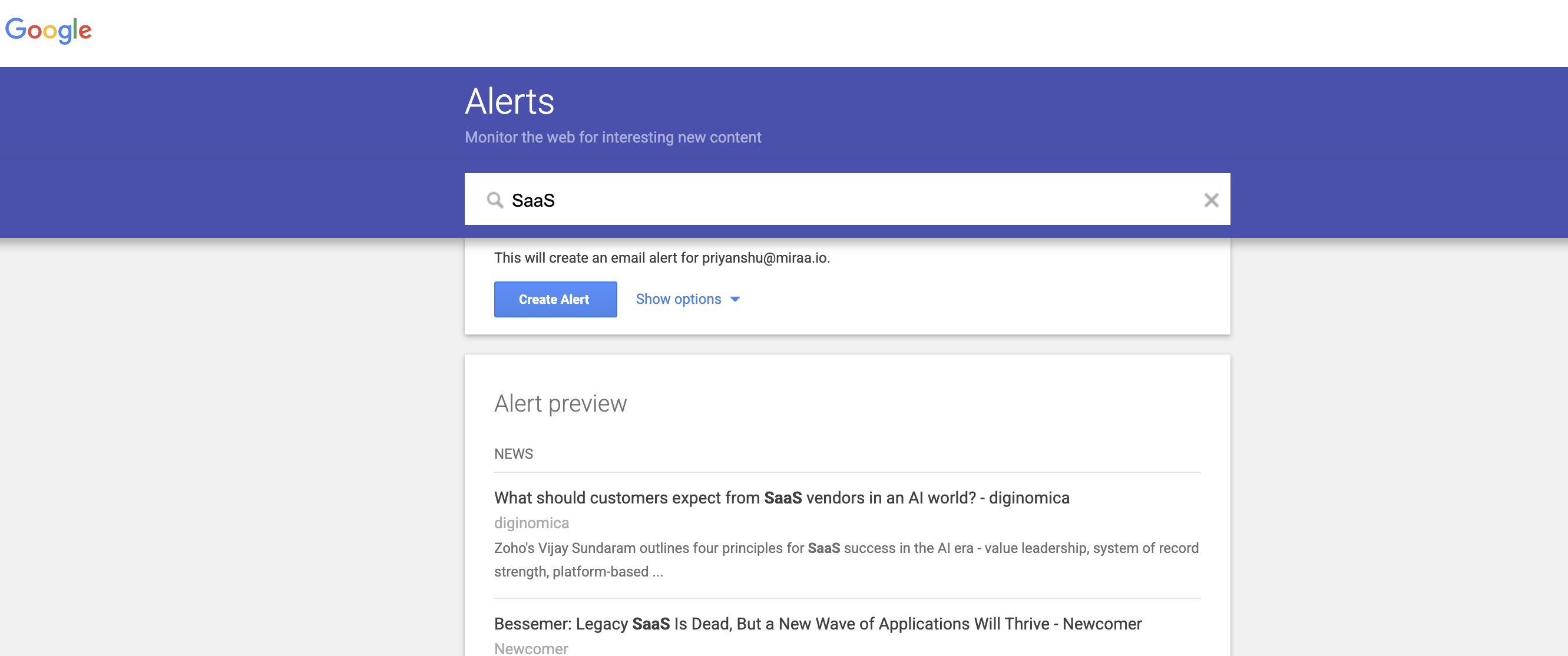
You will see a search box where you can enter the topic you want to monitor. When you type the query, Google shows a preview of example results. Use that preview to check whether the alert is too broad, too narrow, or pulling in the wrong meaning.
2. Enter a precise query#
Use the same discipline you would use for a sales territory or paid search campaign. One alert should have one job.
Weak alert:
community
Better alert:
"community monitoring tool"
Stronger separate alerts:
"community intelligence platform"
"monitor Reddit mentions"
Strongest for competitor monitoring:
"CompetitorName" "alternative" -site:competitor.com
The goal is to create alerts your team will actually review.
3. Click "Show options"#
Before creating the alert, open the options panel.
Set the frequency based on response urgency. For brand safety, competitor comparison, and buyer-intent phrases, use as-it-happens. For broad market learning, use daily or weekly.
A weekly digest works for trend tracking, but it is too slow for active conversations where a buyer is asking for recommendations.
Choose sources based on the alert's job. Use news for PR coverage, blogs or web for broader content discovery, and discussions for public forum-style results.
Set language and region when market relevance matters.
Choose "all results" when recall matters, such as brand risk monitoring. Choose "only the best results" when you are testing a broad category phrase and want less noise.
4. Create the alert#
Click "Create Alert." Google begins sending results based on your settings.
Do not stop there. Put the alert into an operating system:
Who owns the alert?
Which alerts need same-day review?
What counts as high intent?
When does sales respond?
When does marketing capture the insight?
When does product need to see the thread?
Where do resolved alerts get logged?
5. Edit, pause, or delete weak alerts#
Google Alerts lets you edit and delete alerts from the same interface. Treat the first week as calibration.
If an alert produces mostly irrelevant results, add exclusions. If it produces almost nothing, broaden the query or remove exact-match constraints. If it catches the right source but the wrong intent, add buyer phrases such as "looking for", "recommend", "alternative", "vs", "switching from", "integrates with", or "problem with".
Alert quality improves when you tune queries around decisions, not just mentions.
The Best Google Alerts Queries For GTM Teams#
Most teams create alerts for their brand name and stop. That is the baseline, not the system.
Use Google Alerts to monitor five signal types: brand, competitor, category, people, and content.
Brand mention alerts#
Create alerts for every way people name your company.
Examples:
"CommunityTracker""CommunityTracker.ai""Community Tracker" "community intelligence""communitytracker.ai" -site:communitytracker.ai
The last format excludes your own site so the alert focuses on third-party mentions. This helps marketing and PR teams spot new coverage, listicle mentions, customer posts, and unsolicited commentary.
Competitor alerts#
Competitor alerts work best when you combine the competitor name with a context phrase.
Examples:
"CompetitorName" "alternative""CompetitorName" "vs""CompetitorName" pricing"CompetitorName" "not working""CompetitorName" "recommend""CompetitorName" "switching from"
These queries move beyond vanity tracking. A generic competitor mention is often noise. A competitor mention attached to pricing, frustration, comparison, or switching language is a stronger GTM signal.
Category alerts#
Category alerts help you see how buyers describe the problem.
Examples:
"social listening for Reddit""monitor Reddit mentions""community intelligence platform""track competitor mentions" "Reddit""brand monitoring" "Slack communities"
Category alerts are useful for content strategy, positioning, and sales messaging. They show the language buyers use before they know your brand.
People, content, and backlink alerts#
Monitor public-facing executives, report titles, original phrases, and important URLs.
Examples:
"Founder Name" "Company Name""CEO Name" interview"Exact title of your report""Exact phrase from your original research""yourdomain.com/blog/post-slug" -site:yourdomain.com
This helps teams catch event recaps, podcast mentions, citations, copied research, and unlinked references.
If your team keeps finding buying conversations too late, see how CommunityTracker turns community signals into pipeline actions.
What Google Alerts Is Good At#
Google Alerts is still worth using. The mistake is expecting it to do work it was not built to do.
It works well for low-cost web mention monitoring, PR tracking, new indexed content, competitor visibility checks, and early query testing.
A founder can monitor brand mentions without buying software. A PR team can catch public coverage. Product marketing can see where competitors appear in listicles, launch posts, funding news, and comparison content.
It is also a useful query lab. Test phrases such as "incident management tool", "PagerDuty alternative", and "alert fatigue" before you build a larger monitoring workflow. The results show which terms bring up vendors, complaints, educational content, or buyer discussions.
Where Google Alerts Falls Short#
Google Alerts is a search-result alerting tool. GTM teams run into limits when they treat it like a complete signal system.
It misses many community conversations#
Community signals often happen in places that do not behave like normal indexed web pages.
Buyers ask for recommendations in Reddit threads, Slack groups, Discord servers, LinkedIn comments, X replies, GitHub issues, Product Hunt discussions, Stack Overflow questions, Indie Hackers posts, Hacker News threads, Bluesky conversations, and niche forums. Some of that content is public and indexable. Some is not. Some gets indexed late. Some appears in comments or feeds that search alerts do not surface consistently.
Current third-party monitoring comparisons make the same point: Google Alerts tracks content that appears in Google's indexed web results, which leaves gaps for many social and community conversations.
It does not understand intent#
A keyword match is not the same as a buyer signal.
These two mentions can match the same alert:
"We published a glossary entry about community monitoring."
"What are people using to monitor competitor mentions across Reddit and Slack?"
The second one is clearly more valuable for a GTM team. Google Alerts does not classify that difference for you. Someone has to read the context and route it.
It creates inbox work#
Email delivery is convenient until multiple people need to act on the same signal.
An alert inbox does not show ownership, priority, status, notes, response history, or revenue impact. It does not tell sales which thread is worth entering or product which complaint keeps repeating.
The more alerts you create, the more process you need around them.
It is weak for share of voice and trend analysis#
Google Alerts is not built to measure your brand's share of voice across communities. It can show individual mentions, but it does not automatically answer questions like:
Are competitor mentions rising on Reddit?
Which category phrases produce the most buying-intent threads?
Which Slack or GitHub communities discuss this problem most?
What objections show up before buyers choose a tool?
Where are we absent while competitors are present?
Those questions require structured monitoring, source coverage, classification, and analysis.
How To Turn Google Alerts Into A GTM Workflow#
If you use Google Alerts, make it operational. The tool should feed decisions, not just notifications.
Separate alert types by owner#
Do not send every alert to one inbox.
Route brand and PR mentions to marketing. Route competitor comparison alerts to product marketing and sales. Route support risk phrases to customer success. Route technical issue mentions to product or developer relations. Route investor, hiring, and executive mentions to leadership or comms.
Each alert needs a default owner.
Define what high intent means#
For B2B SaaS, high-intent language usually includes active evaluation, pain, comparison, recommendation requests, migration, integration needs, pricing objections, and competitor frustration.
Useful phrases include:
"looking for"
"any recommendations"
"alternative to"
"switching from"
"vs"
"pricing"
"integrates with"
"how are people solving"
"tool for"
"problem with"
When an alert includes these phrases, review it faster. Community conversations go stale.
Create a simple routing table#
Here's a sample:
Signal Type | Example Alert | Owner | Response Time | Action |
Brand mention | "CompanyName" -site:company.com | Marketing | Within 24 hrs | Log it, engage if relevant, or amplify positive mentions |
Competitor complaint | "Competitor" "not working" | PMM | Same day | Capture pain point, turn into objection handling, share with sales |
Buyer recommendation | "looking for" "category tool" | Sales / Growth | Same day | Join the thread, add value, mention your solution naturally |
Product issue | "CompanyName" bug | Product / CS | Same day | Triage issue, respond publicly, follow up with fix/update |
Content citation | "Report title" | SEO | Within 48 hrs | Check backlink, request attribution if missing, build relationship |
This turns alerts into action.
Review alerts weekly#
Every week, ask:
Which alerts produced useful signals?
Which alerts created noise?
Which query needs exclusions?
Which alert should become a community monitor?
Which recurring theme should become sales enablement or content?
The review is where the monitoring system gets better.
Switch from alerts when the signal matters#
Google Alerts is enough for web monitoring. It is not enough when community conversations influence pipeline.
If your buyers evaluate tools in Reddit, LinkedIn, X, Slack, GitHub, Hacker News, Product Hunt, Indie Hackers, Stack Overflow, Dev.to, or Bluesky, you need source coverage and intent detection closer to those communities.
That is where CommunityTracker fits. CommunityTracker monitors communities such as Reddit, Slack, Discord, LinkedIn, X, GitHub, Product Hunt, Stack Overflow, Indie Hackers, Hacker News, and more.
It filters noise, detects high-intent signals, sends Slack or email alerts, tracks share of voice, and gives teams context and suggested next steps.
Do not just show the post. Show the next move.
Google Alerts Troubleshooting FAQ#
Is Google Alerts free?#
Yes. Google Alerts is free to use from google.com/alerts. Current setup guides still describe it as free, with no paid tier required.
Do I need a Google account?#
You need a Google account to create and manage alerts from the Google Alerts interface. Alerts are commonly delivered by email, and the alert settings live inside your signed-in Google experience.
How often does Google Alerts send emails?#
The Google Alerts interface gives three frequency options: as-it-happens, at most once a day, or at most once a week.
Use as-it-happens for high-intent or risk alerts. Use daily or weekly for broad market learning.
What sources does Google Alerts monitor?#
The Google Alerts interface lists source options including automatic, news, blogs, web, video, books, discussions, and finance.
Source filters change what Google sends you. They do not turn Google Alerts into full monitoring for every community, app, private group, or social thread.
Can Google Alerts monitor Reddit, LinkedIn, X, or Slack?#
Google Alerts can surface public indexed pages when they match your query and settings. It is not a dedicated monitor for Reddit, LinkedIn, X, Slack, or other community platforms.
For community-led GTM, use Google Alerts for web coverage and a dedicated community monitoring workflow for platforms where buyers actually talk.
Why am I not getting Google Alerts?#
You’re usually not getting Google Alerts because of delivery issues, slow frequency settings, or overly narrow queries—check spam, filters, and set alerts to “as-it-happens.”
If that looks fine, the problem is often your query or filters—too many exclusions, limited sources (like “news only”), or region/language restrictions can block results.
Also remember Google indexing isn’t guaranteed, some pages (private forums, new content, blocked sites) won’t trigger alerts, so recreate the alert with broader settings and test again.
Why are my Google Alerts irrelevant?#
The query is usually too broad.
Use exact-match quotes for names and phrases. Add exclusions for recurring noise such as -jobs, -careers, -coupon, or -site:yourdomain.com. If a word has multiple meanings, combine it with a category or company term. For example, atlas is broad; "Atlas" "data warehouse" could be relevant.
Do not solve noise by ignoring the inbox. Solve it in the query.
Why are my alerts late?#
Google Alerts depends on discovery, crawling, indexing, serving, and your frequency setting. If Google has not indexed the page yet, or if your alert is set to daily or weekly, the email can arrive later than the conversation.
For PR tracking, that delay may be acceptable. For buyer-intent threads, it can cost the response window. Use dedicated community monitoring when speed matters.
Can I send Google Alerts to Slack?#
Google Alerts does not provide a native Slack routing workflow. Some teams use RSS or email automation to move alerts into Slack, but that still leaves the hard work: deduping, classifying, assigning, and deciding the next move.
If Slack is where your team operates, route only high-value alerts there.
How many Google Alerts should a company set up?#
Start with 10 to 20 high-value alerts:
3 to 5 brand and domain alerts
3 to 5 competitor alerts
3 to 5 category alerts
2 to 3 executive or spokesperson alerts
2 to 3 content or report alerts
Scale only after you know who reviews them and what happens next.
The Bottom Line#
So, how do Google Alerts work?
You create a saved query. Google watches for new matching Search results. Your settings control frequency, source type, language, region, result volume, and delivery. When a result matches, Google sends it to you.
That is useful for web mention monitoring, PR tracking, competitor visibility, and query testing. It is not enough for teams that need to catch community buyer signals while they still matter.
Use Google Alerts as a free web radar. Then build the workflow around it: filter, classify, route, respond, and learn.
If the signal comes from communities, go deeper. Track Reddit, X, LinkedIn, Bluesky, Hacker News, Indie Hackers, Dev.to, Stack Overflow, Product Hunt, GitHub, and Slack. Identify intent. Understand why it matters. Act fast.
From signal discovery to GTM action.