9 Best LinkedIn Leads Monitoring Tools for Sales & GTM Teams
Compare 9 LinkedIn leads monitoring tools for sales and GTM teams on job changes, posts and hiring signals, with pricing and user reviews.
Adarsh Kumar
GTM Expert
Founder — CommunityTracker, Miraa.io, and Infraboxes
Three weeks after you build a list of 500 ICP fits, a VP on it moves to a target account. On the same day someone else on the list posts about replacing a vendor, and a third company opens four SDR roles. You find out a month later, after a competitor has booked the call.
None of it was hidden. LinkedIn showed every change to anyone who opened the right profile on the right day. Nobody on your team refreshes 500 profiles each morning, and the CRM record started drifting the day after import.
This guide is for SDR leads, founders who still sell, and GTM engineers who wire the stack. For each tool you see what it watches, what it costs at your team size, and where the math breaks.
TL;DR
CommunityTracker - Best for a daily “who is ready now” answer on a list of named people
LinkedIn Sales Navigator - Best for finding and saving leads inside LinkedIn search
Apollo - Best for teams that need contact data and a sequencer first, with monitoring second
UserGems - Best for enterprise teams tracking past buyers and champions who change jobs
Common Room - Best for product-led companies pulling product, community and social signals together
PhantomBuster - Best for GTM engineers building their own scheduled LinkedIn scrapes
Clay - Best for designing a custom signal from several data sources in one table
Waalaxy - Best for sending LinkedIn invites and messages to leads another tool already scored
Taplio - Best for founders whose own LinkedIn posts draw buyers
My pick for most sales and GTM teams is CommunityTracker. You upload the people you care about, it flags role moves, raises and posts by each person, tiers each one Hot, Warm or Watch, and lets you push the Hot ones into a LinkedIn and email campaign from the same screen. Pricing begins at $39 monthly for paid tiers.
If your reps live inside LinkedIn search all day, add LinkedIn Sales Navigator. If you sell to enterprise accounts and budget five figures for champion tracking, look at UserGems.
1. CommunityTracker
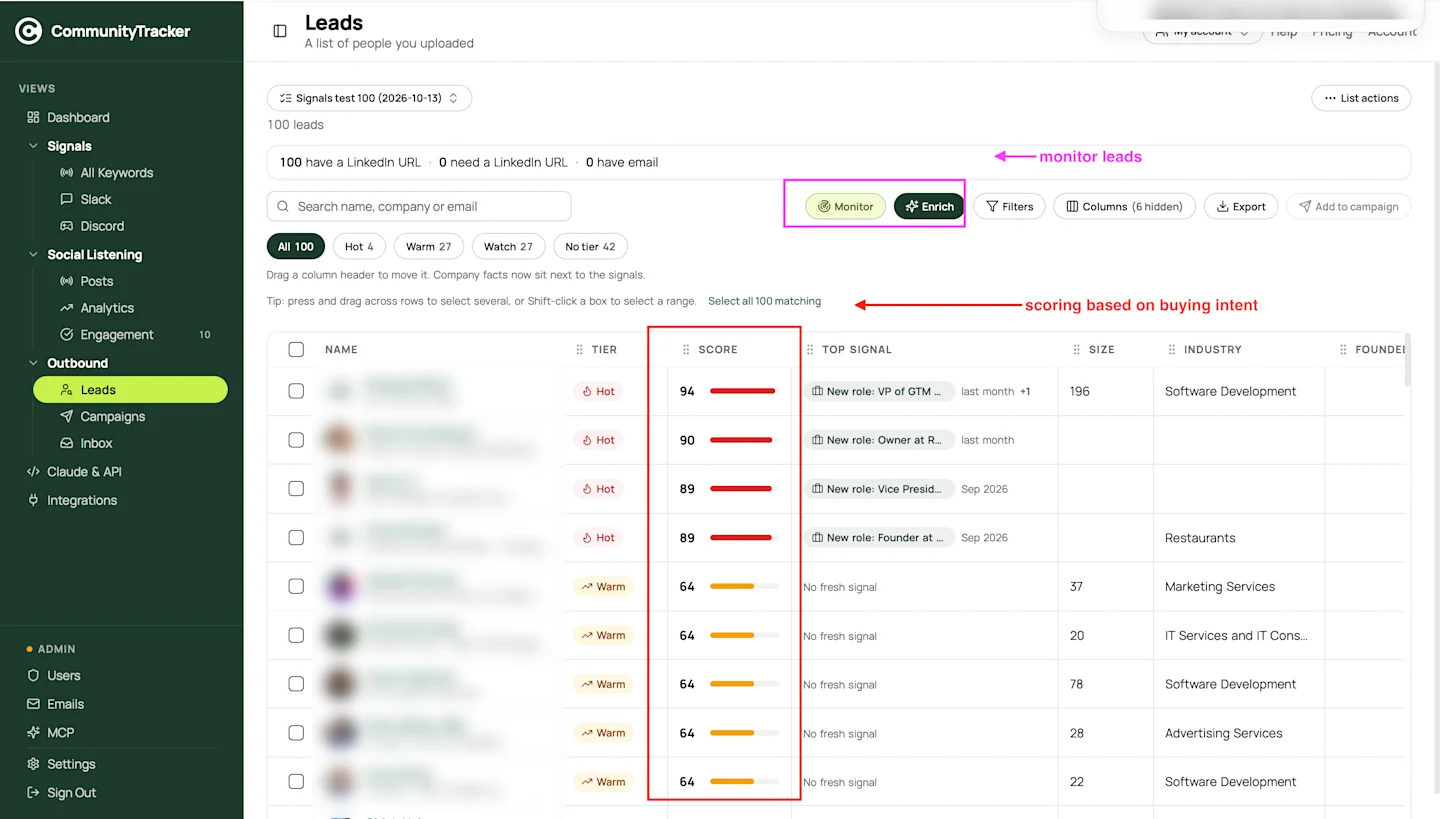
CommunityTracker turns a lead list into a watch list. You drop in a CSV of people, switch on monitoring, and the Leads screen sorts them by Buying intent, with a tier beside each name. The column I check first is Top Signal, which spells out why a person moved up, for example “New role: VP of GTM”.
My number one slot goes to CommunityTracker since it covers the steps between the change and the message. It ranks each change against the rest of your list and hands the lead to a campaign without an export.
Here is how a morning looks. You open Leads and filter to Hot. A VP who started a new role last week sits at the top, and her company posted three SDR openings. You read the Top Signal, hit Enrich for a work email at 1 credit, and click Add to campaign. The draft waits in the approvals queue. You edit one line, approve it, and move to the next name.
Features
Lead lists. You upload people as a CSV or add them in batches of up to 500 and a list can take several batches. To match a person, CommunityTracker needs a profile URL, a work address, or a full name with the employer.
Monitoring. Hit Monitor on a list or on selected rows, and CommunityTracker starts watching each person for a new role, a raise at their company, or a post. Monitoring belongs to the paid tiers.
Buying intent score and tiers. Each watched person carries a score plus one of three tiers, Hot, Warm or Watch, or no tier until the score climbs. You filter the table by tier, so the morning routine becomes “open Hot, work down”.
Top Signal. The reason behind the score sits in its own column. You see the job change, the funding round or the hiring spike before you open the profile.
Enrich. The Enrich button fills one gap per run: profile URL, title and location, work address, mobile, or firmographics. A lookup costs 1 credit, a mobile number costs 10, and you get the credit back when nothing is found. New accounts start with 100 credits.
Filters and Export. You slice the list by tier, monitoring state or search text and export what you need for a CRM import.
Add to campaign. Tick the rows you want and drop them into a LinkedIn plus email sequence. A campaign can also auto-collect fresh Hot and Warm people once an hour, up to a daily cap.
Outbound, Campaigns and Inbox. LinkedIn and email replies share one Inbox, and AI drafts sit in an approvals queue until you approve them.
Social listening sits in the same account. Your keywords catch posts on LinkedIn, Reddit, HN and other sites, which surfaces people who never made your list.
Pricing
Free: $0, limited to a single Reddit keyword.
Starter: $39 monthly. Four keywords watching GitHub, HN, LinkedIn and Reddit, 5,000 mentions, warm emails limited to 100 per month.
Pro: $99 monthly. Ten keywords watched across every platform CommunityTracker reads, with mentions and warm emails uncapped, plus intent scores from AI, alerts pushed to Slack, and share of voice. Ten slots fit a brand, two products and three or four rivals. Pro is priced per account, and the page lists no user limit.
Advanced: $199 monthly. Twenty keywords plus extra community intelligence searches.
Any paid tier gets you lead lists, enrichment, signal tracking and two-channel outreach. Billing runs monthly, and yearly invoices are available if you request them. Each plan covers one account, and the page sets no cap on users. You sign no lock-in. You can try Pro at no cost for 3 days. Paid plans carry a 14-day refund guarantee, which sits apart from the trial. The CommunityTracker pricing page has every plan detail.
Pros
Monitoring, scoring, enrichment and outreach share one screen, so a Hot lead stays in the tool until someone contacts it.
The Top Signal column names the reason behind each score.
Enrichment refunds credits on misses, so you pay per lead found.
Starter costs $39 monthly. It is priced per account, and the page lists no user limit.
Cons
Monitoring needs a paid plan, so the Free tier only covers keyword listening.
Mobile numbers cost 10 credits each, so 1,000 phones cost 10,000 credits.
Annual billing exists only on request.
Summary
Pick CommunityTracker when you already have names and need a daily answer to “who is ready now”. CommunityTracker is priced per account, and the page lists no user limit, so check team access with sales before you add reps.
2. LinkedIn Sales Navigator
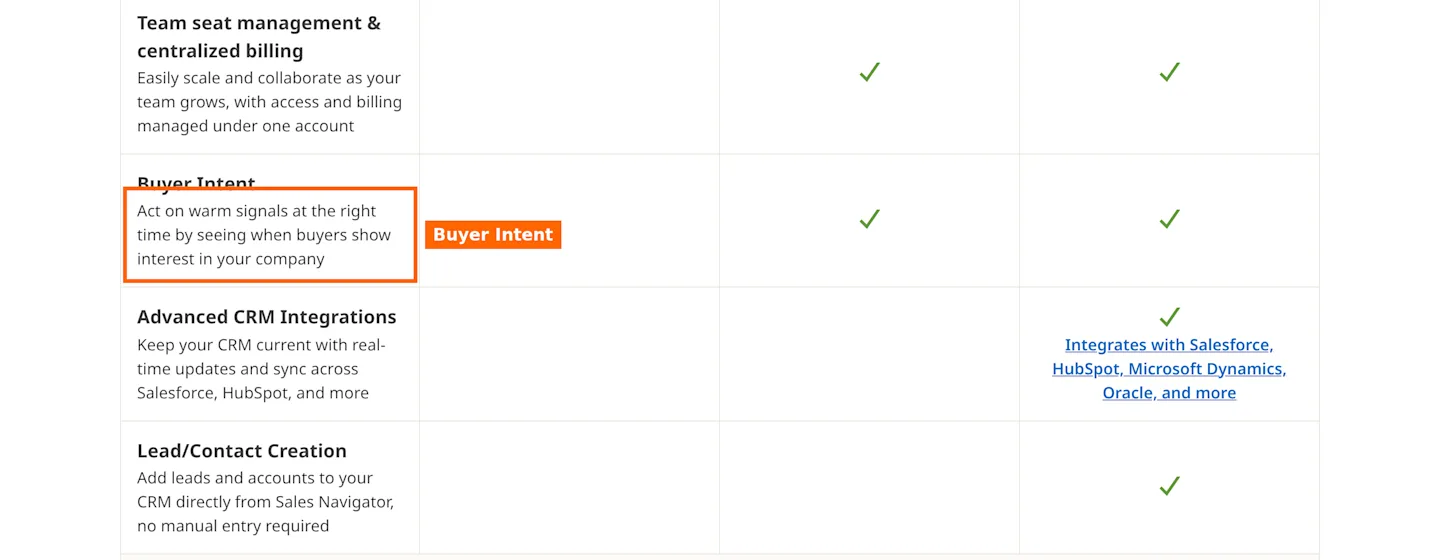
Most sales teams already pay for Sales Navigator, so start with what those seats do for monitoring. You get saved leads and accounts inside LinkedIn, alerts on those saves, and on the Advanced plan a Buyer Intent view that flags accounts showing interest. Volume is where it hurts. A rep with 300 saved leads gets a feed of updates and judges each one alone, with no tier to sort by.
Features
50+ advanced search filters for building lists from LinkedIn’s own member data.
Account IQ plus Lead IQ summaries of a person or company before you reach out.
Buyer Intent on higher tiers, the feature I boxed in the screenshot above.
CRM integrations, with the most of them on Advanced Plus.
Pricing
Core: US$119.99 per month per license, or US$1,079.88 per year per license.
Advanced: US$159.99 per month per license, or US$1,799.88 per year per license.
Advanced Plus: custom quote.
LinkedIn offers a trial to members who skipped one over the last year, and it asks for payment details up front.
Pros
The data comes straight from LinkedIn profiles, so job titles update as soon as members edit them.
Your reps stay in the interface they already know.
Filters cover company size, seniority and function.
Cons
You pay per seat, so monitoring cost grows with headcount.
Alerts sit inside LinkedIn and need a rep to act on each one by hand.
Email outreach sits outside it, so a sequencer stays on the bill.
Summary
Treat Sales Navigator as your search engine. Find people there, then hand the list to a tool that watches and scores them so your reps stop scrolling alerts.
3. Apollo
Apollo started as a contact database and grew into an outbound stack with data, sequences, a dialer and deal tracking. For lead monitoring, the piece that matters is buying intent, sold as intent topics you assign per plan. You pick topics such as a product category, and Apollo flags companies researching them. You learn which accounts to look at. Which person inside them changed seats stays hidden.
Features
Contact and account data, with more filters and signals on paid plans than on Free.
Intent topics: one on Free, six each on Basic or Professional, twelve on Organization.
Email sequences, a US dialer on credits, and a Chrome extension that works on LinkedIn.
Website visitor identification, 20 companies a month on Free and 100 on paid plans.
Pricing
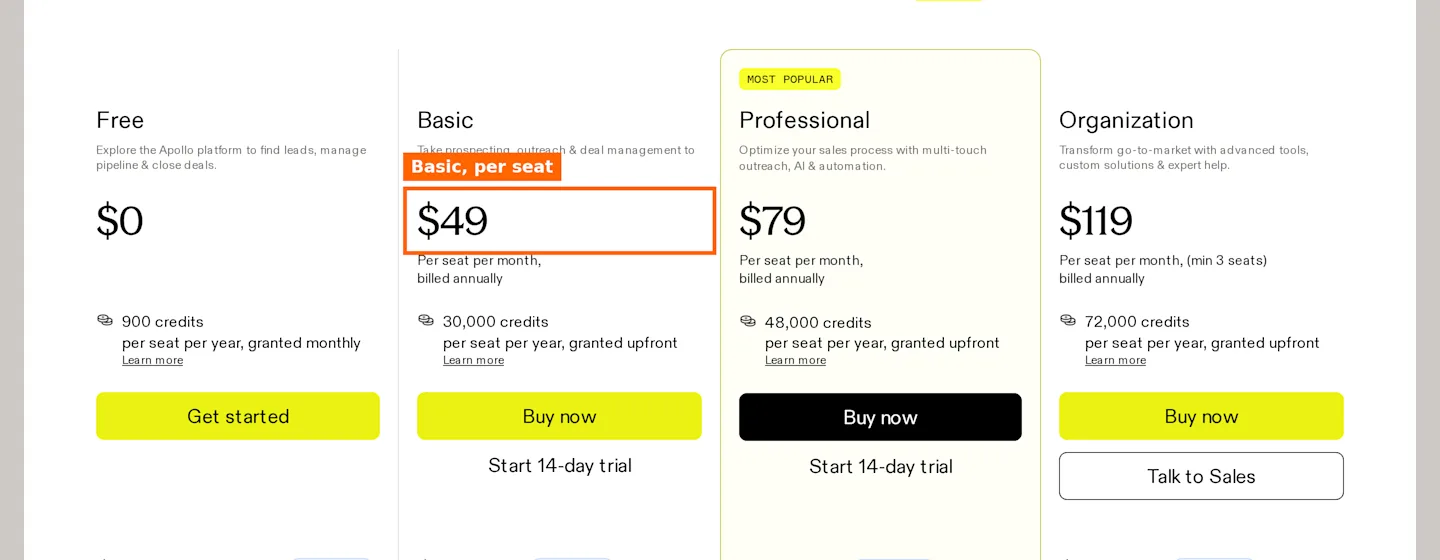
Free: $0, with 900 credits a seat yearly, released month by month.
Basic: $49 per seat each month, billed yearly, with 30,000 yearly credits for each seat.
Professional: $79 for every seat monthly, billed yearly, with 48,000 yearly credits for each seat.
Organization: $119 per seat each month, billed yearly, three seats minimum, with 72,000 yearly credits for each seat.
Basic and Professional each offer a trial of 14 days. Billed monthly, seats cost $65, $99 and $149 for Basic, Professional and Organization.
Pros
One subscription covers data, intent and sequences.
One person can test the workflow on Free.
Paid seats carry 30,000 to 72,000 credits a year.
Cons
Intent works at the topic level, so you watch themes instead of named people.
Pricing runs per seat, the same scaling problem as Sales Navigator.
Trustpilot reviewers report support tickets with no resolution.
Summary
Pick Apollo when contact data and a sequencer come first and monitoring comes second. If your list of named people matters more than topic intent, pair it with a watcher.
4. UserGems
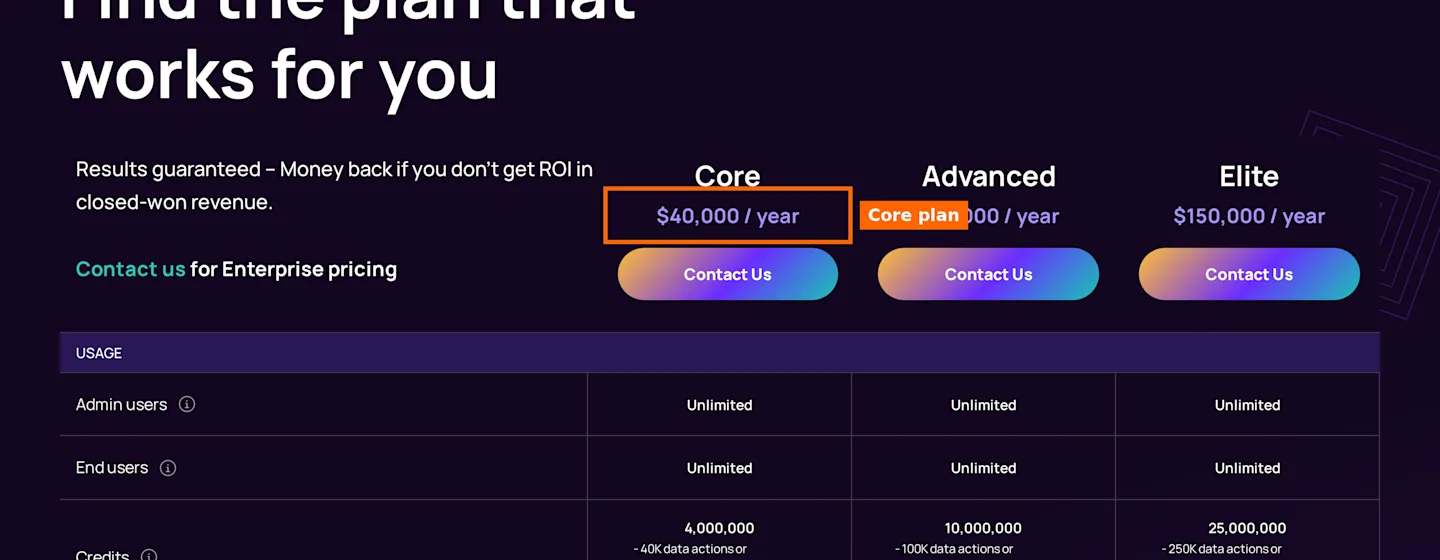
UserGems built its name on one signal: your past buyers and champions changing jobs. When a former customer lands at a new company, UserGems flags the account and starts a play, which suits enterprise teams with years of customer history. A former champion already trusts your product, so a new job means a new budget with a familiar face behind it.
Features
Champion tracking across job changes, with new hires and promotions inside target accounts.
Data actions measured in credits, with Core covering roughly 40,000 data actions.
Every tier allows unlimited users.
A results guarantee: a refund if closed-won revenue shows no ROI.
Pricing
Core: $40,000 a year, 4M credits, TAM coverage of 2,000 to 4,000 accounts.
Advanced: $75,000 a year.
Elite: $150,000 a year.
Pros
Unlimited users means the whole revenue team can see alerts.
The ROI guarantee shifts some risk back to the vendor.
Reviewers credit it with surfacing warm prospects who already know the product.
Cons
Core at $40,000 yearly rules out startups and most mid-market teams.
TAM coverage caps the number of accounts per plan.
Reviewers ask for clearer segmentation by signal type.
Summary
UserGems pays off when one closed deal covers the annual fee. Below that deal size, you spend more on the signal than the signal earns.
5. Common Room
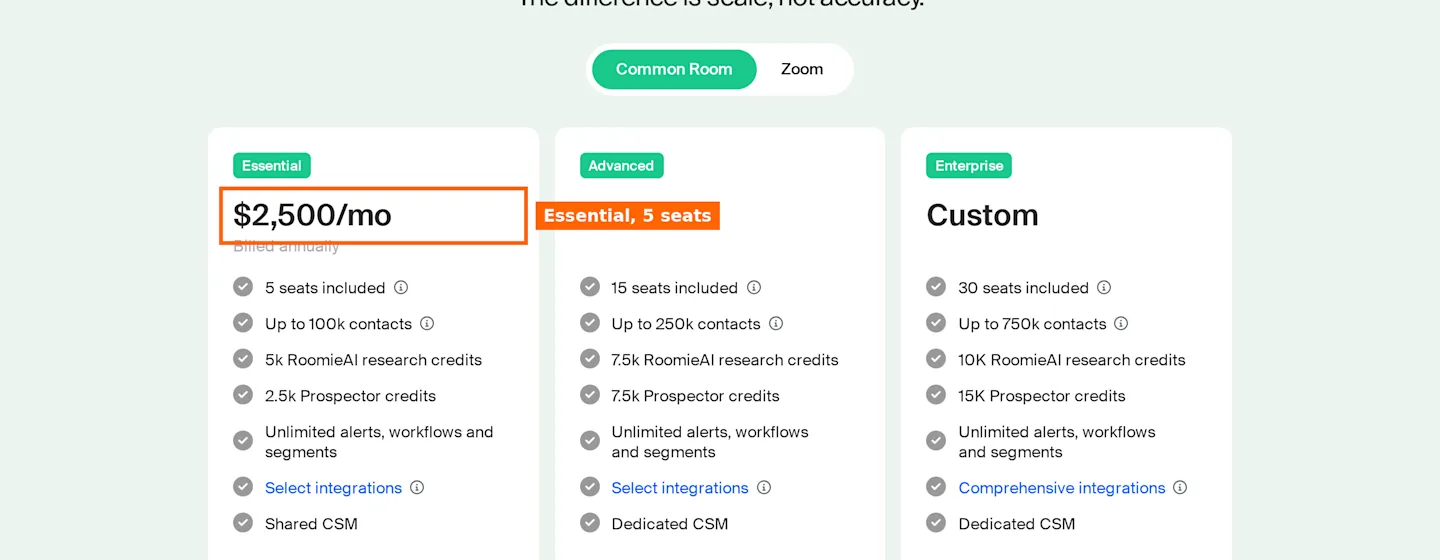
Common Room pulls signals from your product, community, website and social channels into a single profile per person and company. Job change tracking and social engagement sit next to each other, so you can see when a contact moves and what they did on LinkedIn before the move. The setup takes work. You connect sources, map identities and tune scoring before the alerts mean anything.
Features
Job Changes Tracking and Social & Community Engagement on its signal list.
AI scoring, Spark notifications and briefs, and Bombora Company Surge topics.
Prospector credits for finding contacts at target accounts.
Custom signals on higher plans.
Pricing
Essential: $2,500 monthly, paid yearly, covering five seats, 100,000 contacts at most, and 2,500 Prospector credits.
Advanced and Enterprise: quote only, and Advanced begins at 15 seats.
Pros
Signals from product, community, web and social merge into one record.
Seats come bundled, so five reps share one price.
Bombora topics add third-party intent.
Cons
Annual billing makes the entry cost $30,000 a year.
One TrustRadius reviewer reports trouble with the HubSpot integration.
Most of the value assumes you have a community or product data worth piping in.
Summary
Common Room fits product-led companies with a community and a RevOps person to maintain it. A five-person sales team with a list and a quota pays for features it never opens.
6. PhantomBuster
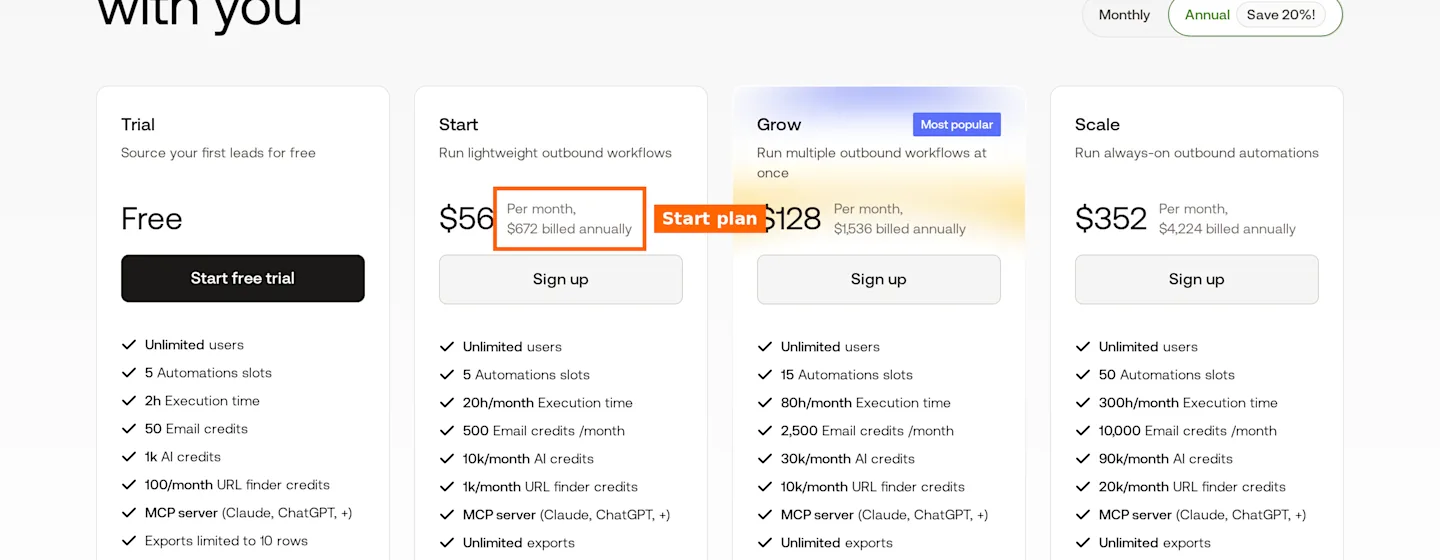
PhantomBuster runs automations, called Phantoms, that pull data out of LinkedIn and Navigator and chain it into outreach. Monitoring here means scheduling a scrape of the same search or profile list and comparing results yourself. A GTM engineer can build a job change detector from a weekly profile scrape and a sheet formula, then has to maintain it every time LinkedIn changes a field.
Features
LinkedIn and Sales Navigator automation, plus profile and email enrichment.
LinkedIn outreach campaigns and lead warming.
Automation slots and execution hours that cap how much runs.
100+ prebuilt automations and an MCP server for AI assistants.
Pricing
Trial: free, with exports limited to 10 rows.
Start: $56 per month on the annual plan, which bills $672 up front. Five automation slots, 20 execution hours monthly, 500 email credits monthly.
Grow: $128 a month, $1,536 on yearly billing. 15 slots, 80 hours.
Scale: $352 a month, $4,224 on yearly billing. 50 slots.
All plans allow unlimited users.
Pros
You decide what runs and when.
No user cap at any tier.
It chains into most CRMs and sheets.
Cons
You build the scoring logic yourself.
Execution hours run out on lists in the thousands.
Trustpilot reviewers report broken Phantoms and slow support.
Summary
Hand PhantomBuster to a GTM engineer who likes building pipelines. If no one wants to maintain scrapes, the hours cost more than the $56 plan saves.
7. Clay
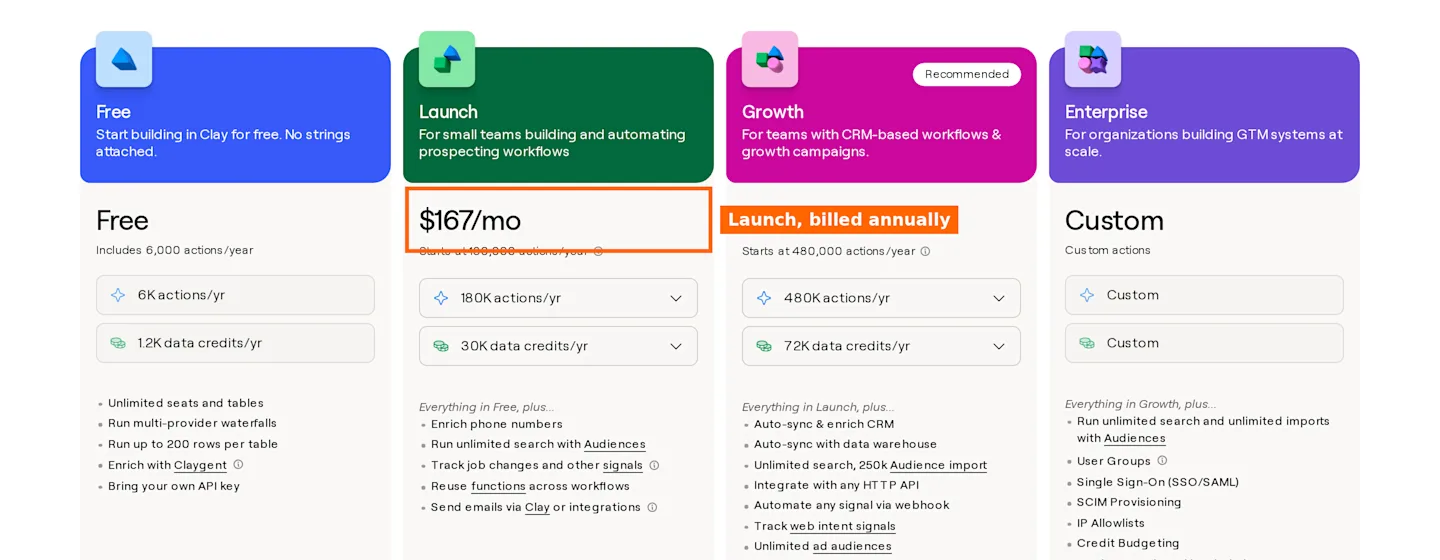
Clay is a spreadsheet where every column can query a vendor, run an AI prompt or fire a webhook. Job moves and other triggers live in a table you configure, and it pays off when you combine five data sources into one score.
Features
150+ data providers and AI research inside a table.
Job change and promotion tracking on paid plans.
Actions and data credits as separate meters.
CRM sync and webhooks for routing.
Pricing
Free: 6,000 yearly actions plus 1,200 yearly data credits.
Launch: $167 monthly on the annual plan, with 180,000 yearly actions and 30,000 yearly data credits.
Growth: $446 monthly on the annual plan.
Try any paid tier free for 14 days.
Pros
You design the workflow column by column.
150+ data providers in one table.
Signals feed straight into enrichment.
Cons
One Trustpilot reviewer describes a learning curve before the tables pay off.
One Trustpilot reviewer lost every credit within 5 minutes of a table run.
Outreach still needs a separate tool.
Summary
Clay rewards teams with someone who enjoys building tables. I use it as a place to design a signal, then decide whether to run that signal there long term.
8. Waalaxy
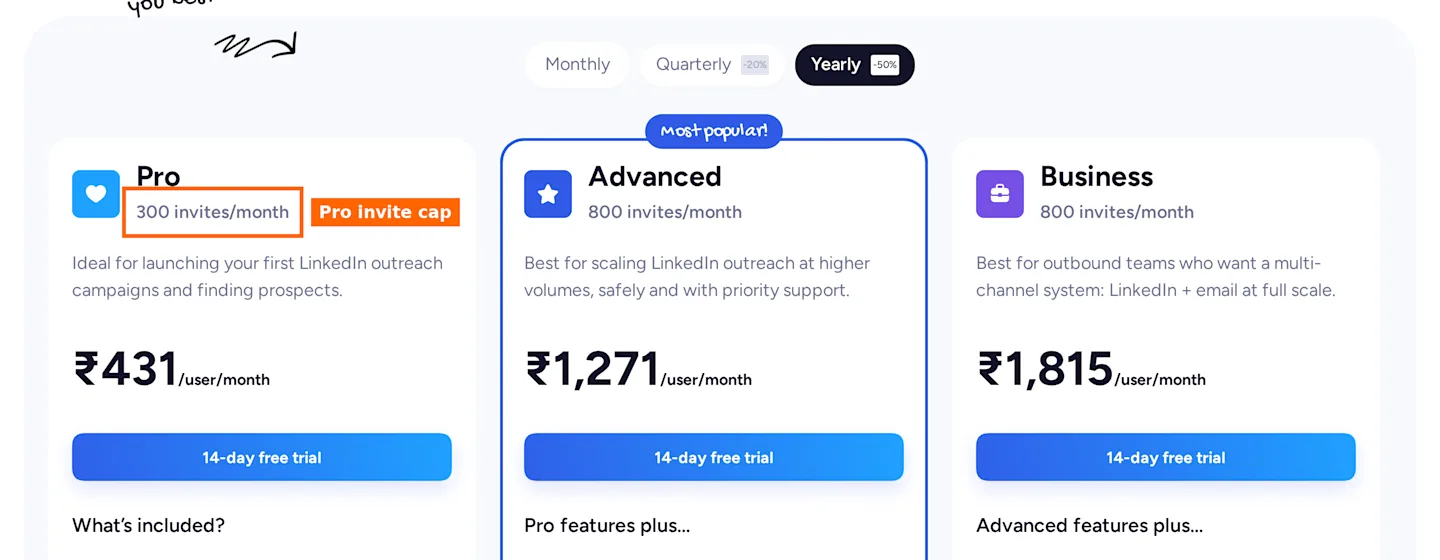
Waalaxy automates LinkedIn invites and messages from a Chrome extension, with cold email on the Business plan. Waalaxy moves people through a sequence once you add them, and stops at the invite cap. Spotting changes on your list is a job for another tool.
Features
Automated LinkedIn invitations and messages.
Cold email sequences on Business.
Email finder credits, 500 on Business.
Campaign templates you clone and edit.
Pricing
Pro: from €19 per user, 300 invites a month. The page doesn’t say whether that price is monthly or yearly.
Advanced: €49 per user per month, 800 invites a month.
Business: €69 per user per month, 800 invites, cold email, 500 email finder credits.
Every paid tier opens with 14 free days. Quarterly billing takes 20% off and yearly billing 50% off, so I cannot tell which period the €19 figure assumes. Currency follows your location, which is why the screenshot shows rupee prices.
Pros
Pro starts from €19 per user.
Setup takes minutes.
Trustpilot reviewers credit the support staff by name.
Cons
You need another tool for job change and funding signals.
Invite caps limit volume per seat.
You pay per user, so cost grows with each rep.
Summary
Waalaxy handles the last step, sending. Feed it leads that another tool already scored. My pairing for a solo founder is CommunityTracker Starter for the watch list and Waalaxy Pro for invites, with the Hot tier as the only list Waalaxy ever sees. That keeps the invite cap spent on people who just changed something.
9. Taplio
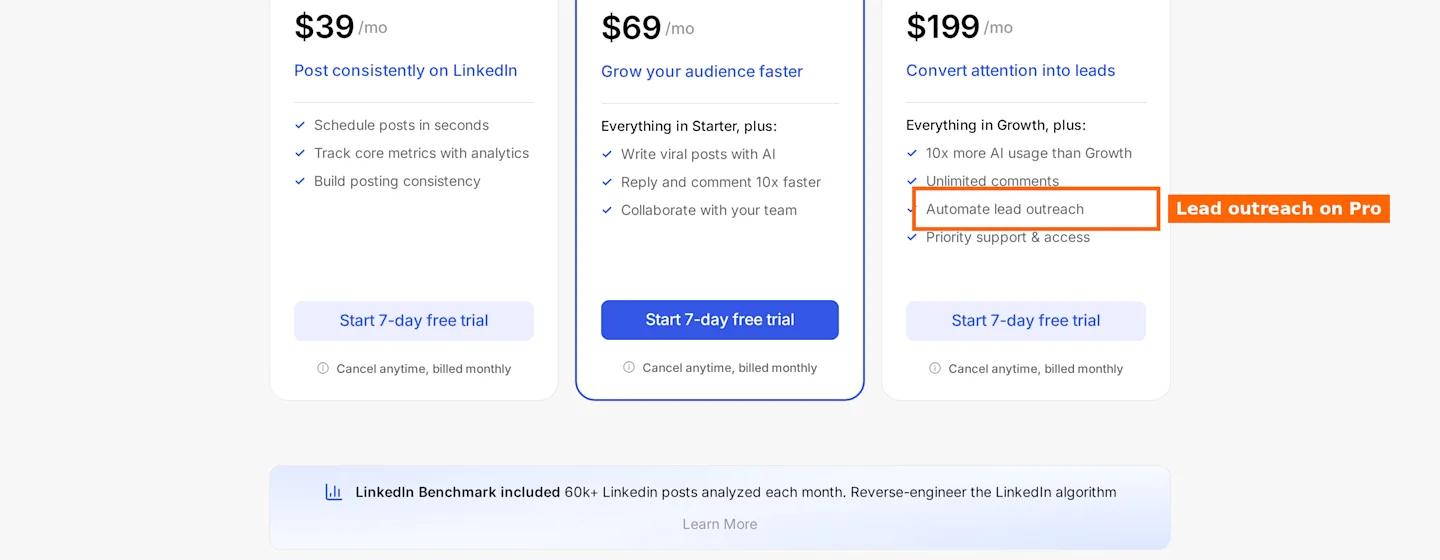
Taplio started as a LinkedIn content tool and added lead features around your own posts. It drops anyone who reacts to or comments on your posts into a list, then lets you DM or connect with them automatically. For a founder who posts twice a week and draws comments from buyers, that list fills itself. For a team whose buyers read without reacting, the list stays empty.
Features
Saves likers and commenters to a contact list: 20 per post on Growth, all of them on Pro.
Lead finder with a 250M+ lead database.
Automated DMs and connection requests.
Post scheduling, AI writing and analytics.
Pricing
Starter: $39 a month.
Growth: $69 a month.
Pro: $199 a month, adds lead outreach automation and unlimited comments.
Each tier opens with 7 trial days.
Pros
Turns post engagement into a lead list with no export.
Content and outreach live together for founders who post.
Plans start at $39 a month.
Cons
Leads come only from engagement, so buyers who never react never show up.
Capturing every liker and commenter needs Pro.
One Trustpilot reviewer reports renewals with no notice.
Summary
Taplio fits a founder whose posts already draw buyers. If your pipeline does not start on your own feed, look elsewhere.
Feature Comparison
Tool | Monitors named people | Job change signals | Intent score or tier | Built-in LinkedIn outreach | Built-in email outreach | Unified inbox |
|---|---|---|---|---|---|---|
CommunityTracker | Yes | Yes | Yes | Yes | Yes | Yes |
Sales Navigator | Yes | Yes | Yes | Yes | No | No |
Apollo | No | Yes | Yes | Not published | Yes | Not published |
UserGems | Yes | Yes | Not published | Not published | Not published | Not published |
Common Room | Yes | Yes | Yes | Not published | Not published | Not published |
PhantomBuster | No | Not published | No | Yes | Not published | No |
Clay | Yes | Yes | Not published | No | No | No |
Waalaxy | No | Not published | No | Yes | Yes | Not published |
Taplio | No | Not published | No | Yes | No | Not published |
Pricing Comparison
Tool | Free option | Entry paid plan | Billing unit | Trial |
|---|---|---|---|---|
CommunityTracker | Yes | $39 a month | Per account | 3-day Pro trial |
Sales Navigator | No | US$119.99 a month | Per license | Yes |
Apollo | Yes | $49 a month, annual | Per seat | 14 days |
UserGems | No | $40,000 a year | Per account | Not published |
Common Room | No | $2,500 a month, annual | 5 seats included | Not published |
PhantomBuster | Yes | $56 a month, annual | Unlimited users | Yes |
Clay | Yes | $167 a month, annual | Per workspace | 14 days |
Waalaxy | Not published | from €19, period not published | Per user | 14 days |
Taplio | No | $39 a month | Per account | 7 days |
What Users Say
I pulled each score and count from TrustRadius or Trustpilot, and every rival clears 10 reviews or ratings on the cited site. For each reviewer I print one like and one dislike from the same review, with the date it went up. Where a review lists no dislike, I say so.
LinkedIn Sales Navigator. 8.5 out of 10 across 1,608 TrustRadius reviews and ratings. - Brian Milliron, CEO, May 29, 2026. Like: “lot of filters available”. Dislike: “customer service is terrible”. - Dustin Roberts, marketing associate, April 30, 2025. Like: “Opportunity alerts can be set and I receive notifications.” Dislike: “Contact information is not always the best, at least for email addresses.” - This sample is thin and old. On November 3, 2026, TrustRadius listed a single Sales Navigator review newer than November 2025, so the second review stays with its date.
Apollo. 3.1 from 1,387 reviews on Trustpilot. - Lorin, October 2026. Like: “Good access to data”. Dislike: “Vetting filters aren’t great; I would consider them large mesh strainers instead of micromesh.” - Andi R, October 23, 2026. Like: “List building was intuitive”. Dislike: “Credits also require planning, since enrichment adds up quickly.”
UserGems. 6.9 out of 10 across 15 TrustRadius reviews and ratings, two of them with written text. - Sales manager, July 17, 2026. Like: “Connects us to leads we wouldn’t otherwise have been able to follow”. Dislike: “I would like better segmentation on types of leads (job changes, new hires, etc)”. - Sales contributor, April 26, 2023. Like: “Finding champions”. Dislike: none; the reviewer writes, “there is not a whole lot I dislike about using the tool.” - This sample is thin and old. TrustRadius shows two written reviews, and only the July 2026 one is newer than November 2025.
Common Room. 7.6 out of 10 across 10 TrustRadius reviews and ratings. - Marketing director, December 27, 2025. Like: “job movers is great for tracking high value ICP folks”. Dislike: “Hubspot integration was really difficult to use”. - Marketing manager, December 27, 2025. Like: “Signal capture”. Dislike: “Integrate with more sales enablement tools”. - This sample is thin: three reviews carry written text.
PhantomBuster. 3.4 from 114 reviews on Trustpilot. - David, November 9, 2025. Like: “The integrations just work”. Dislike: “yes sometimes the job can fail”. - Reviewer RO, February 1, 2026. Like: the 50 records “were enriched successfully”. Dislike: “LinkedIn kicked me out and warned me to stop after 50 records”.
Clay. 2.7 from 27 reviews on Trustpilot. - Prachi, September 16, 2026. Like: “it’s insanely powerful what this tool can do”. Dislike: “steep learning curve”. - Reviewer, July 29, 2026. Like: “The spreadsheet-style UI makes managing complex data sets feel clean and intuitive”. Dislike: “you have to keep an eye on your credit usage so you don’t burn through them while experimenting.”
Waalaxy. 4.8 from 1,306 reviews on Trustpilot. - Frank, April 16, 2026 (updated review). Like: “It simplifies campaigns and makes it easy to send out bulk LinkedIn messaging and connections.” Dislike: “Using the tool, my response rate declined to 9.1%.” - Luxus Conservus, September 18, 2026. Like: “It makes it so easy to reach out to clients via LinkedIn and email.” Dislike: none listed in the review.
Taplio. 3.6 from 20 reviews on Trustpilot. - Reviewer BE, May 20, 2026. Like: “The customer support was extremely helpful”. Dislike: “we got charged for another full year”. - Arooba Asim, October 3, 2026. Like: “Their communication is fast”. Dislike: none listed in the review.
Three GTM Scenarios With the Math
Scenario 1: Five SDRs watching 500 accounts
You run a team of five SDRs. Each rep owns 100 accounts, so you have 500 named buyers to watch.
Sales Navigator for all five. Core runs US$119.99 monthly for each license. Five licenses total $599.95 monthly, or $5,399.40 yearly if you prepay. Buyer Intent needs Advanced at $1,799.88 per license per year, so five seats reach $8,999.40.
CommunityTracker for the list. Pro runs $99 monthly, $1,188 across twelve months. All 500 leads go up in one call, since a batch takes up to 500, and you switch on monitoring. Each Enrich call takes 100 leads at most, so work emails for all 500 take 5 Enrich runs and 500 credits at most, and a new account covers the first 100.
Hot leads and phones. CommunityTracker connector data for three lead lists shows 220 monitored leads, and 5 of them sit at Hot (4 of 100, 0 of 100 and 1 of 20). That sample is thin, so I plan on a Hot rate of 2 to 4 percent. On 500 leads that gives 10 to 20 Hot leads. Mobile numbers cost 10 credits each, so phones for the Hot leads take 200 credits at most (20 x 10), against 5,000 credits for phones on all 500.
Where it breaks. CommunityTracker does not replace LinkedIn search, so reps who prospect net-new accounts still want Navigator seats. Credits past the first 100 cost extra, and the pricing page doesn’t say what a top-up costs, so budget a buffer. My setup for this team: one or two Navigator seats for search, with monitoring on CommunityTracker.
Scenario 2: Watching 2,000 accounts for a mid-market team
Your team targets 2,000 accounts and wants alerts when champions move.
UserGems Core. $40,000 yearly, sized for 2,000 to 4,000 accounts.
Common Room Essential. $2,500 per month, paid yearly, $30,000 in total, for five seats and a ceiling of 100,000 contacts.
CommunityTracker Advanced. $199 a month, or $2,388 over twelve months. Loading 2,000 people takes four batches of 500.
Where it breaks. UserGems finds former buyers and champions from CRM history. CommunityTracker watches the people you upload, so if you want former users found automatically, you first export them from your CRM. Phone enrichment at 10 credits per lead means 20,000 credits for 2,000 mobiles. Run phone lookups on Hot leads only.
Scenario 3: An Apollo team adding a watch list
Say your five reps already use Apollo for data and sequences.
Apollo Basic for five. $49 per seat each month, billed yearly totals $245 monthly, $2,940 yearly. The team gets 150,000 credits a year (30,000 per seat) and 6 intent topics.
Adding CommunityTracker Starter. $39 monthly, $468 across twelve months, layers named-person monitoring and tiers on top of the Apollo topics.
Where it breaks. Starter stops at 100 warm emails monthly, so sending at volume from CommunityTracker means Pro at $99. And if the reps never leave Apollo’s sequencer, someone has to move Hot leads across, either through Export or by running the campaign inside CommunityTracker instead. The total, $2,940 plus $1,188 for Pro, still lands below five Navigator Core seats at $5,399.40 yearly.
How I Chose the Nine
I started with one question: does the tool tell you when a named person on LinkedIn becomes worth a call? Tools that watch named people scored higher than tools that only send messages or search a database.
Then I read every public pricing page and stored a copy. Any tool that hid its entry price behind a demo needed another reason to stay on the list. Trigify dropped off because the team is shutting down the standalone product.
Last, I required 10 or more reviewers per rival on Trustpilot or TrustRadius, and swapped any tool that fell short. Teamfluence matches the job on features, since it follows engagement on your own posts, your team’s posts and competitors, but I could not find 10 reviewers for it on Trustpilot or TrustRadius, so Apollo took the slot.
I weighted three things above the rest. First, whether the tool watches people you name, or only accounts and topics. Second, what happens between the alert and the first message, because every extra tab costs a day. Third, the price at five seats and at 2,000 accounts, the two sizes that set most GTM budgets.
How to Choose a LinkedIn Leads Monitoring Tool
Start with the list you already have. If you know the 500 people you want, pick a tool that watches uploaded people. If you need to discover them, start with a database like Sales Navigator or Apollo.
Count seats against accounts. Per-seat bills climb with each hire. Divide the annual cost by the number of accounts you watch and compare that figure across tools.
Check what happens after the alert. An alert that lands in another tab waits for someone to notice. A tool that drops hot leads into a campaign removes that wait.
Look at the credit meter. Enrichment and actions run on credits nearly everywhere. Price the phone lookups before you price the plan.
Decide who owns the signal. A tier only helps when one person checks it every morning. In a small team that is the SDR lead. In a larger one, a GTM engineer sets the rules and reps work the Hot tab.
Test with a list you know. Upload 100 accounts where you already know the story: a few recent job changes, a funding round, a hiring spike. If the tool misses what you know, it will miss what you do not.
Match the build effort to your team. Clay and PhantomBuster reward a GTM engineer. Without one, choose a tool that ships the scoring.
FAQ
What is a LinkedIn leads monitoring tool?
It watches a set of LinkedIn profiles or companies and pings you on a change, such as a new job, a funding round, hiring or a post. The ones I rank higher score those changes so you can sort your call list.
Can Sales Navigator monitor leads on its own?
Yes, through saved leads and alerts. You still read each alert by hand, and email outreach needs another tool.
How much does lead monitoring cost for a small team?
CommunityTracker paid tiers begin at $39 monthly. Five Navigator Core seats cost $599.95 monthly. UserGems begins at $40,000 yearly.
Do I need Clay to track job changes?
No. Clay tracks job changes on paid plans, and so do Sales Navigator, Common Room, UserGems and CommunityTracker.
Which tool fits a founder who posts on LinkedIn?
Taplio, if your buyers already engage with your posts. If they do not, CommunityTracker watches the people you choose whether they engage or not.
How often should you review monitored leads?
Daily, if your team works Hot leads. A job change loses value each week you wait, because other vendors see the same update. A campaign set to auto-add Hot and Warm leads every hour removes the check for the leads you trust the score on, and your reps spend the morning on replies instead.
Can I monitor competitors’ followers or engagers?
Taplio imports likers and commenters from any post through a search URL, and CommunityTracker keywords catch posts that mention a competitor across LinkedIn and communities. Either route gives you people to upload into a monitored list.
Final Verdict
Before you sign anything, take one list of 100 accounts you know well and run it through a trial. Note which known moves appear and the lag in days for each. Bring that hit rate and lag to your budget meeting; a pricing page can’t give you either.