To track mentions on Twitter, start with three searches: your
@handle, your brand or product name, and your domain. That catches tagged mentions, untagged brand references, and posts that share your site without naming you.
The playbook depends on volume and urgency. A founder checking five posts a week does not need the same setup as a GTM team routing competitor-comparison threads into Slack.
Playbook | Best for | What it catches | Main limitation |
Manual search | Low-volume brands, one-off audits, launch checks |
| Easy to miss timing-sensitive posts |
Saved search or X Pro columns | Recurring X-only monitoring | Reusable searches for mentions, replies, hashtags, competitor terms | Still needs a human to check and triage results |
Automated monitoring | Support risk, competitor tracking, buyer-intent workflows | Tagged and untagged mentions, alerts, routing, multi-community signals | Costs more than native search and needs query upkeep |
Use the lightest workflow that catches the mention type that matters.
If you only need tagged mentions, notifications plus a weekly @handle review is enough. If you need untagged mentions, build keyword and domain queries. If X is one source among Reddit, LinkedIn, Slack, GitHub, Hacker News, and other communities, use a monitoring workflow that routes signal to action.
Turn high-performing competitor posts into structured X threads. 👉 Download the workflow template
What counts as a Twitter/X mention in 2026?#
A Twitter/X mention is any post that references your brand, product, person, campaign, or website on X. It is not only a @username tag.
That distinction matters because direct @username mentions trigger native notifications, while plain-text brand mentions, product mentions, domain shares, and hashtags often do not.
There are direct username mentions, brand-name mentions, and hashtag references; note that brand-name and hashtag references need keyword tracking because they do not behave like direct notifications.
For a B2B SaaS team, track these surfaces:
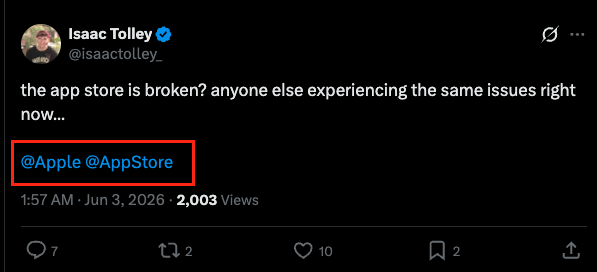
Tagged mentions:
@YourBrandReplies to your account, quote posts that include your handle.
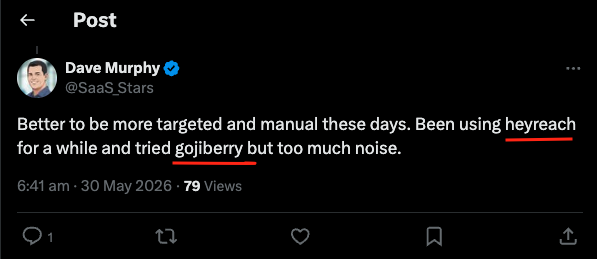
Untagged brand mentions:
"Your Brand", Product names, common abbreviations, and misspellings.
Domain mentions:
yourbrand.com, Shortened campaign URLs, docs URLs, status-page URLs.
Campaign mentions: event hashtags, launch tags, webinar names, community challenge tags.
People mentions: founder names, executive names, public-facing product leaders.
Competitor comparisons: your competitor plus
alternative,vs,recommend,switching fromor category phrases.Buyer-intent phrases:
looking for,recommend,any alternatives,what do you use for, plus your category.
Tagged mentions are the easiest. Untagged mentions are where most teams lose visibility.
How to choose the right Twitter mention tracking playbook#
Choose the smallest workflow that catches the business-critical mentions without creating a queue of low-value posts. A support team needs response speed. A founder-led sales motion needs buyer context. A product marketer needs competitor and positioning signals. The wrong setup either misses the post or floods the team with noise.
Mention type: Are you tracking direct
@mentions, untagged brand references, domain shares, competitor comparisons, campaign hashtags, or buying-intent phrases?Noise control: Can the workflow remove your own posts, reposts, link spam, unrelated meanings, and low-signal syndicated content?
Response urgency: Do you need real-time alerts for support and reputation risk, or is a daily or weekly review enough?
Workflow owner: Should the mention route to support, social, product marketing, founder-led sales, RevOps, or an agency dashboard?
Coverage and cost: Is native X enough, or do you need paid monitoring because the same buyer conversation also happens on Reddit, LinkedIn, Slack, GitHub, and other communities?
Step-by-step: build your Twitter mention tracking queries#
Start broad. Inspect the results. Then subtract the noise. That beats writing a clever query that filters out the useful posts before you see them.
Start with your handle.
Search for @yourhandle. This catches posts that mention the account directly. Also review replies and quote posts, because a support issue can start as a reply and become a public thread.
Add untagged brand, product, and domain terms.
Use exact phrases for brand names with more than one word:
``text
"Your Brand" OR "Product Name" OR yourbrand.com
``
Exclude your owned accounts.
Your company account, support account, founder account, and automated posting account can pollute results.
``text
("Your Brand" OR yourbrand.com) -from:yourhandle -from:yoursupport
``
Remove low-signal content when it dominates.
If link spam or reposts fill the results, test:
``text
"Your Brand" -filter:links -filter:retweets
``
Do not remove links by default. Domain shares and article discussions often contain links. Remove them only when they bury actual conversation.
Add language, category, and competitor context.
X Advanced Search supports word fields, account filters, link filters, engagement filters, and date ranges (X Advanced Search).
You can also use operators directly in the search bar. Typefully’s advanced search guide lists operators such as from:, filter:links, -filter:links, since:YYYY-MM-DD, and until:YYYY-MM-DD.
Save or document the query.
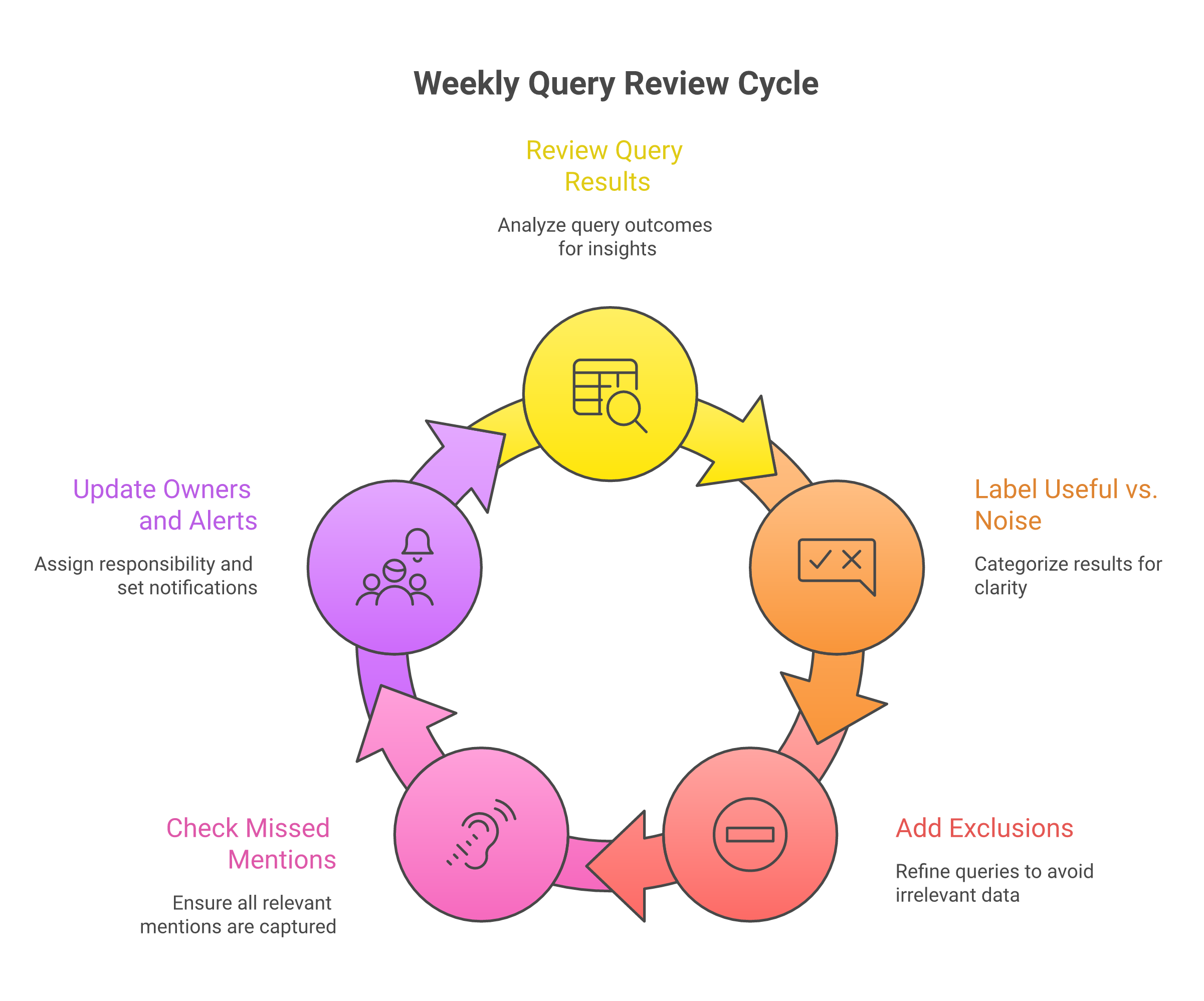
Keep a short query log with the query, owner, cadence, and last reviewed date. If a query catches nothing useful for two weeks, change it. If it catches too much noise, add one exclusion at a time.
Tagged mention |
| Support or social | Real-time or daily | Reply, DM, or escalate |
Untagged brand |
| Social or PMM | Daily or weekly | Thank, clarify, log feedback |
Competitor comparison |
| PMM or founder | Daily | Evaluate fit, respond only with context |
Campaign |
| Marketing | During campaign | Engage, report reach, capture objections |
Buyer intent |
| GTM or RevOps | Daily | Qualify, route, or ignore |
The largest table in this draft has 5 columns.
Five tracking playbooks for different mention types#
1. Tagged mention playbook: protect response time#
Use this when customers, prospects, partners, or creators tag your account directly.
Query:
``text
@yourhandle
``
Owner: support for complaints and account issues, social for public praise or community replies.
Cadence: real-time for support-heavy products, daily for low-volume brands.
Response action: reply publicly when the answer helps others, move to DM when account details are involved, and log recurring product complaints. Tagged mentions are not always high intent, but they are public. Slow response turns a small issue into a visible brand signal.
2. Untagged brand mention playbook: find what notifications miss#
Use this for posts that name the company, product, or website without tagging the account.
Query:
``text
("Your Brand" OR "Product Name" OR yourbrand.com) -from:yourhandle -filter:retweets
``
Owner: social, product marketing, or founder, depending on company stage.
Cadence: daily for active categories, weekly for lower-volume brands.
Response action: split the results into praise, complaint, product question, media mention, and noise. Do not reply to every untagged mention. Reply when the conversation has a clear next move: answer a question, correct confusion, thank a user, or ask for feedback.
Manual tracking misses untagged mentions. Treat untagged tracking as a separate workflow, not as a weaker version of notifications.
3. Competitor comparison playbook: catch switching signals#
Use this when buyers compare vendors, ask for alternatives, or complain about a competitor.
Query:
``text
("Competitor" "alternative") OR ("Competitor" "vs") OR ("switching from" "Competitor")
``
Add category context if the competitor name is ambiguous:
``text
("Competitor" "alternative") "CRM" lang:en -from:competitorhandle
``
Owner: product marketing for positioning patterns, founder or sales for high-fit active buyers.
Cadence: daily for competitive categories, weekly for slower markets.
Response action: qualify before responding. A post saying “any alternative to [competitor]?” is not automatically a sales opportunity. Check whether the person names the pain, budget, team size, use case, or timing. If the thread has real intent, reply with a useful recommendation. If your product is not the fit, say so or stay out.
4. Campaign and hashtag playbook: measure conversation, not only reach#
Use this for launches, webinars, community events, reports, and creator partnerships.
Query:
``text
#YourCampaign OR "Campaign Name" OR yourbrand.com since:2026-06-01 until:2026-06-15
``
Owner: campaign marketer or social lead.
Cadence: daily during the campaign, then once after the campaign closes.
Response action: capture objections, FAQs, creator posts, and unexpected audience segments. A campaign mention with five replies from target buyers can matter more than a high-like post from the wrong audience.
5. Buyer-intent playbook: route only the posts worth acting on#
Use this when X is part of demand capture, not just brand monitoring.
Query:
``text
("looking for" OR "recommend" OR "any alternatives") "category tool" lang:en -filter:links
``
For a B2B SaaS team, pair category terms with competitor and pain phrases:
``text
("recommend" OR "what do you use") ("sales intelligence" OR "community monitoring") lang:en
``
Owner: GTM, RevOps, founder-led sales, or an agency demand-gen owner.
Cadence: daily, because timing matters when someone asks for a recommendation.
Response action: classify first. If the post is a real buying signal, route it with context: post URL, author, pain, category, competitor named, suggested response, and owner. If the post is only broad discussion, log it as market intelligence instead of forcing outreach.
For a fuller X demand workflow, link this playbook to your broader B2B lead generation on X process.
Manual search vs saved searches vs monitoring tools vs API access#
Manual search is the cheapest starting point. It is right for low-volume brands, launch audits, founder-led checks, and query debugging. The tradeoff is timing. If a support complaint or competitor comparison matters within hours, manual review loses context fast.
Saved searches and X Pro-style columns are better for recurring X-only monitoring. They keep the query visible so the owner does not rebuild it each day. They still depend on a person checking, labeling, and routing results.
Monitoring tools make sense when mentions need alerts, routing, sentiment or intent filtering, historical reporting, and coverage beyond X. CT fits here when X is one community in a GTM signal workflow.
CommunityTracker tracks high-intent buyer signals, competitor share of voice, and community conversations across Reddit, Slack, LinkedIn, X, GitHub, Product Hunt, Stack Overflow, Indie Hackers, Hacker News. It also supports Slack and email alerts, intent detection, share of voice, and action-ready workflows.
How to triage mentions once you find them#
Tracking is only useful if the next move is clear. Otherwise, the team creates a pile of posts and calls it listening.
Use this triage system:
Support issue: Bug, outage, account problem, billing complaint. Owner: support. Action: respond or DM, then log the issue.
Reputation risk: High-visibility complaint, inaccurate claim, creator criticism. Owner: social or comms. Action: assess reach, respond with facts, escalate if needed.
Product feedback: Feature request, recurring pain, UX confusion. Owner: product marketing or product. Action: tag theme, add source link, review weekly.
Competitor comparison: Alternative request, switching question, vendor shortlisting. Owner: PMM or GTM. Action: qualify before engaging.
Buyer intent: Specific request for a category, tool, recommendation, or implementation help. Owner: sales, founder, or RevOps. Action: route with context and suggested response.
Creator or partner signal: Influencer, community leader, analyst, operator with audience fit. Owner: partnerships or social. Action: engage, follow up, or add to relationship list.
Noise: Spam, irrelevant keyword collision, automated reposts. Owner: no one. Action: add exclusions or ignore.
Do not route every mention to sales. A public reply that helps the thread often beats a cold DM. The routing rule is simple: support gets urgency, product gets repeatable learning, PMM gets comparison language, and GTM gets high-intent posts with context.
Verification: how to know your tracking setup works#
Run this check before calling the setup done.
Compare notifications against search for one week. Check native X notifications, then run
@yourhandle, brand, product, and domain searches. Count how many useful posts the search found that notifications missed.Sample 20 recent results per query. Label each one as useful or noise. If fewer than 5 of 20 results are useful, the query is too broad. Add category terms, exact phrases, or exclusions.
Check untagged coverage. Search for product names, founder names, domain mentions, and common misspellings. If the best posts do not include
@yourhandle, notifications are not enough.Add one negative filter at a time. Use
-from:,-filter:retweets,-filter:links, language filters, or unrelated-word exclusions. Then inspect results again. Do not stack ten filters and assume the query improved.Review missed mentions from real business channels. Ask support, sales, customer success, and founders whether customers referenced X conversations that your search missed. Add those phrases to the query log.
Revisit queries weekly. Product names, competitor language, campaign tags, and buyer phrases change. Your query file is a living operating document, not a one-time setup.
Troubleshooting: why you are missing Twitter mentions#
Cause: you only check notifications#
Fix: add keyword, product, domain, and hashtag searches. Notifications catch direct tags. They do not catch every plain-text reference.
Cause: your brand name is ambiguous#
Fix: use exact phrases, category terms, language filters, and exclusions.
``text
"Your Brand" "project management" lang:en -"unrelated meaning"
``
If the name is short, track product names, domain shares, founder names, and competitor comparisons instead of relying on the brand term alone.
Cause: spam and syndicated links bury the useful posts#
Fix: test -filter:links, -filter:retweets, exact phrases, and owned-account exclusions. If removing links hides useful domain shares, keep links in the domain query and remove them only from the brand-name query.
Cause: the team responds too late#
Fix: move from manual search to saved searches, X Pro columns, Slack alerts, email alerts, or a monitoring tool. Timing matters most for support issues, competitor comparisons, creator posts, and buyer-intent threads.
Cause: X-only tracking misses demand elsewhere#
Fix: monitor adjacent communities when your GTM motion depends on peer recommendations. For B2B SaaS, a prospect can ask for recommendations on X, Reddit, Slack, LinkedIn, GitHub, Hacker News, or a niche forum. If the business case is buyer-intent capture, X is one source, not the whole map.
Final decision guide: which Twitter mention tracking setup should you use?#
Use notifications plus a weekly @handle review if you only need tagged mentions. This is enough for very low-volume brands and founders who want a basic pulse.
Use saved searches or X Pro columns if you need recurring X-only tracking. Build separate searches for @handle, brand/product/domain terms, campaign hashtags, and competitor comparisons. Assign an owner and review cadence for each.
Use a Twitter monitoring tool if missed timing creates business risk. That includes support escalation, reputation risk, competitor switching threads, and buyer-intent posts that need routing to GTM.
CommunityTracker is the fit when the workflow needs X plus Reddit, LinkedIn, Slack, GitHub, Hacker News, and other communities, with intent scoring, Slack/email alerts, share-of-voice tracking, and next-step routing.
Do not choose CT if all you need is a free weekly check of tagged mentions.
It is also not the best fit if your main requirement is enterprise social publishing, customer-care inbox management, broad social reporting, or PR/media intelligence in one suite. In that case, compare Sprout Social, Meltwater-style platforms, or a full social media monitoring software shortlist.
The practical next step: write five queries today.
@yourhandle"Your Brand" OR "Product Name" OR yourbrand.com("Competitor" "alternative") OR ("Competitor" "vs")#YourCampaign OR "Campaign Name"("recommend" OR "looking for" OR "any alternatives") "your category"
Run them manually, label 20 results from each, and decide which ones deserve saved searches, alerts, or a monitoring workflow. That is how mention tracking becomes signal-to-action instead of another tab someone forgets to check.