The mentions that matter most often do not tag you.
A direct @brand complaint lands in Notifications. A buyer asking for alternatives does not.
A customer sharing your product page without your handle does not. A founder complaining about a category problem does not.
So if you want to track mentions on Twitter in 2026, do not stop at the Notifications tab.
Build a system that catches tagged mentions, untagged brand references, product names, domain mentions, campaign hashtags, competitor comparisons, and buying-intent phrases. Then decide what happens next.
That is the difference between watching X and using it as a GTM signal source.
TL;DR#
Notifications catch direct
@handleactivity. They do not catch every useful brand, product, domain, or category mention.Manual tracking works when volume is low and one owner reviews saved searches every day.
Good X searches use exact phrases, exclusions,
from:,to:,url:,lang:,has:links, and date windows. Test each query before you depend on it.Tooling becomes useful when your team needs alerts, ownership, filtering, reporting, and intent routing across more than X.
The goal is not "find every mention." The goal is "find the mentions worth acting on and send each one to the right owner."
What Counts As A Twitter Mention In 2026#
A Twitter mention is any post on X that references your brand, product, person, campaign, competitor, category, or problem space in a way your team should notice.
That includes:
Tagged mentions: posts with your
@handle.Replies: posts responding to your account.
Quote posts: posts quoting your original post with added commentary.
Untagged brand mentions: plain-text references to your company or product.
Hashtag mentions: campaign, event, or branded hashtag usage.
Link mentions: posts sharing your domain or product page.
Competitor mentions: posts comparing, praising, or complaining about alternatives.
Category-intent mentions: posts asking for recommendations, alternatives, pricing help, implementation advice, or category guidance.
For B2B SaaS teams, untagged and category-intent mentions are often more useful than direct mentions. A direct mention usually means the person wants your attention. An untagged post often shows what someone says to peers when they are still forming an opinion.
That is where early signal lives.
Turn high-performing competitor posts into structured X threads. 👉 Download the workflow template
Why Tracking Mentions On Twitter Still Matters#
X is noisy, inconsistent, and full of low-context posts. It is still one of the fastest public places to catch launch reactions, outage complaints, pricing frustration, category debates, founder recommendations, and competitor comparisons.
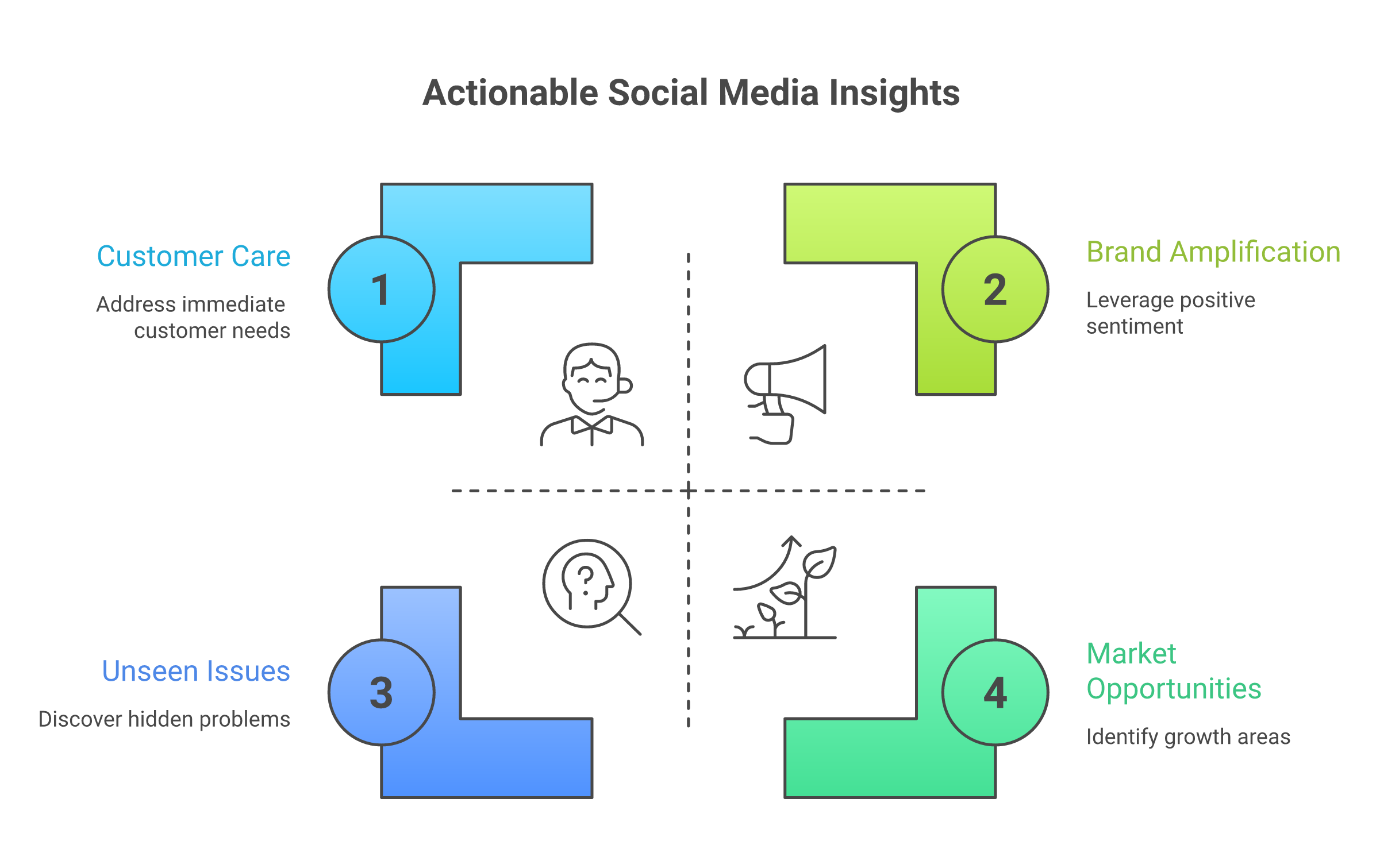
Tracking mentions helps GTM teams:
Catch support issues before they spread.
Thank customers and advocates while the post is still active.
Find product feedback that never reaches a survey.
Spot competitor frustration and switching windows.
Identify creators, partners, and community voices.
Turn recommendation threads into sales or founder-led replies.
The practical goal is simple: define the signals that matter, catch them while they still matter, and route them.
Do not turn this into an all-day monitoring habit. Build the workflow once, sharpen it weekly, and make the next action obvious.
The Five Mention Types Worth Tracking First#
1. Tagged mentions and replies#
Start with the obvious layer: @brandhandle, replies, and quote posts of your own posts.
These posts usually contain customer support questions, event reactions, partner chatter, product questions, praise, or public complaints. They deserve fast triage because the person intentionally pulled your account into the conversation.
Use a simple rule:
Support issue: route to support, then reply or move to DM.
Buying question: route to sales, founder, or product marketing.
Product feedback: log the theme and acknowledge it if a reply helps.
Advocate or creator praise: route to community.
Low-context noise: ignore.
Not every tagged mention deserves the same response speed. A broken workflow with screenshots matters more than a generic thank-you. A target-account operator asking about pricing matters more than a casual reaction.
2. Untagged brand and product mentions#
Search for your brand name, product name, old product names, abbreviations, common misspellings, founder names, and domain.
Untagged mentions do not notify you, but they often carry more honest context because the poster is talking to their network rather than your brand.
Starter searches:
"Brand Name"- from:brandhandle
"Product Name" OR "Old Product Name" lang:en
"BrandName" problem OR issue OR broken OR pricing
url:branddomain.com
For ambiguous names, add category words. If your brand name overlaps with a common word, search for brand plus product category, founder name, domain, or common phrase around the product.
3. Hashtags, campaign names, and event terms#
Track branded hashtags, webinar titles, event hashtags, campaign slogans, launch names, and partner campaign terms.
This matters most during time-boxed campaigns. A campaign can look healthy from impressions while the actual X conversation says something else: people may repeat a different phrase, ask the same objection, or quote the announcement with skepticism.
Use date windows for campaign reviews so old posts do not pollute the read.
4. Competitor and comparison mentions#
Competitor mentions are not just market research. They show active pain, switching intent, and language your sales and product marketing teams can use.
Track competitor names with terms like:
"Competitor" alternative
"Competitor" expensive
"switching from" "Competitor"
"Competitor" "not working"
"Competitor" "missing"
"Competitor" vs
Send competitor frustration to product marketing and sales. Send repeated feature gaps to product. Ignore low-context dunking.
The right move is rarely "reply with a pitch." A useful answer, clarifying question, or practical resource beats a sales interruption.
5. Buying-intent and problem-aware mentions#
This is the highest-value layer for pipeline.
Track the problem, not only your name:
"looking for" "social listening tool"
"recommend" "Reddit monitoring"
"best tool" "track brand mentions"
"how do you monitor" "X mentions"
"anyone using" "community monitoring"
These posts often appear before someone fills out a form. The next move depends on context: reply with a useful answer, ask a clarifying question, save the thread for sales, or use the question as content fuel.
See how CommunityTracker monitors buyer intent across X and other communities
How To Track Mentions Manually Inside X#
Manual tracking is the right starting point if your team is early, low volume, or still learning which terms matter.
Check Notifications for tagged mentions#
Open Notifications daily and separate mentions into four buckets:
Needs a public reply.
Needs a DM or support ticket.
Needs internal escalation.
No action.
This is the lowest-effort layer. It is also the easiest layer to overvalue. Notifications show people who already know how to reach you. The bigger opportunity is often outside that tab.
Search your brand and product names directly#
Run searches for your brand, product, handle, and domain variations. Start broad, then add exclusions.
"Brand Name"
"Brand Name" -from:brandhandle
@brandhandle -from:brandhandle
"Product Name" lang:en
url:branddomain.com
The -from: pattern removes your own posts so you can see what other people are saying. For domain searches, test both the root domain and common landing page paths if people share specific URLs.
Use Advanced Search when normal search gets noisy#
X Advanced Search lets logged-in users refine searches by words, exact phrases, hashtags, language, accounts, replies, links, engagement, and dates through the X Advanced Search interface.
Use it when a normal search returns too much noise.
Good uses:
Exact phrase for a two-word brand or product name.
"Any of these words" for product variations.
"None of these words" for unrelated meanings.
Date filters for launch, event, or incident windows.
Account filters for posts from, to, or mentioning key accounts.
For repeat work, copy the resulting query string into your tracking sheet. Do not rely on memory. The query list is the operating system for this workflow.
Save repeat searches or use monitoring columns#
Create a saved-search list for:
Brand and product names.
Handle mentions.
Domain mentions.
Competitor terms.
Category recommendation phrases.
Campaign and event terms.
Complaint and pricing terms.
Check priority searches daily. Review broader category searches weekly. If the same search returns junk for two weeks, change it or kill it.
Search discipline matters more than search volume.
Review quote posts, link mentions, and high-engagement posts#
Quote posts often contain the real interpretation of your announcement. Link mentions show who is sharing your pages without tagging you. High-engagement posts show where the conversation is already moving.
For a product launch, review:
Original launch post replies.
Quote posts.
Domain mentions.
Exact product-name mentions.
Competitor comparison terms.
Posts with links.
X's API search operators include exact phrases, hashtags, @ mentions, from:, to:, url:, post types, links, language, grouping, OR, and negation in the X Search API operator reference.
Some of these patterns also work in the web search experience, but test your saved web searches before you make them operational. The web UI and API do not deserve blind trust as identical systems.
Related Read: 15 Best Social Media Monitoring Software in 2026
X Search Queries Worth Saving#
Use this as a starter matrix. Adapt it to your category, brand ambiguity, and response owners.
Search goal | Query pattern | When to use it |
Tagged mentions, excluding your posts |
| Daily mention triage |
Exact brand mention |
| Untagged brand monitoring |
Product variations |
| Rebrands and multi-product teams |
Complaints or support issues |
| Support escalation |
Pricing friction |
| Sales and positioning |
Link mentions |
| Posts sharing your site without tagging you |
Campaign review |
| Time-boxed campaign analysis |
Competitor alternatives |
| Sales and product marketing |
Recommendation intent |
| Founder-led replies and sales assists |
Noise removal |
| Ambiguous terms |
Link-only posts |
| Resource sharing and content tracking |
English-language monitoring |
| Language-specific teams |
The interpretation matters more than the syntax. A post saying "what should I use instead of Competitor?" is a sales-assist signal. A post saying "BrandName is hiring" is not.
For API-based workflows, X separates recent search and full-archive search in its Search Posts overview. Recent search is useful for active triage. Full-archive search is useful for historical analysis, incident reviews, and campaign retrospectives.
Keep queries short enough that someone else can understand them. One giant query that mixes support, sales, campaign, and competitor use cases becomes impossible to maintain.
See how CommunityTracker monitors buyer intent across X and other communities
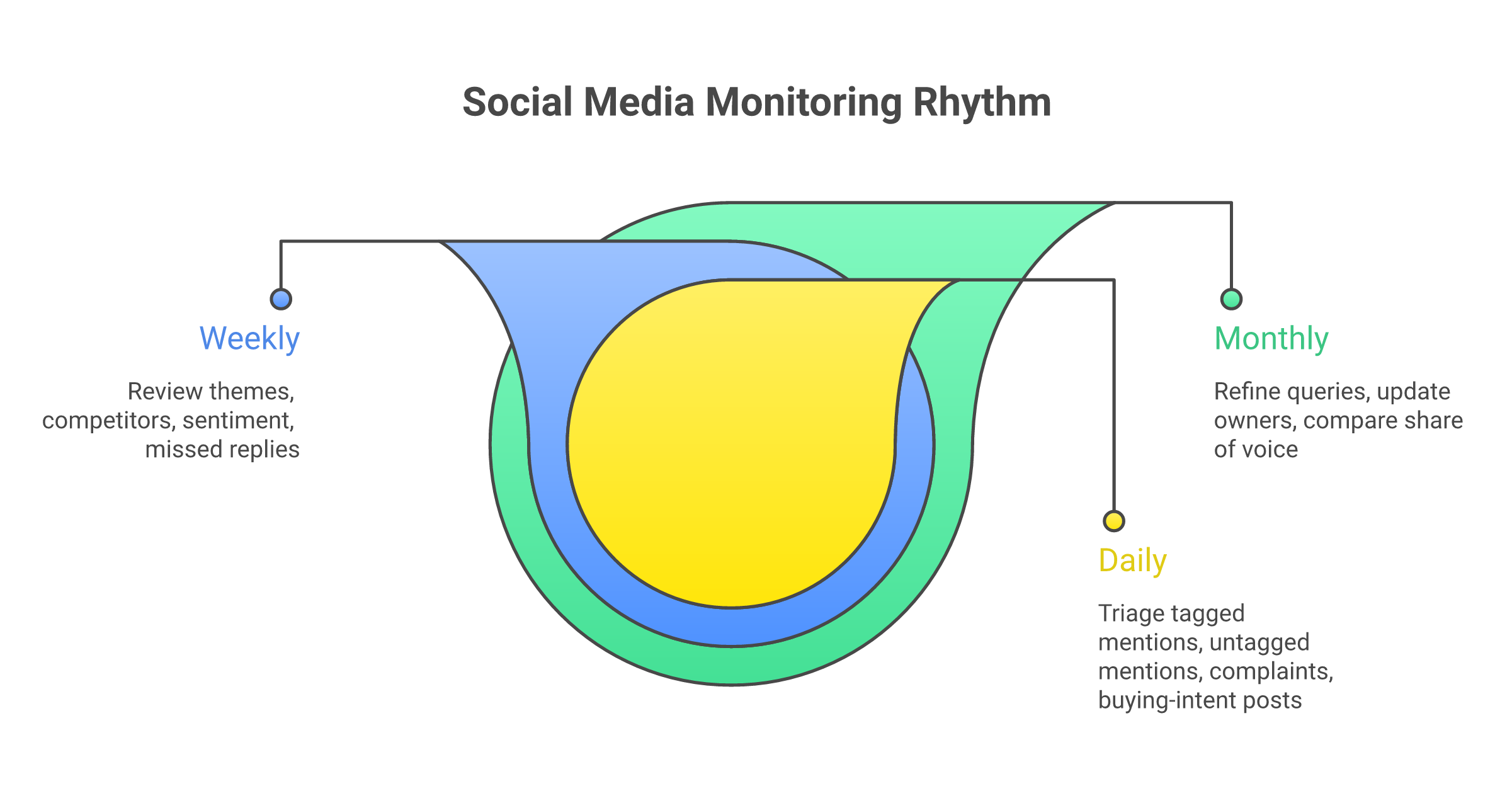
The Manual Tracking Workflow: Daily, Weekly, Monthly#
Daily: respond and escalate#
Spend 10 to 15 minutes on priority searches:
Notifications and direct
@handlementions.Brand and product exact phrases.
Domain mentions.
Complaint terms.
Recommendation-intent terms.
Active campaign terms.
Classify each mention by next action:
Reply publicly.
Move to DM.
Send to support.
Send to sales.
Log for product.
Save for content or positioning.
Ignore.
Do not just show the post. Show the next move.
Weekly: review themes and intent#
Once a week, look for repeated patterns:
Which complaints appeared more than once?
Which terms created noise?
Which posts deserved a response but were missed?
Which category questions kept coming up?
Which competitor names appeared near your category?
Which objections should become content, docs, or sales enablement?
This is where mention tracking becomes useful beyond response speed. Daily triage protects the moment. Weekly review turns repeated posts into GTM learning.
Before the monthly cleanup, review a small scorecard: response time for urgent mentions, response rate for posts that deserved engagement, useful mention volume by bucket, sentiment by repeated topic, and sales or product handoffs created from X.
Each metric should answer one decision: reply faster, change owners, rewrite a query, update positioning, or feed an objection into sales enablement.
Monthly: refine the system#
Every month, update the query matrix:
Add new product names, campaign terms, and competitor names.
Remove dead searches.
Add exclusions for noisy terms.
Compare volume and sentiment by topic.
Review share-of-voice movement if you track competitors.
Feed repeated objections into sales and product marketing.
The system should get sharper. If it only gets bigger, it will stop being used.
#
When Manual X Mention Tracking Breaks#
Manual tracking is fine until speed, volume, or ownership becomes the problem.
It starts breaking when:
Mentions happen outside working hours and go stale before anyone sees them.
Multiple people check the same searches without clear ownership.
Keyword searches return too much noise.
You need historical reporting, not just today's posts.
Competitor and category-intent searches create more results than one person can review.
You want to route posts into CRM, Slack, support, or sales workflows.
You need to connect X signals with Reddit, LinkedIn, GitHub, HN, Slack, and other communities.
The hidden cost is not missing every mention. It is missing the few that mattered.
How A Twitter Monitoring Tool Improves Mention Tracking#
A monitoring tool should reduce decision time, not just collect more posts.
Look for capabilities that map to a workflow:
Real-time alerts for priority terms.
Filters that separate brand chatter from intent.
Sentiment and theme grouping for weekly review.
Author and source context so the team knows who is speaking.
Competitor tracking for comparison and switching language.
Team assignment or routing.
Reporting for share of voice, volume, and recurring issues.
Cross-channel monitoring when the same buyer signal appears outside X.
Avoid using a tool as a bigger inbox. If nobody owns the next action, more alerts only create more work.
This is the common failure pattern: a team buys a monitoring suite, pipes every mention into Slack, and calls it done. Two weeks later, everyone ignores the channel because there is no priority logic.
Fix the routing before you scale the alerts.
Related Read: 11 Best Twitter Monitoring Tools I Tested to Track Mentions in 2026
Where CommunityTracker Fits#
CommunityTracker fits when X mention tracking is part of a broader community-signal workflow, not an isolated social dashboard.
Use CT when the job is:
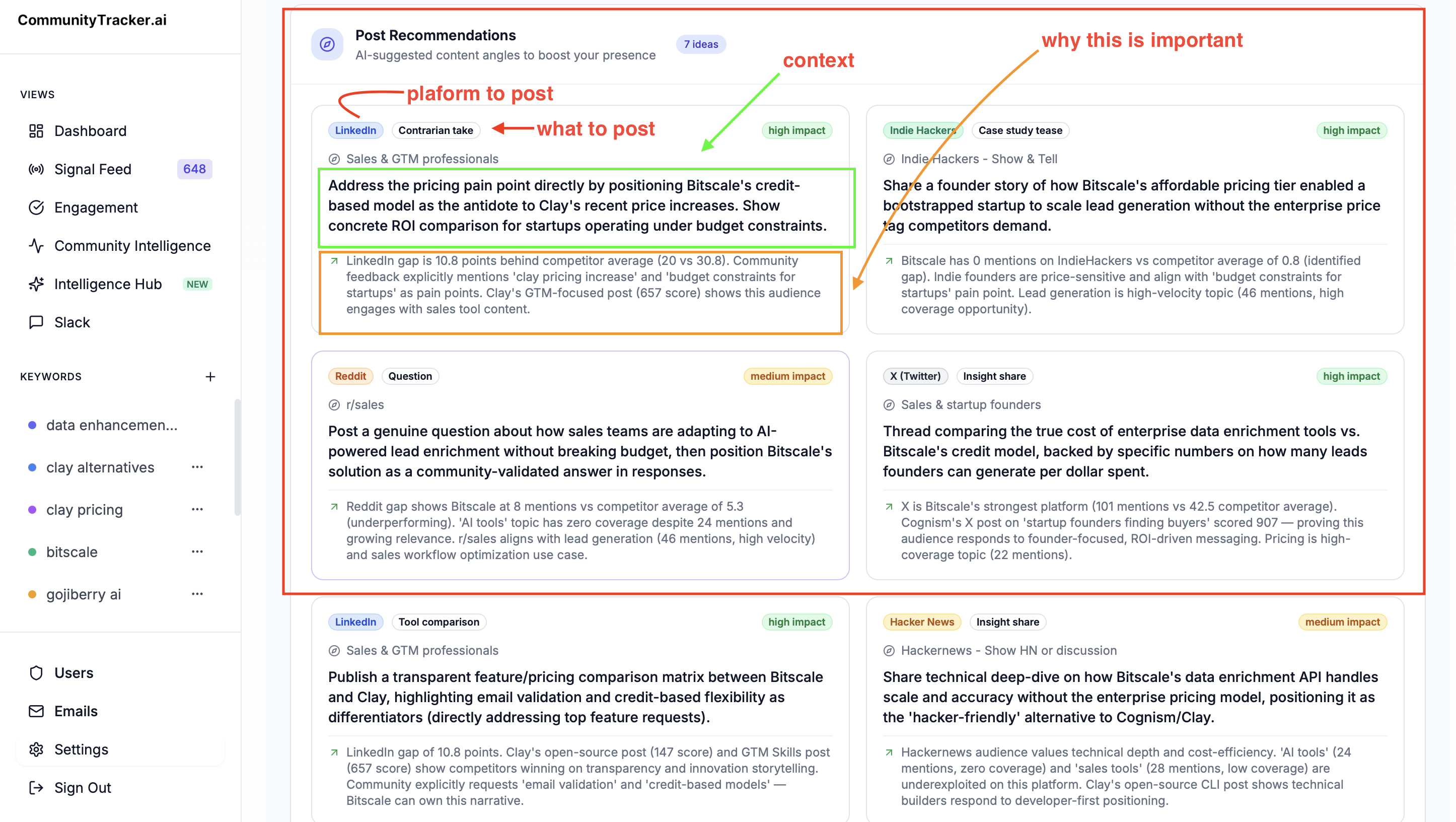
Find untagged brand and product mentions.
Catch recommendation, alternative, and competitor-comparison posts.
Monitor X alongside Reddit, LinkedIn, Bluesky, HN, IH, Dev.to, SO, PH, GitHub, and Slack.
Sort mentions by intent, not just keyword match.
Route the signal to a GTM next move.
Who should not pick CommunityTracker?
If you only need a personal saved search for @yourhandle, X's native search is enough. If your team mainly needs publishing calendars, approval workflows, and scheduled posts, a social media management suite is a better fit.
But if the X mention is one input in a signal-led GTM motion, CT gives the team a cleaner path: find the post, understand why it matters, and decide the next move.
See how CommunityTracker monitors buyer intent across X and other communities
A 30-Minute Setup Checklist#
Use this to get from zero to a working mention-tracking system.
List the entities.
Build the first 10 saved searches.
Add exclusions.
Define priority buckets.
Assign owners.
Write response rules.
Set a review cadence.
Decide when to add a tool.

FAQs About Tracking Mentions On Twitter#
Can I track Twitter mentions for free?#
Yes. Use Notifications for tagged mentions, X search for brand and product terms, Advanced Search for cleaner filters, and saved searches for repeat checks. Free manual tracking works when volume is low and one person owns the review rhythm.
It stops working when mentions need alerts, team routing, reporting, or cross-channel context.
How do I find untagged mentions on X?#
Search exact brand and product names without the @ symbol:
"Brand Name" -from:brandhandle
"Product Name" OR "Product Nickname"
url:branddomain.com
Add complaint, pricing, and recommendation terms to find the posts that need action.
What is the difference between Twitter monitoring and social listening?#
Twitter monitoring is usually mention capture: finding posts, replies, hashtags, and links related to your brand on X.
Social listening is broader. It looks for patterns across topics, competitors, sentiment, authors, and channels. For GTM teams, the useful version connects those patterns to action: support escalation, sales assist, product feedback, content ideas, or positioning changes.
Can I track competitor mentions on Twitter?#
Yes. Search competitor names with comparison and switching language:
"Competitor" alternative
"Competitor" "switching from"
"Competitor" expensive
"Competitor" "not working"
Use these for market insight and helpful replies. Do not jump into every competitor complaint with a sales pitch. That creates brand risk.
How often should a team review Twitter mentions?#
Review urgent brand, support, and buyer-intent searches daily. Review competitor, campaign, and category searches weekly. Clean the query list monthly so the system stays useful.
If X is a serious GTM channel for your team, assign an owner. Shared responsibility usually means missed signals.
The Next Move#
The cleanest way to track mentions on Twitter is to start manual, then add tooling when the workflow demands it.
Start with 10 saved searches. Review them for one week. Mark every result by action: support, sales, product, community, marketing, or ignore. At the end of the week, you will know which searches matter, which terms create noise, and which mentions are worth catching faster.
Then decide whether X is just a channel to watch or a signal source for pipeline.
If it is the second, use CommunityTracker to turn Twitter/X mentions into buyer intent and community signals across the places your market already talks. From signal discovery to GTM action.
See how CommunityTracker monitors buyer intent across X and other communities