11 Best Warm Leads Finder Tools For B2Bs (Compared & Reviewed)
Compare 11 warm leads finder tools for B2B teams on the signals they catch, real pricing and user reviews, and find the people ready to talk first.
Adarsh Kumar
GTM Expert
Founder — CommunityTracker, Miraa.io, and Infraboxes
Four hundred emails a week, three meetings booked. That is a 0.75% hit rate, and most teams would call it a normal week.
The list is the problem. Most people on it never heard of you. Hidden inside it, though, are a few who changed jobs last month, a few who read your pricing page twice, and a few who asked a question in a LinkedIn thread your team missed. Call those people first.
Finding them is harder than it sounds. You need to spot them before a competitor does, and you need to do it without five seats of a tool your reps open once a week.
So I compared 11 tools on the signals they catch, how they score them, and what a five person sales team pays each month, with the caps and the point where each plan stops working.
My picks at a glance
I rank CommunityTracker first because it puts the people you already know into one list, scores them Hot, Warm or Watch, and hands them to a campaign for $99 a month (one account; user limit not listed). If your warm leads come from site visits, pair it with RB2B. If you have a five figure budget and a CRM full of past champions, look at UserGems.
# | Tool | Warm signal it catches | Entry paid price (billing basis) | Dealbreaker |
|---|---|---|---|---|
1 | CommunityTracker | Job changes, funding, hiring, posts on your lead lists | $39 a month, billed monthly | Few outside reviews |
2 | RB2B | US website visitors by person | $79 a month, billed monthly | US only person ID |
3 | Leadfeeder by Dealfront | Companies on your site, with intent filters | €79 a month, billed annually | Company level only |
4 | Clay | Job changes and company news inside tables | $185 a month billed monthly ($167 a month billed annually) | You build the scoring |
5 | Apollo | Contact data plus intent filters | $49 per seat a month, billed annually ($65 billed monthly) | Per user seats |
6 | LinkedIn Sales Navigator | Search filters and buyer intent on LinkedIn | $119.99 per licence a month, billed monthly | Intent needs Advanced |
7 | PhantomBuster | Post likers and commenters you scrape | $56 a month, billed annually | No scoring |
8 | Common Room | Community and product activity by account | $2,500 a month, billed annually | $30,000 a year |
9 | UserGems | Past buyers and champions who moved | $40,000 a year, billed annually | Annual contract |
10 | Warmly | Site visitors plus a chat agent | $4,875 a quarter, billed quarterly | $19,500 a year on quarterly |
11 | Gojiberry | Competitor engagement on LinkedIn | $99 a month (billing basis not stated) | 1,800 prospects contacted a month |
What makes a lead warm, and what I checked
A warm lead did something you can see. They took a new role, their company raised money, they visited a page, or they engaged with a post on your topic.
For each tool I looked at four things:
Signal source. Your own lists, your website, LinkedIn, or a data vendor.
Scoring. Does the tool rank leads, or hand you a raw feed?
Next step. Can you enrich and send from the same place?
Cost for five reps. Seats break most budgets before credits do.
I did not run a lab test on every tool. Prices come from each vendor’s pricing page, and the review quotes come from Capterra.
1. CommunityTracker
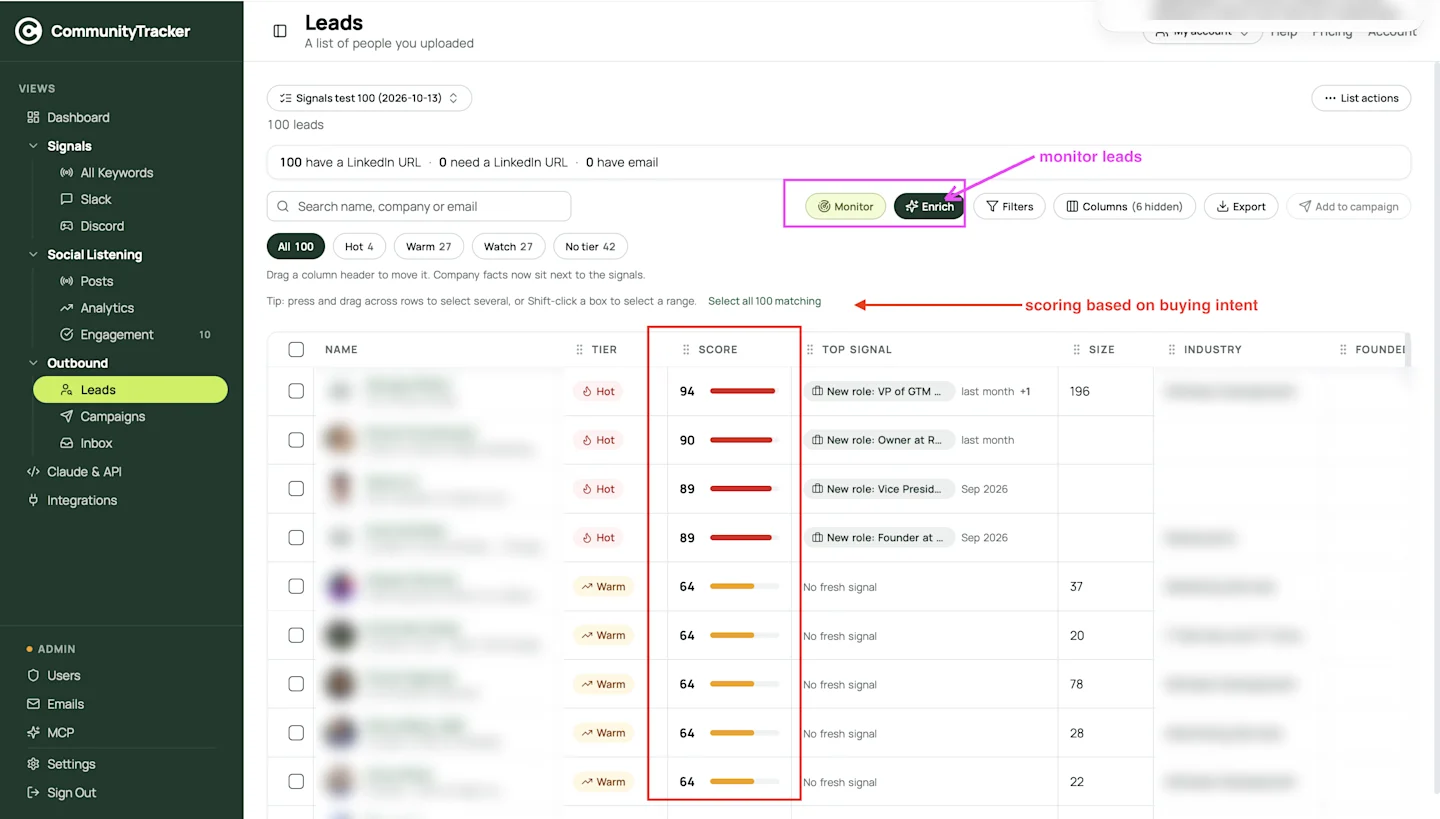
Boxed: Monitor and Enrich, and the Score column that ranks each lead by buying intent.
CommunityTracker starts from people you already have. You upload a CSV, it maps the columns, and every person lands in a Leads list. The header counts the leads in the list and how many have a LinkedIn URL.
From there it watches them. Monitoring tracks job changes, funding and posts for each lead on a paid plan, then gives every person a score from 0 to 100 and a tier.
How the tiers work
Hot rows in the test list carry a fresh signal, such as “New role: VP of GTM”, and score 89 to 94.
Warm rows score 64 and show “No fresh signal”.
Watch is the third tier on the filter chips.
No tier means scored, with no tier given.
The Top signal column tells you why a person moved up. You open the list on Monday and sort by score. That sort is your call list.
In one 100 person test list in the account, 4 scored Hot, 27 Warm and 27 Watch. That puts 31 people in this week’s queue out of 100. A second 100 person list scored 0 Hot and 21 Warm, so expect the count to swing by list.
Monitor, Enrich, then Campaigns
Enrich fills the gaps with credits:
LinkedIn URL, title, work email or company data: 1 credit per lead
Mobile number: 10 credits per lead
No result, no charge: credits come back for each lead the lookup misses
A dry run shows the cost first. For 100 Hot and Warm leads, work emails cost 100 credits and mobiles cost 1,000. The pricing page does not list a credit price, so budget that line once you see it in the app.
Then you select leads and click Add to campaign. Campaigns write LinkedIn and email steps from the signal, and replies land in one inbox. Turn on auto add and every hour new Hot or Warm leads join the campaign, up to the daily limit you set. You can require approval before anything sends.
Social listening sits in the same app.
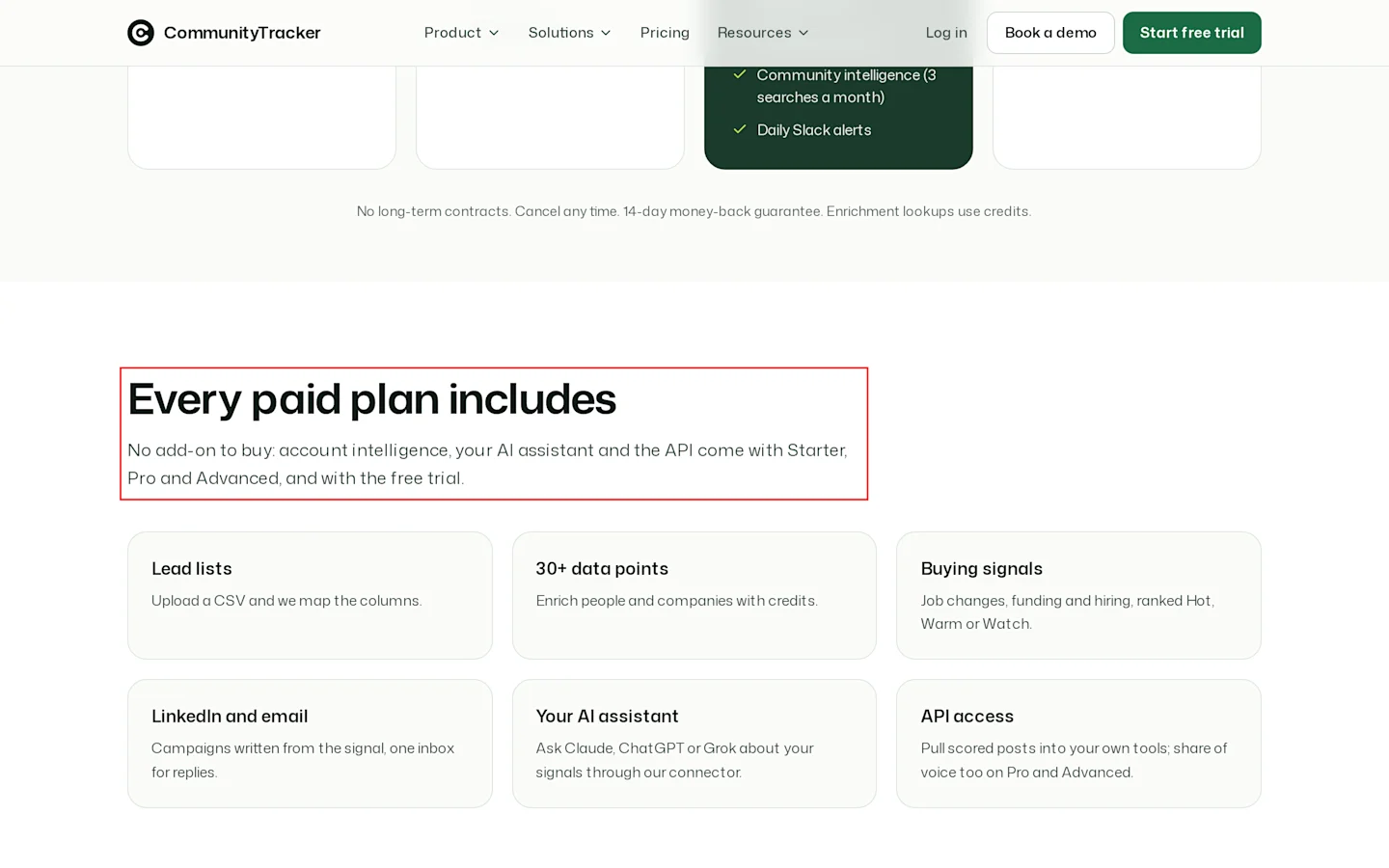
Boxed: “Every paid plan includes”, with lead lists, data points, buying signals and LinkedIn and email.
Pricing
Free: $0 a month, 1 keyword on Reddit
Starter: $39 a month, billed monthly, up to 100 warm emails a month
Pro: $99 a month per account, billed monthly, unlimited warm emails and AI intent scoring
Advanced: $199 a month, billed monthly, 20 keywords
3 day free trial of Pro
Annual billing on request
No long term contract, 14 day money back guarantee. Enrichment uses credits.
Pros
Hot, Warm and Watch tiers with the reason shown on each row
Monitor, Enrich and Campaigns in one screen
Flat plan price, billed monthly
Cons
Few outside reviews
Mobile lookups cost 10 times an email lookup
2. RB2B
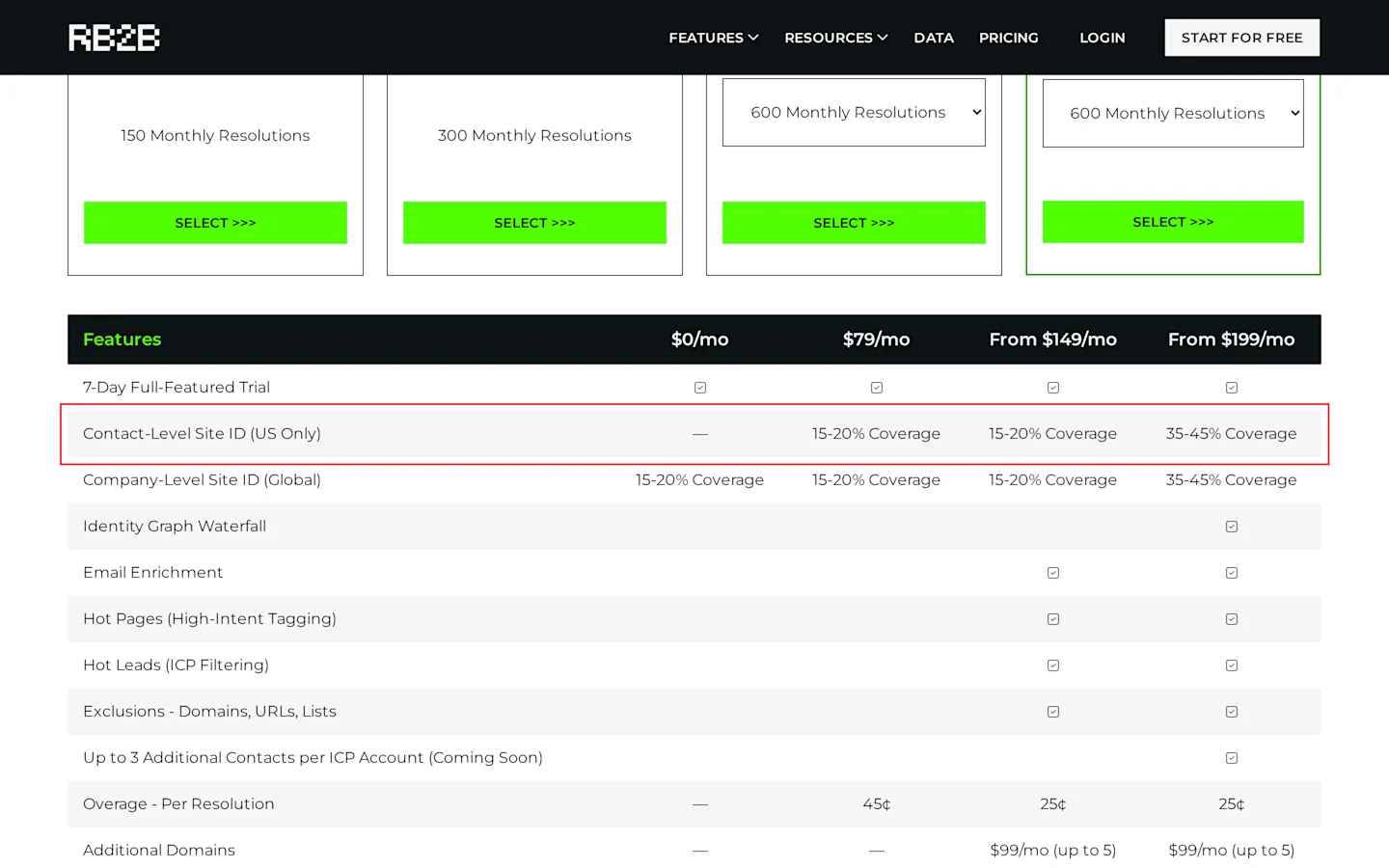
Boxed: Contact-Level Site ID (US Only), 35 to 45% coverage on Pro+ from $199 a month.
RB2B names the people on your website. It pushes their LinkedIn URLs to Slack or Teams, and Pro adds business emails, Hot Pages tagging and a Hot Leads filter for your ICP.
Two limits decide the call. Person level ID works for US visitors only. Coverage runs 15 to 20% of visitors below Pro+, and 35 to 45% on Pro+.
Pricing
Free: $0 a month, company level ID, 150 resolutions
Starter: $79 a month, billed monthly, 300 resolutions, no emails
Pro: from $149 a month, billed monthly, from 600 resolutions, all integrations
Pro+: from $199 a month, billed monthly
Overage: 45 cents per resolution on Starter, 25 cents on Pro and Pro+
7 day trial, no card
Overage is the line to watch. At 1,000 visitors a month on Pro you pay $149 plus 400 extra resolutions at 25 cents, so $249.
Pros
Free plan with Slack alerts
Hot Pages flag the visitors who reach pricing
7 day trial with no card
Cons
No person level ID outside the US
Starter sends no email addresses
3. Leadfeeder by Dealfront
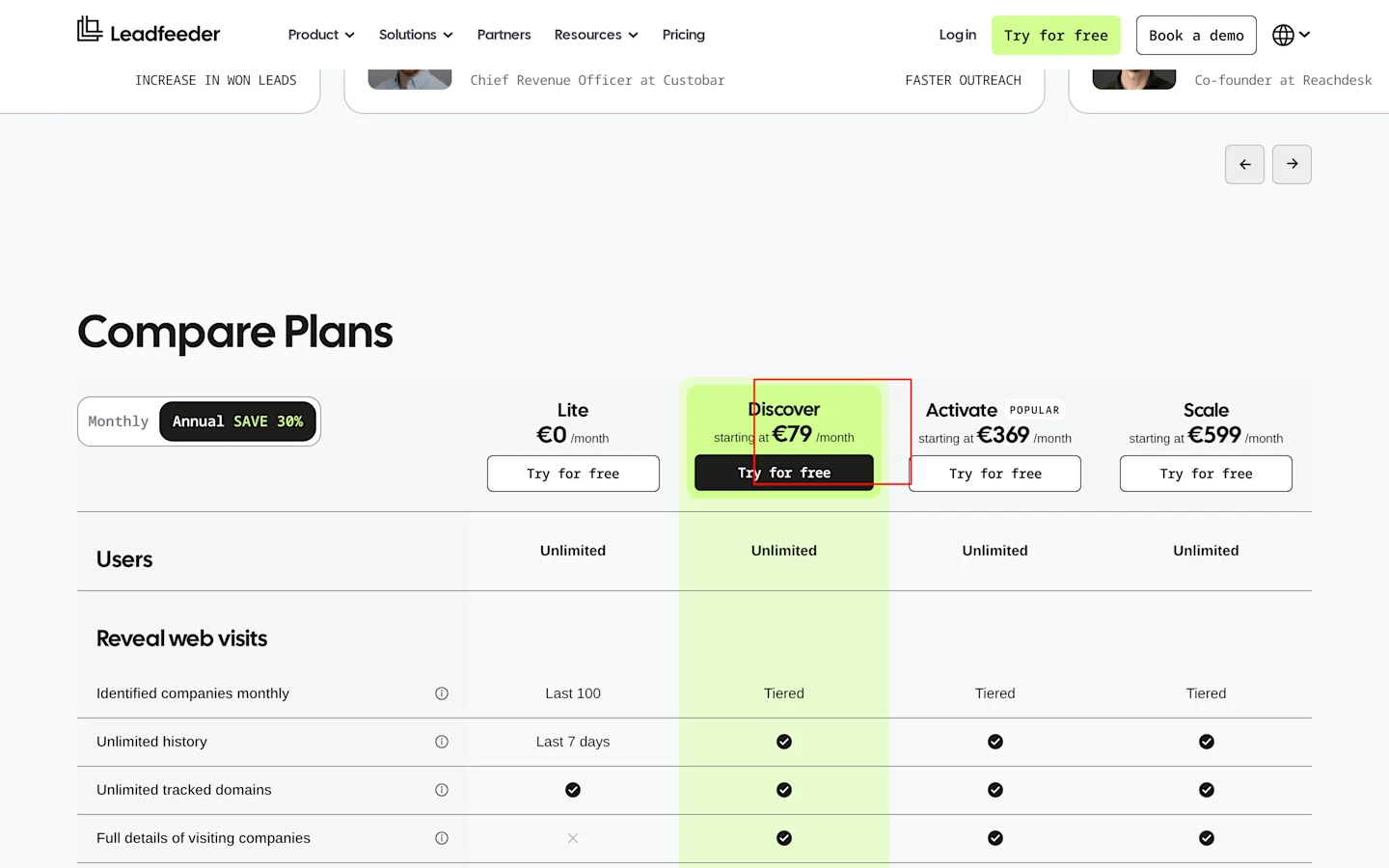
Boxed: Discover starts at €79 a month, billed annually.
Leadfeeder names the companies that visit your site, in real time, with industry, headcount and tech stack for each one. It names companies, so you still pick the person to contact.
Activate adds verified emails and phones, a filter by intent signals, and CRM automations. Each report row shows ICP fit and an Intent Score. Every plan includes unlimited users and unlimited tracked domains.
Pricing
Lite: €0 a month, last 100 companies a month, 7 day history
Discover: from €79 a month billed annually, or €113 billed monthly
Activate: from €369 a month billed annually, or €527 billed monthly
Scale: from €599 a month, billed annually only
Enterprise: custom quote
14 day trial, no card. Enrichment uses credits.
Paid plans are tiered by identified companies a month, so the “from” price rises with traffic.
Pros
Unlimited users on every plan, with no seat fees
Free Lite plan with no end date
Cons
Company level ID, so you find the person yourself
Intent filters start at €369 a month billed annually
4. Clay
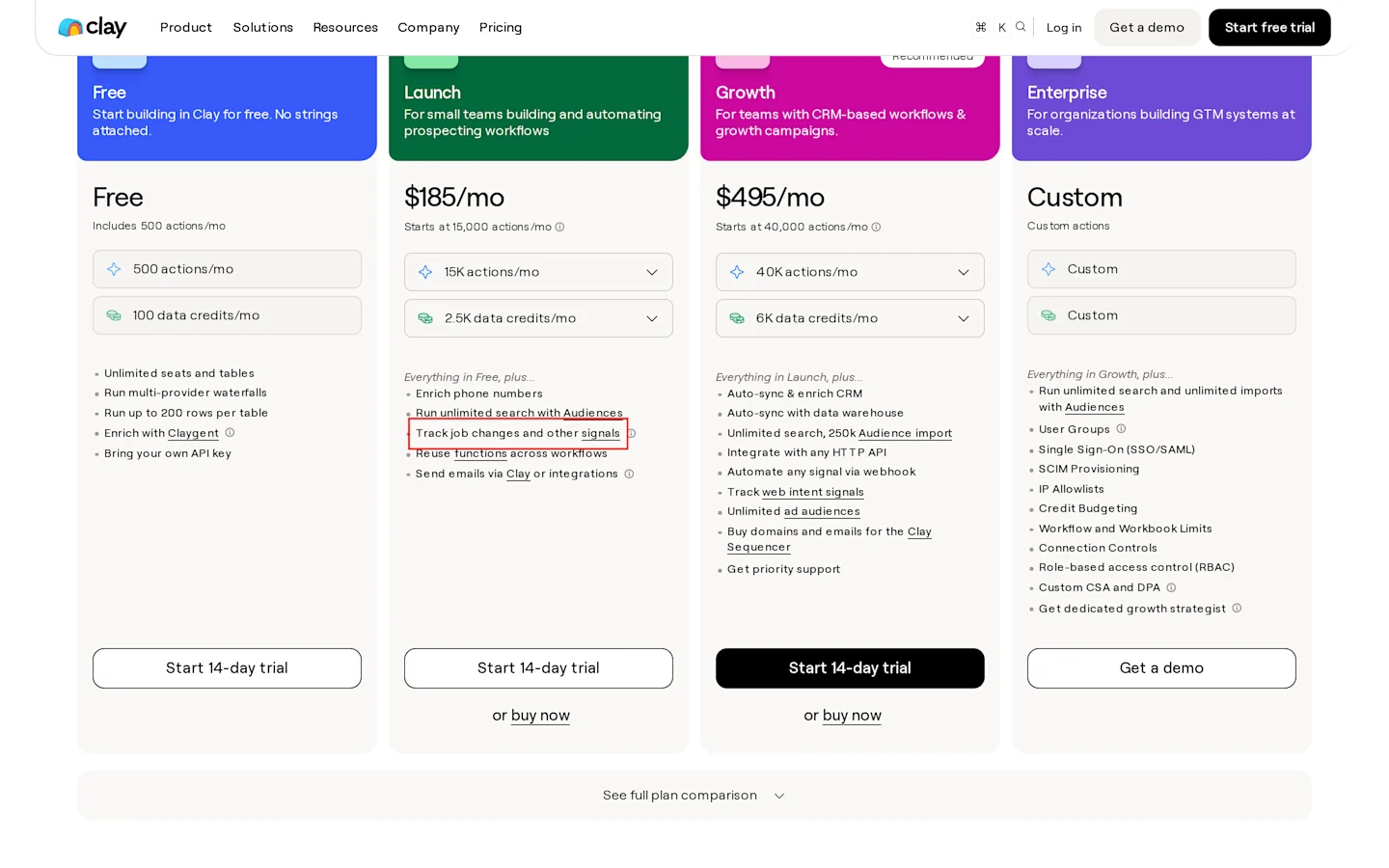
Boxed: “Track job changes and other signals” on Launch.
Clay is a spreadsheet that runs lookups. Each row is a person, and each column can be an enrichment, a signal or an AI prompt. Launch tracks job changes, promotions, new hires and company news. Web intent signals sit on Growth.
You get unlimited seats. It does not hand reps a ranked list unless you build one.
Pricing
Free: $0 a month, 100 data credits and 500 actions a month
Launch: $185 a month billed monthly ($167 a month billed annually)
Growth: $495 a month billed monthly ($446 a month billed annually)
Annual billing saves 10%. 14 day trial.
Pros
Unlimited seats on every plan
150+ data providers in waterfalls
Cons
Two meters to watch: actions and data credits
5. Apollo
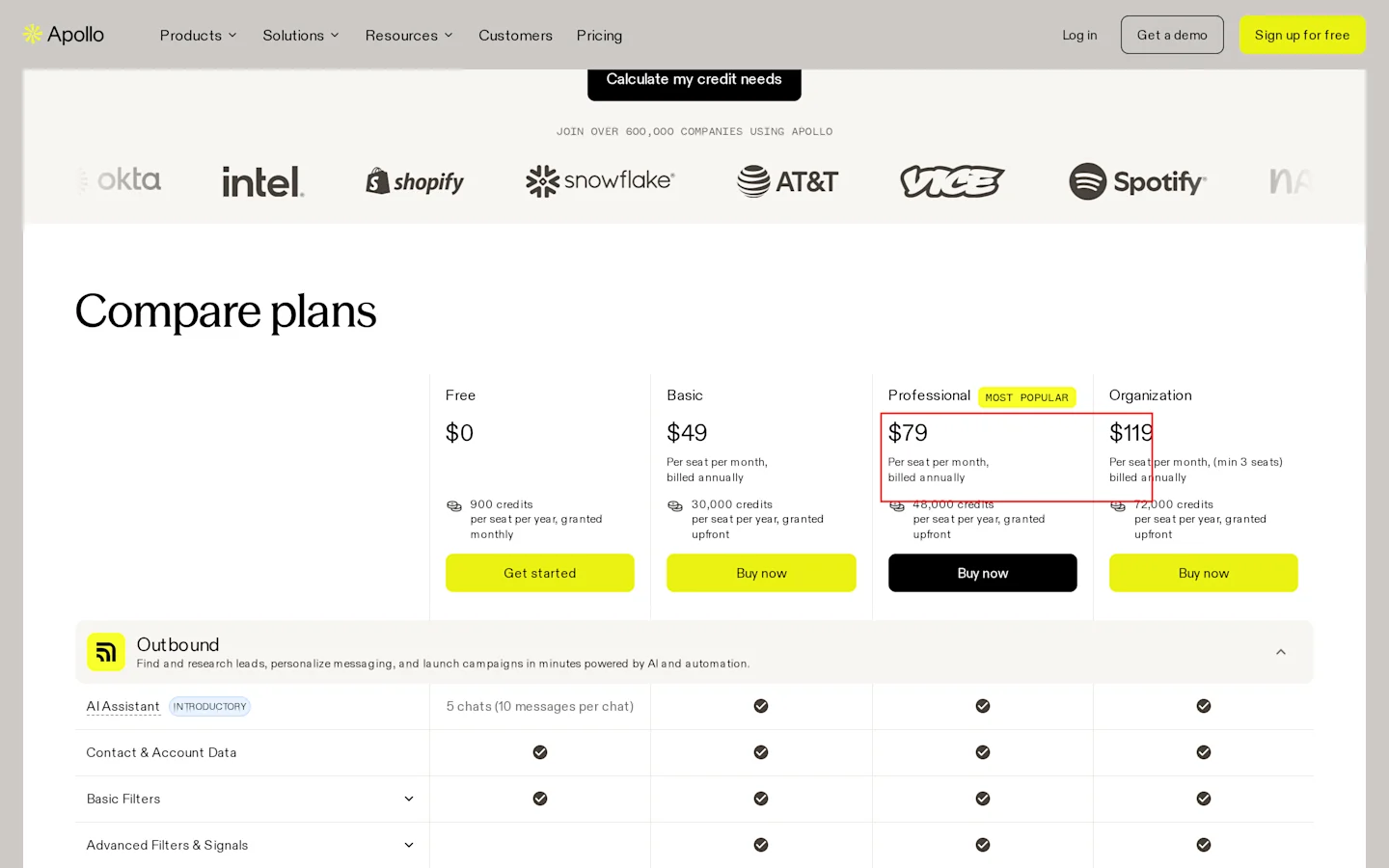
Boxed: Professional at $79 per seat a month, billed annually.
Apollo is a contact database with a sequencer and intent filters. You find people, filter by signals, and send from the same tool. Warm signals here are filters on a cold database, so expect to verify data before you send.
Pricing
Free: $0 a month
Basic: $49 per seat a month billed annually, or $65 billed monthly
Professional: $79 per seat a month billed annually, or $99 billed monthly
Organization: $119 per seat a month billed annually, or $149 billed monthly, 3 seat minimum
Pros
Database and sequencer in one tool
Free plan to try search
Cons
Mobile numbers use more credits
Contact data can be out of date
6. LinkedIn Sales Navigator
Sales Navigator gives you 50+ search filters plus Account IQ and Lead IQ, and Advanced and Advanced Plus add Buyer Intent. Every rep needs a licence.
Pricing
Core: $119.99 per licence a month billed monthly, or $1,079.88 a year
Advanced: $159.99 a month billed monthly, or $1,799.88 a year
Pros
Role and company filters on LinkedIn data
Account IQ and Lead IQ insights
Cons
Intent signals need Advanced
7. PhantomBuster
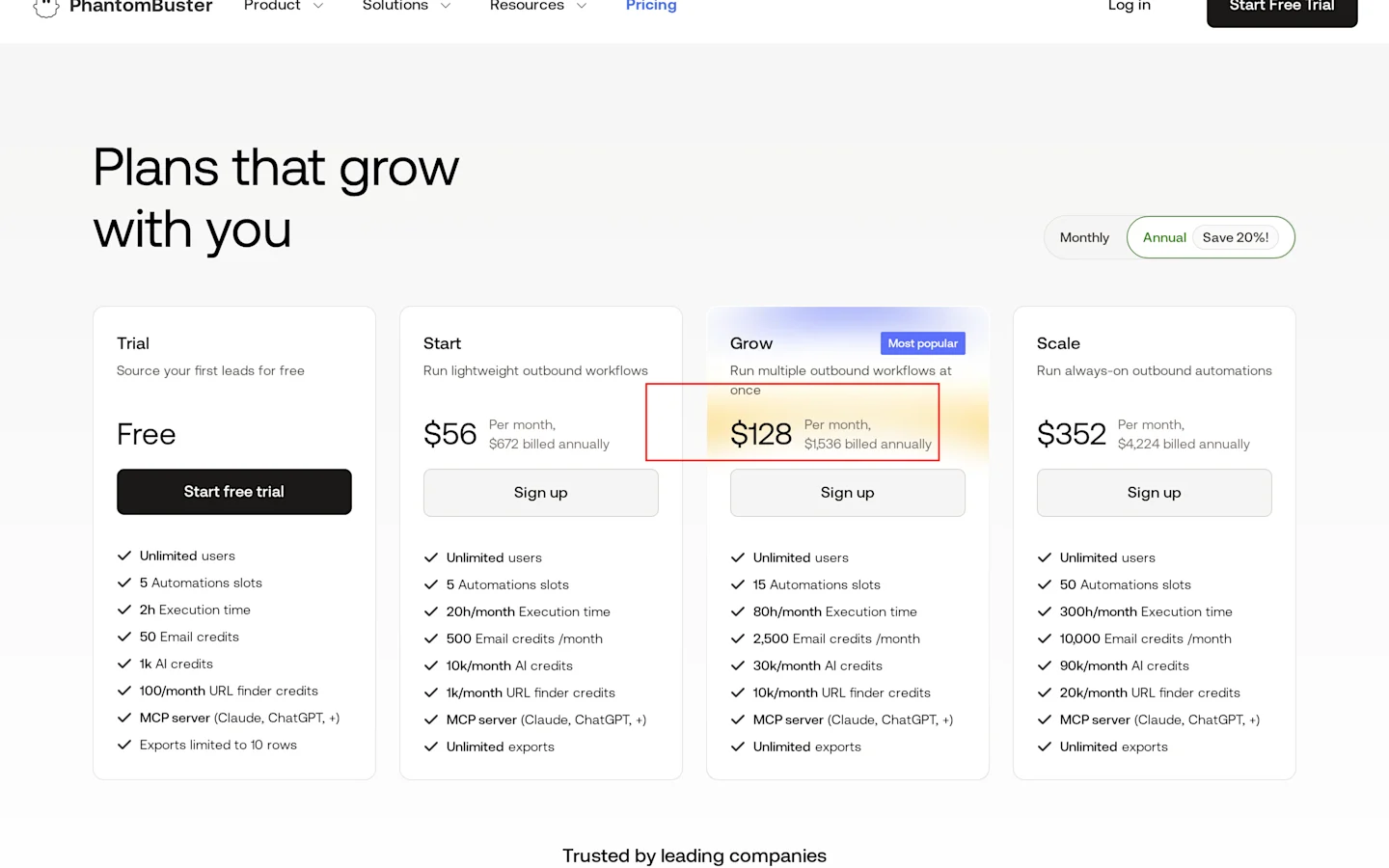
Boxed: Start at $56 a month, $672 billed annually.
PhantomBuster scrapes. Point it at a LinkedIn post and it pulls everyone who liked or commented. That list is warm, but you score it yourself.
Pricing
Start: $56 a month ($672 billed annually)
Grow: $128 a month ($1,536 billed annually)
Scale: $352 a month ($4,224 billed annually)
Unlimited users on every plan
Annual billing on Start saves $156 a year.
Pros
Engagers from any post
Cons
No scoring or tiers
One phantom per job
8. Common Room
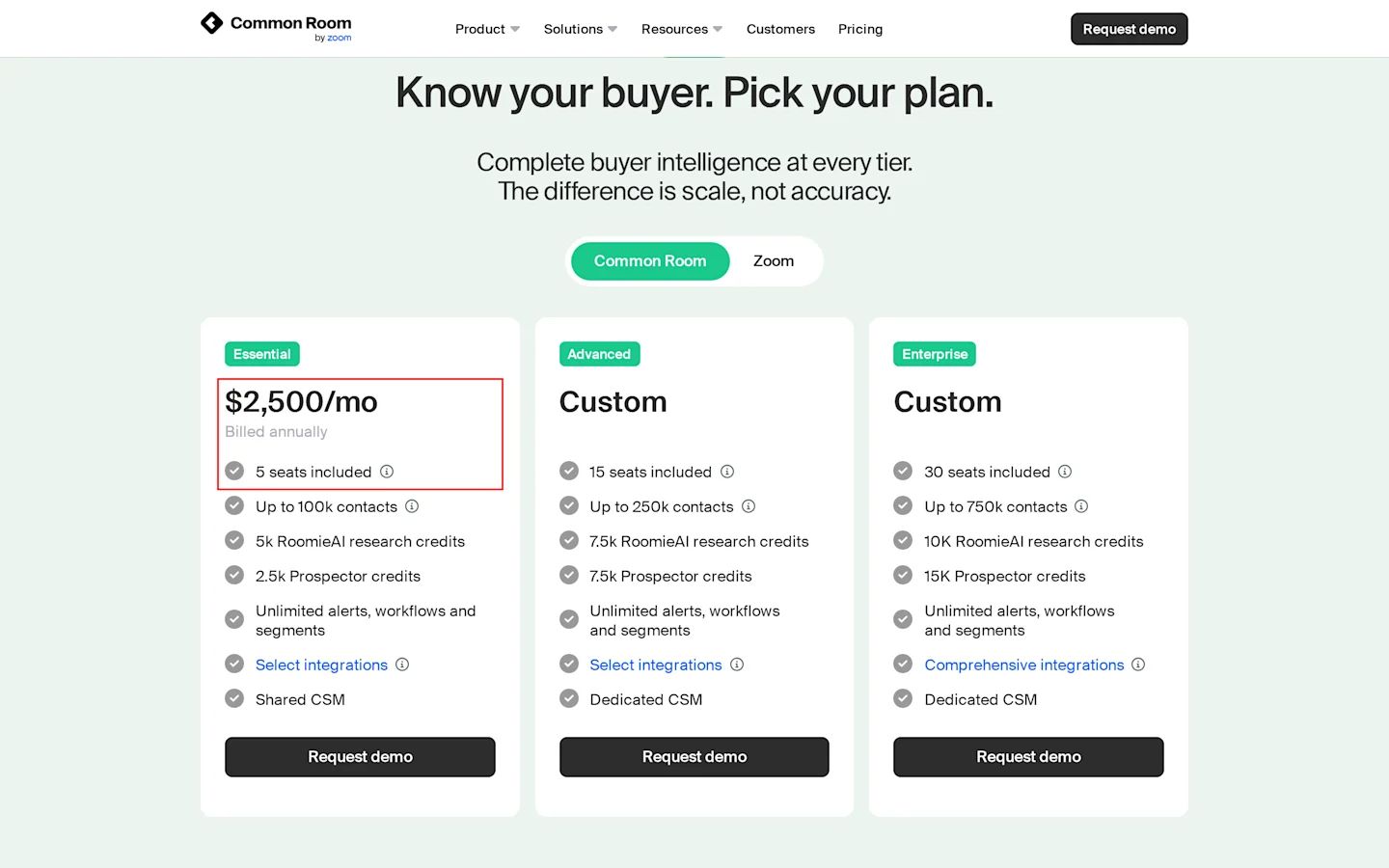
Boxed: Essential at $2,500 a month billed annually, with 5 seats included.
Common Room ties community, product and web activity to accounts and people.
Pricing
Essential: $2,500 a month billed annually, 5 seats, 100,000 contacts
Advanced: custom quote, 15 seats
Enterprise: custom quote, 30 seats
Pros
Community and product signals per account
100,000 contacts on the entry plan
Cons
$30,000 a year commitment
No Capterra reviews to read
9. UserGems
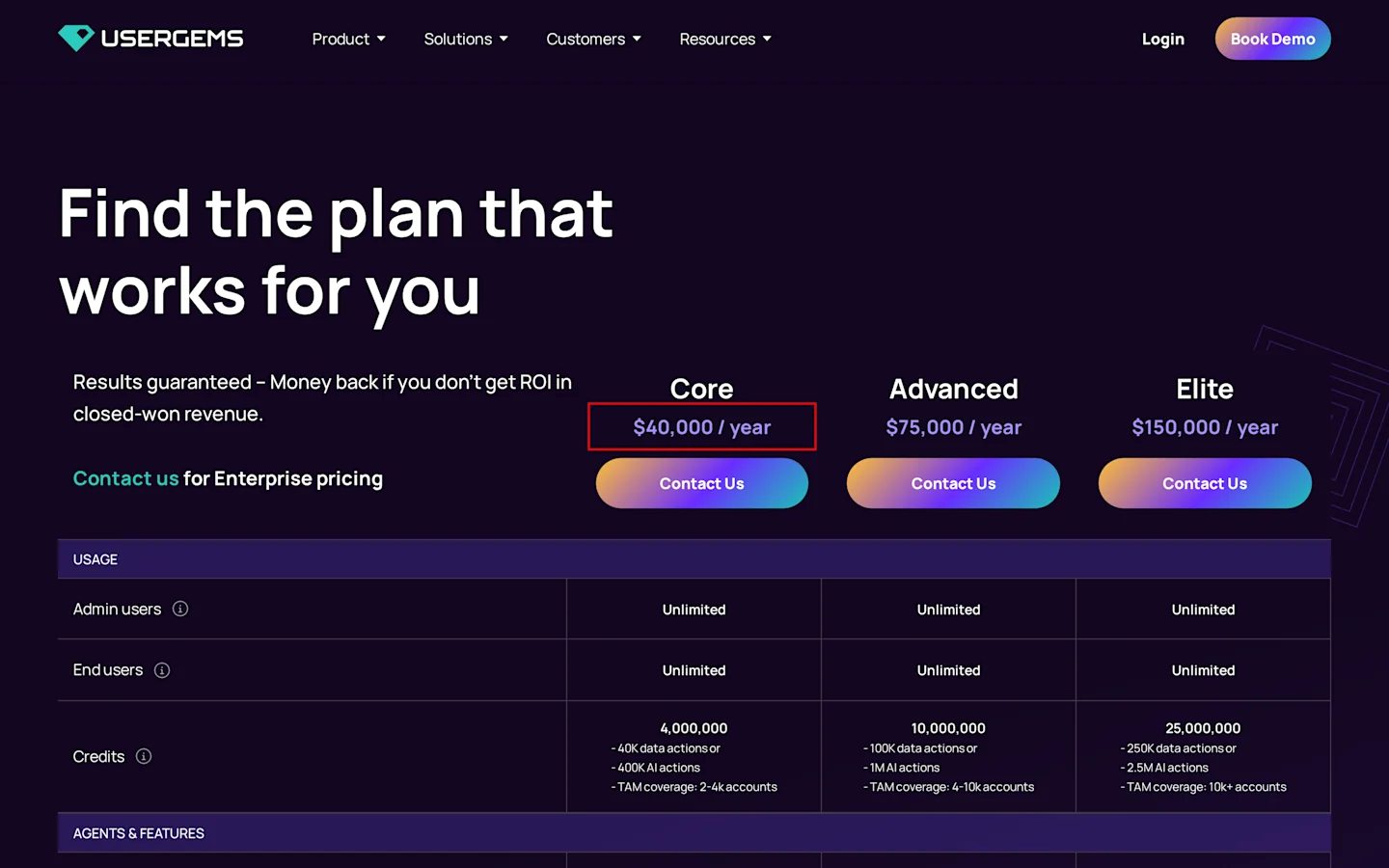
Boxed: Core at $40,000 a year.
UserGems tracks your past buyers and champions when they change jobs, then flags their new company as a warm account.
Pricing
Core: $40,000 a year, billed annually
Advanced: $75,000 a year, billed annually
Elite: $150,000 a year, billed annually
Plus a one time implementation fee
Pros
Job change tracking on your CRM contacts
New account flags when a champion moves
Cons
Annual contract only
Implementation fee on top of the plan
10. Warmly
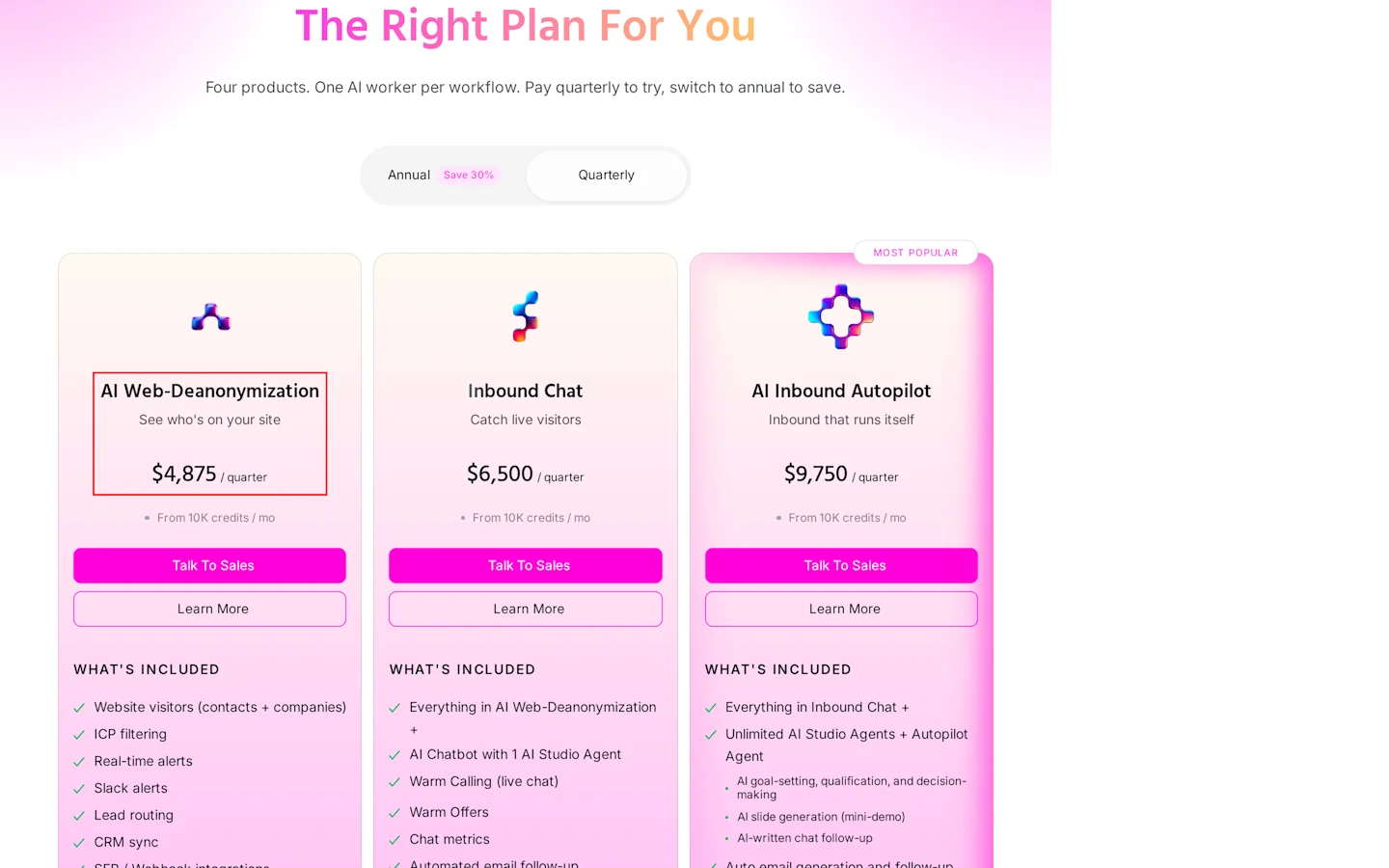
Boxed: AI Web-Deanonymization at $4,875 a quarter.
Warmly identifies site visitors, routes them to reps and can run an AI chat agent on your site. Job change tracking and Bombora intent sit in the GTM Signals add on.
Pricing
AI Web Deanonymization: $10,000 a year billed annually, or $4,875 a quarter
Inbound Chat: $20,000 a year, or $6,500 a quarter
AI Inbound Autopilot: $30,000 a year, or $9,750 a quarter
GTM Signals add on: $10,000 a year, billed annually
Pros
Quarterly plan to try first
Cons
Signals beyond your site cost $10,000 a year more
Quarterly billing costs $19,500 a year
11. Gojiberry
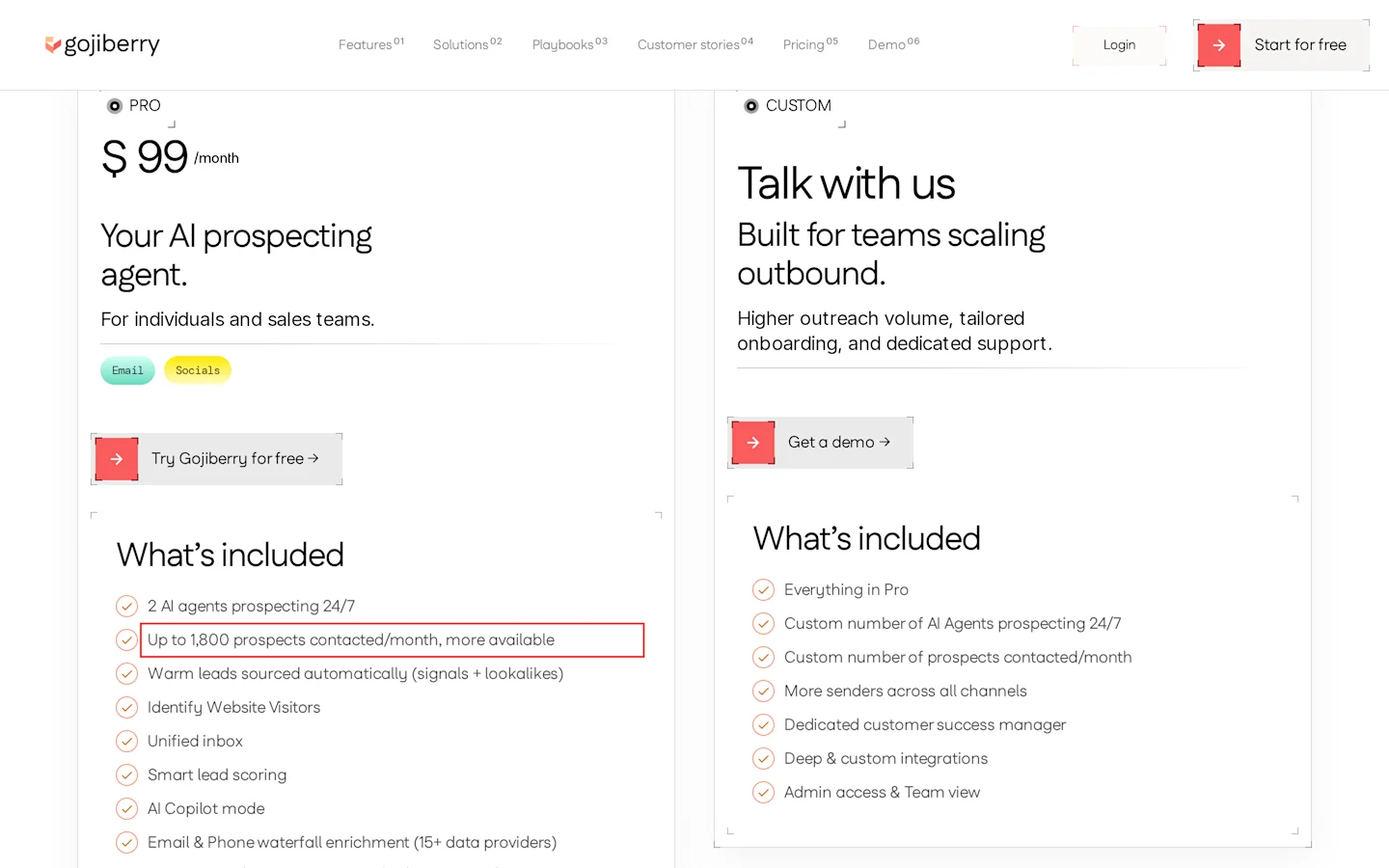
Boxed: up to 1,800 prospects contacted a month.
Gojiberry runs AI agents that find people engaging with competitors and topics on LinkedIn, then score and message them. It overlaps with CommunityTracker on price.
Pricing
Pro: $99 a month (billing basis not stated), 2 AI agents, up to 1,800 prospects contacted a month
Custom: by quote
Pros
Competitor engagement as a signal
Unified inbox and lead scoring
Cons
Pro lists $99 a month with no billing basis, so you can’t confirm your annual cost before you talk to them
No Capterra reviews
What users say
I read Capterra reviews for four tools in this list on Nov 3, 2026. CommunityTracker, Common Room and Gojiberry had none I could use.
The sample is thin: two reviews per tool at most, and one for Leadfeeder. The PhantomBuster and UserGems reviews are old, more than 12 months, and I found no newer ones to swap in. Read them as a rough signal.
LinkedIn Sales Navigator
Jordan V., Sales Specialist (Capterra, May 24, 2026): “Once you become familiar with the platform, it becomes a very powerful tool for pipeline generation.” Downside: “the workflow between LinkedIn Sales Navigator and the main LinkedIn platform can sometimes feel disconnected”
Reviewer on Capterra Singapore, Jan 3, 2026: “The advanced search and filtering are extremely powerful.” Downside: “Pricing can feel high for smaller teams”
PhantomBuster
Inna Z., CEO (Capterra, May 10, 2022): “the data is extracted well, way faster if with own solution. Easy to use.” Downside: “need to wait or have more budget what gets costly”
Angelo F., Commercial Funding (Capterra, May 4, 2022): “The interface is good, the tutorials are also very good.” Downside: “It lacks punch when one has a more "sophisticated" workflow to automate”
Leadfeeder by Dealfront
Reviewer on Capterra, Sep 27, 2026, user since Aug 2020: “I liked that it was easy to setup/install and integrated with HubSpot.” Downside: “Their cancellation policy requires you cancel more than 30 days before renewal, but they never give you any notice about renewal”
UserGems
Almir, SDR (Capterra UK, Jun 10, 2023): “I have been able to identify customers who are highly likely to refer others.” Downside: “there may be certain limitations or compatibility issues when using the platform with specific platforms”
Adnan, CEO (Capterra UK, Jun 26, 2023): “the ability to target specific user segments … helped me streamline my marketing efforts” Downside: “Limited Social Media Integration”
Two patterns show up. Sales Navigator users praise the search and push back on price. PhantomBuster users get data fast and hit a wall on complex workflows. If you buy Leadfeeder on annual billing, put the renewal date minus 30 days in your calendar.
The math for a five person SDR team
Scenario 1: per seat vs per account
Five reps on Sales Navigator Core, billed monthly, cost 5 × $119.99 = $599.95 a month. CommunityTracker Pro costs $99 a month per account. The pricing page lists no seat or user limit for Pro, so ask how many users one account covers before you count the gap.
If one account serves your team, the gap is $500.95 a month, or $6,011.40 a year.
Apollo Professional runs 5 × $79 = $395 a month billed annually, $4,740 a year. Leadfeeder Activate costs from €369 a month billed annually, and every plan includes unlimited users, so the price holds at five reps. That is €4,428 a year. Leadfeeder prices in euros and Apollo in dollars, so convert at your rate before you compare the two.
Where it breaks: if every rep needs to search LinkedIn all day, you still need Sales Navigator seats. CommunityTracker tells them who to call, and the search itself stays in Sales Navigator.
Scenario 2: the $248 warm stack
Say your warm leads come from two places: people on your lists who change roles, and US visitors on your pricing page.
CommunityTracker Pro: $99 a month per account for list monitoring, tiers and campaigns
RB2B Pro: $149 a month for 600 identified visitors
Total: $248 a month. If one CommunityTracker account serves all five reps, that is $351.95 less than five Sales Navigator Core seats.
Where it breaks: traffic. At 1,000 visitors RB2B costs $249 alone, and the stack hits $348. Past about 2,000 visitors a month, the stack costs more than five Core seats.
Scenario 3: when a $40,000 contract pays
UserGems Core costs $40,000 a year, or $3,333.33 a month. At a $5,000 deal size you need 8 extra wins a year to cover it, before the implementation fee. If your deal size is $50,000, one win covers it. Common Room works the same way: $30,000 a year, $500 per seat a month across five seats.
Scenario 4: enrichment before outreach
Out of a 100 person list, 31 scored Hot or Warm in the CommunityTracker test list. The second list scored 0 Hot and 21 Warm, so the same rule there means 21 credits. Enriching only those 31 with work emails costs 31 credits. Enriching all 100 with mobiles costs 1,000. Score first, then enrich.
Which tool should you pick?
You sell to people already on your lists and want a ranked call list: CommunityTracker Pro at $99 a month (one account; user limit not listed).
Your pricing page gets US traffic you cannot name: add RB2B Pro.
Your visitors sit outside the US, or you want company intent filters for the whole team: Leadfeeder Activate.
You have a GTM engineer who builds workflows: Clay Launch.
Your reps live in LinkedIn search: Sales Navigator Core, and keep the seat count tight.
Your average deal tops $50,000 and your CRM holds years of champions: UserGems.
Skip UserGems and Common Room if your deal size sits under $10,000. Skip RB2B if most of your buyers sit outside the US.
FAQ
What is a warm lead in B2B?
A person who has shown a signal you can see: a role change, a funding round, a page visit, or engagement with your topic.
How do you find warm leads on LinkedIn?
Watch your saved leads for role changes, and pull the people who engage with posts in your category. CommunityTracker monitors role changes on your lists. PhantomBuster pulls post engagers.
Are website visitor ID tools enough?
They cover one source. RB2B names US visitors only, and coverage runs 15 to 20% below Pro+. Leadfeeder names companies, and you still find the person.
What does CommunityTracker charge for enrichment?
Lookups use credits: 1 per email, LinkedIn URL or company record, and 10 per mobile. You get credits back for every lead with no result.
Find your warm leads with CommunityTracker
Upload a list, turn on Monitor, and see who scores Hot this week. Start a 3 day free trial of Pro.