I signed up for Brand24, ran a real project for 7 days, and tested every feature. Here’s my honest Brand24 review, what worked, what didn’t, and the one thing it still doesn’t answer.
Most people searching for a tool like Brand24 are trying to answer one simple question: is it actually worth it, or just another dashboard full of noise?
That was my goal too. Not to casually try it, but to properly review Brand24.
So I signed up for Brand24 and tested it for 7 days using a single keyword: “social listening.”
I kept things intentionally simple to see how the tool performs in a real, everyday use case.
The focus was clear: can it surface meaningful conversations, track sentiment accurately, and give insights you can actually use?
Along the way, I also compared what I was seeing inside the tool with real Brand24 user reviews to check if the experience holds up.
Key Review Takeaways#
Brand24 starts pulling mentions within minutes and the coverage across news, X, blogs, TikTok, and podcasts is genuinely strong.
The AI features are useful, but only when you use them intentionally and ask the right questions.
Sentiment accuracy is not fully reliable, especially with sarcasm or nuanced language, so manual checks are often needed.
Keyword limits become noticeable if you try to track competitors alongside your brand.
There is no way to track engagement or mark mentions as responded inside the tool.
Reporting is one of the strongest parts, with clean exports in PDF, Excel, and infographic formats.
The tool shows you what is happening clearly, but deciding what to act on is still mostly up to you.
What is Brand24 and What Does It Do?#
Brand24 is a social listening tool that tracks online mentions of your brand, product, or any keyword across the internet.
It pulls data from sources like news sites, blogs, social media platforms, forums, and more, and brings everything into one dashboard.
From there, you can see how often your brand is being mentioned, where those mentions are coming from, and whether the sentiment is positive, negative, or neutral.
It also adds layers like reach, influence scores, and AI-generated insights to help you understand trends over time.
In simple terms, Brand24 helps you monitor what people are saying about a topic and make sense of that conversation in one place.
Start tracking conversations across communities with CommunityTracker.
Setting Up Brand24 (Takes a Few Minutes)#
The setup is straightforward, but not as “instant” as some tools claim, and that’s actually a good thing.
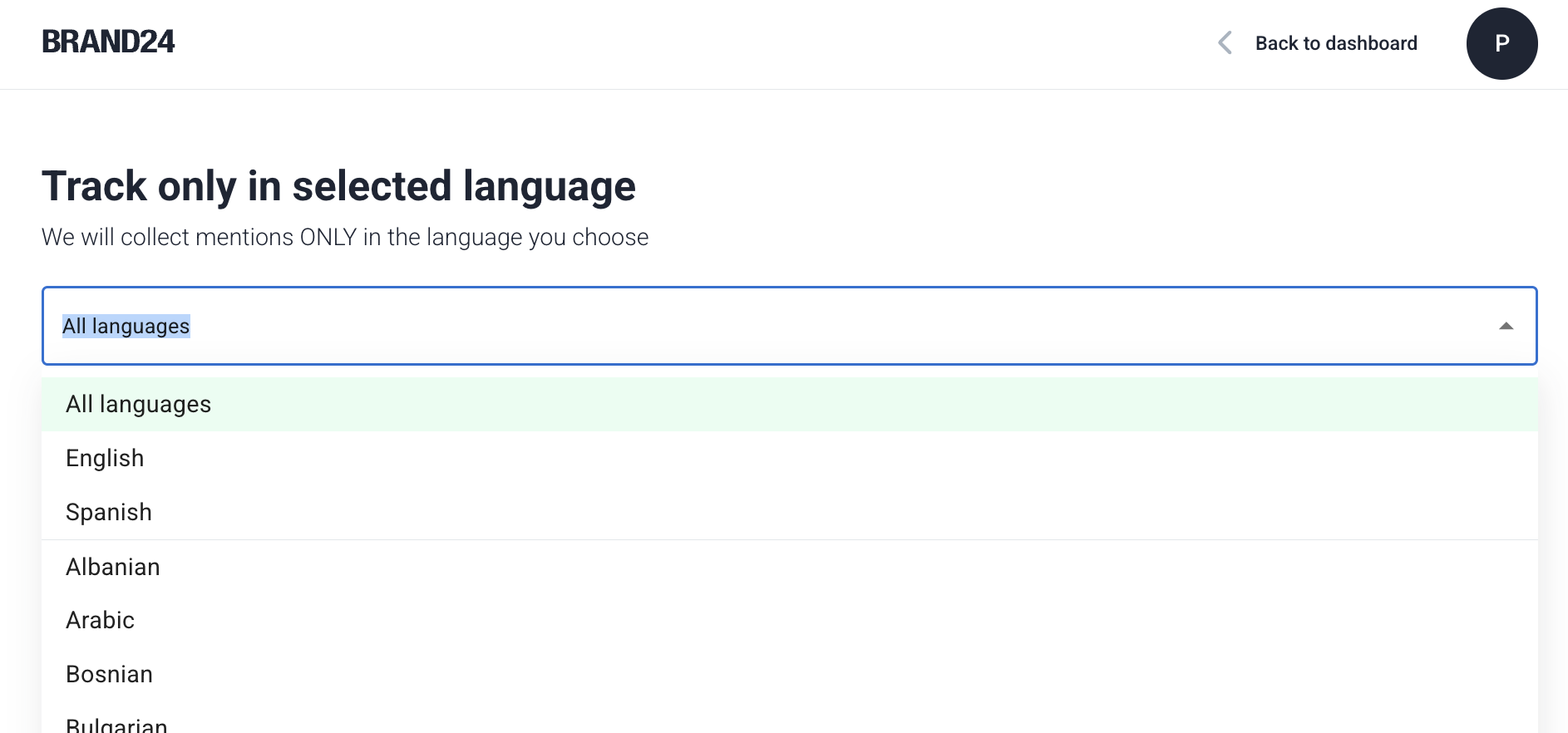
You start by naming your project, then add your main keyword. Brand24 also lets you include required keywords, exclude irrelevant terms, and pick a language.
It’s a simple form, nothing technical, but it gives you enough control to avoid pulling completely random mentions.
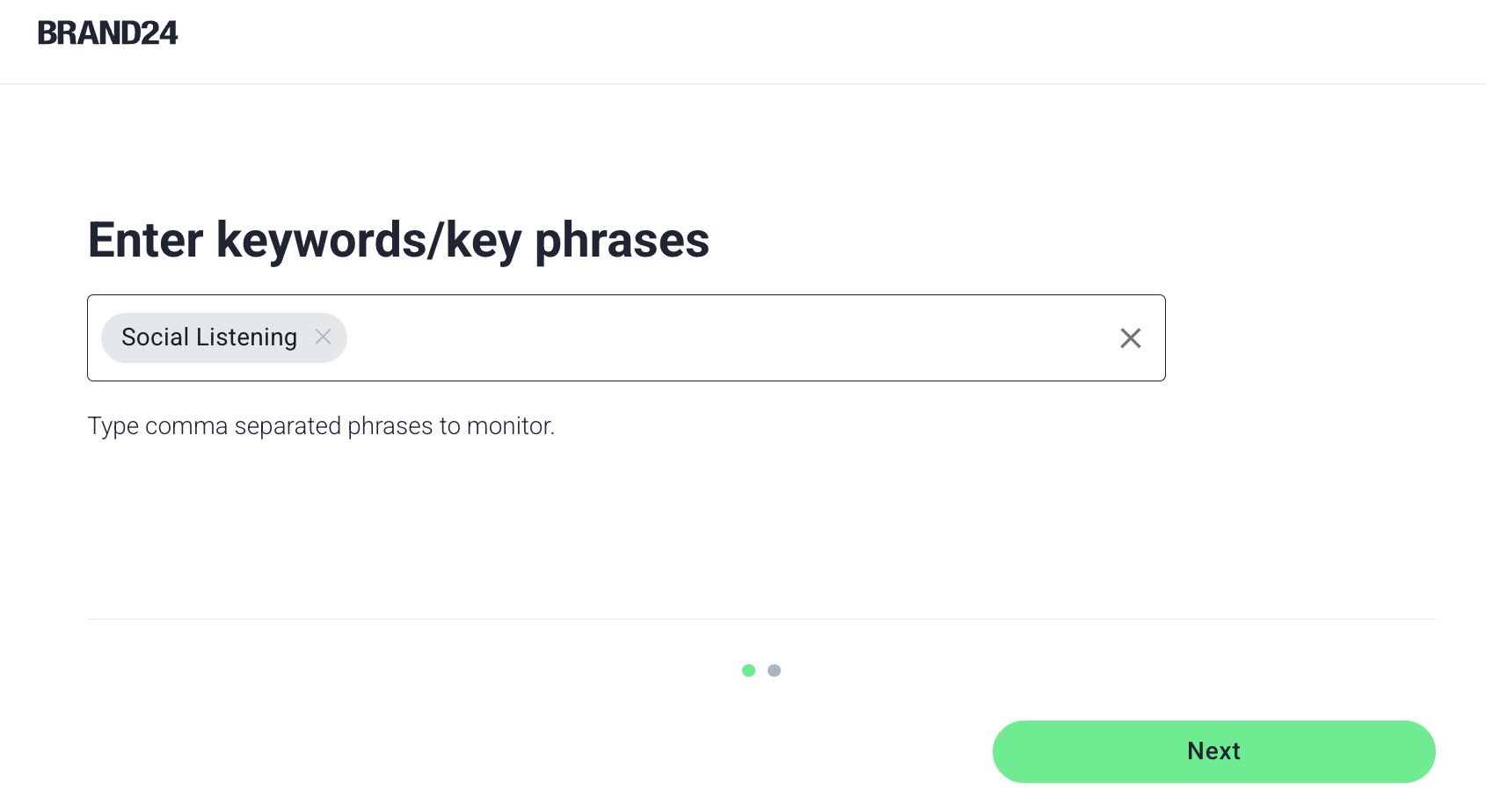
For this test, I kept it clean and entered just “social listening.” Then you select the languages you want to pull the mentions from.
From start to finish, it took me under 1–2 minutes to get everything live.
Once the project was created, Brand24 immediately started pulling mentions. There’s no waiting around for hours.
Within a short time, I could already see a steady stream of results coming in from different sources, news sites, social platforms, blogs, and more.
Turn real buyer conversations into LinkedIn content that actually performs.
Brand24 Features, One by One#
I have reviewed all the features one by one, and here are my insights:
The Mention Feed#
This is where you’ll spend most of your time.
The feed is clean and easy to scan. You can sort mentions by relevance, date, or reach. Relevance worked best for me since it pushed more meaningful posts to the top.
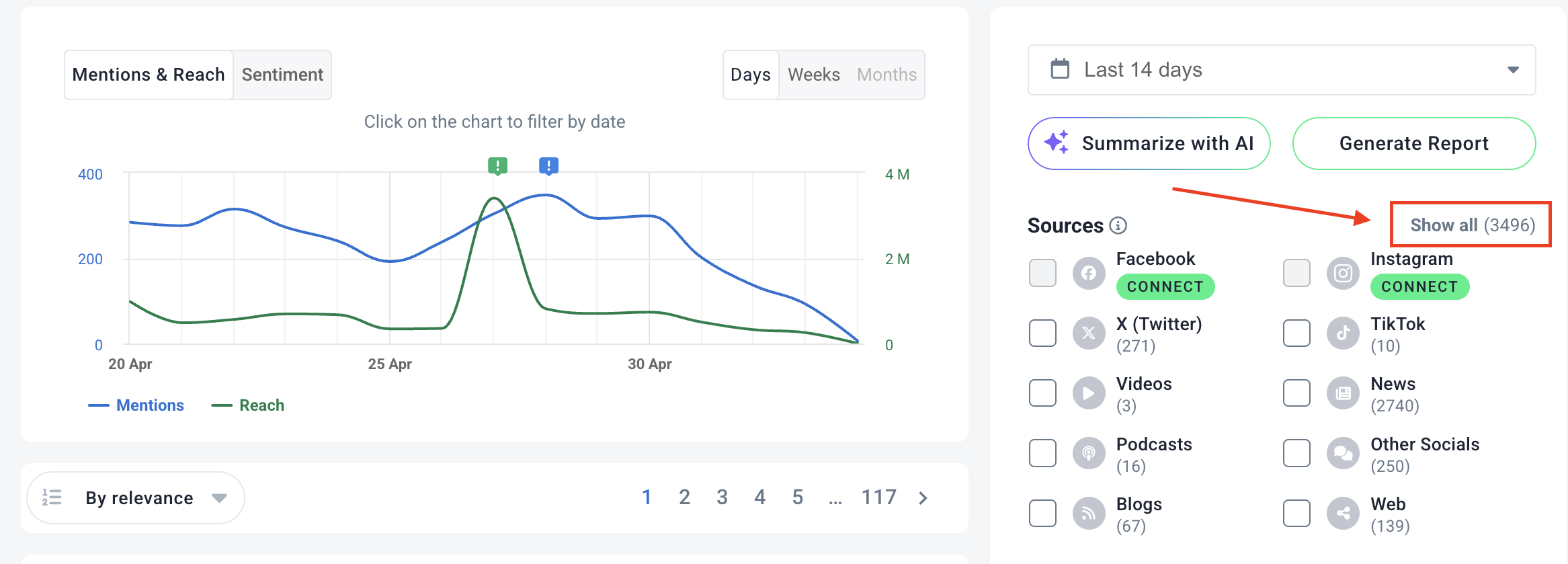
Each mention shows the source, sentiment, influence score, and a short preview, so you don’t have to click into everything.
What I liked: it’s fast to work through. You can tag mentions, remove noise, or save something to a report in one click.
What didn’t work: there’s no way to track what you’ve done with a mention. No “responded” status, no engagement tracking. If you’re actively replying or doing outreach, you’ll end up managing that outside the tool, which becomes annoying over time.
Also, you can not add any context to your search to personalize what you want to search from. There was a lot of noise.
The Analysis Tab#
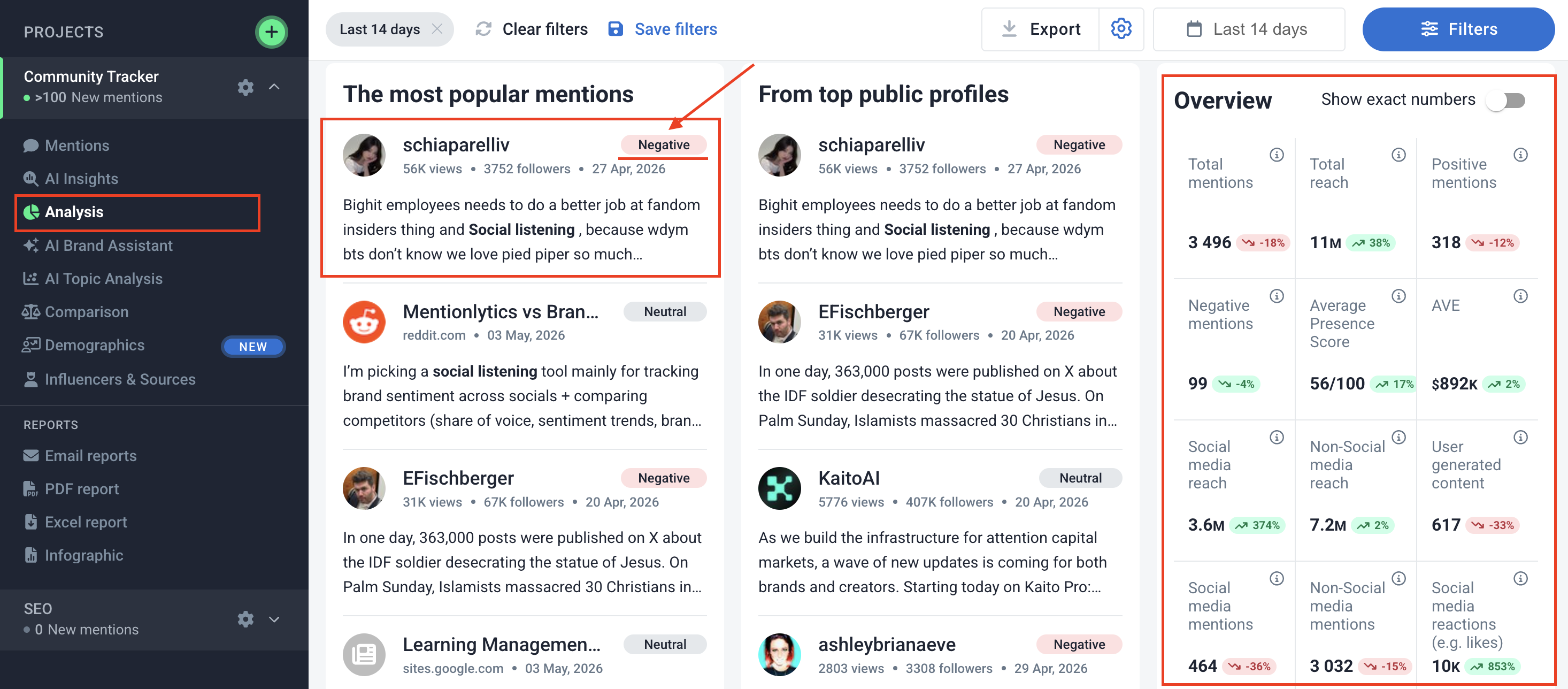
Over my 7 day test, it showed 3,496 mentions and 11M reach, along with sentiment breakdowns and a presence score. The numbers are useful, but what stood out more was the breakdown between sources.
A big chunk of reach came from non-social sources like news sites, not actual conversations.
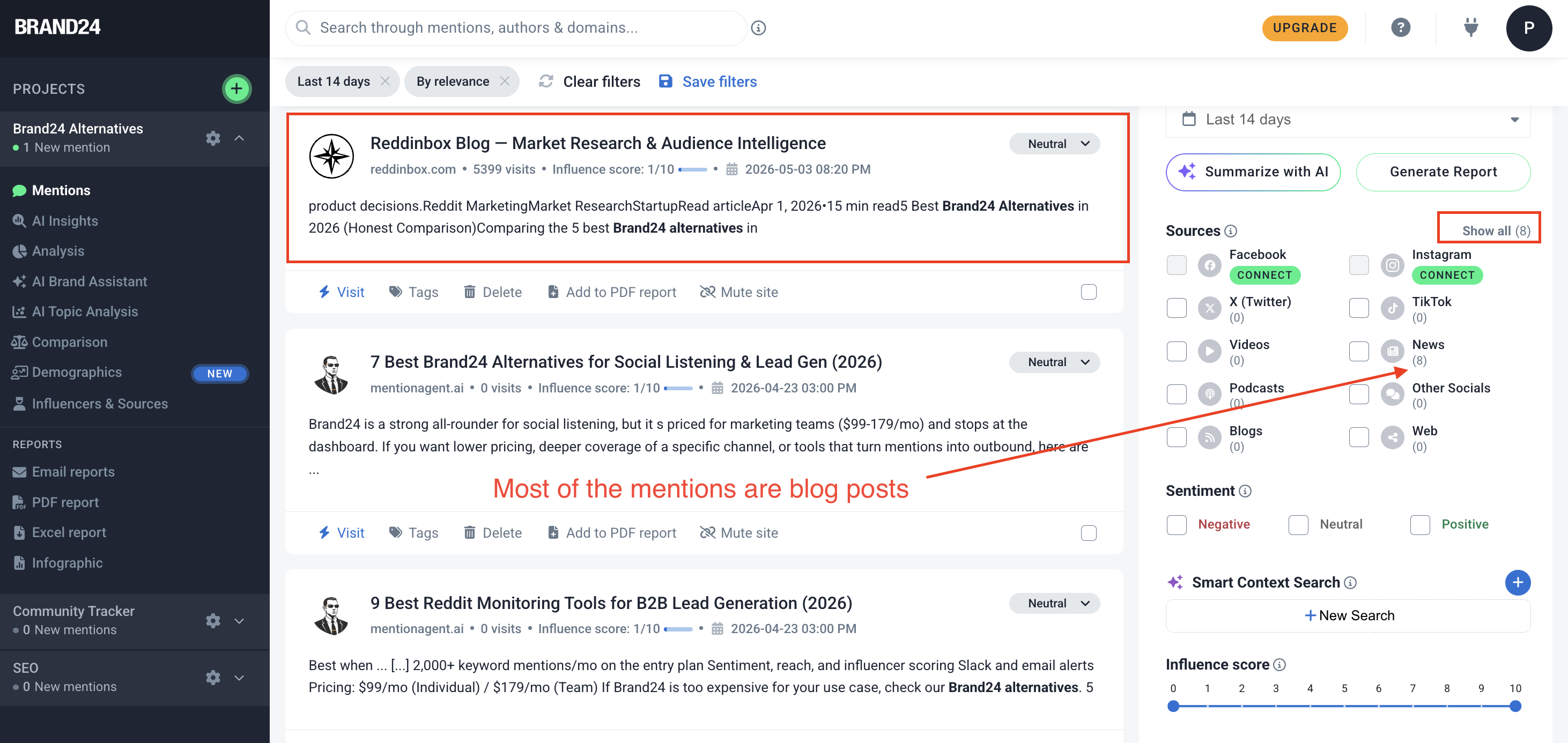
That’s important because it can inflate how “big” your keyword looks if you don’t look deeper.
Brand24 gives you the data clearly, but interpreting it is still on you.
AI Insights#
This was more useful than I expected.
Instead of just showing charts, it tries to explain what’s happening.
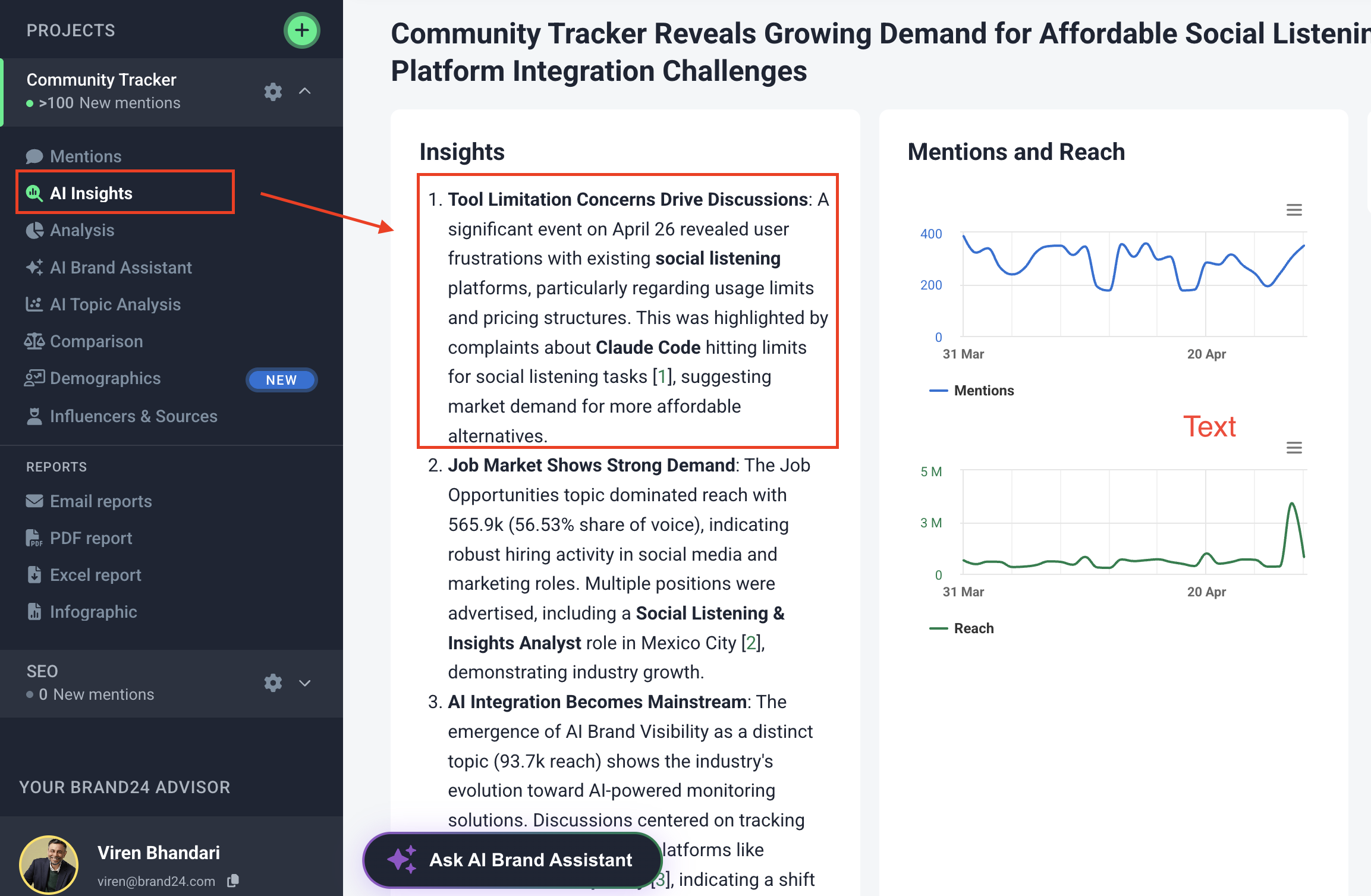
For example, it picked up a spike in conversations and linked it to frustration around pricing and tool limitations. That’s something I had noticed, but it saved me time connecting the dots.
That said, it’s not always that sharp. Some insights feel obvious and not relevant.
The quality depends on the data and the moment.
AI Topic Analysis#
This groups your mentions into themes automatically.
In my case, a huge portion of the conversation was actually job postings using the term “social listening”, not product discussions.
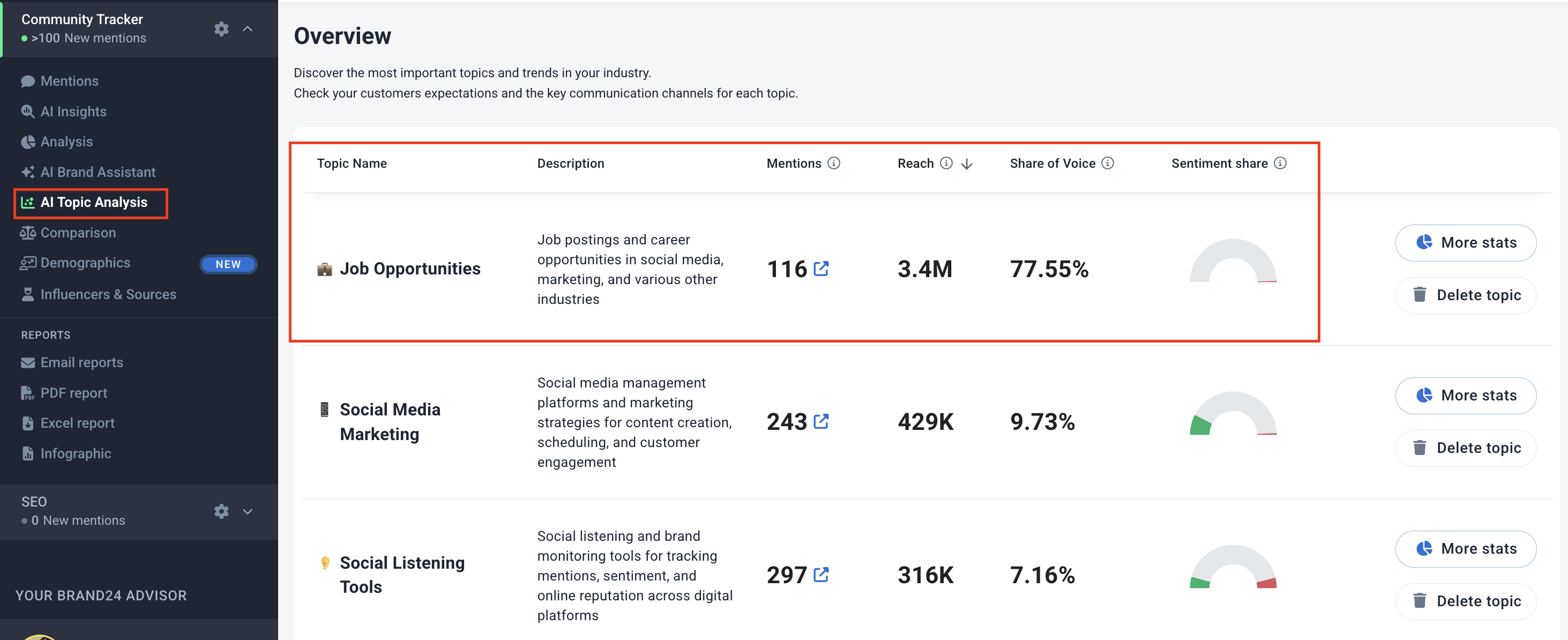
That’s something you’d easily miss if you only looked at total mentions or reach.
This feature helps you see what’s really driving your data.
But again, filtering out irrelevant clusters still takes manual effort.
AI Brand Assistant#
It’s basically a chat interface where you can ask questions about your data. I asked: “Where are users most frustrated with social listening tools?”
The output was structured, breaking down frustration by platform and highlighting key issues like pricing and sentiment accuracy. But not that relevant.
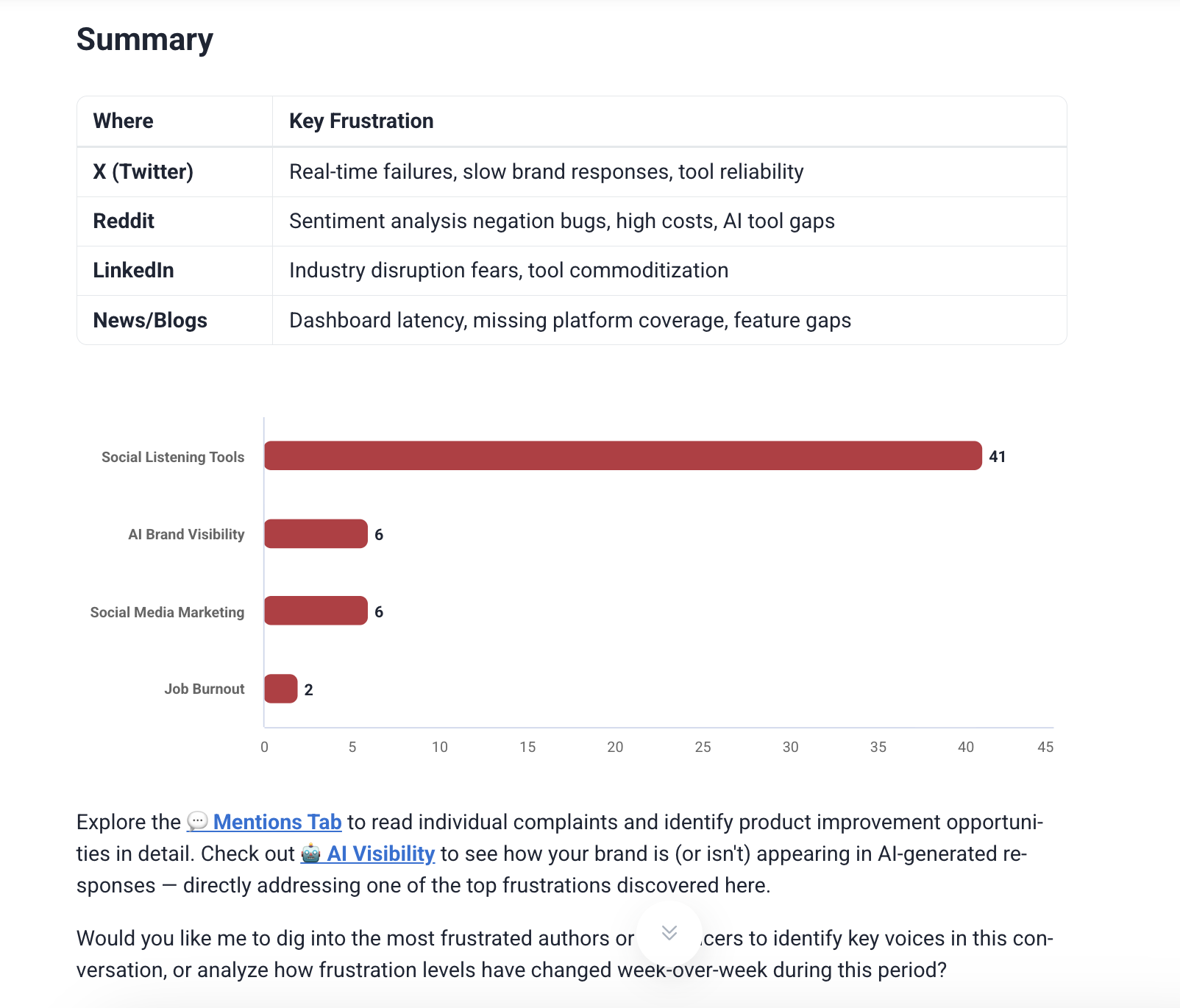
But here’s the catch: it only works if you ask the right questions. Nothing surfaces automatically. If you don’t dig, you won’t get much value from it.
Demographics#
Brand24 also shows who’s behind the conversations: age groups, gender split, and reach distribution.
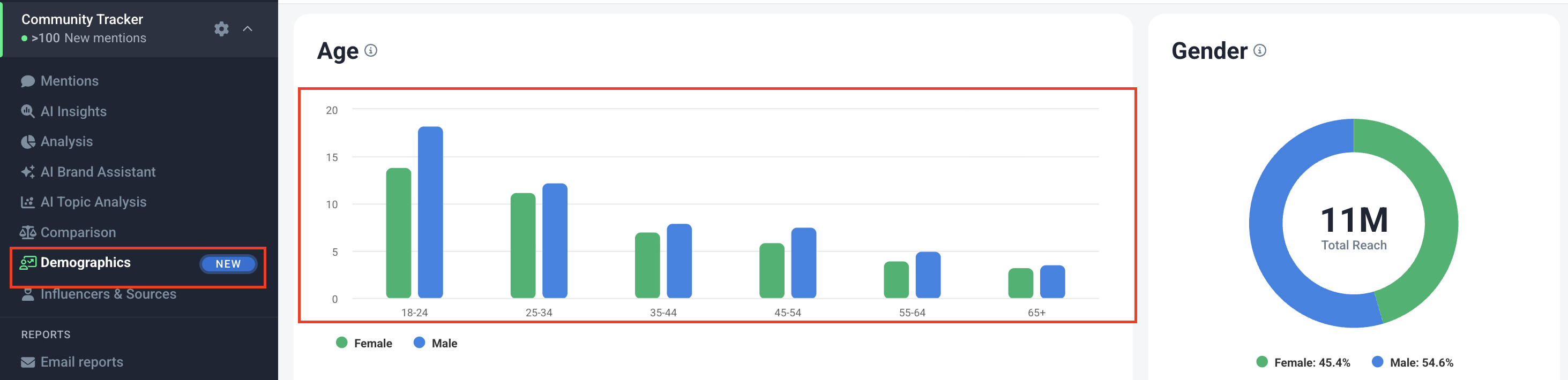
In my test, most activity came from the 18–24 group, with a slight male skew. For brand or PR teams, this is actually useful context when planning responses or campaigns.
Most tools lock this behind higher plans, so it’s a nice inclusion here.
Influencers and Sources#
This section ranks who is talking about your keyword.
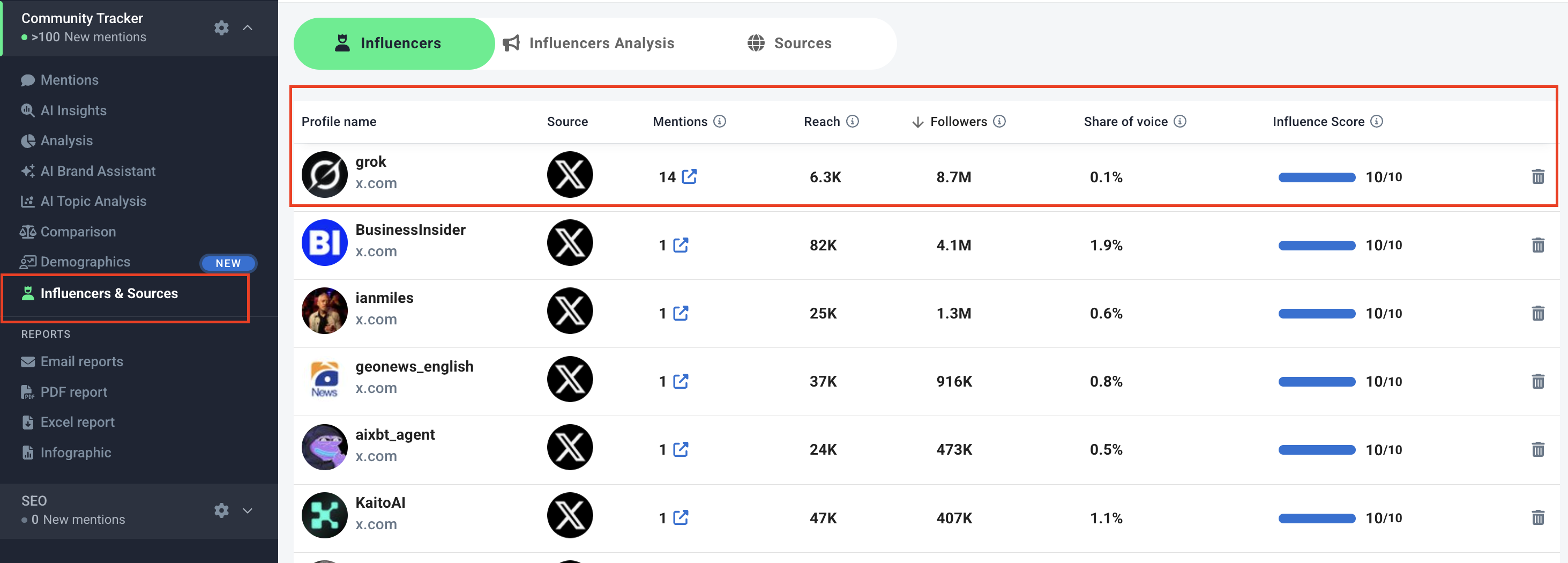
You can sort by followers, reach, or influence score, which helps clear up a common confusion: big accounts don’t always drive a big impact.
In my data, some accounts with fewer mentions had much higher reach than those posting more frequently and vise-versa.
That flexibility in sorting makes this feature genuinely useful, not just a vanity leaderboard.
Also Read: B2b Lead Generation on X: A Complete Strategy Guide
Brand24 Pricing (What You Actually Get)#
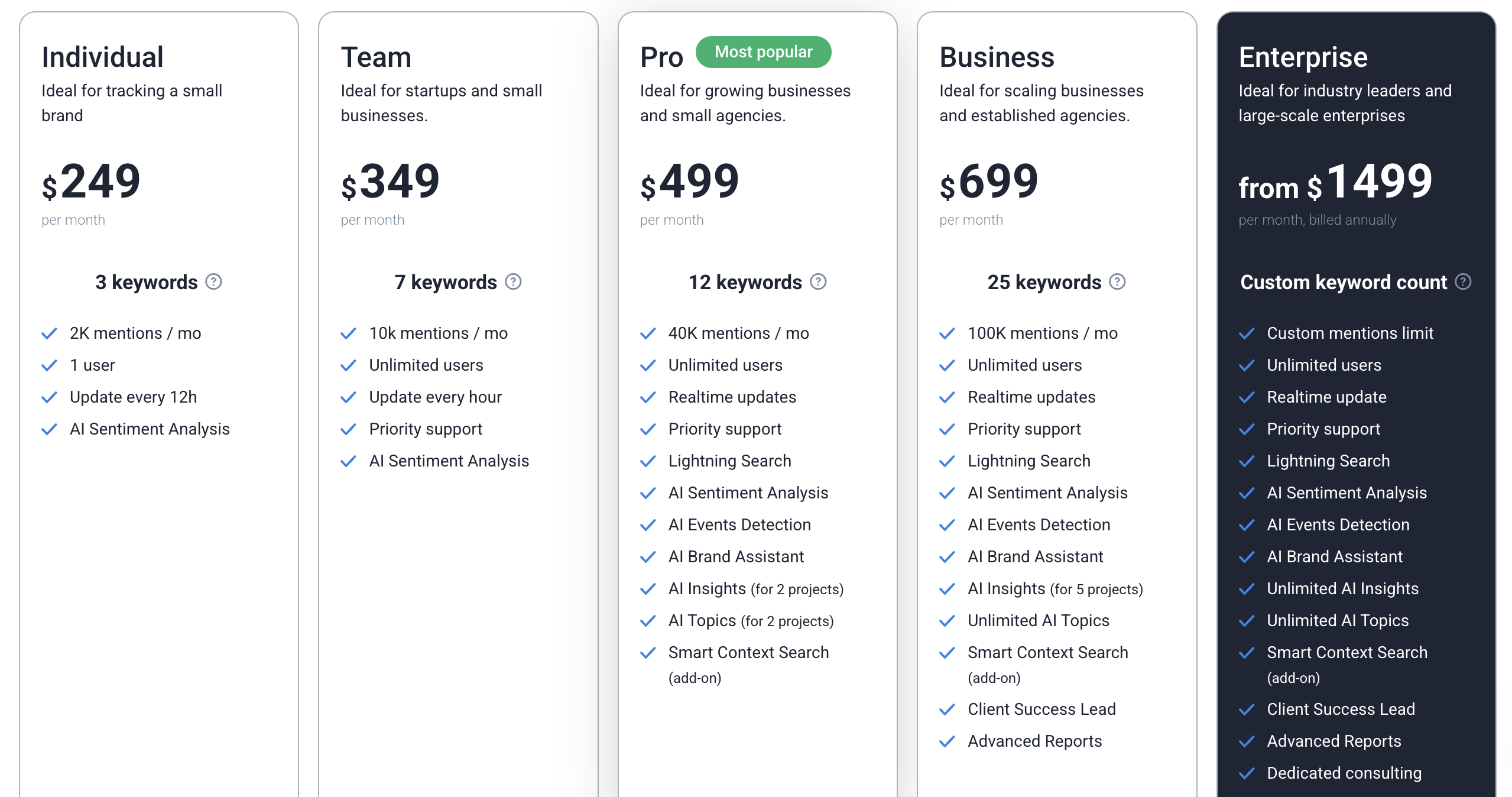
Brand24 is not a low-cost tool. It’s priced for teams that need consistent monitoring and reporting, not casual use.
The good part is you can start with a 14-day free trial to test it properly before committing.
Here’s how the plans break down:
Plan | Price (Monthly) | Best For | Key Limits |
Individual | $249 | Small brands | 3 keywords, 2K mentions, 1 user, 12h updates |
Team | $349 | Startups | 7 keywords, 10K mentions, unlimited users, hourly updates |
Pro | $499 | Growing teams | 12 keywords, 40K mentions, real-time updates, AI features |
Business | $699 | Agencies | 25 keywords, 100K mentions, advanced reporting |
Enterprise | From $1499 | Large teams | Custom limits, full AI access, dedicated support |
What stands out
Pricing scales mainly on keywords and mention limits, not just features
Most AI features unlock from the Pro plan onwards
Unlimited users start early (Team plan), which is useful for agencies
Real-time data only comes in Pro and above
What to watch for
Keyword limits matter more than they seem. If you want to track your brand + competitors, you’ll hit limits quickly on lower plans
Costs increase fast as you scale usage or add more tracking needs
Some features like Smart Context Search are still add-ons
Quick takeaway#
Brand24 is priced fairly for what it offers in monitoring and reporting. But the value depends on your use case.
If you only need brand tracking and reporting, even the lower plans can work.
If you want deeper insights, competitor tracking, and AI features, you’ll likely need Pro or higher.
Pros and Cons of Brand24 #
What Works Well | What Needs Work |
Wide source coverage across news, blogs, podcasts, X, TikTok | No way to mark mentions as “engaged” or track responses |
Fast, simple setup with no technical steps | Sentiment struggles with sarcasm and non-English nuance |
AI Insights helps explain spikes and trends (when accurate) | AI Insights quality is inconsistent |
AI Brand Assistant gives structured, usable answers | Requires the right prompts—nothing surfaces automatically |
Demographics data included (adds audience context) | Keyword limits restrict broader tracking (brand vs competitors) |
Ready-to-use reports (PDF, Excel, infographics) | Alerts lack context, you have to click in every time |
Topic Analysis groups mentions into themes automatically | High data volume without prioritization can feel overwhelming |
The Users Pain Points (Concluded by Real Usage + Reviews)#
Here are the things users dislikes the most about Brand24:
Sentiment accuracy breaks on nuance#
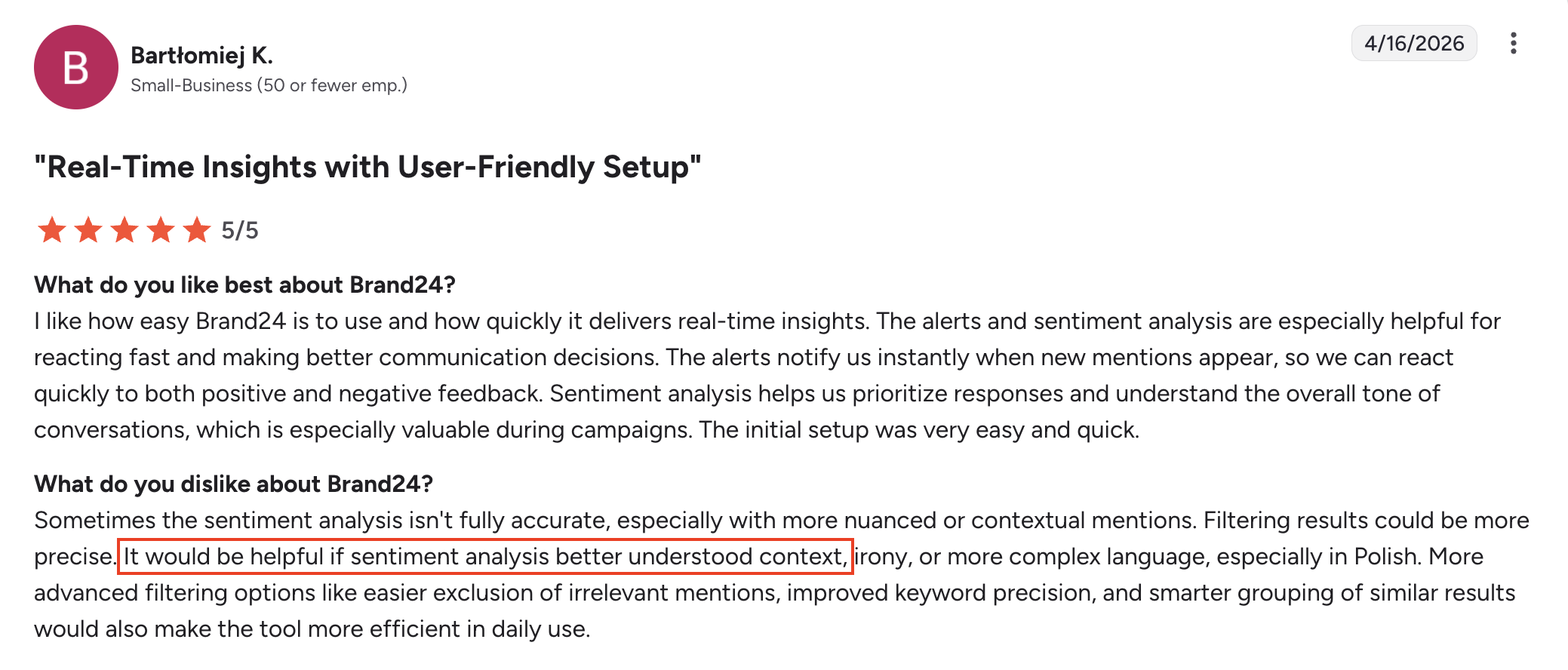
This isn’t a rare edge case, it showed up in my test too.
A clearly sarcastic post praising a brand’s terrible service was labeled as positive. Even inside Brand24’s own AI analysis, “sentiment analysis issues” came up as a common frustration.
The takeaway is simple: Brand24 reads words, not intent.
For basic monitoring, that’s fine. But if you’re making decisions based on sentiment (campaign performance, brand health), these small errors stack up quickly.
Keyword limits make competitive tracking harder than it should be #

If you’re only tracking your own brand, this isn’t a big issue.
But the moment you try to monitor competitors alongside your brand, the limits start to show. You either simplify your tracking or upgrade your plan.
For agencies, this might be expected. For smaller teams trying to do proper competitive monitoring, it becomes a real constraint.
Too much data, not enough prioritization#

Within the first hour of my test, I had pages of mentions already.
That’s the good part, Brand24 finds data fast.
The harder part is figuring out what actually matters right now. The feed is sorted by relevance, but not by urgency. It won’t tell you which mention needs a response today versus what can wait.
You can use filters or the AI assistant to dig deeper, but that requires effort. There’s no built-in prioritization layer guiding you.
Alerts don’t give enough context#
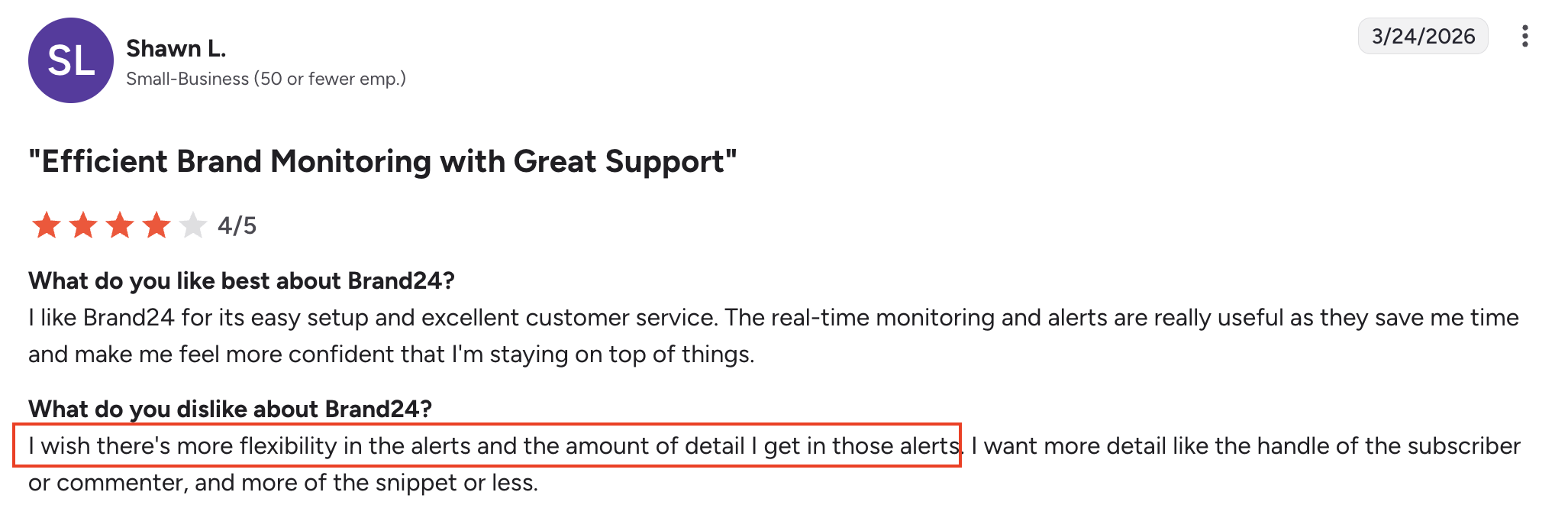
Alerts are useful, but a bit shallow.
You’ll get notified when something happens, but not enough context to act immediately.
For example, you won’t know if the mention came from someone with 500 followers or 500,000 without opening the tool.
That extra step sounds small, but if you’re actively monitoring and responding, it adds up fast over time.
Who Should Use Brand24#
Brand24 works best for teams that need a clear view of what’s being said across the internet, without going too deep into execution.
It’s a good fit if you want to monitor brand mentions across sources like news, blogs, social platforms, and podcasts in one place.
It also makes sense for PR teams and agencies that need regular client-ready reports, with exports like PDF and Excel already built in.
If your focus is on tracking sentiment, reach, and overall conversation trends, Brand24 handles that well. The dashboard is also simple enough for non-technical stakeholders to use without much setup.
If the goal goes beyond monitoring, like identifying which conversations to engage with or where you are missing opportunities, tools like CommunityTracker is more aligned with that use case.
In short, Brand24 is built for visibility and reporting, not for execution.
Also Read: 10 Best Social Media Competitor Analysis Tools in 2026
A Better Alternative to Brand24 for Acting on Signals: CommunityTracker.ai#
Brand24 is built for monitoring. It tracks mentions, shows sentiment, and gives you a view of what’s happening across the web.
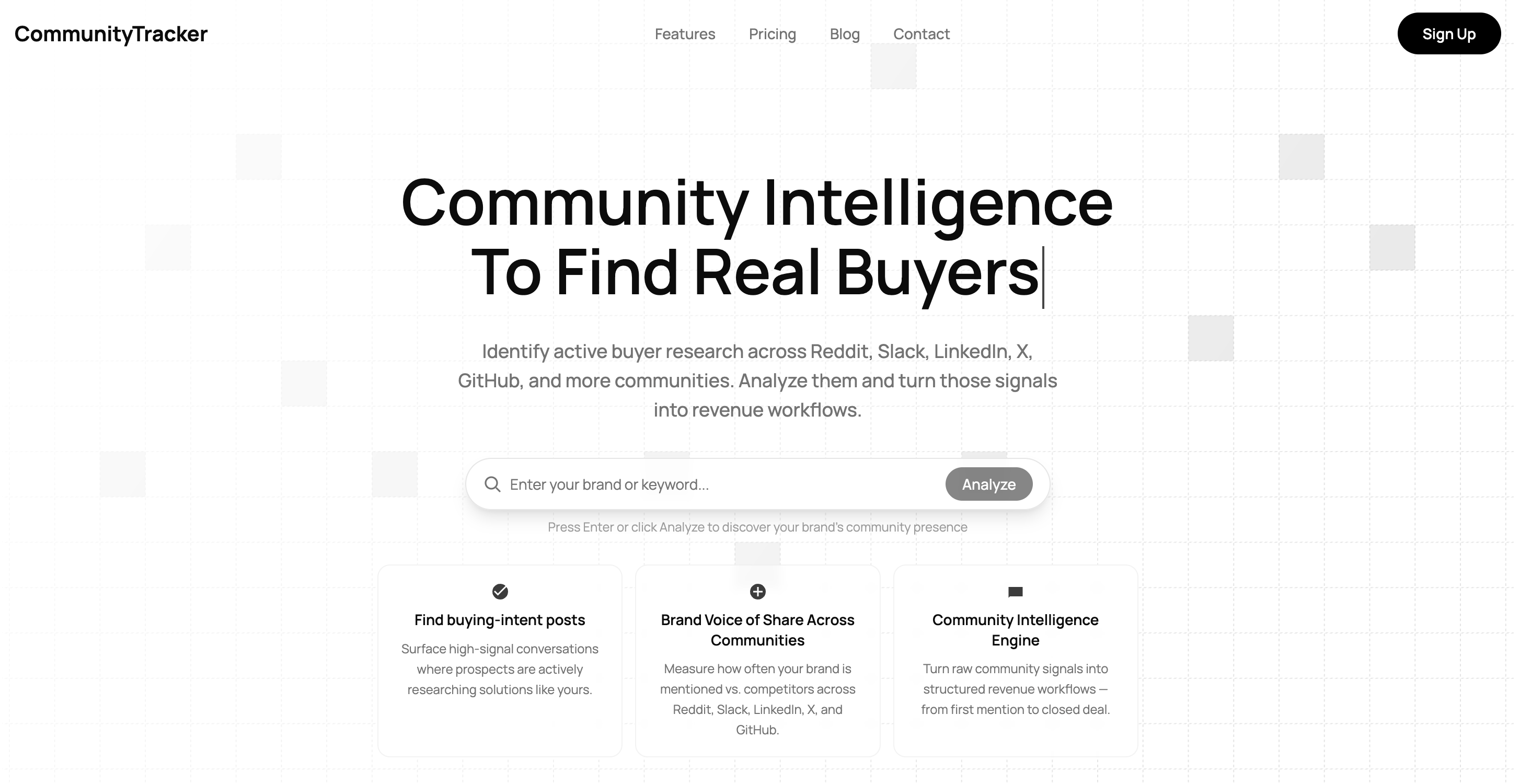
On the other hand, CommunityTracker focuses on buyer signal discovery inside communities like Reddit, LinkedIn, Slack, and X, where real decisions are being made.
Instead of collecting all mentions, it filters for conversations that show intent like comparisons, recommendations, or specific problems.
So to test the output, I compared Brand24 and CommunityTracker for the same keyword.
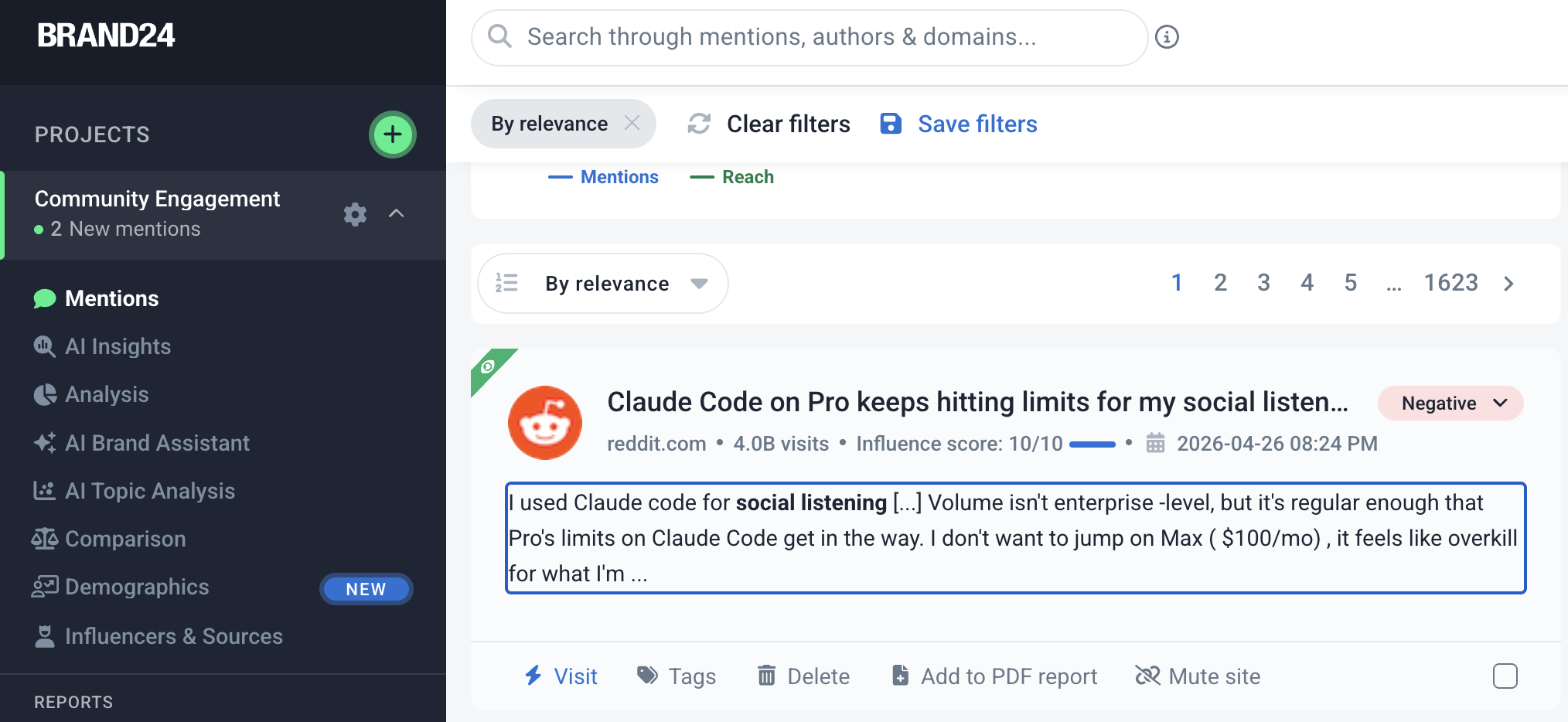
In Brand24 (see image above), a post about Claude Code hitting limits for social listening shows up in the feed. It’s related to the keyword, but not really actionable.
It’s more of a general complaint than a buying signal. And this is a broader issue.
You cannot add deeper context to your keyword, so the tool pulls in anything loosely related.
You end up manually filtering what matters.
In CommunityTracker (see images below),
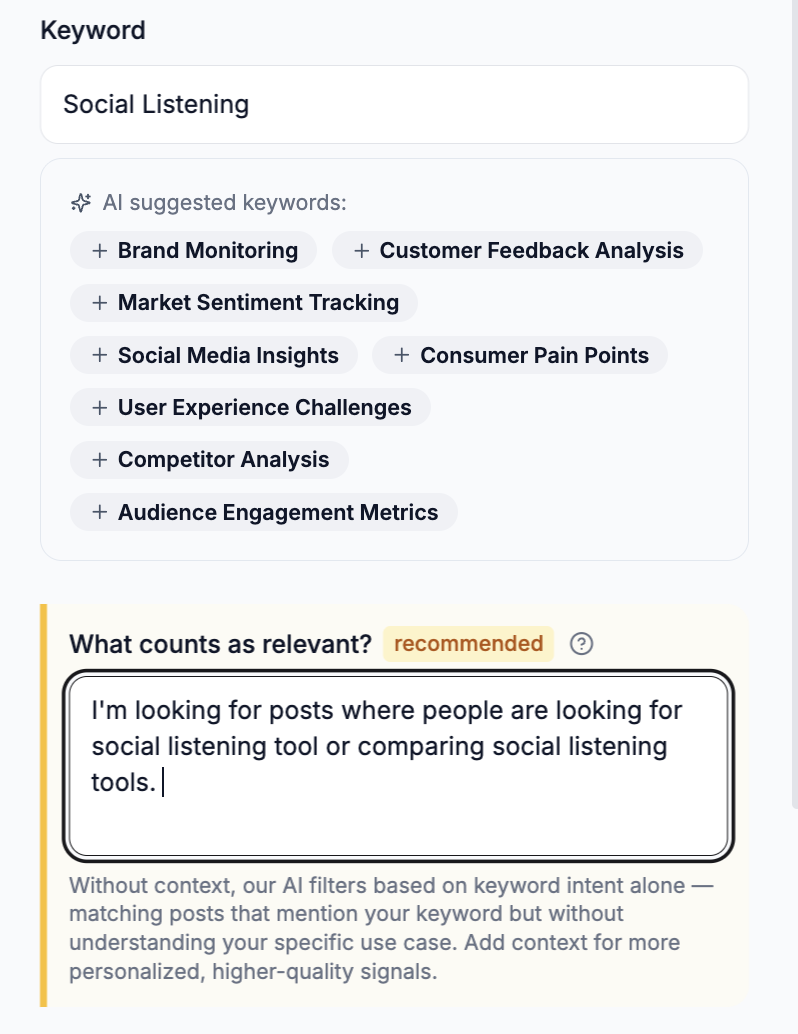
You can add context to your keywords, which helps reduce irrelevant mentions from the start.
Instead of pulling everything, it focuses on conversations that match the actual use case you care about.
The feed is not just a list of mentions. Each post is labeled by intent such as tool comparison, buying language, or active evaluation.
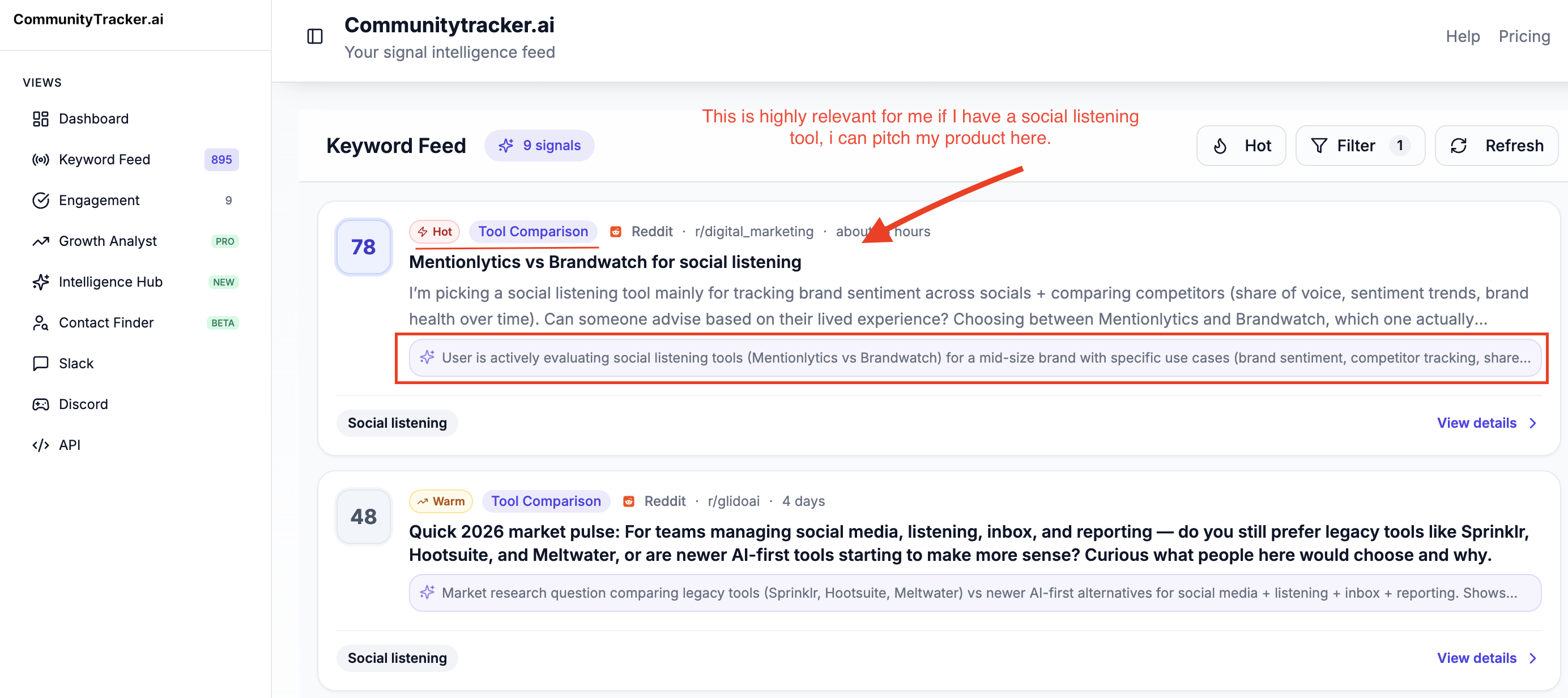
So instead of scanning everything, you can immediately focus on conversations tied to decisions.
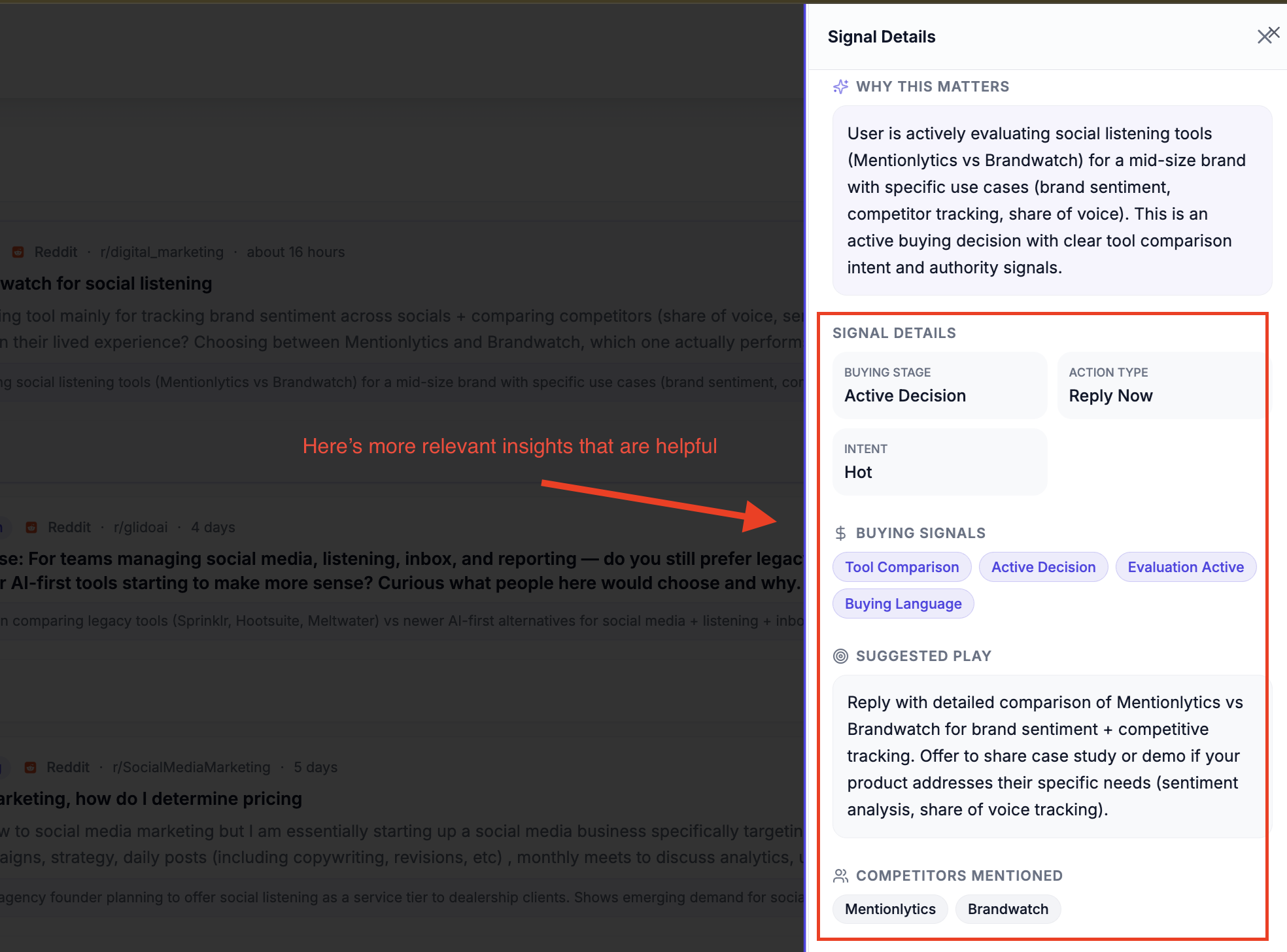
When you open a signal, you also see why it matters, the buying stage, and suggested next steps. That removes the need to interpret each thread manually.
There is also a clear suggested response, which turns the signal into something you can act on immediately.
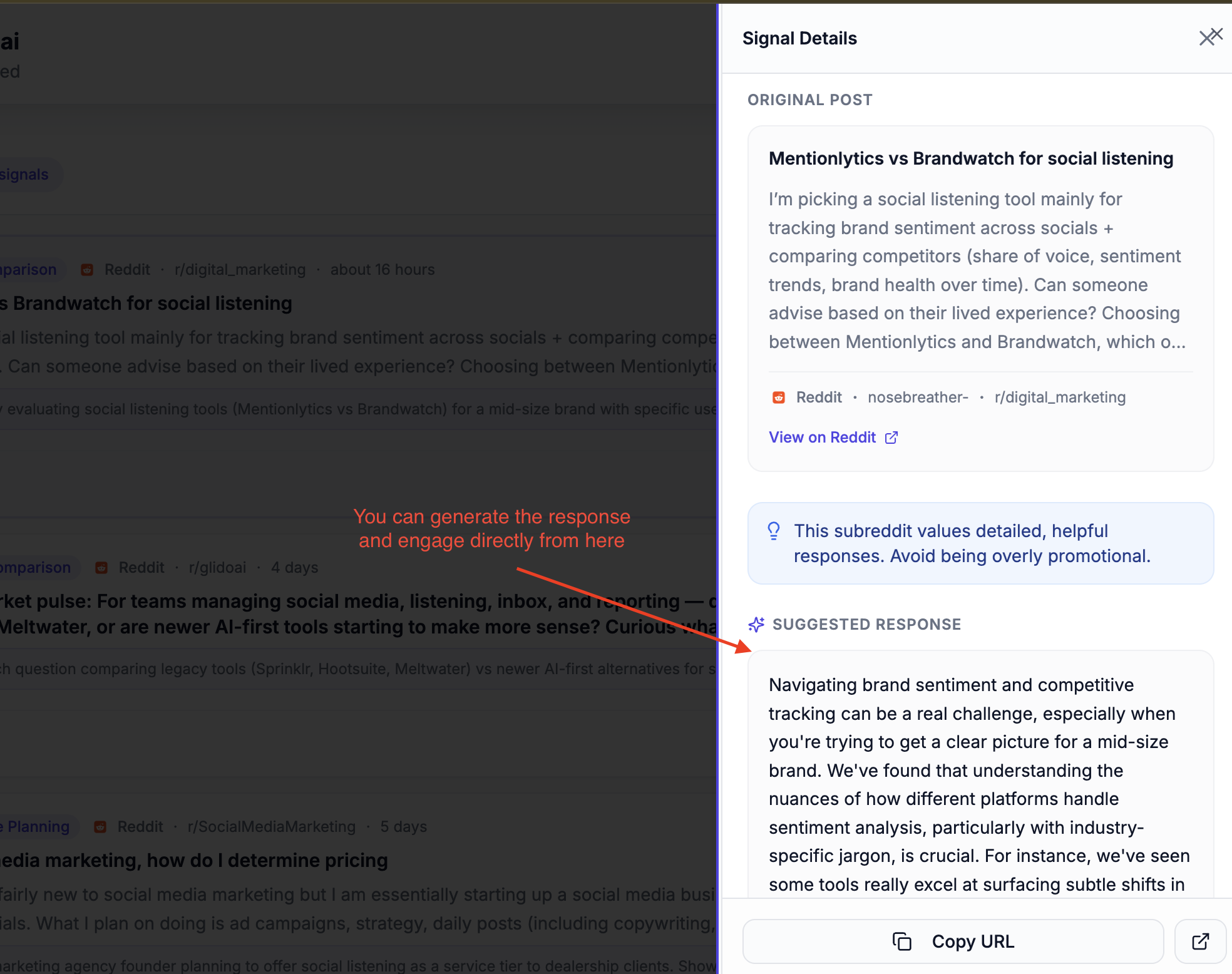
Another key difference is prioritization.
Brand24 shows all mentions in one stream. CommunityTracker highlights signals that need attention now, especially where users are actively discussing and comparing options.
This is the shift.
Brand24 gives you volume, but you filter it yourself.
CommunityTracker adds context upfront, filters noise, and surfaces conversations that are more likely to lead to action.
If the goal is just finding mentions, Brand24 works. If the goal is to find and act on real opportunities, this approach is more direct.
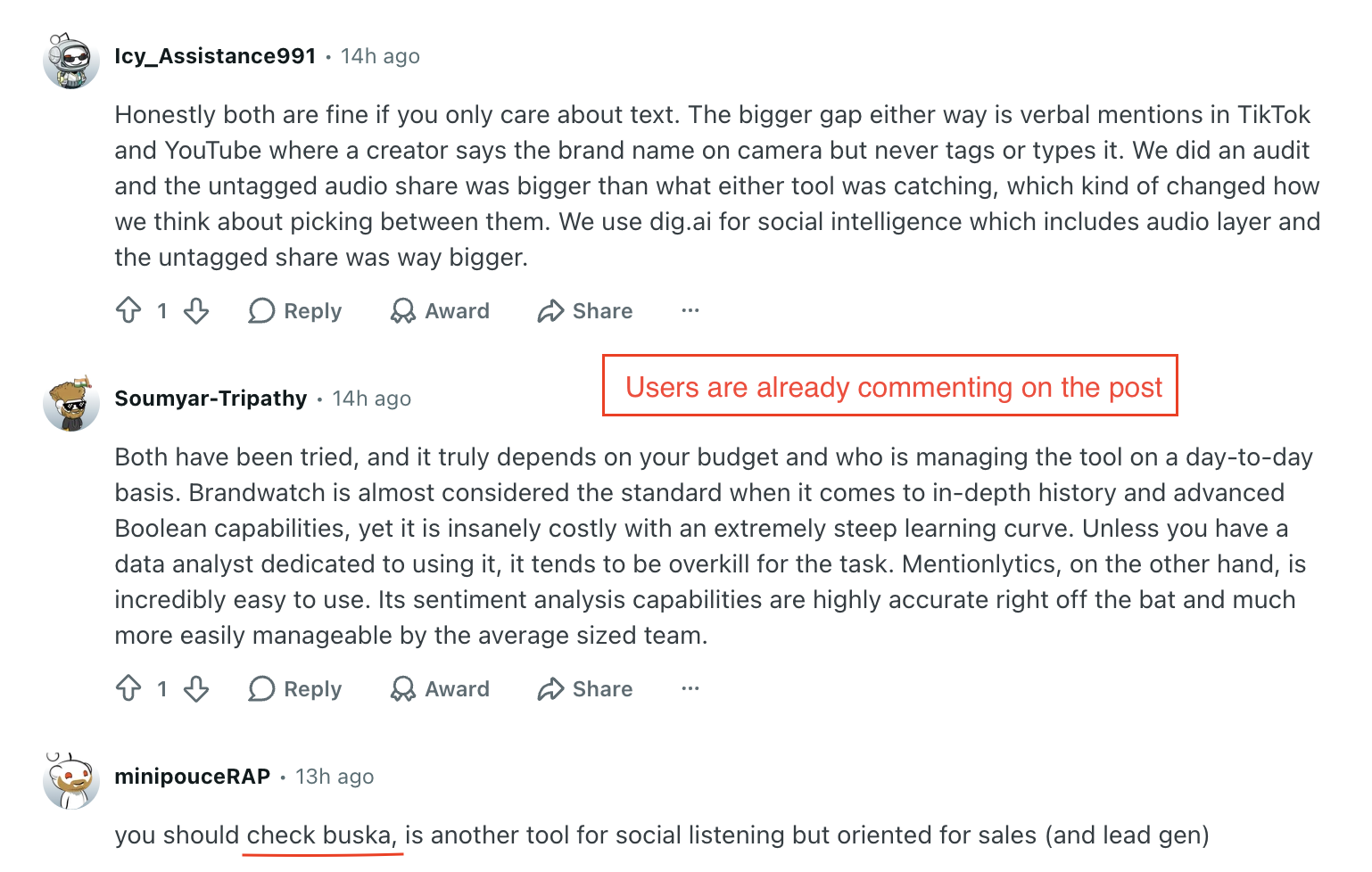
P.S: You can see in the image above that users are already engaging in the post.
Related Read: 5 Best Brand24 Alternatives & Competitors for Social Mentions in 2026
Brand 24 Vs CommunityTracker.ai (Quick Comparison table)#
Criteria | Brand24 | CommunityTracker |
Core purpose | Social listening and mention tracking | Buyer signal discovery and action |
Data type | All mentions (broad coverage) | High-intent signals (filtered) |
Keyword control | Basic keywords, limited context control | Context-based keyword input to reduce noise |
Feed structure | Stream of mentions | Intent-labeled signals (comparison, buying, problem) |
AI usage | Insights and assistant (prompt-based) | Intent detection + suggested actions (auto) |
Prioritization | Sorted by relevance or reach | Highlights high-priority, actionable signals |
Competitive analysis | High-level share of voice | Topic + platform-level gaps and SOV |
Actionability | Manual interpretation required | Built-in next steps and weekly action plans |
Coverage | News, blogs, podcasts, social platforms | Focused on communities (Reddit, LinkedIn, X, etc.) |
Best for | Monitoring and reporting | Acting on conversations and generating pipeline |
Is Brand24 Worth It?#
For most brand monitoring use cases, yes.
Brand24 delivers on what it promises. The coverage is strong, setup is quick, and the reporting tools are reliable.
The AI features are also improving and can save time when used properly. For PR teams, agencies, or anyone focused on tracking brand health and reporting it, it does the job well.
Where it starts to fall short is when you expect more than monitoring.
If the goal is to figure out where to engage, which conversations matter, or how you compare against competitors in specific communities, Brand24 does not surface that directly.
The data is there, but you still have to interpret it and decide what to do next.
Bottom line#
Brand24 is a good for tracking and understanding conversations.
But if the goal is to act on those conversations, you will end up doing a lot of the work yourself or relying on tools like CommunityTracker that focus more on turning signals into actions.
Schedule for a demo of CommunityTracker and I'll set you up for a trial.
FAQs#
What is Brand24 used for?
Brand24 is a social listening tool used to track mentions of a brand, keyword, or topic across sources like news, blogs, social media, and podcasts. It helps teams monitor sentiment, reach, and overall conversation trends.
Is Brand24 good for social listening?
Yes, Brand24 is reliable for social listening. It offers strong coverage, fast setup, and useful reporting features. It works well for tracking what is being said, especially for PR and brand monitoring use cases.
What are the limitations of Brand24?
The main limitation is actionability. Brand24 shows mentions and insights, but it does not clearly tell you which conversations to engage with or what to do next. Sentiment accuracy and keyword noise can also be challenges.
Can Brand24 be used for lead generation or outreach?
Not directly. While it can surface conversations, you still need to manually identify opportunities and decide how to act on them. It is more suited for monitoring than for generating pipelines.
What is a good alternative to Brand24?
If your goal is to act on conversations rather than just track them, CommunityTracker is a strong alternative. It focuses on high-intent signals, competitive gaps, and suggested actions.
How is CommunityTracker different from Brand24?
Brand24 focuses on broad mention tracking, while CommunityTracker focuses on filtering high-intent conversations and helping you act on them. It adds context, intent labels, and next steps instead of just showing raw data.
Is Brand24 worth it for small teams? Yes, if the need is basic monitoring and reporting. But if a small team wants to prioritize engagement and growth from conversations, they may need additional tools alongside Brand24.
Does Brand24 track competitors? Yes, you can track competitor keywords, but keyword limits may restrict how many you can monitor effectively at the same time.
Does Brand24 provide reports for clients? Yes, Brand24 offers ready-to-use reports in formats like PDF and Excel, which are useful for agencies and stakeholder updates.
Which tool is better for acting on social listening data? For acting on data, CommunityTracker is more aligned. It focuses on identifying high-intent conversations and turning them into actions, while Brand24 focuses on tracking and reporting.