HubSpot for Cold Email: My Review of Sequences, Limits and Pricing
HubSpot cold email in 2027: sequences start at $90 a seat plus $1,500 onboarding, each rep sends from one inbox, and the policy bars bought lists.
Adarsh Kumar
GTM Expert
Founder — CommunityTracker, Miraa.io, and Infraboxes
Your contacts already live in HubSpot, and you want to know if you can send cold email from there instead of paying for a second tool.
Get it wrong and you pay for seats before you learn what the tool will and won’t let you send.
HubSpot bars purchased and third-party lists outright, and it can review your lists and take enforcement action. Sequences start on Professional at $90 a seat a month, billed yearly, plus a $1,500 onboarding fee.
This HubSpot cold email review shows where HubSpot fits your outreach and where it stops. I’d use it for follow-ups to people who already talk to you, and keep cold sends to strangers out of it.
I read the pricing pages, the anti-spam policy, the product catalog, four HubSpot help articles and dated reviews on G2 and TrustRadius. I have no HubSpot account, so nothing here comes from sending.
TL;DR: HubSpot vs CommunityTracker
HubSpot Sales Hub fits follow-ups to people who already talk to you. It’s the wrong tool for emailing strangers, and it costs $90 a seat before you add a lead source.
HubSpot Sales Hub - Best for follow-ups and sequences to contacts who opted in or already talk to you, with every email logged in the CRM.
CommunityTracker - Best for a GTM workflow that finds accounts worth writing to, then emails them on a paid plan.
HubSpot Sales Hub | CommunityTracker | |
|---|---|---|
Main job | CRM with sales email, tracking and sequences | Account intelligence with outreach |
Who you email | Contacts who gave consent, under HubSpot’s policy | Accounts it flags as ready to buy |
Sequences | Professional and Enterprise | On every paid plan |
Outreach channels | Sequence emails; LinkedIn actions need a Sales Navigator subscription | Email outreach on paid plans |
Email volume | 500 sends per user a day on Professional, 1,000 on Enterprise | Starter up to 100 warm emails a month; Pro unlimited |
Entry price | Free $0; Starter from $7 a seat; Professional $90 a seat plus $1,500 onboarding | Free $0; Starter $39; Pro $99; Advanced $199 |
Trial | Free plan, no card | 7 days of Pro for $4.99, once |
How I Put This Review Together
I checked everything on Nov 10, 2026, then rechecked the Sales Hub pricing page in US dollars on Nov 23, 2026, and every price matched. I rechecked the Marketing Hub prices the same day, and they matched too. I read HubSpot’s Sales Hub and Marketing Hub pricing pages in US dollars, its anti-spam and acceptable use policies, its product and services catalog and its email tracking page. I read four HubSpot Knowledge Base articles on connecting an inbox, creating sequences, enrolling contacts and open tracking, each dated between Sep 28 and Nov 9, 2026. I read the G2 pages for Sales Hub and Marketing Hub on Nov 10 and the TrustRadius page for Sales Hub on Nov 23, and I quote only reviews that show a date and a reviewer name or role.
I did not create a HubSpot portal, connect an inbox or send a sequence. So I make no claim about deliverability, inbox placement or reply rates.
For CommunityTracker, I used its saved pricing page only.
I’ve spent about 5 years in GTM at startups I helped scale from 0 to $5M+ ARR. My question throughout: what happens to a small team’s domain and budget when it points HubSpot at strangers?
What Is HubSpot Cold Email?
HubSpot is a CRM. Sales teams use it to manage contacts, track deals and send email. When people say “HubSpot cold email,” they mean one of two products, and the two behave differently.
Marketing Hub | Sales Hub | |
|---|---|---|
What it sends | Bulk marketing email: newsletters, updates, re-engagement | One-to-one email and sequences from your own inbox |
Who it’s for | Contacts who opted in | Prospects a rep is working |
How it bills email | By marketing contacts, with a monthly send limit tied to them | By seat |
Closest to cold outreach? | No | Yes |
Marketing Hub is the wrong tool for cold email from the start. Its send limit is a multiple of the marketing contacts you pay for: 5 sends per contact a month on Starter, 10 times your contact tier on Professional, 20 times on Enterprise. You pay for every stranger you load as a marketing contact.
Sales Hub is closer. Sequence emails are one-to-one sales emails, and they go out through the rep’s connected work inbox, not through HubSpot’s marketing servers.
HubSpot’s email tools are built for contacts who already know you: someone who filled a form, downloaded a guide or already sits in your CRM. A cold email reaches a stranger who never opted in.
HubSpot’s Anti-Spam Rules on Cold Lists
The anti-spam policy decides the answer. It covers “all message types,” including outbound messages sent directly through HubSpot. Four clauses matter:
Section 2.1 defines spam to include “unsolicited bulk messages sent to recipients who have not provided verifiable, explicit consent.”
Section 2.1.1 says you are “strictly prohibited from using the HubSpot Services to directly contact recipients from purchased, rented, borrowed, or other third-party lists.”
Section 3.1 says messages “must be sent only to recipients who have” given express, verifiable consent and opted in through a documented process.
Section 3.6 asks you to keep bounce rates below 5% and spam complaint rates below 0.1%.
Section 4.1 lets HubSpot review your lists, ask for proof of consent and take enforcement action.
A bought list in a HubSpot sequence breaks Section 2.1.1 on the first send.
What HubSpot Asks of Your Sending Setup
The same policy sets rules for how you send, as well as who you send to. Even for warm follow-ups, check these before you turn on a sequence:
Authentication. Section 3.2 says you “must properly configure SPF, DKIM, and DMARC records” and use valid DNS for your sending domains.
Volume. Section 3.5 says HubSpot keeps daily limits “based on account type and history,” hourly rate limits, and “automatic throttling for accounts showing signs of abuse.”
Unsubscribes. Section 3.4 asks for one-click unsubscribe in every marketing message and opt-outs honored “across all communication channels.”
List hygiene. Section 3.6 expects you to remove hard bounces at once and suppress inactive contacts.
Those rules mean HubSpot watches the account that also holds your customer records. If a cold campaign trips a limit, the account your whole sales team works from carries the flag.
Your inbox has to qualify too. A View-Only seat can’t connect a work inbox, and HubSpot doesn’t support Gmail accounts on Google’s Advanced Protection Program, Microsoft 365 shared mailboxes, or inboxes hosted on Amazon SES or WorkMail. A team inbox connected to the conversations tool can’t send sequence emails at all.
How HubSpot Sequences Work, Step by Step
If you still want to send prospecting email through HubSpot to people who fit the policy, Sales Hub is where you start.
Connect your inbox and install the extension. You need a connected personal work inbox before you can enroll anyone. The HubSpot Sales extension connects Gmail, Outlook or Office 365 to the CRM.
Build a sequence. You write each email step, set the delay between steps and add personalization tokens that pull first name, company and job title from the contact record. Each sequence holds up to 10 email templates, with as many task reminders as you want.
Add LinkedIn steps if you pay for Sales Navigator. LinkedIn actions in a sequence need a Sales Navigator subscription. A LinkedIn step is a task: the note you write for an InMail or connection request doesn’t fill in the Sales Navigator box, so the rep pastes it.
Enroll contacts. Professional allows 5,000 sequences per account and up to 500 email sends per user a day; Enterprise raises that to 1,000. A user with bulk permission can enroll up to 50 contacts at once, and HubSpot then sends at most three emails a minute.
Let replies stop it. A contact who replies or books a meeting from the sequence is unenrolled. You can set that trigger to unenroll everyone at the same company.
Watch the tracking. HubSpot alerts you when someone opens an email, clicks a link or downloads a document.
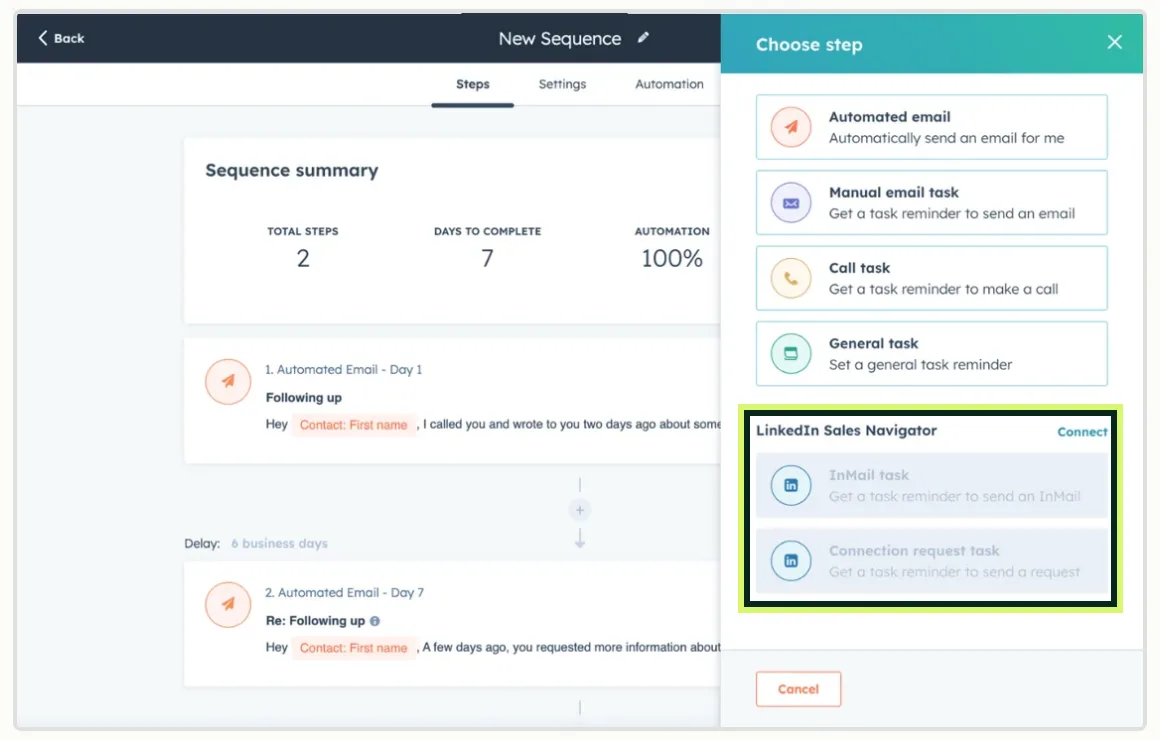
A sample screen from HubSpot’s sales automation page on Nov 23, 2026, not from an account I opened: a two-step sequence, with a Choose step panel that lists automated email, manual email, call and general tasks, plus LinkedIn Sales Navigator InMail and connection request tasks.
Three rules change how you plan volume. Each contact sits in one sequence at a time. The daily send limit per user is fixed: HubSpot can’t raise it, and a contact enrolled past it doesn’t enroll. And to send from a teammate’s inbox you need a workflow, because a manual enrollment must use one of your own connected accounts.
Where this stops working for cold outreach: every sequence email goes out from one rep’s own inbox, under that rep’s domain, within a cap HubSpot won’t lift. That holds for a handful of prospects a day and breaks at volume.
The HubSpot Cold Email Features You’d Use
Sales email templates
You can save any email as a template, share it with the team and fill it with tokens such as first name, company, job title and lifecycle stage. The Free plan allows 3 templates per account; paid Sales Hub plans allow up to 10,000.
One rep writes a version that gets replies, and everyone else pulls from it.
Email tracking and read receipts
HubSpot tracks “every open, click, and interaction,” and works in Gmail, Google Workspace, Outlook and Office 365. Alerts can arrive in Sales Hub, your browser or your desktop. HubSpot sells the tracking tool with “Free and premium features available.” Click tracking on one-to-one email needs an assigned Sales seat.
Opens come from a tracking pixel, an invisible one-pixel image HubSpot embeds in each tracked email. An open won’t record when:
The email is written or sent in plain text.
The recipient’s email client doesn’t download images on its own.
A corporate filter strips images from incoming mail.
A strict spam filter blocks images or link tracking, and it may file the email as spam.
If the pixel never loads but the contact clicks a tracked link or replies, HubSpot may record one inferred open with the same timestamp. Forwarded emails keep the original pixel, so a colleague’s open can land on your contact’s record, and a tracked email to several people on CC or BCC shares one pixel.
For cold outreach, read that list as a warning about open rates. Corporate buyers behind image filters show as unopened, and the spam filter note means tracking itself can count against you.
The inbox extension
Every email sent through the extension logs to the contact record on its own. That removes manual data entry for the rep.
Sequences and workflows
Sequences run the email steps. Workflows handle the rest: lifecycle stage updates, internal alerts and list enrollment. Sequences no longer update a contact’s lifecycle stage themselves, so you set that with a workflow action. Starter includes up to 50 workflows with restricted triggers, Professional 300 and Enterprise 1,000, and only Enterprise can trigger sequences from a workflow.
Breeze AI email writing
HubSpot’s Breeze AI drafts subject lines and email bodies from a short prompt and can pull context from the contact record. Treat its drafts as drafts. G2’s AI summary of Sales Hub reviews says outputs “still need checking.”
HubSpot Credits, intent signals and the prospecting agent
HubSpot now ships its own prospecting layer. The Sales Hub Starter card lists a prospecting agent and intent signals, and each plan comes with HubSpot Credits: 500 on Starter, 3,000 on Professional and 5,000 on Enterprise. Credits “are used when features take action across the platform,” and you can buy packs or pay as you go.
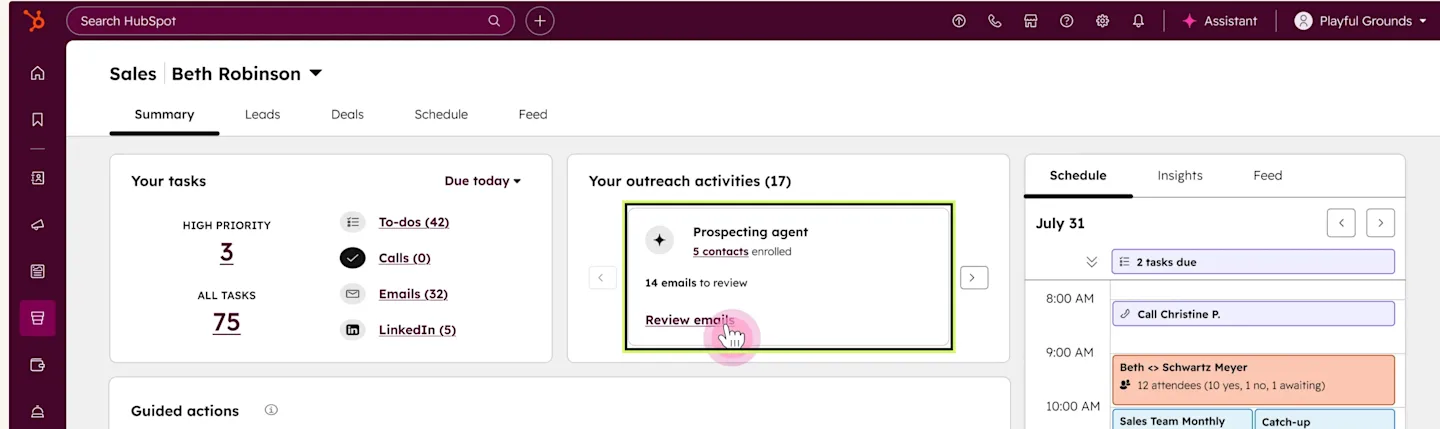
A sample screen from HubSpot’s Sales Hub product page on Nov 23, 2026, not from an account I opened: a Sales workspace with a task summary, an outreach activities card for a prospecting agent with 14 emails to review, and a day schedule.
HubSpot doesn’t publish how many credits a prospecting run uses or what it counts as an intent signal, so I can’t price it. If you’re weighing HubSpot against a signal tool, ask for both numbers in writing.
HubSpot Cold Email Pricing
On Nov 23, 2026, in US dollars, Sales Hub Starter lists at $20 a seat, discounted to $7 yearly for new customers, and Professional carries a one-time onboarding fee. The $10 monthly Starter price comes from the monthly view of the same page on Nov 23.
Sales Hub
Plan | Billed yearly | Billed monthly | What matters for outbound |
|---|---|---|---|
Free | $0 | $0 | Up to 2 users, no card, 3 templates |
Starter | $7 a seat a month | $10 a seat a month | New-customer price; list price $20 |
Professional | $90 a seat a month | $100 a seat a month, on an annual commitment | Sequences; $1,500 one-time onboarding |
Enterprise | $150 a seat a month | $150 a seat a month (sold through sales) | 1,000 sends per user a day; $3,500 one-time onboarding |
Starter’s $7 and $10 are discounts “available for new customers only,” shown against a struck $20. Plan your second year at the list price until HubSpot quotes you otherwise.
Sequences don’t appear until Professional. That’s the plan you need for cold outreach automation, so price from there.
Marketing Hub
Plan | Billed yearly | Seats and contacts | Onboarding |
|---|---|---|---|
Free | $0 | Up to 2 users | None |
Starter | $7 a seat a month ($10 monthly; list $20) | 1,000 marketing contacts | None listed |
Professional | $800 a month ($890 monthly) | 3 core seats, extra seats from $45; 2,000 marketing contacts | $3,000 one-time |
Enterprise | $3,600 a month | 5 core seats, extra seats from $75; 10,000 marketing contacts | $7,000 one-time |
What a 5-rep team pays for sequences
Five reps on Sales Hub Professional, billed yearly: $90 × 5 × 12 = $5,400, plus the $1,500 onboarding, is $6,900 for year one. Paid monthly on the annual commitment, it’s $6,000 plus $1,500, or $7,500.
For a two-person founding team, the gap between plans is wide. Two Starter seats at the new-customer yearly price cost $7 × 2 × 12 = $168 a year, but Starter has no sequences. Two Professional seats cost $90 × 2 × 12 = $2,160, plus $1,500 onboarding, or $3,660 for year one. So the first automated follow-up you send from HubSpot costs you about $3,500 more than the plan below it.
That buys sequences, tracking and the CRM. It buys no lead data, and every send still goes through each rep’s own inbox. If you add LinkedIn steps, each rep also needs a Sales Navigator subscription on top.
At five reps on Professional, the fixed daily cap sets your ceiling: 5 × 500 = 2,500 sequence emails a day, and HubSpot won’t raise it.
What Reviewers Say About HubSpot for Outreach
Sales Hub holds 4.4 from 14,389 reviews on G2, and Marketing Hub holds 4.4 from 16,064. TrustRadius lists Sales Hub at 8.9 out of 10 from 584 ratings.
I quote only reviews that show a date and a reviewer name or role. That gives 11 reviews, 3 on G2 and 8 on TrustRadius, and TrustRadius marks 4 of those 8 as incentivized. Across the 11, I count 18 positive points and 21 negative ones. Eight of these 11 reviews are older than 12 months, and I have marked them in the table.
Reviewer | What they liked | What they didn’t like |
|---|---|---|
Div G., Lead Sales Development, Sep 23, 2026 (G2, Sales Hub) | email tracking, templates and sequences save time on outreach; the Gmail, Outlook and LinkedIn integrations work smoothly | the price climbs fast on Professional and Enterprise as you add users; sequences and tracking hit sending limits at times |
Nykko F., Oct 6, 2026 (G2, Sales Hub) | pipelines are clear and meeting booking is easy (review title) | meeting scheduling can’t route prospects by location; a workflow doesn’t enrol records that already match |
Kelly S., Sep 22, 2026 (G2, Marketing Hub) | Nothing quoted | email tracking stops working fairly often; staff members often get booted from the email integration |
Eddien Laroya, Business Development Executive, Mar 28, 2025 (TrustRadius, incentivized, reviewed more than 12 months before this article) | shows open rates on cold email outreach; dashboard reports are easy to build | no automatic subject line suggestions; can’t sync sent LinkedIn messages; weak cold calling features |
Verified user, C-level executive, 1 to 10 employees, Dec 18, 2024 (TrustRadius, incentivized, reviewed more than 12 months before this article) | email templates the team can customize; every contact interaction sits in one place | contact limits keep raising the cost; the platform grows more complex as features are added |
Verified user, Manager in Marketing, 201 to 500 employees, Dec 11, 2024 (TrustRadius, incentivized, reviewed more than 12 months before this article) | easy to keep track of lead information; email open rate is easy to see | sequences are confusing to use |
Ridwan Khan, Account Executive, May 26, 2023 (TrustRadius, reviewed more than 12 months before this article) | sequences fill in first name and company; task management | the help section is overwhelming |
Cameron Youngblood, Director of Growth and Expansion, May 23, 2023 (TrustRadius, reviewed more than 12 months before this article) | sequence tracking shows success and conversion rates | wants more ways to remove contacts from sequences on their own, such as after a connected call or a booked meeting (this review is from May 2023; HubSpot’s current help articles say a booked meeting already unenrolls the contact) |
Grant Carlile, Managing Director, Apr 2, 2025 (TrustRadius, reviewed more than 12 months before this article) | deals, companies and contacts tracked in one place | prospecting needs improvement; scoring doesn’t connect to activities on lower tiers |
Tim Parker, Account Executive, Feb 5, 2024 (TrustRadius, incentivized, reviewed more than 12 months before this article) | tasks and notes; pipeline stages | upgrading customer subscriptions is difficult; too many default fields on deals |
Verified user, Strategist in Sales, 51 to 200 employees, Feb 13, 2025 (TrustRadius, reviewed more than 12 months before this article) | ease of use; an all-in-one option; integrations | limited customization; customer support; limited reporting |
On price. Div G., a lead in sales development, wrote on Sep 23, 2026 that Sales Hub “gets expensive quickly as you move to the Professional or Enterprise tiers and add more users.” For a founding team, that matches the $3,660 year-one math above. The C-level executive who reviewed on Dec 18, 2024 adds that contact limits keep raising the bill.
On limits. The same Div G. review reports that “email sequences and tracking hit sending limits” now and then. That fits the fixed daily cap per user.
On sequences. Sequences come up in 4 of the 11 reviews. 3 praise them (Div G., Khan and Youngblood) and 3 criticize them (Div G., the marketing manager and Youngblood). Youngblood wants more ways to remove contacts from a sequence on their own, but that May 2023 request may be stale, because HubSpot’s current help articles say a booked meeting already unenrolls the contact.
On cold email itself. Only one of the 11 lists cold email outreach in its pros, and that review is incentivized. No review here can tell you how HubSpot treats a cold list. The anti-spam policy does.
On automation. Nykko F. wrote on Oct 6, 2026 that “switching on a workflow doesn’t enrol records that already match,” so existing records need a separate manual step.
On setup time. Teams most often report going live in 1 to 3 months, in G2’s summary of Sales Hub reviews. For a founder who wanted to send next week, that’s a long runway.
On tracking reliability. Kelly S., reviewing Marketing Hub on Sep 22, 2026, wrote that “email tracking stops working fairly often” and that staff “often get booted” from the email integration. Eddien Laroya, on the other side, credits Sales Hub for showing open rates on cold email outreach.
Pros and Cons of HubSpot for Cold Email
Pros
Every email logs to the contact record through the inbox extension.
Open and click tracking with alerts, with free and paid features.
Shared templates, up to 10,000 per account on paid plans.
Sequences stop when a contact replies or books a meeting, and Professional allows 500 sends per user a day.
LinkedIn steps inside sequences, if each rep has Sales Navigator.
A large review base: 4.4 from 14,389 G2 reviews for Sales Hub.
Cons
The anti-spam policy bars purchased and third-party lists and asks for documented consent.
Sequences start at $90 a seat billed yearly, plus $1,500 onboarding.
Tier jumps cost. A Sep 2026 G2 reviewer says the price climbs fast as you move to Professional or Enterprise and add users.
Each rep’s send volume is capped, and HubSpot can’t raise the daily sequence limit.
Tracking glitches show up in dated reviews, such as tracking that stops working (Kelly S., Sep 2026), and opens don’t record when images are blocked.
When Does HubSpot Cold Email Make Sense?
HubSpot cold email fits one kind of team.
Who gets the most out of it
I’d point you to HubSpot if you already run the CRM and want email tracking without another tool. It works when your reps send to people who filled a form, attended a webinar or answered something you put out.
It also holds up for small teams sending light volume, a handful of follow-ups a day to leads already in the pipeline. At that scale the sequence tool handles the volume.
When it won’t work for you
You email people with zero prior context. HubSpot’s policy asks for consent you don’t have.
You load bought or scraped lists. Section 2.1.1 rules that out.
You need a second channel without a second subscription. LinkedIn steps need Sales Navigator.
You need more sends a day than your reps’ combined cap. HubSpot won’t raise it.
HubSpot and CommunityTracker: Signals First, Then Outreach
Before you pick a sending stack, answer an earlier question: who should you contact at all, and why this week?
HubSpot answers that question for people who already raised a hand. It has no way to find accounts that haven’t.
CommunityTracker is account intelligence and monitoring for B2B teams: it shows which accounts are ready to buy so you reach them first. Paid plans include email outreach, and the caps are what matter next to HubSpot’s sending limits:
Email outreach on paid plans: Starter up to 100 warm emails a month; Pro unlimited.
Alerts: Starter alerts once a day.
The plans:
Plan | Price | What you get |
|---|---|---|
Free | $0 | Free plan |
Starter | $39 a month | Up to 100 warm emails a month; alerts once a day |
Pro | $99 a month | Unlimited warm emails |
Advanced | $199 a month | Everything in Pro |
Trial | $4.99 once | 7 days of Pro |
Where each one wins
HubSpot wins on the record. If you need deal pipelines, a shared template library, 1,000 sends per user a day on Enterprise and a CRM that the rest of the company already uses, CommunityTracker doesn’t replace that.
CommunityTracker wins on the why-now. A new VP of Sales, a funding round or a hiring push is a reason to write to an account this week, and a GTM tool that points you at accounts ready to buy saves you the research. On Starter, warm email caps at 100 a month, so it’s built for a short list of timely accounts, not a blast.
One CommunityTracker Pro plan costs $99 a month. One HubSpot Professional seat costs $90 a month billed yearly, before onboarding.
If you want to see how signal-led outreach works on one channel, read LinkedIn signal outreach and the list of B2B buying signals.
Conclusion: Is HubSpot Cold Email Worth It?
HubSpot cold email is worth it if warm contact management, follow-up sequences and CRM-logged tracking are what you need.
For cold outreach to strangers, the answer is no, and HubSpot’s own policy says so: no purchased or third-party lists, consent required. Sequences cost $90 a seat before you’ve added any lead data, and each rep sends from one inbox under a fixed daily cap.
Keep HubSpot as the system of record. Find the accounts worth writing to with signals, and keep cold sends out of the CRM account your customers live in.
HubSpot Cold Email FAQs
Can you send cold emails from HubSpot?
You can send one-to-one email and sequences from Sales Hub. HubSpot’s anti-spam policy bars purchased, rented or third-party lists and asks for documented consent, so cold email to strangers breaks its rules.
Which HubSpot plan includes sequences?
Sales Hub Professional and Enterprise. Professional costs $90 a seat a month billed yearly, or $100 paid monthly on an annual commitment, plus $1,500 onboarding.
How many emails can you send per day with HubSpot sequences?
Up to 500 email sends per user a day on Professional and 1,000 on Enterprise. HubSpot can’t raise that limit, and bulk enrollments send at most three emails a minute.
Can HubSpot sequences include LinkedIn steps?
Yes. LinkedIn actions in a sequence need a Sales Navigator subscription.
Is HubSpot email tracking free?
HubSpot offers its tracking tool with “Free and premium features available,” and its free plan needs no credit card. Click tracking on one-to-one email needs an assigned Sales seat.
Do HubSpot sequences send from my own inbox?
Yes. Sequence emails go out through the individual work inbox you connect, and a shared team inbox can’t send them.