PumpGTM Review 2026: Is the $1,740 Setup Worth It?
PumpGTM charges $75 a month per LinkedIn seat for up to 1,000 contacts, plus Energy for lookups and X DMs. See what you pay and when a $1,740 pack pays off.
Adarsh Kumar
GTM Expert
Founder — CommunityTracker, Miraa.io, and Infraboxes
You have a B2B product, a handful of paying customers, and nobody whose job is outbound. You want more calls like the ones that closed, without wiring three tools together.
PumpGTM finds people who look ready to buy and messages them from your own LinkedIn, X and email accounts, and every reply lands in one inbox. Its public record is two reviews on G2 and three on Capterra, all at 5.0.
For this PumpGTM review, I read its pricing, terms, docs, review listings and three videos, then worked out what a founder team pays once Energy is added. I have no workspace, so nothing here comes from running it.
Starter costs $75 a month per LinkedIn seat for up to 1,000 people contacted, and lookups and X steps draw on a separate Energy meter.
Guided setup adds $1,740 once for a setup call, your first campaign and up to 4,200 leads. I’d pay it if you’ve never written a LinkedIn sequence that got replies, and skip it if one already books calls. The 50% money-back guarantee doesn’t cover it.
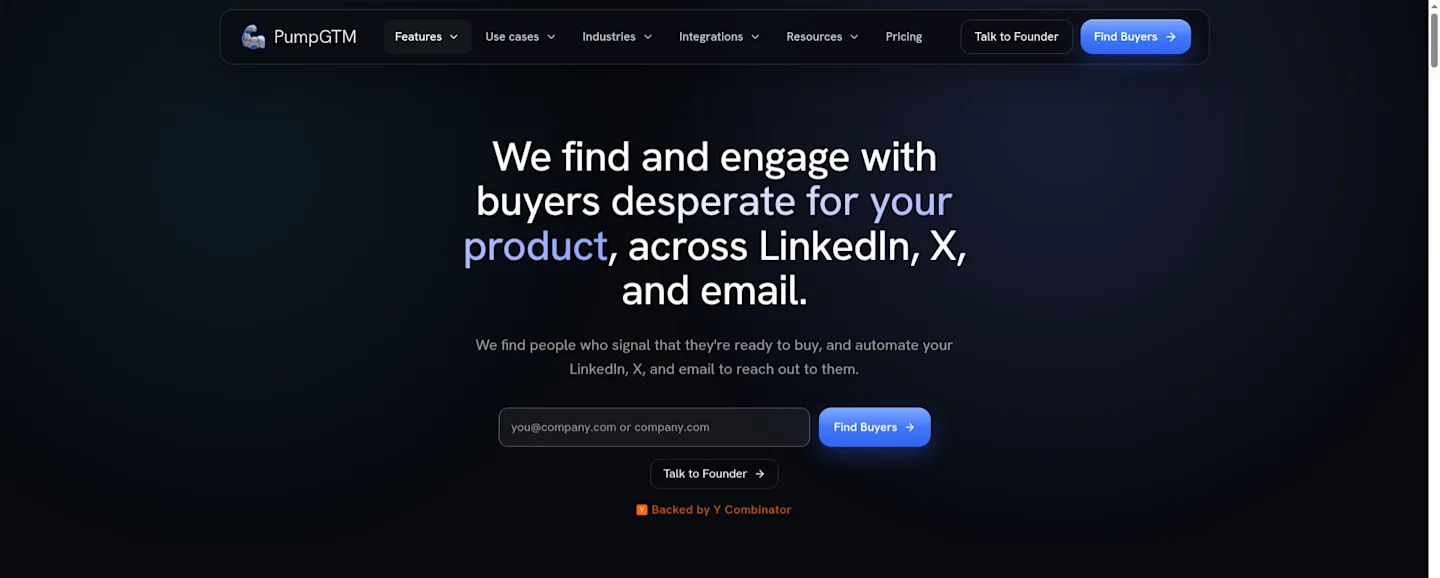
The PumpGTM homepage, which pitches finding people who signal they’re ready to buy and reaching them on LinkedIn, X and email.
The Short Verdict
PumpGTM is an outreach engine for founder-led sales. You describe who you want, approve the list and the LinkedIn sequence, and it sends from your accounts at a paced rate until someone answers. A reply on any channel stops the rest of that person’s steps.
I’d trial it if you already post on LinkedIn or X and want that attention turned into meetings. I’d hold off if you need phone, SMS or a long review history first.
The software price is easy to read. The total cost is not. Energy pays for finding people, paid lookups and X outreach, and the vendor’s own pages give it two different prices.
My call: one seat on the trial before any pack.
PumpGTM at a Glance
Item | Detail |
|---|---|
Company | Giga Next Inc., a US company founded by Namanyay Goel |
What it does | Finds likely buyers and runs LinkedIn, X and email outreach from your own accounts |
Channels | LinkedIn, X and email (Gmail, Microsoft 365 or IMAP); WhatsApp in beta by request |
Not covered | Phone calls, SMS and iMessage |
Self-serve plan | Starter, $75 a month per LinkedIn account, up to 1,000 people contacted a month |
Custom plan | Enterprise, for teams of 5 or more, by call |
Free plan | None listed |
Trial | 7 days at $0; a card is needed to start it, and a workspace needs none |
Usage meter | Energy, $0.05 each on the people data page |
Managed packs | $1,740, $8,940 or $16,870, each paid once, plus the software |
AI and code access | MCP server and REST API on one workspace key |
Review sites | G2 5.0 from 2 reviews; Capterra 5.0 from 3; no Product Hunt listing |
How I Put This Review Together
I used saved copies of the PumpGTM homepage, pricing page, integration pages, developer docs, MCP guide, people data page, terms and engineer pack guarantee, the G2 and Capterra listings, and the transcripts and visual-check notes for three videos.
I’ve spent about five years in GTM at startups I helped scale from 0 to $5M+ ARR. That’s the lens here: what a small team pays in money and in founder hours before the first meeting lands.
What PumpGTM Actually Runs for You
Think of it as three jobs in a row: find people, message them, and hand you the replies.
Finding buyers
You can start from several places. PumpGTM builds audiences from likes, reposts, new followers, comments, reactions and connections, from buyer-list companies, from a Sales Navigator search, or from a CSV you upload. PumpGTM puts its contact pool at 2B+ people, with work emails, phone numbers, LinkedIn profiles and company details.
In the founder’s blog post on how PumpGTM works, the lists come from a lead waterfall across Apollo, Exa, PeopleDataLab, ZoomInfo and your Sales Navigator lists, and PumpGTM learns your buyer from a list of your current customers. I like that starting point. Your last ten customers tell you more about your next ten than any persona doc.
X adds a second audience. Connect your X account and every new follower, and everyone who likes or replies to your posts, becomes a lead to review and DM. If your X following is active, that’s the lead source with the least work behind it. With 300 followers, it’s close to empty.
Sending from your own accounts
Every message goes out from the LinkedIn, X and email accounts you connect. LinkedIn traffic runs through a residential proxy in your city at randomized times, new accounts ramp up slowly over the first weeks, and PumpGTM commits to never saving your LinkedIn credentials.
Your LinkedIn profile is the asset. The founder writes that he got his own account restricted twice before he worked out the setup, and he puts LinkedIn’s cap at 200 connection requests per week per account. Sending stays paced by account limits and connection health, so connecting an account does not give it unlimited sending capacity.
Email works from your own Gmail, Google Workspace, Microsoft 365 or IMAP mailboxes, inside sending windows and daily limits you set, with an unsubscribe option in each message. X runs as DM sequences, and delivery depends on each recipient’s message settings.
One inbox, one stop rule
X DMs, LinkedIn messages and email replies land in one list. Once someone replies on any channel, the remaining steps are cancelled. The homepage example shows the pattern: an X DM on day 0, a follow-up on day 3, then LinkedIn and email only if the person stays quiet.
This is the feature I’d pay for. A prospect who answers your LinkedIn note and then gets your cold email two days later learns that a robot is in charge. A stop rule that spans every channel prevents that.
The same blog post adds that PumpGTM drafts a reply when someone answers, which you can send in one click or set to auto-send. Outreach starts only after you approve the buyers and the LinkedIn sequence. Replies work differently: auto-send skips that gate. I’d keep auto-send off. The reply is where a deal gets made, so it deserves the same gate.
Running It From Claude, Cursor or Your Own Code
PumpGTM also ships as an MCP server and a REST API on the same workspace key. It works with Claude Code, Codex, Cursor, ChatGPT and Claude. The docs add webhooks and a Partner API for running PumpGTM for many clients.
PumpGTM’s homepage lists ChatGPT, Claude and Cursor under “Built for your AI tools.”
The MCP tools cover each step: find people, review them, add leads, save a sequence draft, approve it, read pending replies and decide each one. Sequences save as drafts that send nothing until you approve them, and each reply waits in a queue with a drafted answer for you to decide. In Muskan Joshi’s walkthrough below, the creator picked automatic sending instead. People sign in with OAuth, so you don’t paste a key into a chat window.
For a GTM engineer, this is the reason to look at PumpGTM at all. The API and MCP cover the whole loop: find, sequence, approve and reply. Your agent can read how a sequence is doing and draft the next one, and a person can approve each sequence before it runs.
The founder says he barely opens the dashboard and tells Claude to change messages and duplicate the sequence with the best reply rate. That’s his workflow, from his own blog.
What the Demo and Creator Videos Show
Three videos are worth your time. Two come from PumpGTM’s own channel. One comes from a creator whose video PumpGTM lists on its customer videos page, which also invites creators to an ambassador program. For each one, I read the transcript and notes from a visual check of what the screen shows. None of it is an independent test.
PumpGTM’s own explainer (2:01). The founder gives three reasons he thinks it beats other tools: lead sources and signals, sequences that run across LinkedIn, email and X with a different message on each channel, and access from AI tools. In this demo, the sequence view lists seven steps for one lead:
Connection request, sent first
LinkedIn message, 1 day after they accept
LinkedIn message, 4 days later if no reply
Email, 3 days later if no reply
Email follow-up, 4 days later if no reply
Engage on X, the same day if no reply
X DM, 2 days later if no reply
Add up the waits and a lead who never answers gets the last X DM about 14 days after accepting your request. That’s a cadence I’d keep for founder outbound. It also means a 7-day trial ends before one full sequence can play out.
The same demo shows a “Message variants” table that compares copy versions on reply rate and meeting rate against a baseline. That table is the part I’d use most, because it tells you which opener to keep. The founder also promises a shared Slack channel and a direct line to him, and the demo shows a “Talk to me” page with a “GTM 1:1 Setup” booking widget. I take that as a promise from a small team.
The Supermemory walkthrough (6:33). In PumpGTM’s own demo, the founder filters a map of Y Combinator companies down to about 3,000 earlier stage ones, then to 523 that build AI agents. He points viewers to a free public page for that founder data, and the screen doesn’t show whether the map itself sits inside the app. Each company gets a short fit note with its founders’ LinkedIn and X links.
The Supermemory sequence sits in a flowchart editor: a connection request, “Accepted, then wait 1 day”, a first message that leads with research, then “Wait 3 days” before a second message, marked “Stops if they reply”. The visual check found no approval control on that screen.
PumpGTM’s video says the sequence got a 25% reply rate. The figure is spoken and added as an edit overlay. The results table on screen shows dashes and no counts. Read it as PumpGTM’s claim, not a measured result you can check.
He also shows a generic ChatGPT LinkedIn opener and takes it apart line by line. Then the sequence he wrote leads with Supermemory’s own research and asks only to share a note. That’s how founder outbound that gets replies reads, with or without PumpGTM.
Muskan Joshi’s MCP walkthrough (2:20, channel Still). In her walkthrough, she adds PumpGTM to Claude as a custom connector and lands on a PumpGTM “Create your account” page that asks only for a work email, with no card field in view. Claude then asks how many connection requests the campaign should send in total across 6 companies, and she picks 15 to 20. Next, Claude asks whether to show the generated messages for approval before sending, or send them automatically. She chose automatic. The drafts in the sidebar carry a different message for each person.
The MCP flow lets you review every message first, and it also lets you skip the review in one click. Picking “send automatically” is the approval. For your first campaigns, pick review.
What Users and Customers Say
There isn’t much yet, and you should weigh it that way.
On G2, PumpGTM holds 5.0 from 2 reviews. On Capterra, it holds 5.0 from 3. Casey M. reviewed on both sites, so don’t add the counts. Product Hunt has no listing. PumpGTM’s own review page asks customers to review it on G2.
PumpGTM’s G2 listing: 5 out of 5 from 2 reviews.
The praise centers on speed and support. Casey M. wrote on G2:
“PumpGTM has evolved to our needs in quick fashion, and the team is very quick with support.”
Rachel T., who lists a founding GTM role, wrote on Capterra that PumpGTM let her team scale an outbound program “in a day” and helped them use LinkedIn “in a strategic way that would have been very manual before.”
The complaints point at ease of use:
“The interface is taking a little time to get used to but am figuring out things quickly, there is a lot there.” (Casey M., G2)
Rachel T. added that there’s room for “more integrations and easier ways to standup plays.” With so few reviews, treat both comments as things to check on your trial.
The founder’s two Reddit posts compare PumpGTM with other tools, and he discloses that he works on it. I don’t count them as reviews.
Testimonials PumpGTM publishes
The homepage carries testimonials PumpGTM chose and published. They read well, and they’re marketing:
“Every other tool I tried couldn’t find our niche buyer on LinkedIn. PumpGTM nails it, and the replies are already turning into calls.” (Albert Cai, Harbor, vendor-published)
“On my first day I wrote in saying nothing was happening, and I was already looking at Apollo and Instantly. Two days later a managing director asked me for a meeting.” (Brian Noronha, LADR Media, vendor-published)
“PumpGTM quickly finds relevant leads from different sources and allows me to test messaging. I’m onboarding my entire team now to speed up my outbound sales.” (Chaitanya Choudhary, Workers.io, vendor-published)
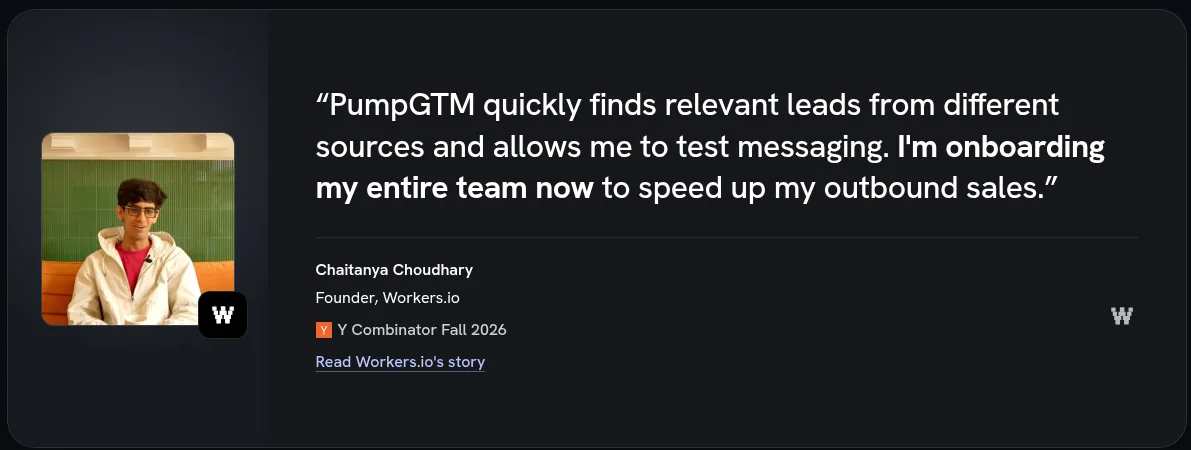
A testimonial PumpGTM publishes on its homepage, from Chaitanya Choudhary, founder of Workers.io.
I like that Brian Noronha quote more than the vendor probably intended. It tells you the first days can be quiet, which fits a tool that ramps new accounts slowly. Plan for a slow first week.
PumpGTM Pricing in 2026
PumpGTM sells two plans on its homepage cards: Starter and Enterprise.
Starter costs $75 a month per LinkedIn account. Each LinkedIn account comes with an email inbox and an X account, and each extra LinkedIn account bills at the same price. It covers up to 1,000 people contacted a month, and finding new buyers to contact is included. Starter outreach runs on LinkedIn, email and X.
Enterprise is custom, for teams of 5 or more, with custom volume, an account manager, security reviews and invoicing. You book a call with the founder to get a price.
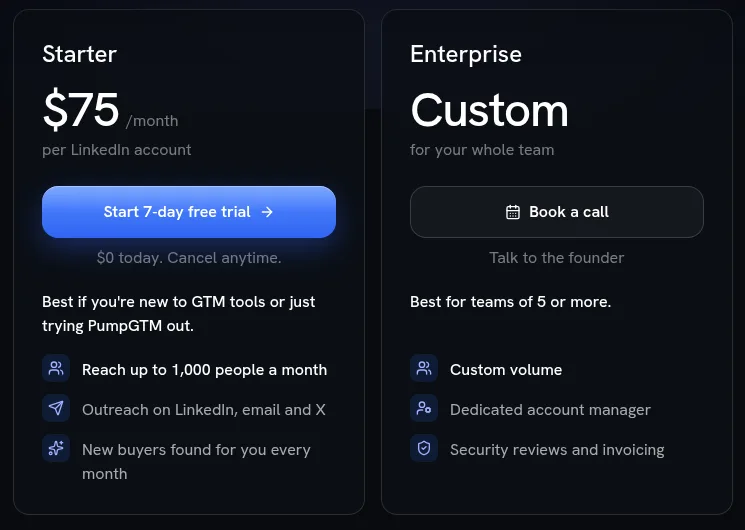
PumpGTM’s plan cards: Starter at $75 a month per LinkedIn account with a 7-day free trial, and Enterprise at a custom price for teams of 5 or more.
The trial runs in four steps, and only the third one needs a card:
Create a workspace. No card.
Pick a plan and a billing period.
Add a card. The 7-day live trial starts at $0.
The first charge lands when the trial ends, unless you cancel before then.
Signup, LinkedIn connection, the trial and the MCP connection are all self-serve, and nothing about Starter requires a sales call.
PumpGTM also promises the first-month base fee back if your first paid month books no qualified meeting. The legal terms for that guarantee still carry another product’s name, Gigamultiplier, and a gigamind.dev support address. Ask PumpGTM to confirm the terms in writing before you count on it.
Put the trial end date in your calendar the day you start. Seven days is short for LinkedIn, because a new account starts slow on purpose.
The Energy meter
Energy is the second bill. It pays for finding people, paid lookups, X outreach and AI-written openers. Starter includes 1,500 Energy per LinkedIn account each month. LinkedIn invites, messages and replies, and emails and email replies, cost no Energy.
Energy prices for the actions you’ll use most, from PumpGTM’s API docs and MCP guide:
A person found by the search tool: 2 Energy
An X DM with the thread check (the MCP guide calls it a history check): 5 Energy
An X DM from a sequence with the thread check off, or an X reply: 0.6 Energy
A paid profile or email lookup: priced per call. The MCP guide makes a lookup free when nobody matches. On the people data page, a paid attempt can use Energy even with no match.
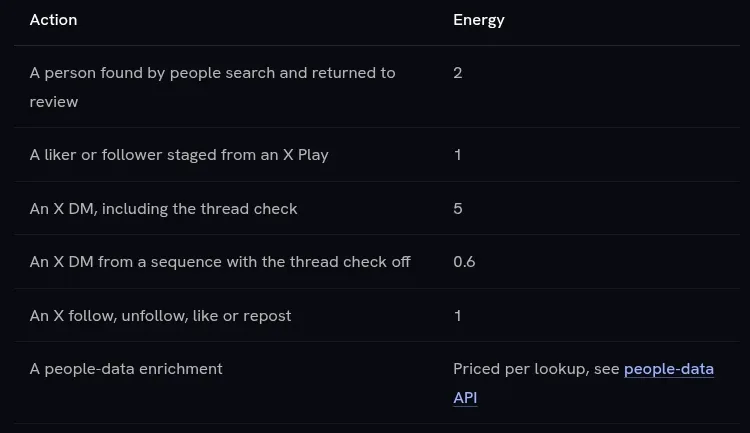
Each action has an Energy price: 2 for a person found, 5 for an X DM with the thread check, and 0.6 with the check off.
The people data page prices one Energy at $0.05. The MCP guide sells extra Energy in $10 packs: 75 Energy each, or 100 each when you buy 5 packs ($50) or more at once. That works out to about $0.13 or $0.10 per Energy, two to almost three times the people page rate. Ask which price applies before you top up.

Extra Energy comes in $10 packs: 75 Energy each, or 100 each when you buy 5 packs ($50) or more.
What $75 a seat means for a 3-person founder team
Say three cofounders each connect their own LinkedIn. That’s three seats: $225 a month, with a combined ceiling of 3,000 people contacted. Used in full, that’s $0.075 per person reached, before Energy.
Two limits sit underneath that ceiling.
First, LinkedIn itself. At the 200 connection requests a week the founder cites, one LinkedIn account sends about 867 requests a month at most. If connection requests are your main LinkedIn step, a seat reaches 1,000 people only when email, X or your existing connections carry the rest. In the ramp weeks, it reaches fewer.
Second, Energy. If PumpGTM’s search finds every person at 2 Energy, 1,500 included Energy covers 750 people found per seat. Starter includes finding new buyers every month, yet find_people charges 2 Energy a person, so the two may count differently. I’d confirm it on the trial. If X is your main channel, 1,500 Energy also covers only 300 X DMs with the thread check.
My advice for a three-person team: don’t buy three seats on day one. Seats scale by LinkedIn profile, not by headcount, so the question is whose profile your buyers trust. In early-stage B2B, that’s usually the CEO’s. Run one seat on that profile through the trial, then add a second seat only for a cofounder whose network reaches a different buyer, such as a CTO selling to engineering leads.
PumpGTM’s homepage prices a Clay, HeyReach and Instantly stack at $311 a month for one seat each, from those vendors’ pricing pages on November 10, 2026. One PumpGTM seat at $75 undercuts that, and three seats at $225 still do. The comparison is PumpGTM’s own, so check those three pricing pages yourself before you lean on it.
The Managed Packs: When $1,740 Beats Doing It Yourself
PumpGTM sells three one-time packs on top of the $75 software fee.
Pack | Price, once | What you get | Leads found, up to |
|---|---|---|---|
Guided setup | $1,740 | One 60-minute setup call, your first campaign prepared, $840 in product credit, no ongoing management or weekly optimization calls | 4,200 |
Done For You | $8,940 | 90 days of campaign setup and management, weekly group calls, shared Slack, no 1:1 calls or dedicated engineer | 24,200 |
Forward Deployed GTM Engineer | $16,870 | 90 days with a dedicated GTM engineer, weekly 1:1 calls, shared Slack, 50% money-back guarantee | 75,000 |
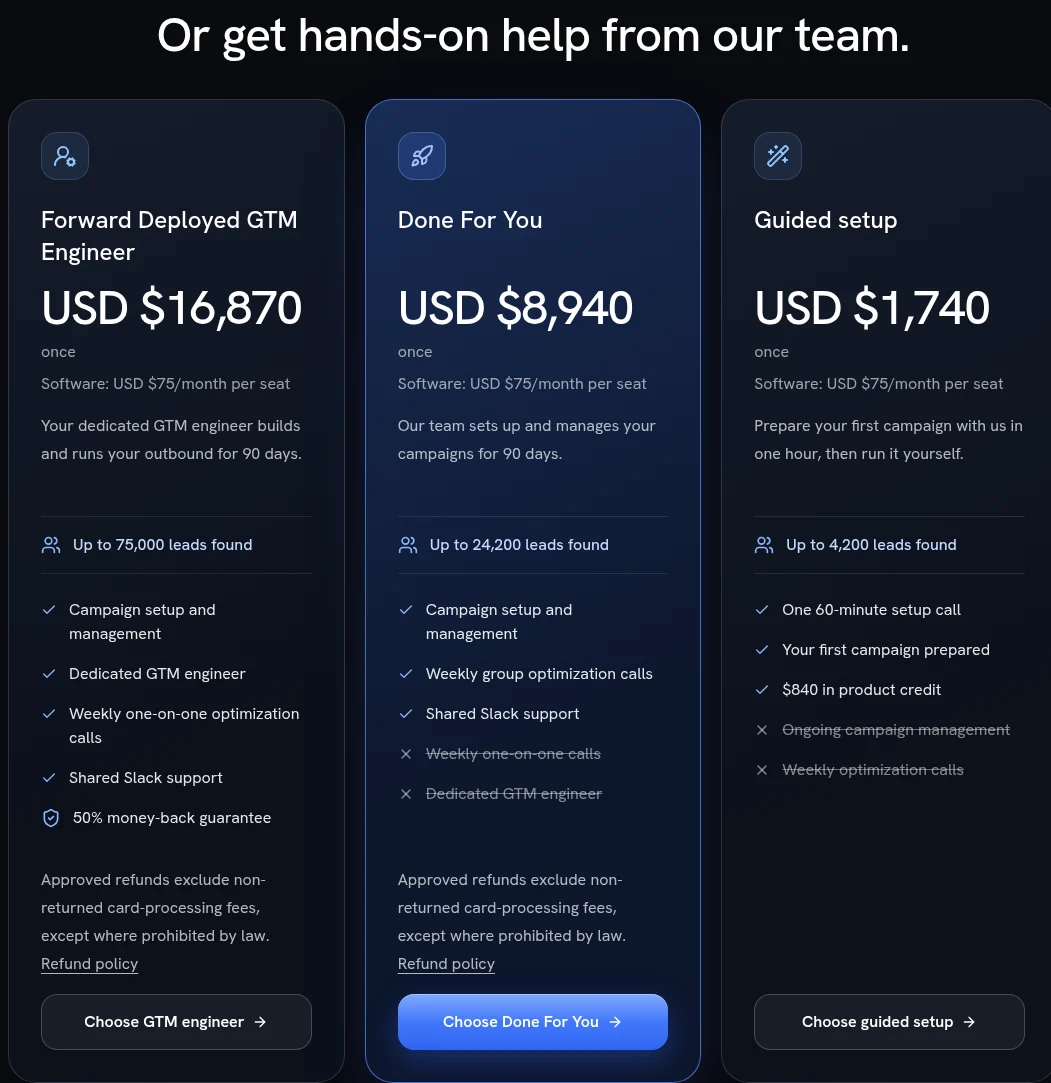
PumpGTM’s three one-time help packs, each with software at $75 a month per seat: $16,870, $8,940 and $1,740.
Per lead found, that’s about $0.41, $0.37 and $0.22. Leads found are list size, and meetings come later.
Guided setup is the pack I’d look at first. Take out the $840 credit and you pay $900 for one hour with the team and a first campaign built for you. The numbers also line up: 4,200 people at 2 Energy each is 8,400 Energy, which is $840 at the $10 per 100 top-up rate. At the people page’s $0.05, the same Energy is $420, so the match holds only at the top-up rate. That’s my arithmetic, and it suggests the credit pays for those leads. Purchased credits last 12 months.
So when does $1,740 beat doing it yourself?
When you’ve never written a LinkedIn sequence that got replies, and your ICP is still a sentence in your head. The expensive part of outbound is the first month of wrong lists and generic openers. If an hour with someone who has run this for other founders saves you three weeks of that, I’d pay the $900. If you already have a sequence that books calls by hand, skip it. You’d pay for setup you’ve done.
Done For You at $8,940 is a 90-day service. I’d only buy it if you can’t give outbound even two hours a week, and even then, you still own the replies.
The Forward Deployed GTM Engineer pack at $16,870 comes with a 50% money-back guarantee in writing. If you’re unhappy, you can email within 30 days of your first purchase for 50% of that payment back, once, on your first engineer pack. That puts your worst case near $8,435, less a share of card processing fees.
Read the refund rules before you pay for any pack. Approved refunds on Done For You and the engineer pack exclude card-processing fees the payment processor doesn’t return, except where the law prohibits it. That rule does not apply to Guided setup or software subscriptions. The engineer guarantee excludes the other packs, the software subscription, sending inboxes and domains. The terms were last updated November 7, 2026.
Pros and Cons of PumpGTM
Pros
Your accounts, your identity. LinkedIn, X and email all send from accounts you connect, with LinkedIn behind a residential proxy in your city and a slow ramp for new accounts.
One inbox with a cross-channel stop. A reply on X, LinkedIn or email ends the rest of that person’s sequence.
An approval step. You approve the buyers and the LinkedIn sequence before outreach starts, and the MCP flow in Muskan Joshi’s Claude walkthrough offers message review before sending.
Agent access to the whole loop. The MCP server and REST API share one key and cover finding, sequences and replies, and LinkedIn and email steps cost no Energy.
Self-serve start. You can create a workspace without a card, and Starter needs no sales call.
Support two reviewers praise. Casey M. and Rachel T. both praise how fast and helpful the team is.
Cons
Very few reviews. Five 5.0 ratings across two sites, with reviewer overlap and no Product Hunt listing.
Two Energy prices. $0.05 on the people data page; $10 for 75 or $10 for 100 in the MCP guide. The two pages also disagree on whether a lookup with no match uses Energy.
Unclear finding cost. The pricing page includes finding buyers in the plan. The MCP guide charges 2 Energy per person found.
An interface that takes time to learn. Casey M. says so on G2.
No phone, SMS or iMessage, and WhatsApp only in beta.
X automation pages disagree. The X integration page rules out automated following and liking. The homepage and MCP guide describe paced follows and likes, and they price an X follow and an X like.
Narrow pack refund. The 50% guarantee applies once, to the first engineer pack only.
A meeting guarantee with mismatched terms. PumpGTM offers a first-month base-fee refund if no qualified meeting books, but the legal terms still name another product, Gigamultiplier, and a gigamind.dev address.
Who Should Buy PumpGTM, and Who Shouldn’t
Buy the trial if:
You’re a founder with a working product and a few customers, and you have no SDR.
Your buyers live on LinkedIn or X, and you already post there.
You use Claude, Cursor or Codex every day and want outbound in the same place.
Look elsewhere if:
You need calls or SMS in the sequence.
Your team needs a long record of independent reviews before a tool touches a LinkedIn profile.
Your buyers talk about the problem on Hacker News, GitHub, Stack Overflow or Discord. PumpGTM’s buying-intent Plays watch X and LinkedIn, and its MCP reference adds a Reddit Play. Its Signals page still marks Reddit as coming soon.
That last group is where CommunityTracker comes in.
PumpGTM vs CommunityTracker
These two tools start the funnel from different places, so I don’t see them as direct rivals.
PumpGTM starts with outreach. Its audiences come from engagement on your own posts, your connections, buyer-list companies, Sales Navigator and your CSVs, plus buying-intent Plays for competitor followers and people asking on X or LinkedIn for a tool like yours. Then it runs LinkedIn, X and email sequences from your accounts.
CommunityTracker starts with buying signals. It watches Reddit, LinkedIn, X, Hacker News, GitHub, Stack Overflow, Dev.to, Indie Hackers, Slack and Discord for people talking about the problem you solve, and Pro and Advanced cover all of them. Its buying signals cover job changes, funding and hiring, ranked Hot, Warm or Watch. Every paid plan also includes lead lists, enrichment, and LinkedIn and email outreach, with campaigns written from the signal and one inbox for replies.
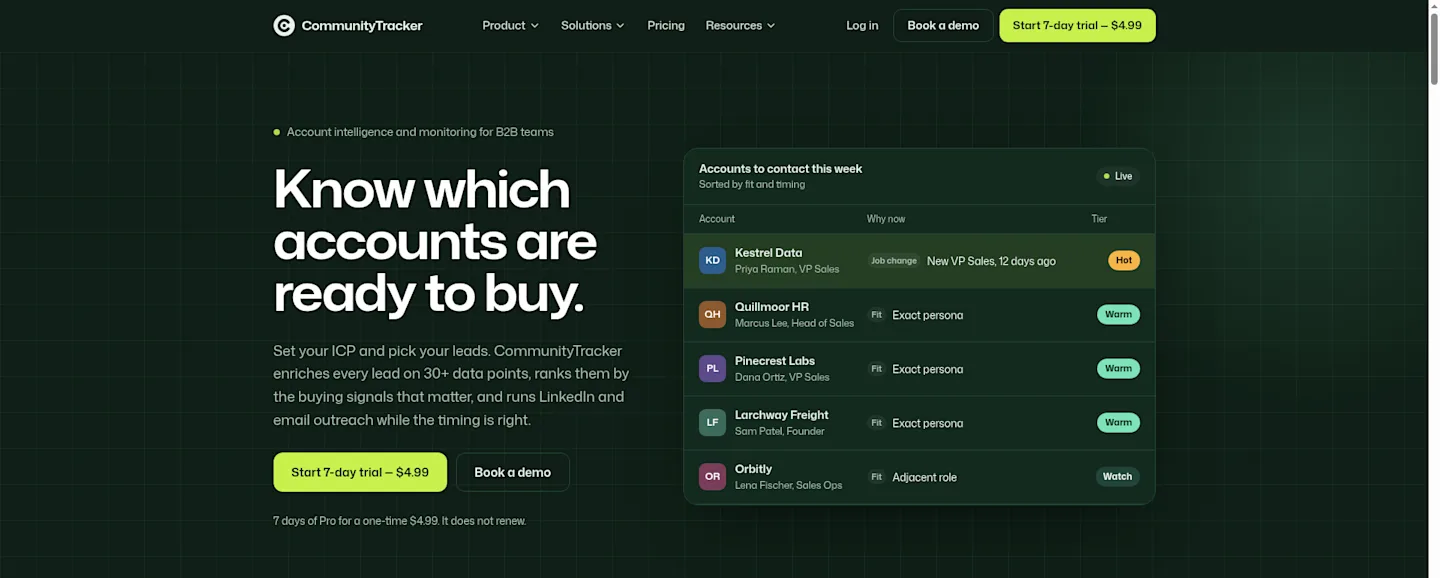
The CommunityTracker homepage.
PumpGTM | CommunityTracker | |
|---|---|---|
Starts from | Engagement on your posts, intent Plays on X and LinkedIn, lists, Sales Navigator, CSV | Posts and signals across 10 communities |
Outreach channels | LinkedIn, X and email | LinkedIn and email |
Entry price | $75 a month per LinkedIn seat | Starter $39 a month |
Next tiers | Enterprise, custom | Pro $99 a month; Advanced $199 a month |
Free option | None listed | A $0 Free plan |
Trial | 7 days at $0, card needed to start | 7 days of Pro for a one-time $4.99, separate from the $0 Free plan |
AI access | MCP server and REST API | AI assistant connector for Claude, ChatGPT or Grok, and API access |
Usage meter | Energy | Credits for enrichment, 100 to start |
Refund | First-month base fee if no qualified meeting books (terms name Gigamultiplier); 50% on the first engineer pack | 14-day money-back on the first subscription payment |
Starter on CommunityTracker covers 4 keywords on Reddit, LinkedIn, Hacker News and GitHub, 5,000 mentions and up to 100 warm emails a month. Pro covers 10 keywords on every platform with unlimited mentions and warm emails. Paid plans bill monthly, with annual billing on request.
Where PumpGTM wins: X DMs, a multichannel sequence that stops on the first reply anywhere, and an agent that can run the outreach loop end to end. If your buyers already engage with your posts, PumpGTM turns that engagement into conversations. CommunityTracker’s plans list LinkedIn and email outreach, not X DMs.
Where CommunityTracker wins: catching the buyer who asks for a tool like yours on Hacker News, GitHub, Stack Overflow or Discord. CommunityTracker watches 10 communities. PumpGTM’s Reddit signal is in its MCP reference, but its Signals page marks it coming soon. It’s also cheaper to start, with a $0 Free plan and a $39 Starter.
If you run both, the split I’d test is CommunityTracker Pro for finding the threads and people showing intent, and one PumpGTM seat for running X and LinkedIn sequences to your own audience. That’s $174 a month before Energy and credits. If you can only fund one, pick by where your buyers announce the problem: in your notifications, or in a community thread.
I also compared 10 PumpGTM alternatives on seat cost, trial terms and buying signals.
Final Verdict
PumpGTM does the job a founder-led sales motion needs most: it sends from your own accounts, stops when someone answers, and keeps you in the loop on who gets messaged. The MCP and API access go further than most tools at this price.
What holds me back is proof and pricing clarity. Five ratings is not a track record, and Energy has two prices on the vendor’s own pages.
Start one seat on the CEO’s LinkedIn, run the 7-day trial with a calendar reminder, and write down your Energy balance on day one and day seven. If the replies come from the people you’d want on a call, add seats. If not, cancel before the first charge. Add Guided setup only if you’re still working out who to message and what to say.
PumpGTM FAQs
How much does PumpGTM cost?
Starter costs $75 a month per LinkedIn account and covers up to 1,000 people contacted a month. Enterprise is custom for teams of 5 or more. Energy for lookups, finding people and X steps is a separate meter.
Does PumpGTM have a free trial?
Yes. The 7-day live trial starts at $0, but you need to add a card to start it. You can create a workspace without one.
Does PumpGTM have a free plan?
No. PumpGTM sells Starter and Enterprise, and neither is free.
Is PumpGTM safe for my LinkedIn account?
PumpGTM sends through a residential proxy in your city at randomized times and ramps new accounts slowly. No tool can promise LinkedIn won’t restrict an account, and the founder says his own was restricted twice before he built this setup.
Can I run PumpGTM from Claude or ChatGPT?
Yes. It runs as an MCP server for Claude, Claude Code, Codex, Cursor, ChatGPT and other clients, with the same key as the REST API.
What do the managed packs cost?
Guided setup is $1,740 once, Done For You is $8,940 once and Forward Deployed GTM Engineer is $16,870 once, each plus the $75 software fee per seat.