How to Use AI Tools to Improve Your Marketing Strategy
Five steps to use AI in your marketing: set a clear goal, pick the right tool, listen to customers, turn questions into content, and personalize by intent.
Adarsh Kumar
GTM Expert
Founder — CommunityTracker, Miraa.io, and Infraboxes
You ask an AI tool for marketing ideas and get 20 before your coffee is finished. A month later, you’ve published more posts and emails and… your sales still aren’t moving. At least your content creation calendar is full.
AI-powered tools can be a game changer when it comes to marketing. But without a solid strategy and an in-depth knowledge of your customers’ needs and preferences, AI can only help you develop ineffective campaigns faster.
So how can you make the most of AI tools in your marketing strategy?
Below are five proven steps you can take to incorporate AI into your marketing strategy and drive better results. In each step, you will find several examples of the best AI marketing tools you can use!
What can AI actually do for your marketing strategy?
There is a lot of behind-the-scenes work in marketing. You read customer reviews, analyze reports, and check the competition. You puzzle over why emails with a ton of clicks didn’t translate to sales.
AI can help with that. With the right prompt and info, AI-powered marketing tools can help you with things like:
Understanding your audience: Group customer feedback by frequent issues, questions, and objections.
Identifying content creation opportunities: Turn customer feedback into potential article, email, and social post ideas.
Creating campaign visuals: Design promotional backgrounds and create images for ads, emails, and social posts by using specialized graphic AI tools for ecommerce.
Adjusting marketing messages: Tailor an email to address the needs of a particular customer group, with their intent positioned at the core of each message.
Analyzing campaign performance: Point out differences in results, calculate marketing ROI, and narrow down potential reasons.
These capabilities will only continue to get better. In a 2026 study by Epoch AI, leading reasoning models’ improvement rate was seen to outperform the improvement rate of non-reasoning models by more than twice:
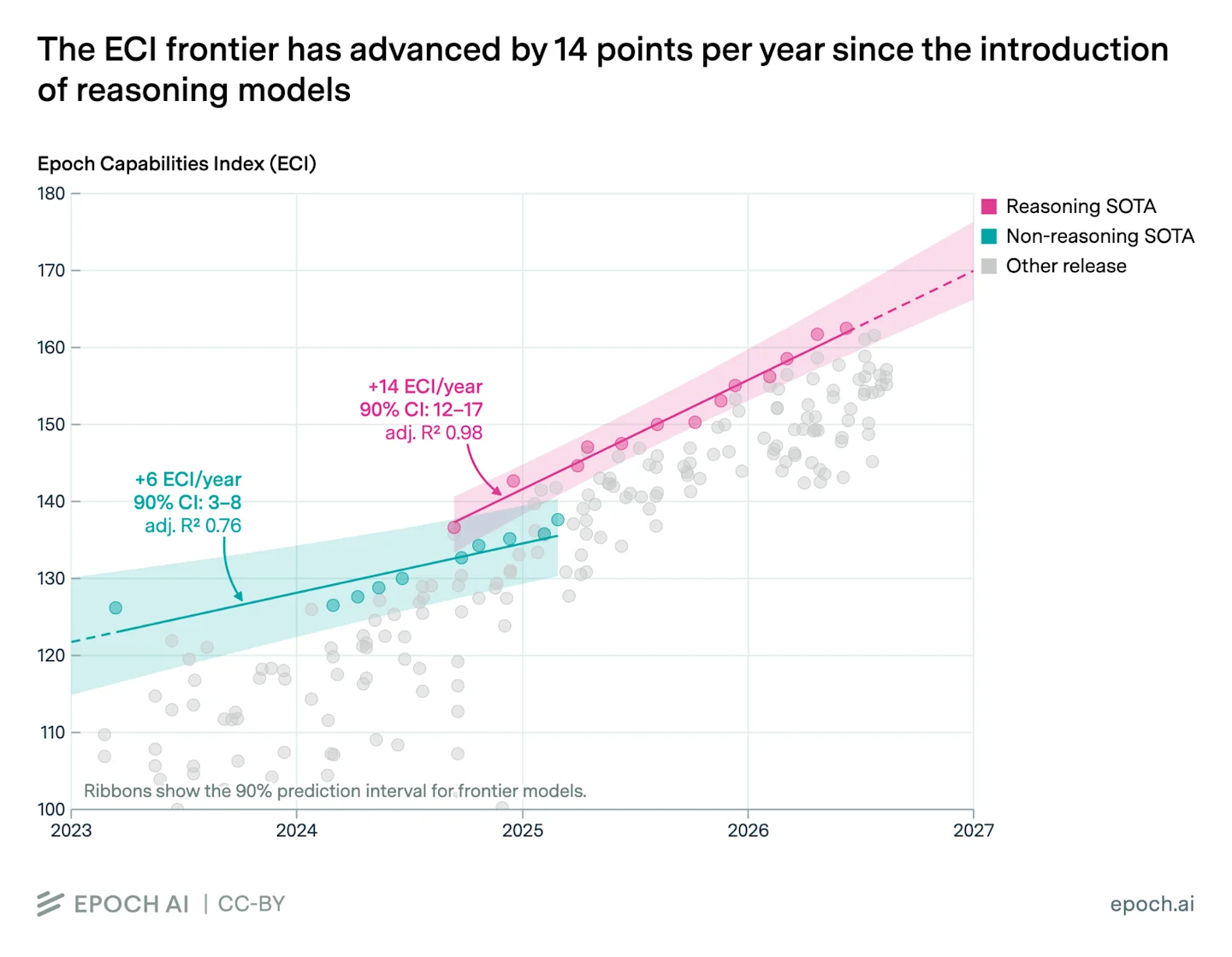
Source: EpochAI
Again, this doesn't guarantee that your next campaign will see twice the performance. This analysis, however, shows that reasoning models have improved, and that you should revisit the tasks you previously tested AI for and see if newer models can perform those tasks.
How to use AI in marketing: 5 practical steps
Too many teams make the mistake of signing up for AI-powered marketing tools first and figuring out what to do with them later. You can end up paying for five different subscriptions, each doing a slightly different version of the same thing, with a spreadsheet to keep track of it all.
Instead, take one hard marketing problem and look for the available tools. Here’s how to do that step by step.
1. Define your marketing goals
Goals like “Improve our marketing” sound nice, but it’s not easy to know what you’ve improved when you get there. Narrow your focus:
Traffic to your website?
More people booking a demo?
Less cringing when people receive your emails?
Pick one, and figure out where you’re at right now.
For example, if you get 20 demo requests from people who seem like they’d actually benefit from your product (aka “qualified”) each month, you might decide you want to get that number up to 30/month in the next quarter.
That’s a goal you can realistically work toward.
Next, think about what’s getting in the way of hitting that goal. Are people coming to your site but not booking demos? Maybe you need to rethink your offer or website copy, as more social media posts likely won’t solve that problem.
To get ideas for what might help, use a tool like Claude or ChatGPT to brainstorm with you. Give them some context (e.g., your goal, info about who you’re trying to reach, recent marketing results, and your budget) and ask it something like:
“Suggest three experiments to increase qualified demo requests using these results. For each, explain what we would test and measure. Flag any missing information instead of making assumptions.”
Work through the ideas with your team to figure out what’s realistic and useful for you right now, and pick one (along with a clear way to tell if it’s working). That’s a concrete input that you can “feed” into an AI tool.
2. Choose the right AI tools
Knowing what to improve makes it easier to know which tools to get. You don’t need multiple subscriptions to get started. Simply find the AI tool that best handles your task.
Try some of these based on your workload:
Content Creation: Claude, ChatGPT, or Jasper. They help create content briefs, drafts, and messages and ensure they are in line with your brand guidelines.
Social Listening & Buyer Intent: CommunityTracker. It helps find and prioritize public conversations about your buyer’s intent.
Product Visuals: Photoroom or Canva. Create backdrops around product photos for campaign creatives, and help determine if the product is truly represented.
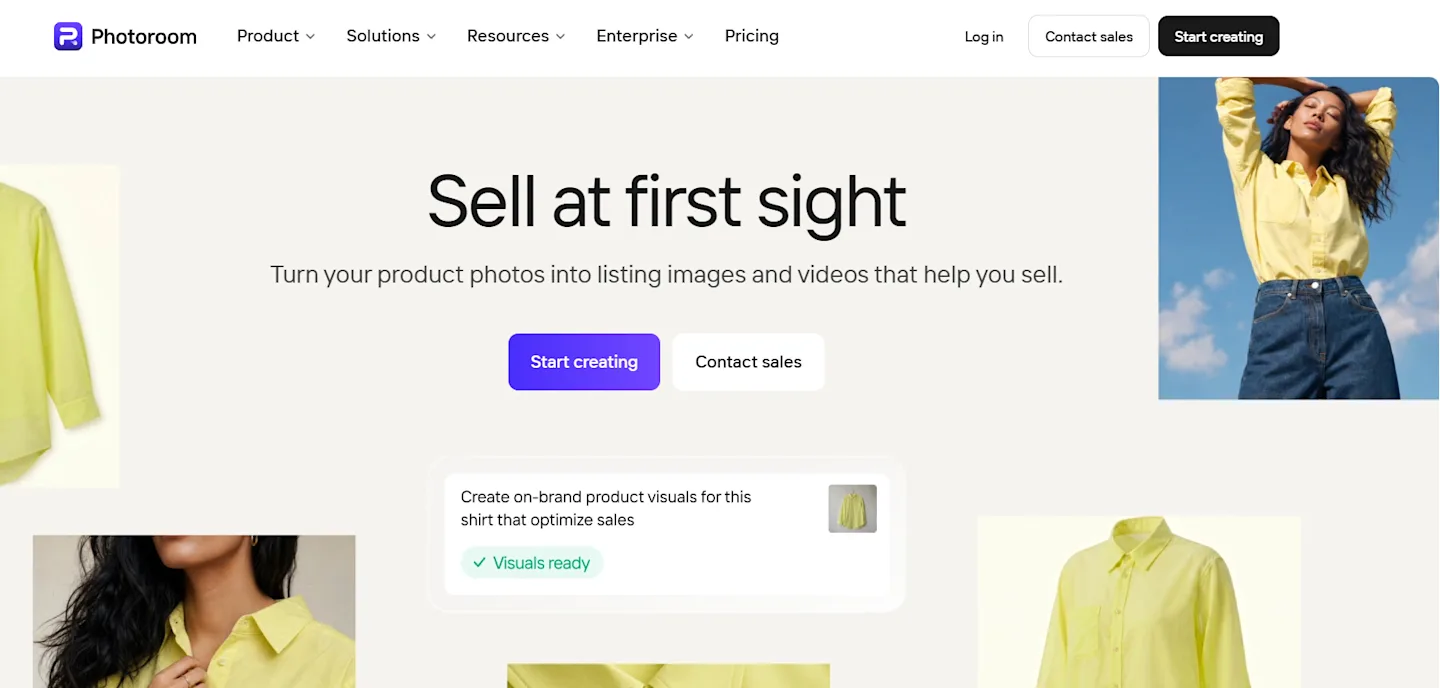
Source: Photoroom
No matter which of these tools (or their combinations) you choose, you should try it for yourself first. How time-consuming is the post-production? Is the time saved worth the cost? The most promising factor is probably a demo, but the true test is your workload.
3. Understand your audience through social listening and customer data
Your target market doesn’t necessarily send you a letter detailing their reasons for not buying your product. However, they may say bad things about you on Reddit and criticize your product. Or they may ask for recommendations on LinkedIn, but you never notice those conversations.
Marketing AI tools like CommunityTracker can help you keep an eye on conversations about your product or brand, as well as your competitors and your customers’ problems. Its AI-powered relevance scoring can help you find discussions that may be indicative of buying intent.
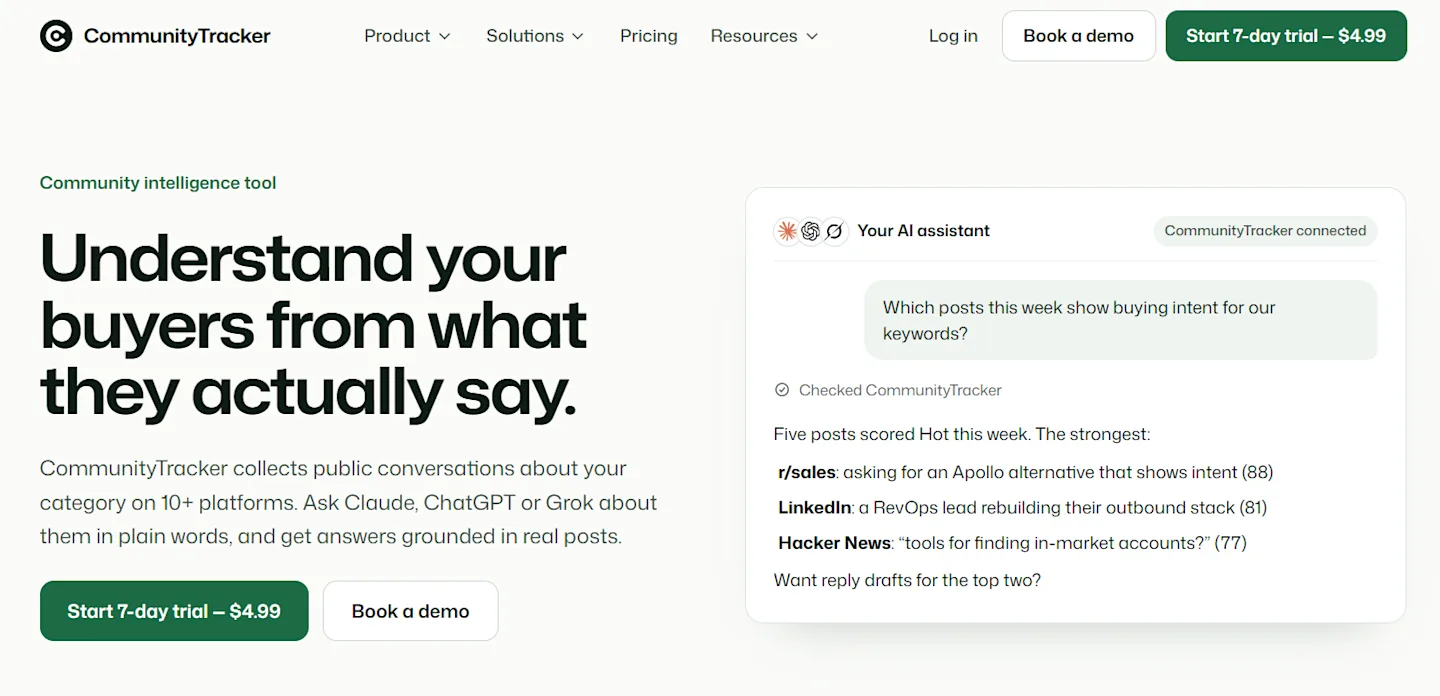
Source: CommunityTracker
Don’t forget to dig deeper into these discussions to better understand the context!
It’s important to complement social listening with customer insights. Feed anonymized survey responses or notes from sales calls to Claude and ask it to identify common themes and challenges customers face, with examples.
4. Turn customer questions into content and campaign ideas
Wondering how to give clients access to your workspace? Here’s a suggestion on how you can create a how-to guide, a product demo video, or an explainer email about guest access.
Hand ChatGPT the question along with any details about your product/service and target audience, and ask it to draft a content brief. A possible prompt could be:
“Write a content brief for an article that answers this question from a potential customer. Use only the information I provide. Make sure the brief includes a summary of the answer, three key points, and one relevant example from our product/service.”
ChatGPT, and any other LLM, needs context about your brand or business to produce tailored results. Otherwise, if you are vague in your prompts, the results may turn out to be too generic (aka AI slop).
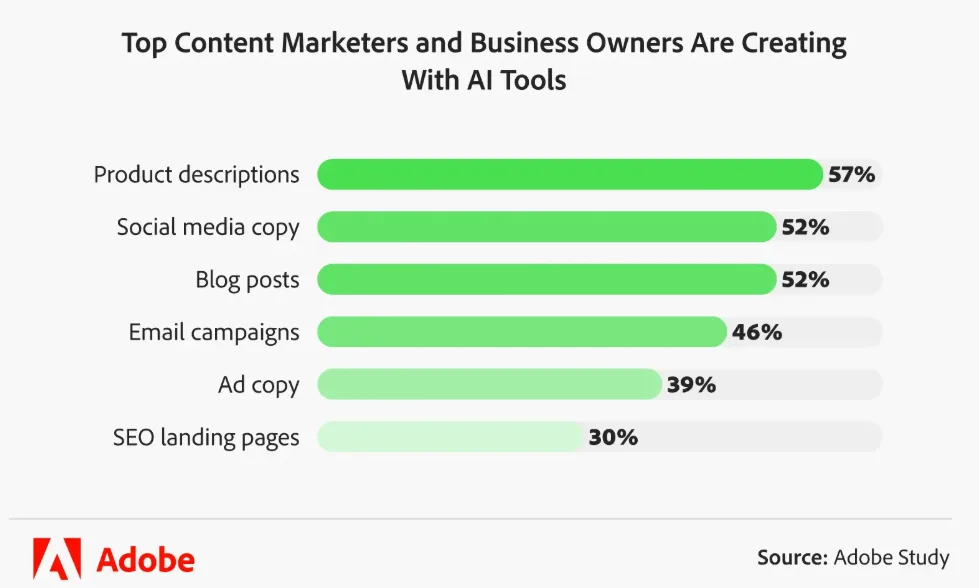
Once you are happy with the brief, ask ChatGPT to come up with relevant product descriptions, social media posts and email marketing drafts. Try to make sure each piece offers value on its own and “hooks” readers to learn more.
Source: Adobe
5. Personalize your messaging based on buyer intent
It’s great to use someone’s name in your emails. But what about everything else? How can you show someone that you understand what they need?
A good starting point is to figure out what they’re after.
For example, the person looking for information on client portals isn’t necessarily interested in hearing about all of the other 15 features your product offers. They might just be wondering if they’ll have to buy seats for their clients to use your product. So instead of launching into your amazing feature list, link them to your pricing page.
Use your CommunityTracker exports to get some context on:
What question/challenge are they sharing?
What stage in the buying process are they in (learning about the problem/category, exploring options, looking for an alternative, etc.)?
What information would be helpful for them next (an explanation, comparison, product walkthrough, etc.)?
Then give ChatGPT (or Gemini, as its latest model, Argon, is especially good at personalization and handling commercial communication) some context. This could be a quote from the thread and any relevant info you can verify is true. Then ask it to write a brief response that addresses the question raised in the thread.
Once you have your personalized reply from ChatGPT, make sure to double check it’s not making anything up before sending. Nothing will turn someone off faster than feeling like you’ve been stalking them online or making promises you can’t keep!
Common AI marketing mistakes to avoid when using AI tools
AI improves your speed and capabilities so much that using it daily may make you feel overly confident in the results. Unfortunately, neither confidence nor increased capabilities are synonyms to quality.
These five mistakes can easily slip into your routine, especially when the output looks convincing:
Giving vague instructions. Asking for a “good email” does little to provide guidance and encourages the AI to make a lot of assumptions. Being specific about your audience, the goal, offer, and desired action is essential.
Assuming generated statements are true. Check the veracity of statements, whether it be statistics, product information, or customer quotes. Always check your sources.
Sharing customer data without permission. If you must provide personal information of a customer, see if there’s a way to remove the most sensitive information and adhere to your company’s policies on sharing data.
Automating before testing. Before letting AI marketing automation tools handle a whole campaign, test them on a small batch and review the results yourself.
Reporting on processes instead of outcomes. Focusing on the number of recommendations or suggestions produces little benefit if it doesn't drive the right customers to your website.
Finally, trust your instincts. If an AI suggestion is at odds with your customers, dig into the disagreement. You’re not obligated to agree with the recommendation. The chatbot will be alright and produce an even better result for you next time.
Start with one workflow and build from there
Select one important weekly process that your marketing team runs and try automating it with AI. It could be sorting customer feedback, creating content briefs, doing PowerPoint presentations for management, or reviewing campaign results and marketing ROI.
Then assign that task to your favorite AI marketing solutions (a couple of tools to compare results) and take all five steps mentioned in this guide. Your primary goal is to determine if this workflow automation is worth the effort and the cost.
Track the time you spend correcting the AI’s errors, too. A draft that takes 30 seconds to generate but takes 2 hours to correct is not improving productivity.
When you finally find an AI routine that works, capture the instructions, inputs, and review steps so your team can replicate it. Then think about other ways you can apply this same approach to your other marketing processes.
Process improvements will add up, but you don’t need to reinvent your entire marketing strategy in a day. One small change gives you a starting point and shows you what else you could try.
Frequently asked questions
Can small businesses use AI for marketing on a limited budget?
Yes. Start small and gradually scale your investment based on the return. For example, you can spend nothing or very little in the beginning to automate one repetitive task, like creating content briefs or summarizing feedback from customers. You may need to pay to unlock certain features only when the cost is justifiable.
What information should you give an AI tool to get useful marketing suggestions?
Provide your target audience, product, goal, constraints (e.g., budget, resources), and any relevant campaign results or customer questions. State what kind of suggestions you want, and ask the tool to let you know if it is missing information.
How can you keep AI-generated marketing content consistent with your brand voice?
Write a style guide and provide a few examples of your best marketing content. Tell the AI what your preferred tone and terminology are. Review all content, especially marketing content that has AI-generated text, and make the final call on whether to publish or not.
How do you know whether marketing AI tools are actually improving your business results?
Compare your results to a baseline. Use metrics to define your goal (i.e., qualified leads, conversion rate, average time to complete a task, etc.). Include the time you spent editing AI content and your subscription costs. For goals that cannot be easily measured, run a controlled test to ensure campaign optimization is attributable to the AI tool.