How to Use Social Listening for Customer Research in 2027
How to run social listening for customer research in 2027: set tight questions, filter buyer intent, check share of voice, and route daily findings.
Adarsh Kumar
GTM Expert
Founder — CommunityTracker, Miraa.io, and Infraboxes
You’re looking up social listening for customer research because product or GTM asked what buyers struggle with, and the only file in the folder is a raw export of mentions with no question behind it.
Product and UX teams now feed research transcripts and feedback hubs into Claude to cluster themes and surface verbatim phrasing, so unstructured public threads need a tight question before any synthesis begins.
I’m sure you’ve tried customer surveys, scheduled interviews, or reading review pages, and still hit a wall because polite calls skip the blunt objection a buyer writes in a forum when no rep is watching.
Follow these six steps to turn public conversations into customer research a team can ship from: frame keywords around pain, pick buyer communities, filter by intent, pull exact buyer wording, weigh communities with share of voice, and route daily alerts to the right owner. I’d run this workflow in CommunityTracker because it scores buyer intent instead of dumping every mention into one sheet.
TL;DR: Social listening for customer research means collecting public threads around a narrow buyer or product question, isolating the exact words buyers use for their pain, and handing a scoped brief to the team that can act. I’d run it in CommunityTracker using question-led keywords, intent filters, community share of voice, and daily alerts.
What social listening for customer research is
Social listening for customer research means collecting public threads around one buyer bottleneck, rival, or workflow gap, then turning those posts into evidence a team can act on.
A mention dump is intake, not research. You only have research when you can name the question, the communities checked, the recurring pattern, and the owner. Public posts miss private procurement calls, so listening complements interviews and support logs rather than replacing them.
After roughly five years inside early GTM teams growing past $5 million ARR, I’ve watched more bets miss from messy feedback tabs than from low volume. Lock one question per pass. For a tool shortlist, compare social listening tools and Origami alternatives.
1. Set keywords around the customer question
A research pass breaks down the moment you enter a broad noun and leave the context blank. Start with the pain phrases buyers bring to discovery calls, plus rival names when the question targets switching friction.
In CommunityTracker, open the Add keyword drawer, enter a short two- or three-word phrase inside Keyword, and explain the research question inside the relevance box so noise stays out. On Starter ($39 monthly), you get 4 keywords. On Pro ($99 monthly), you get 10 keywords and the AI keyword advisor, which reviews what your queries catch and suggests refinements. On Advanced ($199 monthly), the limit rises to 20 keywords.
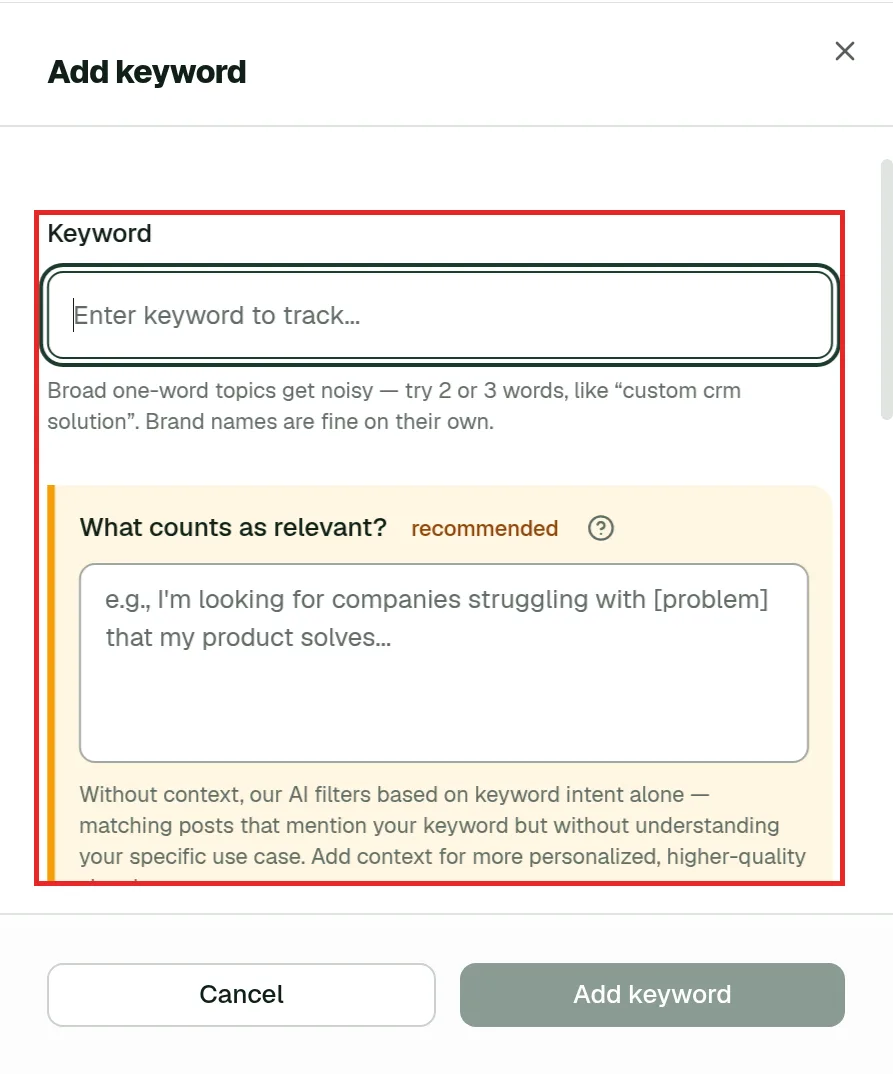
I’d enter a short problem phrase into Keyword and spell out the research question in the relevance field, keeping unrelated talk out (sample data from a tracked set).
Split distinct questions into separate keywords, because mixing setup blockers with pricing complaints spoils the sample.
2. Pick the communities where buyers talk
Different personas complain in different rooms, so tracking every source on autopilot blurs the signal. Pick communities where operators, founders, or engineers explain what broke in their own words.
Starter ($39 monthly) watches four communities: GitHub, Hacker News, LinkedIn, and Reddit. Moving onto Pro ($99 a month) or Advanced ($199 a month) opens the official 10+ list by adding X, Dev.to, Indie Hackers, Stack Overflow, Discord, and Slack. TikTok, Instagram, Facebook, and Quora stay outside coverage.
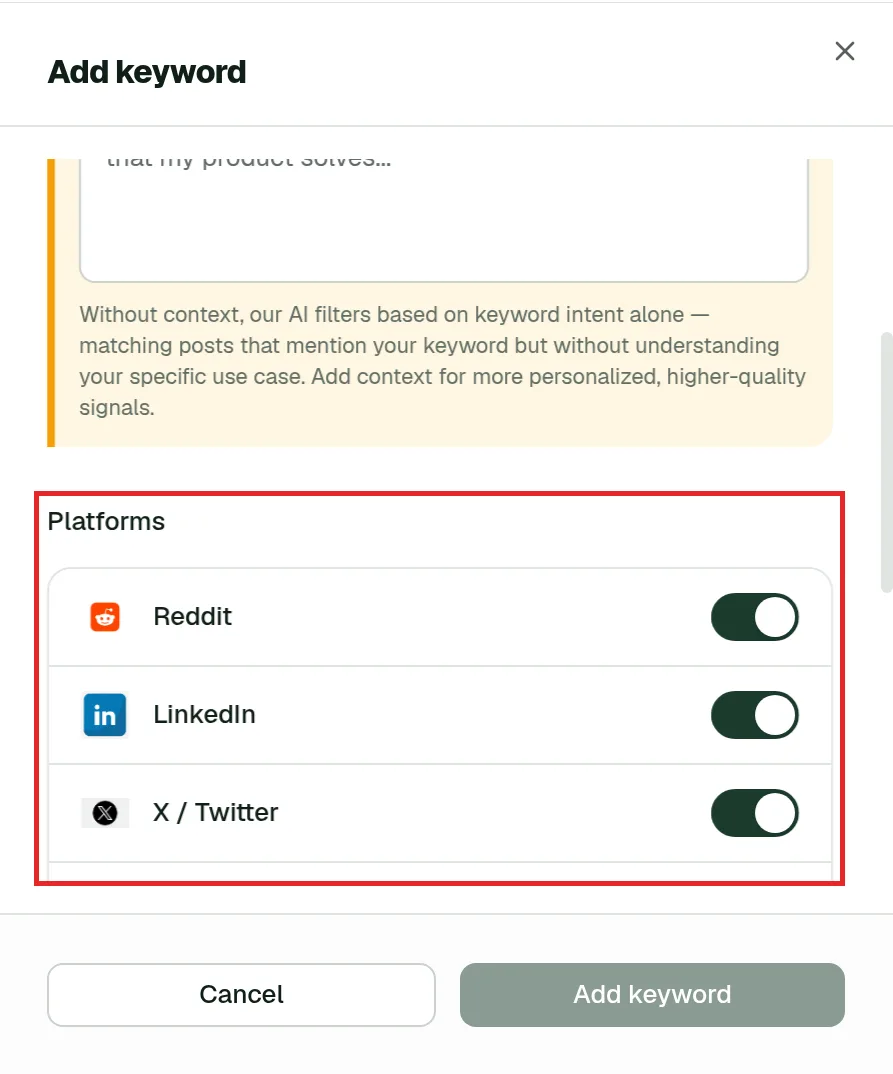
I’d toggle on Reddit, LinkedIn, or X / Twitter inside Platforms for a B2B software question (sample data from a tracked set), leaving noisy channels unchecked.
Match sources to the buyer before launching a query: developer friction belongs on GitHub and Hacker News first.
3. Filter threads by buying intent and friction
Keyword matches still mix news links, job posts, and real product pain. Before reading threads one by one, narrow the feed to posts where buyers compare tools, leave a rival, or ask for setup help.
AI intent scoring and filtering sit on the $99 Pro plan and carry through to $199 Advanced, both billed monthly. Inside Posts Filters, select Team decision, Implementation help, Switching from a competitor, and Comparing tools when the brief examines adoption blockers or churn triggers.
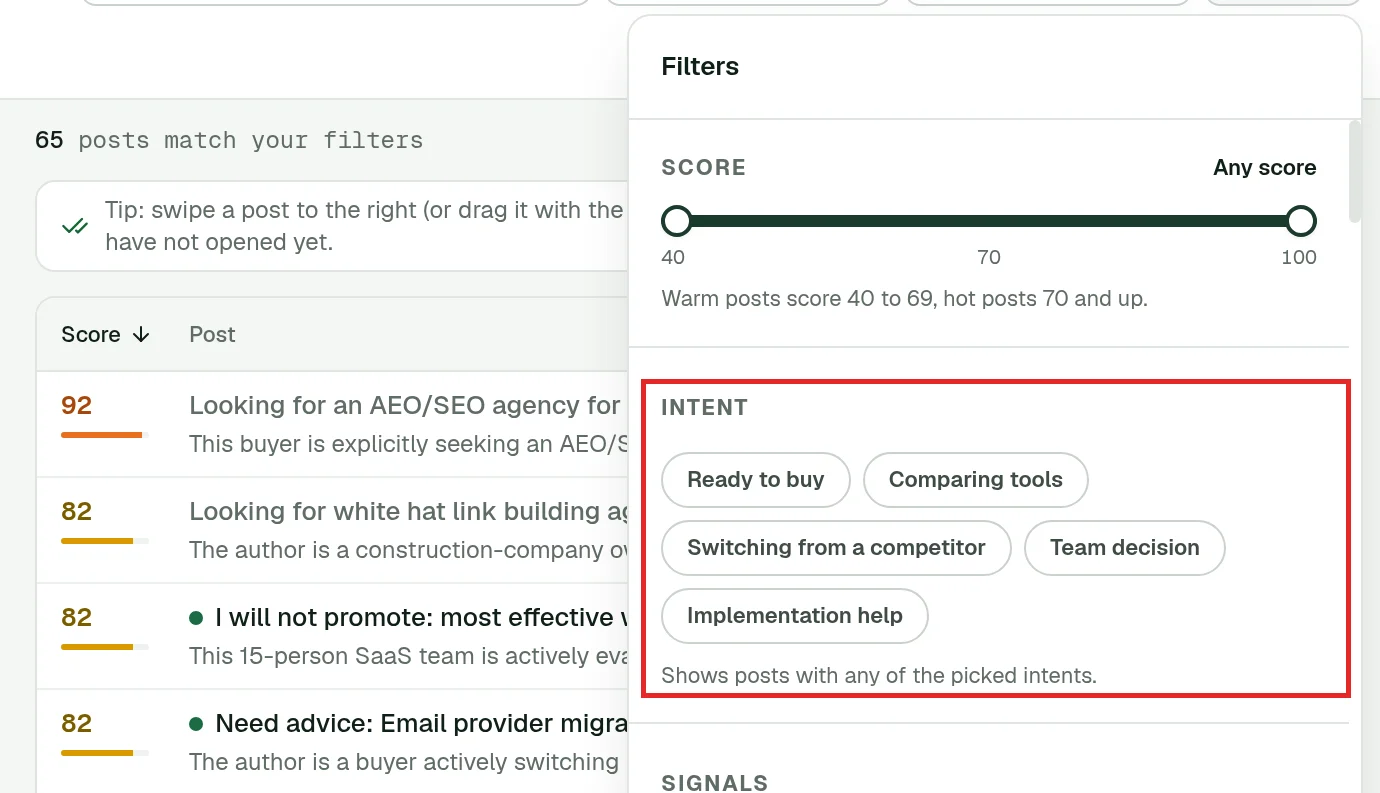
I’d select Team decision, Implementation help, Switching from a competitor, and Comparing tools inside Intent (sample data from a tracked set), keeping purchase and setup friction at the top.
Use Switching from a competitor when researching rival churn, and isolate Implementation help when investigating week-one drop-off.
A keyword match with no intent filter is still a mention dump.
4. Read the matching threads and pull buyer language
Counts reveal volume, never why buyers care. Open top-scored threads and lift the exact verbs and nouns buyers use for the failure.
Every paid plan and the trial assign Hot, Warm, or Watch to buying signals and pair a reason with each row. Read Hot threads first when time is tight, then scan Warm posts to confirm the phrasing repeats across multiple independent authors. Leave Watch items as background reading instead of primary evidence.
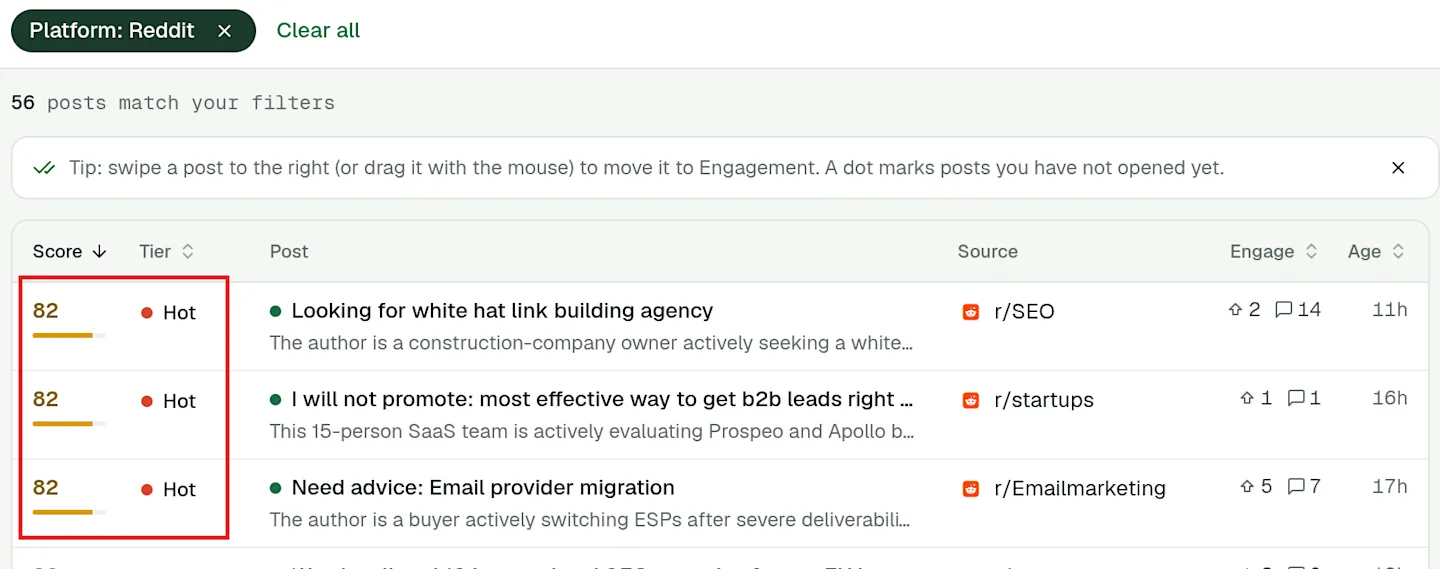
I’d sort the Reddit view by Score and open Hot rows first to copy verbatim buyer phrasing (sample data from a tracked set), before drafting any claim in the research brief.
One loud thread is an anecdote, not a theme. Pair every pattern in the brief with three to five unedited threads from separate buyers.
5. Compare communities with share of voice
Reading one active thread can make you treat the last forum you opened as the whole market. Before telling leadership which rival owns mindshare around a problem, compare brand presence community by community.
Share of voice comes with the seven-day trial, Pro ($99 monthly), and Advanced ($199 monthly). Each workspace holds one report refreshing every Monday, tracking brand share across communities with optional sentiment. On Advanced, you also get Share of voice PDF export and an action plan. Read what share of voice is and how teams track competitors on social media.
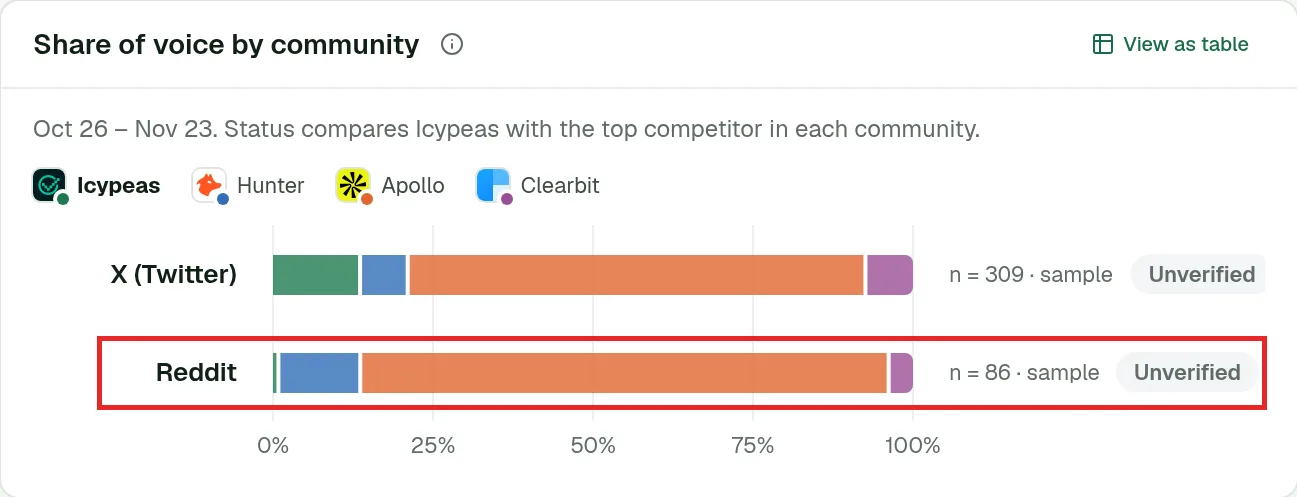
I’d inspect the boxed Reddit bar inside Share of voice by community to check which rival leads that forum (sample data from a tracked set), because channel mix skews what teams hear.
Treat community share of voice as a sanity check on your sample. If rivals own Reddit while your research only watches LinkedIn, the brief has a channel blind spot.
A brief built from one community is a channel opinion, not a market read.
6. Route daily alerts to the team that acts
Research fails most often at handoff, when insights sit inside a sheet nobody in product or customer success opens. Route high-signal threads to the workspace channel where the decision owner works, on a steady daily cadence.
Starter ($39 monthly) alerts once a day. Daily Slack alerts land in a channel you choose once you move onto Pro ($99 a month) or Advanced ($199 a month). Built-in HubSpot CRM sync also pushes Hot and Warm posts into CRM deals carrying the original signal.
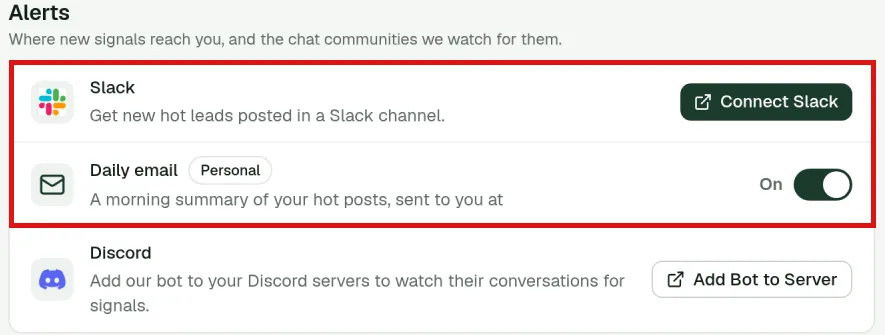
I’d route new hot leads to Slack and leave the morning daily email summary switched on, keeping product and GTM aligned each morning.
Do not expect a cadence faster than daily. Every paid plan also includes API access and AI assistant access for querying signals inside Claude, ChatGPT, or Grok.
An unread alert is as useless as no alert at all.
Three research questions and what a finished finding looks like
Where onboarding or setup stalls
Polite customer calls often gloss over small setup steps that cause users to quit during trial week. Pair setup keywords with Implementation help, then isolate threads naming the exact blocker.
If a brief stops at vague onboarding frustration, send it back to intake. A usable finding names the exact step, the communities reporting it, and the team shipping the fix.
Example brief:
Question: Which setup step blocks new teams from finishing their first live run? Source set: [Community A] and [Community B], filtered on Implementation help. Pattern: Multiple operators abandon setup at [Workflow step] because [Missing prerequisite] lacks guidance. Owner and next step: Handed to [Product / Onboarding owner] to add an inline check at [Workflow step] and verify drop-off in next week’s support tickets.
Why buyers leave a rival
Review averages smooth out switching motives into star ratings. Filtering rival keywords by Switching from a competitor exposes the breaking point that pushed an account from evaluation to cancellation.
Skip generic pricing complaints without context. Anchor on the operational trigger that forced replacement so sales and product marketing know what to test on discovery calls.
Example brief:
Question: What breaks first when teams outgrow [Rival] and search for an alternative? Source set: Public posts naming [Rival], filtered on Switching from a competitor. Pattern: Evaluators cite [Operational bottleneck] and [Billing friction] after crossing [Team milestone]. Owner and next step: Handed to [Product Marketing owner] to update the [Rival] comparison brief and test the objection on upcoming calls.
Which product gap keeps deals off the shortlist
Visibility gaps come with Advanced at $199 a month, billed monthly, and they flag topics and communities where rivals get mentioned and you don’t. Comparing tools threads expose the same pattern when buyers evaluate rivals and leave your product out. Use that signal to pick what to build next when you can tie it to real deal criteria instead of one-off feature requests.
Never turn every forum request into a sprint ticket. Separate baseline deal requirements from minor tweaks, then check the gap against CRM win-loss notes.
Example brief:
Question: Which missing workflow keeps category buyers picking [Rival] ahead of your product in comparison threads? Source set: Comparing tools threads across [Community A] and [Community B]. Pattern: Buyers shortlisting for [Use case] treat [Missing workflow] as a baseline requirement before booking a demo. Owner and next step: Handed to [Product Lead] to weigh [Missing workflow] against active win-loss interviews before next quarter’s roadmap lock.
What I’d pay to run customer research in CommunityTracker
At Starter for $39, Pro for $99, and Advanced for $199 on monthly billing, each tier adds room for deeper research.
A seven-day trial costs $4.99.
API access, the AI assistant connector, and 3 community intelligence searches come with those seven days, and the charge never repeats.
Starter alerts once a day.
Starter limits mention volume to 5,000, and Pro and Advanced drop that limit.
100 warm emails a month on Starter, unlimited on Pro.
Paid subscriptions also include a 14-day money-back guarantee, with no long-term contract if you cancel later.